Film cameras
ACMEL MD User manual
User manual for ACMEL MD. 6 pages in English. Read the original PDF, download or print a copy without registration.
6 pagesEnglish2.1 MB PDF
Loading your manual…Open PDF directly
Document details
- Brand
- Acmel
- Model / document
- ACMEL MD
- Document type
- User manual
- Language
- English
- Pages
- 6
- File size
- 2.1 MB
- Category
- Film cameras
- Document date
- Not specified in catalog
Contents
Search available document text
Find a term, then jump to its page in the original PDF. Image-only pages may not be searchable; check the PDF for exact wording and diagrams.
Page 1 · Read text
ASMEL WO & MDX

USER’S MANUAL

Be sure to read this manual prior to use.

‘Thank you for purchasing this product. This manual is a consolidation of the
ACMEL MD and MDX usage procedures.

Afier you have fully understood the contents herein, we hope you willfully
enjoy using your camera

FEATURES:

Ultra-compact & super-lightweight

CAS electronic shutter

30cm macro function

High performance Azonon lens (3-groups, 4-elements, F35:{~ 15mm]
Powerful lithium batteries

Auto-strobe MDX, one touch mounting

Bright frame finder

Convenient chain strap for Close-up

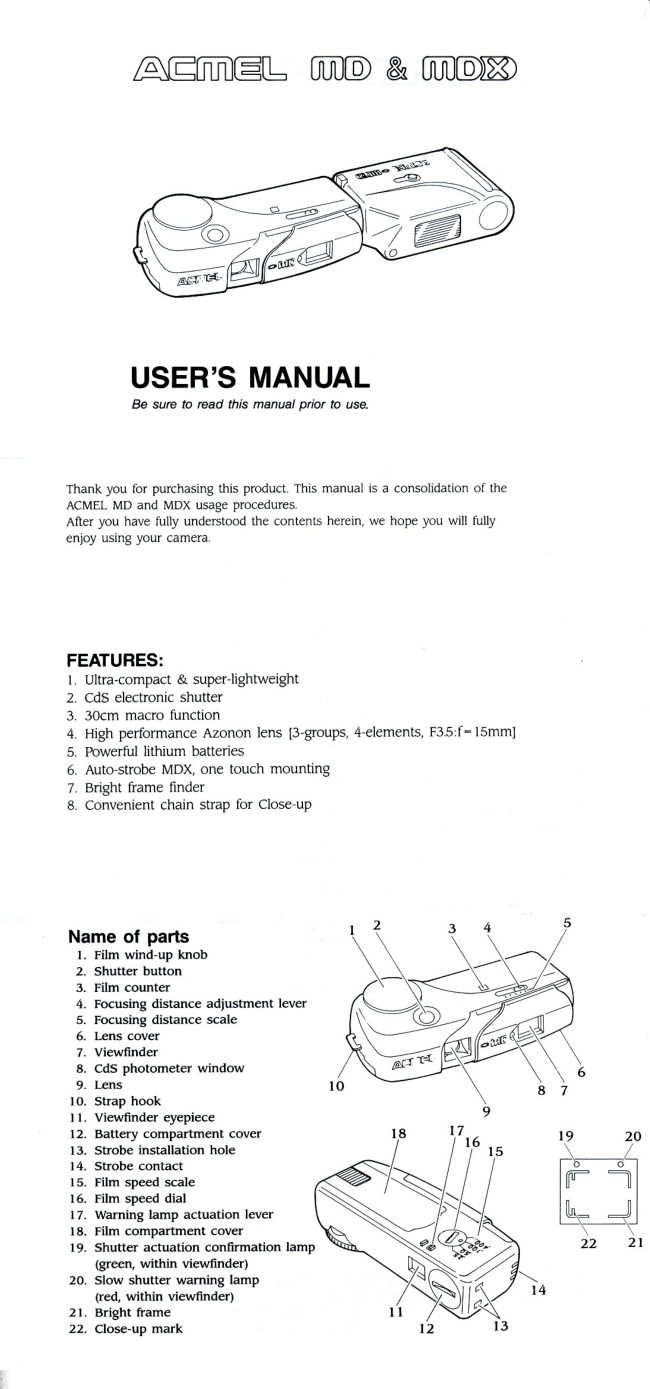
Name of parts
|. Film wind-up knob
Shutter button

Film counter

Focusing distance adjustment lever

Focusing distance scale

Lens cover

Viewfinder

Cs photometer window

Lens

‘Strap hook

11. Viewfinder eyepiece

12, Battery compartment cover

13, Strobe installation hole

14, Strobe contact

15, Film speed scale

16, Film speed dial

17. Warning lamp actuation lever

18, Film compartment cover

19. Shutter actuation confirmation lamp
(green, within viewfinder)

20. Slow shutter warning lamp
(red, within viewfinder)

21, Bright frame

22. Close-up mark
View original page 1Page 2 · Read text
First, Put in the Batteries
‘Tum the battery compartment cover (12) at the rear of the camera in the counter-
clockwise direction and remove the cover.

2 Set the “+” face of the batteries (two lithium batteries, CR-1/3N, 3V) to the outside
and insert them one on top of the other.
{insert as shown in the battery compartment)

‘3. Tum the battery cover clockwise to install it

4. Open the lens cover (6), turn the film wind-up knob (1) until it stops and face the
camera toward a brightly lit spot (outside or something like a fluorescent lamp when
indoors),

‘Then while looking through the viewfinder, press the shutter button (2) and if the
green shutter actuation confirmation lamp (19) inside the viewfinder lights, you can.
assume that the batteries are inserted correctly and that can thus be used,

* The new lithium batteries should be good for about $0 rolls of 36 exposure film.
(Under our test conditions)

The batteries are supplied for the ACMEL MD. You should be sure to purchase the
same batteries (lithium CR-1/3N) from your photo dealer, when you need to replace
the batteries.

‘ When the film is wound up, the cameras power switch will go ON. We recommend
that you wind up the film immediately prior to shooting to prevent premature
depletion of the batteries

When the batteries are getting depeted, the shutter speed function may not work
correctly.

‘We recommend you to check the shutter speed function releasing the shutter button
before putting in the film and change batteries in good time, if they are depleted.

Put in the Film

|. Turn the film speed dial (16) on the bottom of the camera to match the speed of the
fllm to be used. (SO 25, $0, 100 and 400 films can be used in this camera)

2. Using your fingers, push the notched section of the film compartment cover (18) to
the outside (strap hook side).
View original page 2Related documents and language editions
From the M. Butkus archive. Original publisher and archive notices are retained.
Check the model and edition against your equipment.
PDF verified 2026-10-10.