Film cameras
Argus 264 Instant Load User manual
User manual for Argus 264 Instant Load. 12 pages in English. Read the original PDF, download or print a copy without registration.
12 pagesEnglish3.8 MB PDF
Loading your manual…Open PDF directly
Document details
- Brand
- Argus
- Model / document
- Argus 264 Instant Load
- Document type
- User manual
- Language
- English
- Pages
- 12
- File size
- 3.8 MB
- Category
- Film cameras
- Document date
- Not specified in catalog
Search available document text
Find a term, then jump to its page in the original PDF. Image-only pages may not be searchable; check the PDF for exact wording and diagrams.
Page 1 · Read text
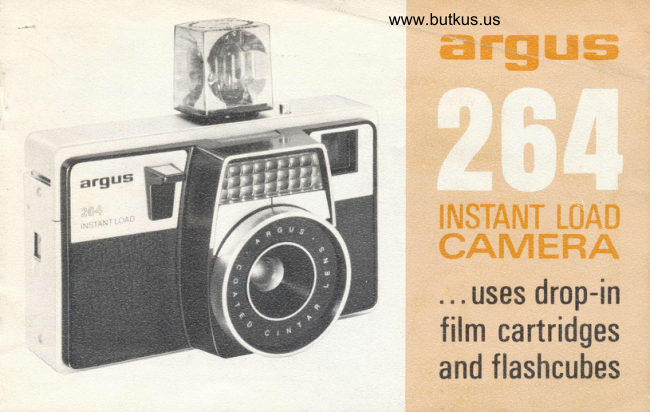
www.butkus.usffiffffiffi%


     E[UST'qruT L*e#
    CAft/'Hffiffidh
       ... uses drop-in
    film cartridges
   and flashcubes
View original page 1Page 3 · Read text
www.butkus.us    These are terms used throughout this book. lt's best to famil:arize yourself with
    them before you read the following pages. May we suggest you read this book
     over carefully?  lt contains simplified steps to perfect pictures as well as detailed
     information. Before you take pictures of a special event or go on a trip, try tak-
     ing pictures both outdoors and with flash for practice.


LENS FOCUSING RING


FOCUS INDEX I\IARK


ELECTRIC EYE


VIEWFINDER WINDOW


SHUTTER RELEASE


FTASHCUBE EJECTOR


FLASHCUBE SOCKET
                                                         ,r
View original page 3Page 4 · Read text
for perfect outdoor p,ictures automatically
loacl ca,rrr.rlrs,          Openclose thethe hingeddoor. Thedoorcartridgeand dropautomaticallyin the film cartridge,sets the elec-then
                                           tric eye for the type of film you have selected.
                            Move wind lever to right and allow it to return. Repeatwirrd filrrr                    until it locks (about six full strokes). Film is now at first
                                       picture, and 1 will appear in exposure indicator window.

                              Set lens focusing ring to estimated subject distance in
ftrcus leres                   feet, or to symbol appropriate for your subject (Sclose-
                             up, V universal setting, or A distant scene).
                            Compose subject in viewfinder, check the safety signal,
                               and slowly press shutter release. Move wind lever throughtake  tr>iettere
                             one full stroke and you're ready for the next picture.

                                                        each of these steps willdetailecl                 More complete information on
ixrstrtlcticrxr.s          being foundFLASHonPICTURES,the followingseepages.instructionsFor informationon pages 8onandtak-9.
3
View original page 4Page 6 · Read text
troa.cling:   f. tee ca,rnera

                                       Slide the door latch up and turn the camera over to open
                                   the door. Drop in the film cartridge (with the largest end
                                   toward the door latch). Be sure it seats properly and lies                                  {.':'".,]                                              flat within the camera. Close the door by pressing it in
                                          until  it snaos closed.

                                   With the camera loaded, move the wind lever to the right     *$                               and allow it to return and repeat until it locks (about 6b.-                                              full strokes). This positions the film for the first picture.
                                       After each picture is taken, move the wind lever through
www.butkus.us        ,'-.-"                      a full stroke to advance the film to the next frame. NOTE:                                        Part way through each stroke you will notice an increase
                                            in pressure. This is merely the flashcube clutch disengag-
                                       ing and is normal. Be sure you go past this point when
                                  advancing the film. The window on the camera back
                                shows the number of the picture you are on and also the
                                    type of film in the camera.

                                NOTE: Failure to advance film a FULL stroke causes pic-
                                      ture overlapping and incomplete flashcube rotation.
        5e                      .,.,.:i):t.r:r
View original page 6Page 7 · Read text
gL|ttirlg'    Xa:llr+ tarl'   tli!.{,a1i  !l!{it}      www.butkus.us

     The 40mm f/5.6 focusing lens on the 264 Instant
      Load assures sharp pictures at any distance, yet I     can be set to universal or zone focus  if you like.
 I    You can ..   .
                     I  Set the camera-to-subject  distance
                       (in feet) on the lens focusing ring
                   to the index mark,
     0R...  2 Set the focusing ring symbol indi-
                   cating the type of picture to the                                           FOR OUTDOOR PICTURES                   index mark-                                                                                                . . . in bright sunlight, you usually
            8 for CLOSE-UPS (5 feet)             can use the symbols or universal
              v for GROUPS OR INTERMEDI-        focus setting.
                 ATE SCENES (I2lz feet)
                                           FOR FLASH PICTURES                                                              (infinitY),I          A for DISTANT SCENES                                                                                           . . .you must set the actual cam-
     oR.      i}set the UNtvERSAL FocUS sym-        era-to-subject distance (in feet) I                                                                                      on                  bol (v) on the focus ring to the        the focusing ring (see page 9).
                   index mark.
View original page 7Page 8 · Read text
CLOSE.UP LINES  SAFETY SIGNAL
,. corrrpose a,nd stroot!
   Compose your subject within the bright-line square in the
   viewfinder-the way you want it in the final picture.
   Check the SAFETY SIGNAL (small circle in the right-hand
   side of the viewfinder) to be sure there is enough light. lf
    is shows CLEAR (or partly clear and parfly RED), there is
   enough light. lf it is completely RED, there is not enough                                                                                                                     /    light (use flash). Press the shutter release down slowly to    FOCUS NEEDLE
   take the picture. lf it won't go down, then the film hasn't   urrloadirrg'
   been wound to the next picture. Make it a practice to wind                                                           Before door is opened, and   the film after each exposure.                                                                         after you have taken the last
   Helpful Hints-Your outdoor pictures will turn out best if    picture, move the wind lever
   the sun is behind you. Don't attempt to take pictures wnen    until it locks. The film's pa-
   the sun is shining into the lens. When the subject is 3 to   per backing will disappear
  5 feet from the camera, place  it so the CLOSE-Up LINES   from the window. Push the
   inside the bright-line frame form the upper and left-hand   door latch UP and tip the
   limits of the picture. The FOCUS NEEDLE at the bottom of   camera so the door opens
   the viewfinder serves as a reminder of the lens focus set_   and the cartridge falls into
   ting. The FOCUSTNG SYMBOLS correspond to the symbols    your hand. Have the exposed
  on the lens focusing ring.                                      film processed immediately.
    7
View original page 8Page 9 · Read text
www.butkus.us
     ta,king      j[I a,sEr pict   LEr:e:s
     Two "N" size batteries are needed to take flash
        pictures. Ask your dealer for Mallory Mn9100,
I     Eveready E90, Bright Star 7528, Burgess AL-N,.l     or equivalent. To install the batteries, slide
      open the battery compartment door (on camera
       bottom) and put the batteries in, one with *
       tip up and the other with + tip down. Close
     the compartment door. Have the batteries
      checked occasionally to be sure they are good.
    TO INSTALL A FLASHCUBE, fit the flashcube
      tabs into the socket recesses, then push down
       into place. The flashcube automatically  rotates
      each time you wind the film. lt can be removed
     and repositioned at any time. When installing
     a partially used flashcube, wind the film first,        Press the FLASHCUBE EJECT
 J     then install the flashcube with a good side for-        button to remove the flashcube
a      ward. lf you rotate the cube manually, turn  it       from the socket. NEVER TAKE
     COUNTERCLOCKWISE to prevent damage to      OUTDOOR PICTURES WITH A
       the mechanism.                             FLASHCUBE IN PLACE.
                                                                                                          8
View original page 9Page 10 · Read text
slirrlg;le   s{,irl}s  tcl finr:   fflashpir:lutres...
 t  lnsert a flashcube in the socket.
 ].j Estimate the number of feet to the main
    subject and set this distance on lens fo-
   cusing ring to index mark (this automa-
    tically adjusts lens for exposure).
i3 Press the shutter release down slowly to
   take the picture.
Estimate distance to subject accurately.  lf
more than one subject will be in the picture,
have them placed so that each one is nearly
the same distance from camera.
The maximum distance for flash pictures is
12 feet. Under normal conditions, pictures
of subjects farther away may be too dark.
However,  if they are taken in a light-colored
room, subjects can be as far away as 16 feet.
Be sure to set lens focusing ring to exact
distance to subject.
I
View original page 10Page 11 · Read text
www.butkus.us
     ca,re and clea,nirrg
        Your Argus 264 lnstant Load is a preci-
                                                        seg=a        sion camera and deserves the best of      ns ffi Fa
        care. Protect it from dust, heat, and I      moisture. Do not store your camera in                       =F
       the glove compartment of your car or
        ):    any other place where the tempera-
        ture tends to rise, humidity is high, or
      where jarring or vibration occurs.
           lf the camera's lens needs cleaning,
ifr    blow the dust off first, then use a soft
       brush or lens cleaning tissure. Refer
       to back page for service information.

             I

                                      ,,,," iig*,$$ffi   (\I    fi"       ,,  ",,,"r,,,:,",
        Cut this page along dotted line and keep \
        the identification card in your wallet or J                     fifi$us ?54 rlrsTfiirT ttlAlr
        other safe place for future reference. /                (lWNER'S IDTNTIFICATI(}N CARtl
          l0
View original page 11Page 12 · Read text
!                Argus uncond'iti,onal guarantee

 For information about your     Your Argus 264 Instant Load Camera is unconditionally guaranteed by the manufactttrer to
                                    operate properly for a period of one year from the date of original purchase. lf, during camera, or for service or                                          this period, your camera fails to operate for any reason, Argus, Incorporated, will restore
 replacement parts, see your         it to operating condition at no charge to you--6his includes all parts and labor.)
 Argus dealer, authorized serv-                                     This unconditional guarantee applies to the product itself. We regret that we are unable
 ice location, or write to the      to assume liability for loss of film or for other expense or inconvenience.
 main office of the Argus                                   This unconditional guarantee is valid only for the original retail purchaser and only if
 Customer Service Department      the product is returned prepaid, directly or through an Argus dealer, to the Customer
 (address listed at right).            Service Department, Argus, lncorporated, 2080 Lunt Ave., Elk Grove Village, lllinois 60007,
                                or one of their authorized service locations. The date and place of original purchase
 When writing, be sure to rnen-     must be included, along with a description of the difficulties encountered.
 tion you have the Argus 264     Many apparent product difficulties are actually a matter of incorrect usage. lt is always
 Instant Load Camera.              wise to see your Argus dealer before returning the product for servicing.

                                         CUSTOMER SERVICE DEPARTMENT, ARGUS, INCORPORATED
                                   MAIN OFFICE 2080 Lunt Avenue, Elk Grove Village, lllinois 60007
          Argus Incorporated         lN CANADA Davis Drive East, Newmarket,  0ntario
           5950 Touhy Avenue        For the address of the service location nearest you which is authorized
                                                                              | | linois 60648   to repair Argus products under guarantee, contact your Argus dealerargus   Chicago,
@ ARcus cAMERAS oF cANADA, LTD.         or write to the main office of the Customer Service Department.
          Newmarket, 0ntario                                          PART NO. 21528-6612    ilTHO tN U.S-4'i
View original page 12From the M. Butkus archive. Original publisher and archive notices are retained.
Check the model and edition against your equipment.
PDF verified 2026-10-10.