Film cameras
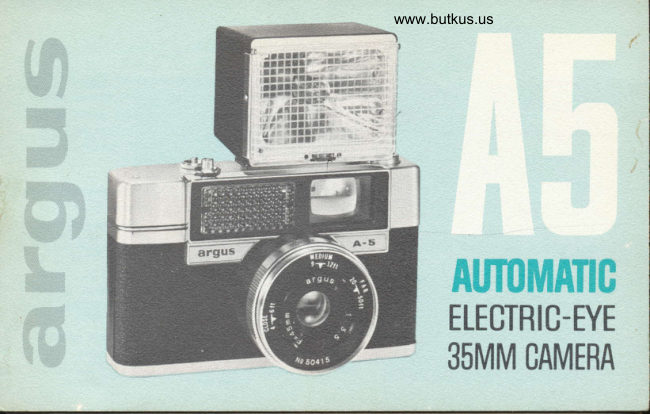
Argus A5 User manual
User manual for Argus A5. 11 pages in English. Read the original PDF, download or print a copy without registration.
11 pagesEnglish3.6 MB PDF
Loading your manual…Open PDF directly
Document details
- Brand
- Argus
- Model / document
- Argus A5
- Document type
- User manual
- Language
- English
- Pages
- 11
- File size
- 3.6 MB
- Category
- Film cameras
- Document date
- Not specified in catalog
Search available document text
Find a term, then jump to its page in the original PDF. Image-only pages may not be searchable; check the PDF for exact wording and diagrams.
Page 2 · Read text
q *"0-rtR  r s+-'! i< p:-i{r{}Eht{} eE d s                                 i r :.

Functional Parts                           Brilliant colors, sharp detail, excellent exposure-
                                          all these are yours when you take pictures withCondensed Instructions  . .. ...3                                 your new Argus A5. No more exposure guesswork.
Loading the Camera. ..  . . ..  . . .4       The built-in automatic exposure system sets the
                                    lens to the right opening for each picture- asSetting the Shutter                                  you take  it.
Focusing the Lens                          May we suggest you read this book over care-
Taking the Picture ..........7            fully? You will want to become completely familiar
                                     with all of the A5's fine features. Before you takeUnloading the Camera ..... ..8                                     pictures of a special event or go on a trip, try a
Filters                                practice roll first to become acquainted with the
                                  camera's operation and capabilities. lf you haveTime Exposures
                              any questions on the use of your camera, or on
Taking Flash Pictures  . .......9         photography in general, see your Argus dealer.
Specifications                       Minor changes in the appearance of this camera
Care and Cleaning  ... .10       may not be included in these illustrations.


1
View original page 2Page 5 · Read text
for automaticallg er,posed perfect p,ictures

                                                       i;-*.' i'" Open cover and insert film magazine. Place end of leader Ioa,d {rrarrrera,     .i*                                    i*l  in take-up drum slot. Turn drum to left to tighten film.                                    ;..t:''  Replace cover andwind film twice (see page 4).
 set strutter          1ii1"i;' SettingSee FilmnumberGuide for(on yourbackfilm.of camera)Turn Shutter-Settingfor correct ShutterRing                                   ,,ti..ol                                                    'i"'+'*";'' until number for your film is opposite the index mark.
                          Move the Auto/Flash-Setting Lever to AUTO position. Set to A{JTO          This engages the camera's electric-eye system to set
                                   the correct lens opening automatically (see page 5).
 focus                        TurnMEDIUM,the Range-Focusor FAR settingRingforonyourfrontcamera-to-subjectof lens to the CLOSE,dis-
                                   tance. The distance can be estimated (see page 6).
 ta,ke trricture            subject.Hold the Composecamera verticallyyour pictureor horizontallyin the viewfinderto suit yourand
                              squeeze the Shutter Release. Wind film for next shot.

3
View original page 5Page 6 · Read text
www.butkus.us
loa,dirrg:  ttre  ca,rrrera,
Use any 35mm film (size 135), color or
black-and-white, 20 or 35 exposure.
I  Turn Cover Latch on bottom of camera
toward 0. The back and bottom together
form a removable cover. Slide it down to
remove. lnsert film magazine ap shown in n
illustration, fitting cross-piece in end _of
magazine to slot in rewind Crank shaft.
2Turn take-up drum until slot is on top.   3 Set Exposure Counter to the red figure
Insert end of leader into slot to engage slot   S by turning knurled ring counterclock-
tooth in second or third perforation. Turn     wise. Before you take pictures, wind film
take-up drum to left until film is tightly    and press Shutter Release twice. You can
fastened. Pressing Shutter Release if nec-    now wind the film for the first picture. The
essary, wind camera until film engages     counter tells how many pictures have been
both sets of sprocket-wheel  teeth. Replace      taken. When the counter indicates 20 (or
cover, pressing it inward and upward into      red dot above 35) and you have taken that
place on camera body, then lock by turn-      picture, you have used all of the film. (See
ing Cover Latch toward L.                  Unloading instructions, page 8.)
View original page 6
Page 7 · Read text
settirrg'  ttre  strutter              All you need do is set your camera for
                                       the speed (exposure index) of the film
When the Auto/ Flash-Setting Lever is set     you are using. The Film Guide on the
to AUTO, your A5's electric-eye system      camera back shows the correct setting to
will automatically set the lens for per-     be used with your film. The Film Guide
fect exposure in any normal daylight or       lists most popular color and black-and-
artificial-light condition in which pic-     white films you are likely to use. You
tures can be taken.                     r  will find the Shutter-Setting number at
                                       the extreme left end of the listing for
                                         each group of films with a similar speed.
                                                                        lf the name of your film does not appear
                                        on the Film Guide, you can determine its
                                         speed by consulting instructions packed
                                        with the film. Use the Shutter-Setting
                                     number indicated on the camera's Film
                                          Guide to the left of the ASA or DIN speed
                                                   of the film. Then simply turn the Shutter-
                                             Setting Ring until the number for your
                                                film is opposite the index mark.
View original page 7Page 8 · Read text
www.butkus.us
   focusing    ttre lens
    Your Argus A5 is equipped with a range-
   focus system. Estimate the distance
   betwben the camera and your picture
    subject, CLOSE (4 to 6 feet), MEDIUM
   (9 to 12 feet), FAR (20 to 5O feet or.   more). Then turn the Range-Focus Ring
    until the triangular pointer is opposite
    the range index mark for your camera-to-
    subject distance. The range-of-sharpness
   provided by the short focal-length lens
    will include areas in front of and beyond
   the point of principal focus.
   Check this focus setting for each picture
   you take. The accuracy of estimating the
    camera-to-subject  d ista nce and the focus
   setting is more critical when you are
   taking pictures on a dull day.
View original page 8Page 9 · Read text
the light is too dim or too bright forta,king  ttre pictrure
                                         an electric-eye exposure. When the
Before taking any picture using the automatic        light is correct for automatic expo-
exposure system, be sure that (1) the Shutter-        sures, a small green area can be seen
Setting Ring is set to the number for your film,       near the right-hand edge of the view-
(2) the Range-Focus Ring is set for the camera-        finder. lf you cannot see this green
to-subject distance, (3) the Auto/Flash-Setting        signal as you compose your picture,
Lever is set to AUTO. lf the lever is set on any       the light is unsuitable forautomatic
position other than AUTO, the electric eye will       exposures. You can probably still
be disconnected. Look through the viewfinder      take the picture by using the time
and composeyour pictute within the bright-line       exposure method or by using flash
frame. The camera can be held either horizon-        (see page 9).
tally or vertically to best suit the type of sub-
ject. Be sure that none of your fingers get in the             Arrows show frome limils for close-ups
way of the Electric-Eye Window. When the pic-
ture is framed as you want, squeeze the Shutter
Release. Move the Wind Lever through a full
stroke for the next picture. Your camera is
equipped with an automatic warning signal
which prevents you from taking the picture  if

7
View original page 9Page 10 · Read text
www.butkus.us
LrnLoa,ding  the  {Ja,rr}*:x'&-
After all of the pictures on your film have been
taken, the film must be rewound back into its mag-
azine before the camera cover is removed. Push.
in and hold the Rewind Button (in the center of
the Exposure Counter) unfold the Rewind Crank,
and rewind the film all the way back into thg maga-
zine. Then remove the cover as in loading step 1.
Take the film magazine from the camera, place  it
in its original container, and take it as soon as
possible to your dealer for processing.

using:     Filters may be attached to the A5 with a 30mm screw-in adapter ring.
             an exposure factor is involved with your filter, a shutter adjustmentfilters        lf
           may be required. Consult filter manufacturer's instructions for the effec-
               tive speed of your film when used with the filter. Use Shutter-Setting
            number indicated on A5 Film Guide for this adjusted film speed.
View original page 10Page 11 · Read text
Argus uncond,itional guarantee                  s(er\ri(ee
Your Argus A5 camera is unconditionally guaranteed by the manufacturer  to operate         For further information on the
properly for a period of one year from date of original purchase.  lf, during this period,                                                                               operation of your camera, 0ryour camera fails to operate for any reason, Argus, Incorporated, will restore it to
operating condition at no charge tolou. (This includes all parts and labor.)                 for servicing or replacement
                                                                                       parts, see your Argus dealerThis unconditional guarantee applies to the product itself. We regret thgt wp are
unable to assume liability for loss of film or for other expense or inconvenience.             or authorized service location
This unconditional guarantee  is valid only for the original retail purchaser and only         oI write to:
if the product is returned prepaid, directly or through an Argus dealer, to the customer
service Department, Argus, Incorporated, 2080 L[nt Avenue, Elk Giove Village, lllinois,          CUST()MER SERVICE DEPT.
or their authorized service location listed below. The date_and place of original pur-          ARGUS, INC()RPORATED
chase must be included, along with a description of the difficulties encountered.                  2{l8(l IUNT AVEilUE
                                                                           EtK GROVE VILLAGE, I[1.Many apparent product difficulties are actually a matter of incorrect usage. lt is always
wise to see your Argus dealer before returning the product for servicing.                                                        When writing, mention you
                                                                   have the Argus A5, and list
         CUSTO]IIER SERVICE DEPARTIIIEIIT, ARGUS, II{CORPORATED             the serial number found on
           ItAlll 0FFICE 2080 Lunt Avenue, Elk Grove Village, lllinois                     the camera bottom.
       ilETROPOLITAlI-- "'lftfrT'fiii      106 West 32nd Street, New York l, New york
            WESTERl{     3410 South LaCienega Blvd., Los Angeles 16, California
       STATES AREA    215 Littlefield Avenue, South San Francisco. California                              l02l East Pine Street, Seattle 22, Washingtdn             I1{ CA]IADA     Davis Drive East, Newmarket,  Ontario     argus                                 INGORPORATED
PART NO. 35380-633   LITHO IN U.S.A.                       cHrcAGo 48. tLLtNOtS
View original page 11From the M. Butkus archive. Original publisher and archive notices are retained.
Check the model and edition against your equipment.
PDF verified 2026-10-10.