Film cameras
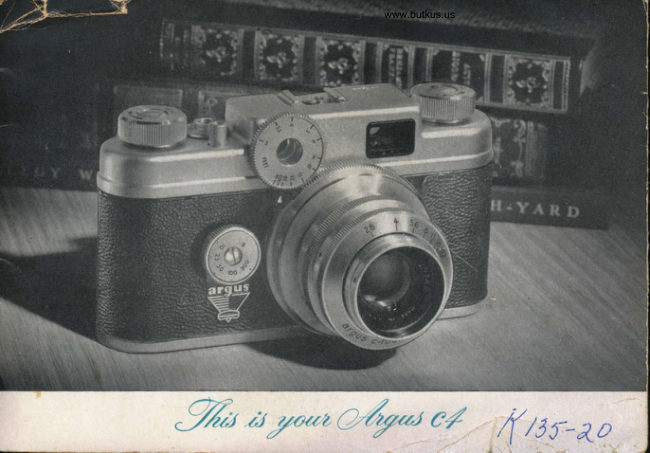
Argus C4 User manual
User manual for Argus C4. 25 pages in English. Read the original PDF, download or print a copy without registration.
25 pagesEnglish8.2 MB PDF
Loading your manual…Open PDF directly
Document details
- Brand
- Argus
- Model / document
- Argus C4
- Document type
- User manual
- Language
- English
- Pages
- 25
- File size
- 8.2 MB
- Category
- Film cameras
- Document date
- Not specified in catalog
Search available document text
Find a term, then jump to its page in the original PDF. Image-only pages may not be searchable; check the PDF for exact wording and diagrams.
Page 2 · Read text
1


                                        have just purchased America's most distinguished
                      35mm camera - the Argus C4.
                                      It is a precision instrument, and with the care it deserves
                          your C4 will provide you with a lifetime of service.
                      This little book is intended to help you to derive the fullest
                     enjoyment frorn its use. If you plan to take a trip, expose a practice
                       roll or two of film first. This will acquaint you with your new
               C-4 ancl prevent spoiling an important picture through lack of familiarity.


                                                                                                                   6,;l                                                                             .         :;...:.-.:..,,,'.-'          ,:.....  ,-.. ";.,.   .-,i.drrl..-.    ,." J      ,  *l..; issi..,," ;";*cffir{&"                                                  "-lt;&.
View original page 2Page 4 · Read text
tG

                                                                    -


Mike Butkus    DigitallyDN:email=mike@butkus.org,Date:cn=Mike2025.02.09signedButkus,by21:12:31Mikeo, ou=Butkus.org,Butkusc=US-05'00'

          I/nlock the camera back by turning the Lock-                                                 Remove camera back lvith dorvnrvard movement.             ing Device in the "open" direction.                                                          Turn the Wind Knob until it stops.
View original page 4Page 5 · Read text
Venmo @mike-butkus-camera  Ph. 2083
PayPal Name  Lynn@butkus.org      www.PayPal.me/lynnbutkus
View original page 5
Page 6 · Read text
www.butkus.us


Pull the Wind Knob completely up and rotate X
   turn backwards to release take-up spool
tension. Rotate take-up spindle with thumb                                                          Place 35mm film cartridge in fflm compartment      to position shown.
                                                   and thread 3 notches of fflm under
                                                        friction roller. Be sure fflm notches are
                                                 engaged with sprocket, as in illustration.
View original page 6Page 8 · Read text
www.butkus.us

            #


                                                    Exposure Counter shows number of picfures
                                                        remaining on your ftlm. To set, push
                                          down with thumb and turn clockrvise
                                                                           trntil 20 is opposite stationary index
                                                                      line, if using a 2O-picture roll; or 0
                                                                                      if using a 36-picture roll.

  Turn Winding Knob until  it stops, press
Shutter Release, :rnd again turn Winding Knob
         until it stops.
View original page 8Page 10 · Read text
www.butkus.us


                         r-
        SHUTTER      t$
      ADJ USTM ENT


The C4 Shutter Speecl Dial controls the length     held down, permitting time exposures when
of time the shutter will be open to admit light      Iight is limited. When making exposures at
when you press the Shutter Release. The     '3" or at I/10 second, the C4 should be on
numbers indicate fractions of a second. You    a tripod or other steady suppdrt to avoid
may select any one of five accurately meas-     movement. The C4 may be held in the hands
ured speeds. Just rotate the dial to bring that      for all other shutter speeds.
number directly over the index dot above the
letter "G" in the Argus trade mark.  ( In the
illtrstration, the dial is set at l/rcO second.  )
When the dial is set at "8", the shutter will
remain open as long as the shutter release is
View original page 10Page 11 · Read text
Aperture Ring settings control the amount of
                                    light that will pass through the lens while
                                   shutter is open. Your Argus C4 gives you a
                                   choice of 7 settings. Make settings by rotating
                               the Aperture Ring until the desired opening
                                          is opposite the index mark.
                                    To re-adjust Aperture Ring setting without
                                           changing focus, hold the Rangeftnder Dial
                                            with thumb while making new setting.

                                                  Sma   I f est opening-t:22.
                                                            Largest open   i ng- t:2.8.
                                       Each setting admits twice as much
                                                            light as the preceding one. Thus, f:2.8
                                             admits twice as much light as f:4.
                                           For proper settings, consult expo-
                                                       sure guides on pages 17 and 19.

3'gG      www.butkus.us
View original page 11Page 12 · Read text
www.butkus.us

     _- FOCUSING


                                                                                                                              q
                                                          Out of focus                                             tn focus

                                                                 The above illustrations show the view as it appears through
                                                                           the View and Rangefinder. lllustration at left shows the
                                                                             subject as it appears when the camera is "orlt of focus";
                                                                                            illustration at right shows the subject as it appears when
                                                                           the camera is "in focr.ls".  lt is also possible to pre-set the
                                                                                distance by means of the Rangefinder Dial and to approach
                                                                           the subject until the two images are superimposed.
                                                               '  -^lrrnt
To focus, look through Rangeffnder-Viervffnder      For pictures that are longer than they are wide,
Eyepiece and ttrrn the Rangefinder Dial until the      hrrn yorrr camera into a vertical position and do
clouble image becomes a single image. Throtrgh      the same us above.
the Eyepiece, you rvill see your subject just as it
rvill appear in the finished picture.             CAUTION: When sighting through the Range-
  The Rangefinder Dial is coupled to the focus-      finder-Viewfinder Eyepiece, be suie yo.tr eyJ is
ing lens mount, so that rvhen you have super-      centered to insure accurute picture composition.
imposed the double image into a single image,     Keep sight of all four sides ofYiewfinder Window
y-our Argus C4 is in focus and will assure you a      for correct framing.
sharp, clear picture.
View original page 12Page 13 · Read text
h,@n7rz*r,ru/


           Hold the camera in either of the two posi-
              tions shown at left, depending on whether
           you are taking a tall or a wide subject.
           Hold camera firmly and compose the
             picture to your own liking.
              Press the Shutter Release, with ftrm,
           smooth motion of foreftnger. It's a good
            idea to hold your breath as you press the
             Shutter Release - this will help to hold the            camera still while you're taking the picture.


FOR COMPLETE EXPOSURE GUIDES, SEE PAGES 17 AND 19
View original page 13Page 14 · Read text
www.butkus.us


Wind: Most C4 owners make it a     Rewind: When all pictures have     Unload & Reload: Open back of
practice not to wind the film until     been taken, pull winding knob com-     the camern, u, in loading, and re-
just before taking the next pic-      pletely up and rotate }i turn back-     move the fflm cartridge. Have the
ture. This prevents tripping the     wards to release take-up spool ten-      film developed as soon as possible
shutter accidentally. When ready       sion, and rewind film (using knob      for best results. Keep your Argus
for a picture, turn the winding     marked "Rewind") until counter    C4 loaded with film so you will be
knob until it stops. Do not touch       dial has stopped rotating. Continue     ready for any picture opportunity.
exposure counter or shutter re-       to turn knob three to four extra revo-      Argus C4 uses standard 35mm film
lease when winding.                     lutions to be sure film is entirely in       cartridges, black-and-white or color.
                                     the cartridge.
                                                                                                                       l1
View original page 14Page 15 · Read text
/o'sE


                                                              www.butkus.usFOR SNAPSHOT SI M PLICITY
         While your C4 is completely adjustable for   YELLOW MARKINGS are used with
          precise variations when you need them, it    Kodachrome Daylight (ASA 10).
        can also be used like the simplest camera.                               RED MAIIKINGS are used with Ekta-                "set it on Color-matic", then wind the          Just                                           chrome or Anscochrome Davlight color          film and snap the shutter for each picture.                                                                films and with Plus-X, Supreme uid si*ilar
         Color-matic markings on Aperture Ring,      black-and-white films (ASA 32-80).
         Rangefinder Dial, and Shutter Speed Dial     Individual adjustments are necessary for
          provide universal settings for arseraga sub-           ( I ) other than "average" subjects, (2) when
          jects in bright sunlight, with sharp focus      subject is not in sunlight, (3) when using
         from 9 to 50 feet.                                  films with higher exposure indexes,
   12
View original page 15Page 16 · Read text
www.butkus.us
            ,%oL/ -,/%o                 hyzr/y
The C4 Flash Unit Iocks on the top of your camera in the Flash
Mounting.Bracket,.permitting  you to take picttrres anywhere with-
otrt re.grud to exislilg light Conditions. A Flash Expoiure Guide is
provicled on page 17.
The side-to-sicle movement of the Flash Lamp Aditrstment on vour
C4 automatically synchronize-s the shutter at^either "M" (20 ;ilh-
second delay) or^"I"-(no delay). The acljustment permitr ir,"of several types of fllsh eqtripment at a choice of shulter speeds. "r"
  FLASH LAMP ADJUSTMENT

  Use the."M" setting for Medium peak flash lamps
  (wire filled, No. 5, Press 25, Bantam 8, etc.l-at
  any shutter speed.
  Use tle "X" setting for Fast peak flash lamps
  (gas filled, SM-SFI-but only at shutter speeds
 up to l/100 second to allow for 5 millisecond
  delay in these lamps.
 Use the "K' setting tol "zeto" ol "X-delay"
  electronic equipment at any shutter sperid.
  Refer to the chart on page 17 for shutter and
  aperture settings.
View original page 16Page 17 · Read text
The C4 Flash Unit is designed to accommodate two size "C"
photoflash batteries. (B-C power units which will ftt the
C4 battery case are also available. )                                                 When inserting size "C" batteries,
To install batteries, ffrst remove the back of the battery case        be sure to position the left-htrnd cell
by grasping it at the sides and pulling directly outward as         top-up and the right-hand cell top-
shown in the illustration below. Inside the battery case, you                 as indicated inside the battery
will ffnd diagrams inclicating correct battery positions.               :,U:r
Fresh batteries are necessary for positive flash synchroniza-
tion. Size "C" batteries should be replaced after about four
months'use or after 50 to 60 flash exposures.
View original page 17
Page 18 · Read text
www.butkus.us


                    A
                             Rc srrrt' to LOCIK vortr Fltsh l-hrit    Arrv nrirlgct brrsc flirsh Irrrnlt mrrv Irc
                                                    orr tlrr' ('rrrn('r'it. ]'r't'ssirrrt <lrlu'rr fir'rrrlv      irtscrtcrl. Aliun tlrc strrcls on the lrasr.
                                                                                                                           f .Y,s                           on Lockirrg Lcvcr u'ill sccurc tlrc   of thc larnlr u'ith the tu'o slots ntk                                                  l,'laslr Urrit in mountccl positiorr.    cithcr sirlc of the rcflcctor sockt't
                                         l'crfcct clt'ctricirl contirct is n-rirrlc      rurrcl prrsh tlrc larnlt in as far as it u'ill
 lir uttuch thc l/lrrsh lhrit to thc    tlrrorrgli clcnrents in thc ntorrrrtirrg    go. It is rrot lt('c,('ssiu'\' to ttrrtr thc
                                               rlcvict'; rro othcr u'ircs or lrtljrrst-       lrrriill rrl'tcr irrst'r'tirrg  ji. cruncl'il, first mlrkcr srrrc thc lockirrg                                            rncrtts lrrc rrt't'rlt'<1. Arrtorrrlrtic {llrsh lcvcr is tulrrccl u1r tor.,'lrrcl thc back.                                                   svrrclrrorrizrrtiorr is llrilt-irr. tht'n slicle thc flangcs on thc lrottorr-r
 ol' tlrc l'-]ash f.lrrit fonvarcl irtto tlrc
 l"lrrslr \[orrrrtirrg  IJrrrc'kt't ort tlrc tolt
 <-r[ tlrc ciulrcl'i.r rrrrtil l'rrllv scirtccl.


                                                                                                     15
View original page 18Page 19 · Read text
co nti n u ed    ,%a/,t%r,rty zr//7


A bayonet terminal is provided for                                         Eject hot lamps without touch-
multiple flash extensions. Several                          www.butkus.us          ing them by pressing down the
extension lights may be fired when                                         red button at top of battery case.
using a B-C unit. (Ordinary flash    Hold camera as shown above. Posi-
batteries, horvever, are not power-     tion of the flash unit provides max-
ful enough for this "in-series" con-    imum illumination on subject. Such
nection.)                             strong front lighting is perfect for
                                        color photography.
16
View original page 19Page 20 · Read text
www.butkus.us
Guide numbers are given in the chart below for combinations  of popular films and flash lamps. By
dividing the appropriate guide number by the number of feet between your camera and subject, you
obtain the correct aperture setting (f:stop).
EXAMPLE: For Kodachrome Daylight and No.58 flashlamp atl/50 shutter speed, the chart shows
45 as the guide number. With a subject l0 ft. from the camera, divide 45 by 10, which equals 4.5.
Set aperture between  f :4 and f :5.6.
ELECTRONIc FLAsH UNITs require exposure adjuStmentS aCCording tO manufaCturer'S re6qm.
mendations. Consult instructions supplied with your electronic unit.

                                               SM.SF           BANTAM 8                50r25
                    FLASHBULB             (Use X setting)          (Use lUl setting)              (Use M settingl
                 SHUTTER SPEED >                        Up to l/50
                 Ektachrome Daylight                    Blue lamps (No. 58 or 258)required for Daylight Color Film used indoors.
                Anscochrome Daylight
                 Ektachrome Type F
                Anscochrome Flash Type
                                                         Blue lamps (No. 58 or 258) required for Daylight Color Film used indoors.
                Kodachrome Daylight


                Kodak Tri-X                                                 190        180
                                                                                    '828-type   fi lter required.
                                                                          'The five millisecond delay, characteristic of gas-ftlled bulbs, prevents propor
                                                                              orposuro al shutter speeds faster thrn l/100 second.
                                                                                              L7
View original page 20Page 23 · Read text
FLASH: Lock-on type, fits standard mounting bracket on camera;
                                                                          automatically fired through mounting contacts; auxiliary bayonet ter-
                                                                      minal provideC for firing secondary flash untt when using B-C power
                                                                                  unit; may be fired through bayonet terminal when mounted on other
                                                                  cameras with external firing cables, provided normally open circuit
PICTURE SIZE: l" x llteo transparencies in 2" x 2" mounts; 0r                                                                           at mounting connection is closed; 5" polished reflector with bayonet3Y+" x4Yz" standard photo-finishers' prints.
                                                                  type socket for all midget base lamps; pushbutton lamp ejection.

FltM SIZEI 35mm, roll cartridge

LENS: 50mm (2") Argus Cintar  f :2.8 color corrected, coated anastig-    LENS ACCESSORIES: 1.300" outside diameter of lens mount
 mat; diaphragm openings trom t:22; rangefinder-coupled  automatic      takes 33mm slip-on adapter ring and 41mm or Series Vl filters and
focusing, 3 ft. to infinity; hyperfocal distance'.57'8"  at  f :2.8; field      supplementary  lenses; threaded inside diameter will take E.K. No. 26
covered;27" x 40' angular at infinity; resolving power: 120 lines per      Series Vl screw-in adapter ring.
millimeter at center of field.

SHUTTER: Behind lens type; gear-controlled speeds at l/10,1125,   OTHER FEATURES: Die-cast metal body with leather-grain and
l/50,1/I00, l/300 and bulb (B); body release threaded for ASA cable;       satin metal trim,SYz" x3Y8" x3%"; weight 25 oz.; automatic exposure
automatically cocked with film wind action;synchronized at M for 20      counter; Color-matic  settings for aperture, shutter speed and distance
millisecond delay wire-filled flashbulbs,  at X (zero delay) for electronic       for average subjects in bright sunlight; double exposure prevention;
flash at all shutter speeds, and at X for gas-filled.bulbs at speeds up      tripod socket; genuine saddle leather, eveready-type carrying case
to l/100 second.                                                       with shoulder strap.


20


                                ,iiri-;:!-:ur..-.-     .. L1.-      " *  ! "tu                ..      ....'^*r!Cm![r!iiara;'"b,
View original page 23Page 25 · Read text
tturuntru    ftttiurr


Your Argus C4 canzerd u)as nzanufac-    materials or utorkmatosbip, your carnera
tured', inspected, and, tested, by skilled'     utill be factory seraiced, uitbout cbarge.                                                                                                                                                                                                                                   rlIcarnera craftsmen. It  is automatically     Argas equipment u.,bich bas been
gilaranteed, utben purcbased, to be free      d,atrzaged,, misband,led, or utorn front, ex-
of d'efects in utorkmanship or naaterial     tend,ed, use utill be factory seraiced, at
d,uring its lifetime,  lf any seruicing is     establisbed, rates, Used. or rebuilt equip-
necessary because of imperlections in   ment is not couered, by tbis guarAntee.

          ARGUS CAMERAS tNC., ANN ARBOR, M|CHIGAN
           ARGUS CAMERAS OF CANADA, LTD., TORONTO, ONTARIO

PART NO. 23287-566                                                        PRTNTED IN U.S.A.
View original page 25From the M. Butkus archive. Original publisher and archive notices are retained.
Check the model and edition against your equipment.
PDF verified 2026-10-10.