Movie cameras & projectors
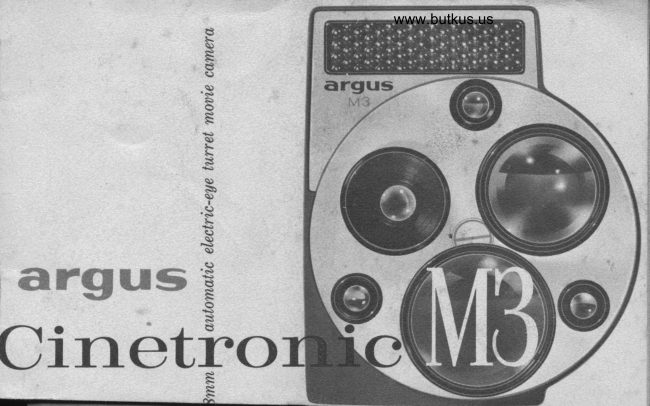
Argus Cinetronic M3 User manual
User manual for Argus Cinetronic M3. 21 pages in English. Read the original PDF, download or print a copy without registration.
21 pagesEnglish6.7 MB PDF
Loading your manual…Open PDF directly
Document details
- Brand
- Argus
- Model / document
- Argus Cinetronic M3
- Document type
- User manual
- Language
- English
- Pages
- 21
- File size
- 6.7 MB
- Category
- Movie cameras & projectors
- Document date
- Not specified in catalog
Search available document text
Find a term, then jump to its page in the original PDF. Image-only pages may not be searchable; check the PDF for exact wording and diagrams.
Page 3 · Read text
www.butkus.us
introdtrction             CONTENTS

Your new Cinetronic M3 movie camera takes                     Functional Perts...                   I
the guesswork out of making movies. No more                 Condensed Instructions.    3.4
worry about light and exposure-the electric eye                                                                                    Choosing the Film.              5takes care of that for you. After loading, wind-
                                                                                                    Setting the Film Speed.........  6ing, and setting the camera for your film, just
look through the viewfinder and press the button.                     Selecting the Right Lens..  ..  . ..     7
                                                                                         Taking the Picture...           8
To assure the fullest enjoyment from your new
camera, won't you read this book over care-                   Loading the Csmera.     ...  I, l0
                                                                                  Taking Movies Up Close... ..  . . .     llfully? It  gives complete information on the
camera's operation and also tips on how to                     Setting the Lens Manually...... ll
make your movies even better. If you're filming                   Unloading your Camera.       12
a special event or a trip, expose a practice roll                     Pointers for Better Movies..   . .. .13, l4first to become familiar with movie-making.                                                                                  Core and Cleaning.            ls
Minor changes in the dppearance of this carnera             Specifications.              l5
may rwt be included in these illustrations.                          Check List and Wallet Card.....16. 17
View original page 3Page 5 · Read text
ct>ndensed
 instructiorls


       Here are the essential
       points in operating the
Cinetronic M3. If this is your
      first movie camera, you'll
find these instructions helpful
      in reviewing the detailed
  steps on the following pages.
    Purchase 8mm roll movie
         film from your dealer.
   Use Daylight color film for
movies outdoors, Type A film
        for indoor movies with
  movie lights or photofloods.

  3
View original page 5Page 6 · Read text
www.butkus.us

I R"-o*'" the cover and thread the film by the camera
diagram. Check the film movement, then close the cover.
I Unfold the crank and wind the camera. Run the fiIm offuntil the footage counter points approximately to "25".
The counter tells how much unexposed f.lm is left.
3 Turn the knob above the exposure setting dial to set the
electric eye for the speed of your film. Each setting has
two .dSA film speeds-turn to the setting containing the
speed of your film. See page 6 for details.
{ Wind the camera fully again and select the lens youwish to use. The lens on the bottom takes the picture.
5 Signt through the viewfinder, check indicator to see
that a red line is not showing. Hold the camera steady,
and press the continuous run button to take the movies.
   It is good practice to wind fully after each scene. When
the counter points apptoximately to "O", continue ta run th.e
carnera (witlnut taking mouies) until the pointer is on or
beyond the dnt. Open the cover, turn the full spool over
 (if you have just exposed one side), and reload the camera.
View original page 6Page 7 · Read text
:a*
                                                                                                                                                                             il:1;    ckroosing your fihn
                                                                                                                                                                                                                                                                                                                                                                   i.i

Your Cinetronic MB us,es slandard double 8mm roll
movie film which is available from all photo dealers.
Very probably you will want to start out using color
film in your Cinetronic. Commonly available color
f"lms in 8mm size include Kodak Kodachrome,
either Daylight or Type A, and Ansco Moviechrome
8 Daylight. Your dealer has these films in stock.
IJse a daylight-type film for movie-making outdoors.
Use Type A film when taking movies indoors using
movie lights or photofloods for illumination.
A booster cell to plug into the top of the Cinetronic's                                                                                                                                                                   '!electric eye will be available whenever color films with
higher film speeds (ASA 25 and 40) are introduced.
View original page 7Page 8 · Read text
www.butkus.us

To prepare for electric'eye operation, turn the knob above the exposure
setting dial to the seiting for your fiIm. If you are using Kodachrome
Daylight color fihn (ASA L0), set the dial to I0'ASA'25. For Kodachrome
Type A or Ansco Mouiechrome 8 fiLrns (ASA 16 or 20), set the dial to
16.A5A'40. Align the center of the setting withlhe__fed index line. The
 illustration shows the setting for Kodachiome ffit       Typc A.
When they are introduced, you can also use color films with speeds of
ASA 25 and 4O on these same two settings just by plugging in the
accessory booster cell (available at a later date).
If you continue to turn the exposure setting dial all the way around,
you will notice numbers 2 through 9. These are aperture-value numbers
for manual lens openings. These numbers are not used for electric-eye
operation, but only to set the lens opening manually. See page 11.


                                                            Doylight   Photoflood
KODACHROME DAYTIGHT COIOR FIIM                     to
KODACHROME TYPE A COTOR FIII\A                                    t6
ANSCO TIIOVIECHROME E DAYLIGHT COIOR FltM          20
View original page 8Page 9 · Read text
The three lenses on your Cinetronic MB allow you to
take all types of pictules-wide angle, normal, or
telephoto-just by trirning the turret from one lens to
another. Each lens has a matching viewfinder so that
the view you see is what you get on the film. Sight
through the viewfinder and change lenses to see how
the size of the picture changes.
The tunet is detented to assure you that the lenses
aliga properly. The bottom lens is the one taking the
picture, while the matching viewfinder will be on the
top of the turret in line with the eyepiece. The name
of each lens is marked on the lens barrel.
View original page 9
Page 10 · Read text
www.butkus.us
             taking ttre    &\                 picture         r$                r"1


When making movies           Sight through the viewfinder and press the continuous
of a particular scene,          run button for regular movies. You can also push the
you may want to first          button down and forward to lock-this  lets you get
use the wide angle lens           into your own movies  if the camera is on a tripod.to get an overall             Pull the button back to unlock."Lrcat.ion" shot,, then
the normal lens for a        The indicator in the viewfinder shows the lens opening
closer view of the          being set by the electric eye. A red line will appear if
scene, then the tele-          the light level is too low or too high for good movies.phclto lens for close-ups. Using these dif-         The forward button (single-frame release) is for special
ferent lenses adds             effects such as animations, titles, etc. Ffave the camera
interest and varietv to            fully wound and on a tripod when using this release.
your movie.                The threaded socket accepts a standard cable release.
View original page 10Page 11 · Read text
1 Unlock the camera cover by    !  Place the full spool (arrow side down) on the upper
sliding the latch forward. The   spindle (rotate spool to seat) and pull out about
cover will pop up and can be    L2' of film. Open the film gate by pushing up on the     fi
removed. Take the new film    tab. Start with the film next to the spool, thread it
from the box and can and re-   around the bottom sprocket, up to and down through
move the paper band (or tape).   the gate, and to the take-up spool. Follow diagram
Do not let the film unwind from    in carnera. You may find a reverse way of threading
the spool uthile loading.            easier for you after you try different ways.
View original page 11
Page 12 · Read text
www.butkus.us

     t Push up the lever (counter arm) above the take-up    button for a few seconds tofi   spool and remove the spool from the bottom (right)    see if the film is moving
i'   spindle. Place the end of the leader in the spool hub    properly. Replace the couer.
     slot. Wind the film around the spool, in the direction   $ Hold the continuous run
     of the arrou), arrow side up, to take up the slack; then    button down until the foot-
    replace it on the spindle.                              age counter points approxi-
    { Close the film gate by pushing the tab down and   mately to "25". This takes   wind the camera fully. Push the continuous run  up the l,eader. Wind the
                                                  camera and you are ready
                                                       to take movies. Wind the
                                                  camera after every scene.
                                                 WrrsN You HAvE RUN THE
                                                           FILM THROUGH TI{E CAMERA
                                                   oNcE, oNLY ONE-HALF OI.
                                                           rT rs ExPosED. Follow the
                                                  unloading directions on
                                           page L2, then turn the
                                                          spool over and reload the
                                                     camera as shown here.


                                                                                   10
View original page 12Page 13 · Read text
gr                                      *
                                                                                                               ffi                                                                                                      $,
                                                               O  TAKING MO\'IES UP CLOSE             LENS
   Your camera's lenses are set for                                         5                          2 3 4    universal focus. The shortest
    distance at which you should                            NORMAI LENS (lOmm)      4V2' 4'  3t 2Y2'    take movies is determined by the
     lens and lens opening used. The
    chart shows the minimum dis-      WfDE ANGLE IENS (6.5mm)  2' !Y2'1Y2' r'
    tances for each lens and lens
     openings. Movies taken at shorter      TEIEPHoTO IENS (25mm)   18/ 15' lzt  to'    distances rnay not be clear.

                                                             {"i,."t ho=r  MANUAL LENS OPE'&''*O GUIDE         SUN   SUN
   There may be occasions where
   you wish to use manual lens     KODACHROME DAYTIGHT       6        5
    openings instead of the electric     ANSCO MOVIECHROME 8       7       6
    eye. This chart gives the lens                           A5A 25 Ftttl^                  7       6    openings to use for average sub-
    jects under different lighting.       ASA 40 FILM                     8       7

11
View original page 13Page 14 · Read text
www.butkus.us
P     IN
 0      I      unloading
IW           l'           your
                  ca.rrlera               l'
                When the footage counter points approximately to "O", you           4l                     have completely exposed that side of the film. DO NOT TAKE
             ANY MORE MOVIES. I{owever, you muet run the camera
                         until the footage pointer rests on or beyond the dot before you
                      open the cover. This runs off the leader and prevents fogging the
                    exposed filr.. In subdued light, open the cover and carefully
CLOU               remove the spool. If the film has only been run through the
BRIGHT              camera once (and is on the Argus spool), it is just half-exposed.
                    Turn it over and reload the camera as shown on pages 9 and 10.
   4             When the fflrn has been completely exposed, and is back on its
   5                     original spool, replace the paper band that came with it, or use
                      a rubber band, and replace the spool in the metal can. Promptly   5                        take it to your dealer for processing. Put the empty spool back on
   6                 the bottom spindle and you are ready for a new roll of film.

                                                                                        L2
View original page 14Page 15 · Read text
...som.e pointers for


     Hold rhe comero steody when making
     movies, for any wavering or jerkiness
     wiU show up very noticeably when the
     movies are projected on the screen. This
      is especially true when using the tele-
     photo lens. LIse a tripod if possible.
     "Ponning" is the name given to moving
    the camera horizontally or vertically
     while taking movies. It must be done
     slowly and carefully or the projected
     movie will appear jerky.
     Chonge lhe comero position or viewpoint
     whenever possible when you are taking
View original page 15Page 16 · Read text
www.butkus.us
   ,
-nT better rnovies

     movies of a single subject. This, plus      sections, but you ean never stretch out a
      using different lenses, helps to keep your     scene that is too short.
     movies interesting.
                                            Use q tripod when taking movies when-
       Select lhe lens which will show the scene     ever it  is convenient. It keeps your
       in the best way, and change lenses often    camera much steadier than you can
     to add a little variety to the movie.     hold it in your hand.
      Don'l moke shorf scenes as they will      Continuily, or the relationship of one
      quickly flash on and off the screen before      scene to the next, gives your movies more
     your audience can tell what it is. The     general interest. Don't go from one
      length of a scene depends on a subject,     general idea to another without some
  &   but a s@ne usually should not be under      sort of "in-between" scene to show the
       five seconds in length. You can always     change. Titles can do this if an abrupt
     make a long scene shorter by cutting out     change is necessary.

                                                                                           L4
View original page 16Page 17 · Read text
If you need further informationcare and cleaning            on the operation of your cam-
                                                            era, or for servicing or replace-
                                            ment parts, write to:
    Your Argus Cinetronic MB is a precision
     instrument and deserves the best of care.              CUSTOI{ER SERVICE DEPARTME]IT
     Protect it from extremes of heat, moisture,                 ARGUS CAMERAS, INC.    and dust. Keep the camera in the carrying
    case (available as an accessory from your                      A]{N ARB0R, trll0HlcAl{
     dealer) when not in use.                          In Canada, write to:
                                                        ARGUS GAMERAS OF CAI{AOA, LTD.,    Clean out the interior of the camera
                                                            REXDALE P.0., TOROIITO, OIITARIO     occasionally with a small camel's hair
    brush. Be sure to brush away any dirt
    or particles that may be underneath the        When writing, be sure to men-
     pressure pad and in the film gate as they           tion you have the Ancus crNE-
   may show up in your movies.                    TRONTC M3 MOVrE CaMrRA, and
                                                                         list the serial number which is
    To clean any of the lens surfaces, blow the         found inside the camera near
    dust off first, or use a lens brush. Then           the counter arm.
    wipe them gently with a lens cleaning
     tissue. IJse lens cleaning fluid sparingly
    and only if it becomes necessary.

15
View original page 17Page 20 · Read text
www.butkus.us

A perfect companion for your
Cinetronic M3 is this fine 8mm
movie projector by  Argus.
Using the new Sylvania Super
Tru-Flector projection lamp,
the projector gives you 75O
watt brilliance; clear, sharp
pictures, from anywhere in the
room, with the Argus f/1.5
Multiscope Zoorn lens; for-
ward, reverse, or  still  oper-
ation; 400 foot reel capacity for
movies up to 33 minutes long;
service light: film splicer; and
host of other fine features.                   Ifere is the best way to protect                                      your movie camera from dust,Small sized, too-only LOTZby                                                        dirt, moisture, and hard knocks.6r,4 by B inches. Your dealer                This genuine leather case holds
will be glad to show the M750              your camera and extra film.
Showmaster to you.                           Shoulder strap with pad included.

                                                                                  18
View original page 20Page 21 · Read text
Your Argus Cinetronic M3 Mouie Camera was
                                      manufactured,, inspected, and tested by skilled
                                       craftsmen. It is guaranteed, to be lree o! defects
                                     in uorkmanship or material d,uring its lifetime.
                                           If ang serticing beeomes necessarA because of
                                        imperlections in materials or workmanship, gour
                                        carnera will be factory serdced without charge,

                                   Argus equipment which hns been d,amaged,, mishanilled
                                      or worn from ertensiae use will be factorE serviced
                                         at established rates. Equipment purehased as used
                                      or rebuilt is not coaered by this guarantee.
Itftilmev           argus calrreras, inc.
    Juarnntee  AANNSubsid,iaryARBOR,of Sgloania ElectricMIGHIGANProducts Inc.@
                             ARGUS CAiIERAS OF CAIIADA, LTD., TORO]ITO, O]ITARIO
                                       PART NO. 41,168-591t LITHO lN U.S.A.
View original page 21From the M. Butkus archive. Original publisher and archive notices are retained.
Check the model and edition against your equipment.
PDF verified 2026-10-10.