Film cameras
Argus ARGOFLEX 75 User manual
User manual for Argus ARGOFLEX 75. 25 pages in English. Read the original PDF, download or print a copy without registration.
25 pagesEnglish3.0 MB PDF

Loading your manual…Open PDF directly
Document details
- Brand
- Argus
- Model / document
- Argus ARGOFLEX 75
- Document type
- User manual
- Language
- English
- Pages
- 25
- File size
- 3.0 MB
- Category
- Film cameras
- Document date
- Not specified in catalog
Search available document text
Find a term, then jump to its page in the original PDF. Image-only pages may not be searchable; check the PDF for exact wording and diagrams.
Page 2 · Read text
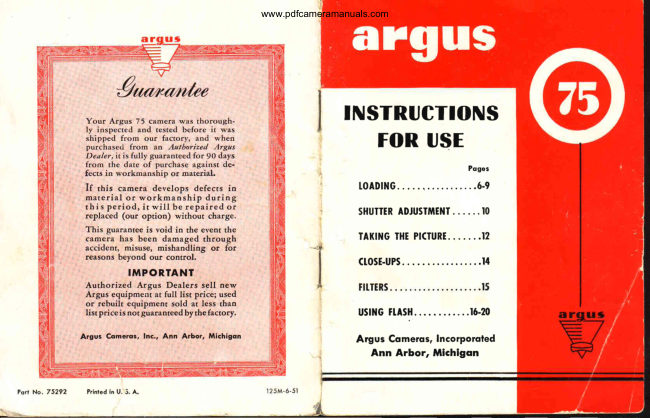
TNSTRUCTIONS
  FOR USE

                             Poges
     t o AD m G .        . . . . . . . . . 6 - 9

  SHUITTRADJUSTMEI{T.. . ...I0

  TAKINGTHTPI(TURE.......I2
  (tost-uPs.  .........14
  tttTERs.          .. ...15
   ustltcH.ASH.   ....16-20

     Argus,  lncorporoted
     Ann Arbor, Michigon
View original page 2Page 6 · Read text
Argoflex 75 is a modified twin-lens type camera with a
Iarge brilliant viewing screen. Like other Argoflex moders,
it shows you the picture before you take it. In operation,
  has been simplified to.the grearest possible dJgree andit
is as easy-to use as the most simple box camera. Modern
features usually reserved for expensive cameras . .  . like
bu'rlt-in flash and double-exposure prevention   .  .  . are
representative of the advanced design of the Argoflex 75.
To obtain the utmost from your Argoflex  75, read this
instruction book carefully so you will thoroughly under-
stand its operation.


 t   Neclc Slrop
2  Film Winding Knob
3  Shulter Releqse
4  Toking lens
5  Viewing Lens
6  Locking Cqtch
7   Film Window
8   Flqsh Gontoclr
View original page 6
Page 7 · Read text
UseOnly Size620 Film-Blqck & White
               or Kodqcolor

In selectinga fihn for your Argoflex 75, we recom-
mend EastmanVerichrome or Ansco Plenachromefor
black-and-white pictttres, and Eastman Kodacolor,
which yields beautiful prints in  full, natural color.
Note: when using Kodacolor, take pictures only  irr
bright sunlight with no shadedareas.


                                                I


                        Open the back of
                               the camera by  lift-
                                ing up the locking
                               catch. The back is
                             hinged for conven-
                             ience but do  not
                                        let it drop or hinge
                       may be sprung.


                       www.orphancameras.com
View original page 7Page 8 · Read text
2

                          Place  empty   film
                           spool in upper film
                        compartment, first
                       making  sure film
                            spool slot is engaged
                             with winding knob;
                           then pressother end
                               of  spool in  place.


     3
Be sure to load the
camera in subdued
light; not in bright
sunlight. Insert roll
of film in lower film
compartment and
slide into place en-
gaging spool pins.
Be sure film  is  in-
serted with end of
protective paper in
position indicated.
View original page 8Page 9 · Read text
4

                                   Pull   off  about  6
                          inches of paper
                                leader  for  thread-
                                           itrg.


     5
Fold end of paper
(about  one  inch)
and insert into long
slot of the empty
film  spool. To  se-
cure end of paper,
give  the  winding
knob. two or three
turns.


                   www.orphancameras.com
View original page 9Page 11 · Read text
SHUTTER
                 ADJUSTMENT

                          A  lever on the front  of
                                    the Argoflex 75 permits
                                adjustment of the shutter
                                         for  "TIME"    or  "IN-
                        STANTANEOUS"   ex-
                                 posures. For  snapshots,
                               use marking INST. The
                           TIME  setting requires a
                                 steady support  for  the
                                   c a m e r a , a n d    i s u s e d
    when taking  pictures indoors or where there  is very
        little light (seepage 19 for use of TIME  setting).

    DOUsLE EXPOSURE PREVENTION


    An unusual feature of Argoflex 75 is double exposure
     prevention. This means you cannot accidentally take
     two pictures on the same film. Because of its design, a
      picture cannot be taken with Argoflex 75 until the film
       is wound. To determine whether or not the film has
    been wound, a red "flug"  is placed inside the camera
     and  is visible through the lens only after winding  the
       film. This invaluable feature will  eliminate one of the
     most common amateur mistakes.
     ' o                           www.orphancameras.com
\
View original page 11Page 12 · Read text
Open the reflecting
                             view-finder hood,
                             using the thumb as
                                indicated.


The  brilliant  view-
finder  shows you
the way the picture
will look on the film.
View original page 12Page 13 · Read text
To take the picture, hold the camera as illustrated
above, and compose the subject in the view-finder
as you want  it to appear in the finished picture. A
lower or higher camera position may be desirable
to get just the effect you want. Then, hold your
breath for an instant and squeeze the shutter re-
lease smootltlywith the right forefinger. Take care
not  to jar  the camera or  the picture may be
blurred due to camera movement.


                  www.orphancameras.com
View original page 13Page 14 · Read text
W]NDING FII.M
                                  After each picture is tak-
                                €o, wind  until  the nexr
                                    figure appears in the cen-
                                     ter  of  the red window.
                                  After   alI L2 pictures (9
                      when using Kodacolor
                                      fikn)  have been taken,
                            wind  about 6  turns  to
                                take  up  film  and  pro-
                                  tectlve PaPef.


UNTOADINGFILM
Open  the  back  of  the
camerabylifting the lock-
ing catch, and lift out the
roll of exposed film.
View original page 14Page 15 · Read text
Argoflex 75 has a "universal focus" lens. This
     me-ans the camera does not have to be focused,
     and all subjects 7t/o f.eet to infinity  will aPPear
       in sharp focus.
            t'close-up"                        pictures, Argus optical glass por-      For
        trait  lenses may be used. Three such lenses are
       available: 1D, for pictures at 28" to 38";2D,  for
       pictures at 75" to 18'/; 3D, for pictures at 71" to !3" -
     The lenses are supplied unmounted, 30 mm.  in
      diameter and an Argus adapter ring size 28.5 mm.
      holds them in place on the camera lens.
      Ask your Argus Dealer to show you this accessory'


        Taken  at 712 feet,       Taken  at 18 inches, using
         no portrait  lens                 Portrait  2D lens

l 4                         www.orphancameras.com
View original page 15Page 16 · Read text
Argoflex 75 may be used
with Argus Optical Glass
Filters for improving the
rendering of  clouds in
pictures or for obtaining
unusual effects. Argus
adapter  ring  size 28.5
mm.  fits the Argoflex 75
lens mount.


 FITTER           FItM       TYPE OF SUBJECT
LightYcllow      Uarlchrome,Phnachromc,    Avelagelandscapesor
               PantomisX                  distantsubiech
DarlYellow      Vedchrona,Plenacftlome,   Seaol snowscaps,
               PanalomicX                  distantmountainscencs
DarlYellow      PlusX,Suplemc         AYeragelanduapesor
                                             distantsubiats
Green          PlusX,Suprene          Avcragelandscaps
Red           SuperXX,SuperpanPress     Avcragelandscapesor
                                             distantsubiects

Use of Argus filters is recommended when taking land-
scapes,seascapes,distant subjects and mountain scenes
becauseof the improved rendering of sky tones.
View original page 16Page 17 · Read text
Argoflex 75 may be used to take pictures with  flash
       bulbs without  special adjustment. Synchronization is
         built-in, and the only extra required is the Argus 76
        Flash Unit.  This  unil  merely plugs into  the camera,
          like plugging  in a lamp and you  are ready  to  take
         flash pictures.


t 5                      www.orphancameras.com
View original page 17Page 18 · Read text
To use the Flash Unit, first unscrew the lower end cap
and install two standard flash light batteries. (The cor-
rect batteries are the size of a quarter.) Be sure the
batteries are fresh. Weak batteries may flash the bulb,
but the flash may not synchronize with the opening of
shutter.
View original page 18
Page 19 · Read text
To attach Flash Unit  to
the camera, insert flash
contact pins into the holes
on the side of the camera.
The camera is automati-
cally synchronized. Cau-
tion: do not have a flash
bulb in Flash Unit when
attaching.


                                                 It  is recommended
                                    that  the film be ad-
                           vanced before flash
                                bulb is inserted. After
                                 attaching Flash Unit
                                     to the camera, a flash
                                bulb may be inserted
                                        in  it. Clean flash bulb
                                  contact. Push bulb in
                              as far as it will go.


                        www.orphancameras.com
View original page 19Page 20 · Read text
ARGOFTEX75 FLASHTABTES
For snapshots(set camera shutter on INST; see
page l0), and use General Electric, lVestinghouse,
Sylvania, or other flash lamps with  the designa-
tions shown below (SN'I,SF, No. 5 or Press25). If
subject is moving, SM or SF lamps produce best
results.


FItM        SM or SF  No. 5   Press 25

Kodqk  Verichrome.  .  7t/z to   g feet   l0  to l5 feet   l2 to l8 feer
Kodok  Plus X                  I     r o 1 2 f e e t     l 2 r o l S f e e t      | 5 to 20 feet

Ansco  Plenachrome                                      t t                                                  , t

Ansco Supreme                                                          t t                                                  , t

K o d q k S u p e r X X .  . .                                     t t                                                  t t
Ansco Superpon Press                          ,t                                         tt                                             tt


lVhen using Kodacolor film (outdoor tyPe), the
GE No. 58 flash lamp is recommended at \Vz to
4 feet (a portrait lens is necessaryfor use at this
 distance). These distances are based on manufac-
 turer's recommendations for average subjects in
medium colored rooms.
View original page 20
Page 21 · Read text
To take pictures with
                                 flash, check the dis-
                              tance to be sure you are
                                 neither too close nor
                                too far, and follow the
                                  instructionson page 72.


After the flash picture
is taken, the flash bulb
may be ejected auto-
matically by pressing
the red button at the
top of the Flash l-Init.
This prevents burned
fingers.


                         www.orphancameras.com
View original page 21Page 22 · Read text
To  protect Argoflex
                            75, a genuine leather
                             carrying case is pro-
                           vided as an accessory.
                                                    I t  is designed to per-
                             mit use of the camera
                            without  removal,  in-
                         cluding use of  the
                              flash unit.


The threaded bushing
on the base of the c?.rrr-
era permits the use of
any  standard  tripod
with Argoflex 75. It  is
a useful accessory for
time exposures.
View original page 22Related documents and language editions

From the M. Butkus archive. Original publisher and archive notices are retained.
Check the model and edition against your equipment.
PDF verified 2026-10-10.