Light meters
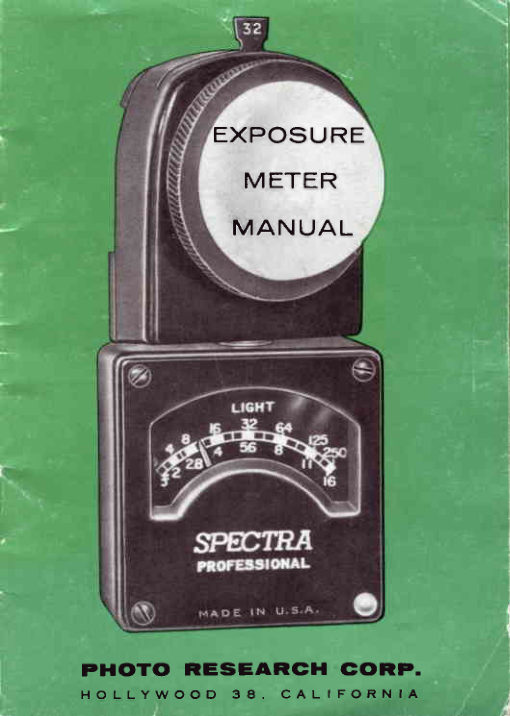
Spectra Professional meters User manual
User manual for Spectra Professional meters. 25 pages in English. Read the original PDF, download or print a copy without registration.
25 pagesEnglish1.6 MB PDF
Loading your manual…Open PDF directly
Document details
- Brand
- Spectra
- Model / document
- Spectra Professional meters
- Document type
- User manual
- Language
- English
- Pages
- 25
- File size
- 1.6 MB
- Category
- Light meters
- Document date
- Not specified in catalog
Search available document text
Find a term, then jump to its page in the original PDF. Image-only pages may not be searchable; check the PDF for exact wording and diagrams.
Page 3 · Read text
INTRODUCTION
 Congratulations,and welcome to the world of SPECTRA.You are in distinguished
company. SPECTRAmeters are used by knowledgeableprofessionalsthe world
over; from the swamps of Asia to the fashion studios of New York; from the
 movie studios of Hollywood to the industrial plants of Europe.
SPECTRAINCIDENT-LIGHTmeters are so called becausethey measure all the
 light falling on -  or incident upon, the subject. (For a detailed explanationof
the principle of Incident-Lightask your dealer for the PHOTO RESEARCH
 publication "lncident-Ly"). Now, get the "feel" of your meter. Twist the swivel
head, note how you can point it in any directionwhile readingthe meter scale.
Examine the meter scale, the upper numbers indicate footcandles,the lower
number f/stops. Insert a multiplying slide, note its effect on the meter reading,
try an ASA INDEXslide.
Look at the white Photosphere. Since the Photosphere receives all the light
falling on the subject, it is an almost perfect 3-dimensionalduplicate of the
subject. Remove the Photosphereand see the light sensitive area underneath.
Now that you have "met" your meter we suggest you make some actual tests
on film. Experiencedphotographersknow that all variablesmust be considered
when determining correct exposure. . . film sensitivity, actual shutter speed,
lens apertures,lens transmission,processing.
All Rights Reserved    €) 1968 Photowww.butkus.usResearch Corp.    Printed in United States of America
2
View original page 3
Page 4 · Read text
Take time to make and recordsome tests. This will help you control or eliminate
the variablesand enableyou to get accurateand dependableresultsout of your
exposuremeter/cameracombination.
lf you are used to a reflected-lightmeter the change to an incident-lightmeter
may requirea slight mental adjustment.You will find it much easierandquicker
to take readings. Your exposures will be more consistently accurate and the
troublesome "angle of acceptance" associatedwith reflected-lightmeters need
no longer be considered.
POINTERLOGK:(Figure5 - Page17)
Some SPECTRAmeters are fitted with a pointer lock device. The Pointer Lock
button (11) is located on the front of the meter immediatelyunder the name
plate.
In the normal positionthe meter is locked.
    NOTE: lt  is good practice to lock the pointer whenever meter
               is being shippedor is not in use.
To Use Pointer Lock:              To DisengageLock:
1) Gently press down red button.         f ) Gently press down red button and . . .
2) Take readingwhile holding down   2) Rotate button r/a turn clockwise.
   button.                         Reverseprocedureto re-engagelock.
3) Releasebutton to hold reading.

                                                 3
View original page 4Page 6 · Read text
ZEROAND BALANCE:
Alf meters are correctly balanced and zeroed before leaving the factory. Zero
adjustment should not be changed unless meter goes off zero.
TO CHECKZERO:(FigureI - Page4)
     A) Insert blank slide in meter.
     B) Lay meter down on flat surface.
     C) Meter should indicate "O" precisely.
               lf adjustment is required, turn ZERO adjustment screw (7) as needed.
TO CHECKBALANCE:
     A) Insert blank slide.
     B) Hold meter in operating (upright) pcsition.
    C) Meter should indicate "Ol'
               lf meter is off balance, see your SPECTRAdealer or have your service
      man adjust it, othenruiseinaccuratereadings may result.
SWIVELHEAD:(Figure 1 - Page4)
The swivel head (No. 1) may be turned almost 360'. This allows unobstructed
use of the photocell while, at the same time, permitting a full view of meter
scale.
    cAUTloN: when using swivel head, Do Nor FoRcE rr BEyoND BUILT-IN
           STOP POINTS!
View original page 6Page 8 · Read text
METERSCALE:(Figure2-Page 6)
Your SPECTRAhas a dual meter scale -  footcandleson the top and f/stops on
the bottom. As you will see, this is a very useful feature of your meter.
    NorE WELL THls RULE: Re.adf/stop scare onry when an ASA slide
                           as in meter.
For reading intermediatevalues on the meter scale, refer to Figure 2-Page 6.
HOWTO MEASURE|NC|DENTLrcHT(PHOTOSpHERE):
Hold SPECTRAMeter at position of principal subject (or interest-centerof scene)
and point Photospheredirectly at camera lens. DO NOT POINT PHOTOSPHERE
AT SUBJECT.Rotate Photosphereto avoid shadows or reflectionsfrom photog-
rapher's clothing. Body of meter may be rotated for conveniencewithout
affectingreadingas long as Photospherepoints at camera lens.
Followthis generalprocedure:
     1) The meter is held with the meter-scaletoward the user.
     2) The swivel head  is turned and pointed directly at the  light being
       measured.
     3) When light level is too high (pointer goes over scale) a MULTIPLIERis
        insertedin slot in swivel head.
For specific techniques and use of ASA slides for direct reading see page 9.
View original page 8Page 9 · Read text
Readings may also be taken near camera so there is no need to approach the
subject. This is especially useful in hazardous situations, or in distant scenes.
make ceftain that the light talling on the Photosphere is the sarne as the light
 falling on the subject, as the camera "sees"  it.
    NOTE: The Photospherecollects all light falling on subject and integrates
                      it into one overall reading. (For balancing light, see Page 14.)

MEASURTNGREFLECTEDLIGHT (WITH PHOTOGRID):
When the Photosphere is replaced with the Photogrid (see Accessories, Page
 22), the SPECTRAbecomesa reflected light meter. This method is recommended
when  it  is impractical to use the lncident-Light method. DO NOT USE ASA
SLIDESWITH THIS METHOD.
Procedure:
         l)  Remove Fhotosphere and snap Photogrid on meter.
     2) Point PhotogridAT THE SUBJECTand note reading. For black and white
        photographythe shadow areas are generallythe most critical. In color,
         the highlight areas call for the most careful reading,as they will "wash
         out"  if overexposed.

      3) Compute the exposurewww.butkus.usas detailed on Pages l1-13, using the Reference
       "DOTS" on the Computer.
8
View original page 9Page 10 · Read text
SLIDE SYSTEM:
An important feature of your SPECTRAis its unique SLIDE SYSTEM. Slides
furnished with your meter are part of the calibration of this meter and should
not be used with any other.
       NOTE: Direct reading without slide -  1200 ASA @ U50 second.

There are two basic types of slides:
      1) ASA Index slides and,    2) Multiplying slides.
 tt is important to understandthe differencebetweenthe two.
                  M}ASASLIDES: 6/-*1il"fi
ASA slides program your meter for direct f/stop readings at pre'selected shutter
speeds.These slides have the film ASA index engravedon the tab and are gener'
affy (though not always) calibratedfor l/50 second shutter speed corresponding
to standard 24 f .p.s. on motion picture cameras.
    TO USE: Insert the appropriateslide ALL THE WAY into the meter (2), take
              reading in the usual way (Page 7), and read your f/stop directly
              from meter scale (Figure 2-Page  6) -  bottom numbers-with'
               out referring to the comPuter.
View original page 10Page 12 · Read text
MULTIPLIERS:
                Multiplying slides are used when the light tevel is greater than the full scale
              meter reading of 250 fc. The X10 is generally used for brightly lit interiors'
                studios, etc., and the X1O0 for daylight outdoors. With Combi-500 a special Red
             X10 slide is provided for use with Booster. Multiplying slides are used with
                the footcandle (upper) scale (Figure 2) and the marks X10 or XIOO on the com-
                puter (Figure 3). They cannot be used for direct f/stop reading, but note the
                following important exception.On each multiplyingslide an ASA number is also
               engraved; XIOO has 12 ASA, XlO has 125 ASA, making these dual purpose
                 slides. When these slides are used for their ASA values, and not as multipliers'
              you may read the f/stop direct, as you would with any standard ASA slide.
         READINGMETHODS:
              There are two methods of obtaining a reading on the SPECTRAmeter: The
            DIRECTmethod and the COMPUTERmethod. The Direct method is used ONLY
             when ASA index slides are in the meter. The Computer method is for use with
             XIO and X1OOmultiplyingslidesor when the meter is used without slides.
         THE COMPUTER:(Figures3 & 4 - Pages12 and 15)
             The Computer consists of 3 dials (2 movable and I fixed). On the large movable
                   dial (Figure 3) there are several reference marks. The arrows are for incident
                   light readings (Photosphere/Photodisk)and the dots are for reflected lightIr
               readings(Photogrid).Use as follows:

                                                                  1 1
View original page 12Page 14 · Read text
ARROWS-  (lncident Light)                 tcombi Only
Black Arrow      No slide in.   Red Arrow     Boosteron. N.oslide in.
BlackX-10 Arrow  X10 slide in.  Red X10 Arrow Boosteron. Red XlO slide in.
Black XlOO Arrow X10Oslide in.
DOTS (Reflected Light with Photogrid):      *Combi Only
One Black Dot   No slide in.    One Red Dot   Boosteron. No slide in.
Two Black Dots   Xl0 slide in.   Two Red Dots  Boosteron. Red XLOslide in.
Three Black Dots XI'00 slide in'
                                          * combi userssee furtherrnstructionspage(s)r5-2r
The computer center dial ("8"  Figure 4) is used for setting film speed. Shutter
speeds and cine frames per second are also marked on this dial. Markings are in
seconds and fractions thereof. Intermediate speeds on this dial are shown in
Figure4-Page 15).
The upper dial ("c"  Figure 4) shows tight vatues on the top and f/stop on the
bottom. Intermediatevalues on this dial are shown in Figure 4 - Page 15.

SET FILM SPEED:
Hold meter in left hand and line up ASA tab (Figure 1) in ASA window on com-
puter; apply slight upward pressure (with thumb) on ASA tab and rotate knurled
disk of computer (with right hand) to bring appropriatefilm speed into window.
Releasepressureon tab, film speed is now locked in.

                                             13
View original page 14Page 15 · Read text
Having taken a reading and noted the light intensity (footcandles):
        l)  Rotate dial A and align appropriate reference point with light value on              r
         dial C. (See pages 12 and 15).
     2) Read off any of the various combinationsof shutter speeds and lens
       openingsindicatedby the computer.
                                                                                            \>The Cine scale (Dial B) shows frames per second opposite the lens aperture for
those using motion picture cameras.
BALANCTNGTHE LIGHT (PHOTODISK):
The ratio of highlight to shadow is generally a matter of personal choice. lt is
easy to achieve any desired lighting contrast with the use of the PHOTODISKon
your meter. (See Accessories, Page 22).
     1) Remove Photosphereand snap Photodiskon meter.
     2) Insert multiplyingslide, if needed(Page 1l).
     3) Hotd meter at subject and point Photodisk directly at key light. Note
                    i ntensity (footcand les).                                                                                                                 *     4) Hold meter at subject and point Photodisk directly at  titt light. Note in'
         tensity (fc).
     5) Adjust lighting ratio as needed. Example: Key light reads 32 tc. and the
        desired ratio is 4:1, adjust fill to read 8 fc.                                                                                      i
     6) Exposure reading is made by replacing disk with Photosphere.Read as
        usual.         www.butkus.us

 L4
View original page 15Page 17 · Read text
COMBI BOOSTERCIRCUIT:(Figure5 - Page 17)

When the level of light falls below the normal sensitivity (10 fc. or less) of the
COMBI-500,a "boost" of LOOtimes sensitivity is obtained by switching to the
CdS booster circuit. (Figure 5).

The Booster "ON"  switch (8)  is located at the side of the swivel head. The
 switch (9) at the top of the swivel head is for checking batteries.
CharacteristicallyCdS photocells do not react to light as quickly as Selenium
 cells, therefore, when using Booster, keep "ON"  button pressed for approxi'
 mately 5 secondswhile taking a reading.


LOW LIGHT LEVELPHENOMENA:(CdSCell)

                                                                                                                                                                 f
When the COMBI-SOOis used to read very low light tevels,and the blank slide
 has been in the meter, or the meter has been in its case, it is advantageousto
 "condition" the CdS celt by exposingit to a light of slightly greater intensitythan
 the one being measured. Due to basic characteristicsof the CdS cell, there is a                         i
 "recovery" time of a few seconds before the reading is stabilized.Where critical
                      www.butkus.usthe reading after a few seconds interval. measurements are required, repeat
16
View original page 17Page 19 · Read text
SENSITIVITY:


                        FULLSCALEIN FOOTCANDLES

                            PROFESSIONAL   coMBt-500

   BASIC RANGE                     250            250
   WITH XlO MULTIPLIER             2,500           2,500
   WITH X1OO MULTIPLIER           25,000         25,000
   WITH BOOSTER(Combi only)                         2.5
   BOOSTERWITH RED XlO SLIDE                     25
  *WITHOUT         PHOTOSPHERE          50              0.s
     (divide reading by 5 to
     o b t a i n  f o o t c a n d l es.)

      t' Emergency procedure only.                      www.butkus.us
1 8
View original page 19Page 20 · Read text
BATTERYTEST:(Figure5 - Page17)
                1) Press battery test switch (9).
               2) pointer should read at the 64 footcandle mark -  or to the right of it -
               on the meter scale.
               3) Replacebatteries if pointer reads less than 64fc. mark.
     REPLACEBATTERIES:
       COMBI-5OOBooster uses two 1.34V Mercury batteries (button type), mounted in
         a spring loadedslot in the swivel head. To replacebatteries:
                1) Push battery holder out (with large coin) of battery slot. (L0, FIG' 5)
               2) place new batteries in holder. Observe pglarity (etched on holder and
                on batteries).&               3) Hold meterwith photocellfacing down'
               4)  lnsert battery holder into slot with notched side of holder alignedwith#                "step" in slot.
       coMBl-500 GG PHOTOREADER:(See AccessoriesPage 22)
*       The SpECTRAGG (GroundGlass) PHOTOREADERutilizesthe ultrasensitiveCdS
           cell of the COMBI-500to measure the actual brightnessof the image on the
        camera ground glass. lt may also be used with SLR camerasthrough the view-
          finder.
                     Before using the GG PHOTOREADERit is necessary
                                  to match it to the equiPment in use.
#                                                              1 9
View original page 20Page 21 · Read text
CALIBRATION: (Photoreader)
'
       l. Make a typical photographicset-up, using the same equipment which will be
      used with the GG PHOTOREADER.
    2. Determine correct exposure in the usual way. (Do not use GG PHOTOREADER
        for this.)
    3. Set computer on the COMBI-5OOfor correct exposure.

        NorE: RETAIN THls "REFERENCE SETTTNG"THRoucH srEp 8 UNT|L
            CALIBRATION IS COMPLETED.

    4. Attach cG PHOTOREADERto meter.
    5. Open up fully the lens apertureon camera.
    6. Hold GG PHOTOREADERfirmly against camera ground glass or SLR eyepiece.
      (Use focusing cloth to exclude extraneouslight.)                                                                                                                                                                      :
    7. Press cdS switch and note light value (upper meter scale).
    8. Locatethis same light value on upper dial C of Computer. Oppositethis value
      scribe a reference mark on large movable dial A. (Be sure ,,REFERENCE             r
     SETTING" is still set as in STEp 3.)
                        www.butkus.us
  20
View original page 21Page 22 · Read text
-j-
  II
  f         The meter is now calibrated for this particular camera/lens combination. This
 I       GG reference mark is valid so long as the equipment remains the same. A new
.*           reference mark must be established whenever the lens or ground glass is
           changed.

  L      TO USETHE GG PHOTOREADER:
 3
 #             1. Hotd pHOTOREADERfirmly against ground glass or eyepiece.(Use focusing
                                                    light.)                            extraneous                        to                 cloth                      exclude &" r                                         has a wide tonal range several "spot" read'                                   the subject                     When                     reading.               2.             Take -
                ings may be taken over the ground glass area and then averagedout.
 I
  I             3. On Computer set GG referencemark opposite reading.
.t             4. Read off exposurefrom computer setting.

           Because the GG PHOTOREADERmeasuresthe light at the focal plane, it auto'
             maticallycompeilsatesfor lens transmission,filters and bellowsextensions.The
        GG PHOTOREADERis particularly useful in the fields of photomacrography,

                                                                      2l
View original page 22Page 24 · Read text
CAREOF THE METER:*5
F         Your SPECTRAmeter is a precision pivot and jewel instrument. lf used with
          normal care it will give many years of reliable service.Treat it like any fine pre'
            cision instrument. Avoid excessiveshock or vibration, do not drop, do not store
              in glove compartmentof car, near radiatorsor other hot places.
       When storing COMBI-5OOfor any extendedperiod,alwaysremovebatteries,
         neverleaveworn-outbatteriesin meter.
        The words SPECTRA,PHOTODISK,PHOTOGRID,PHOTOSPHEREare
          registeredfrade marks of the PHOTO RESEARCHCORP.
      GUARANTEE:

        SPECTRAmeters are guaranteedfor one year against all defects of material and
          workmanship,providedthe REGISTRATIONCARDaccompanyingthe instrument
              is filled out and mailed to us within 3O days after purchase.

         The guaranteedoes not cover damage due to accident, misuse or tampering.

                Distributors throughout  the world

            A Product of
          PHOTO RESEARCH CORP.                                    Bur bank, Califor nia, U.S.A.
                                                      23
                                   MA NUA L NO. 3 -0 1 4
View original page 24Page 25 · Read text
www.butkus.us
3 0 0 0N O . H O L L Y W O O DW A Y ' B U R B A N K , C A L l F . 9 1 5 0 2 . C A B L E : S P E C T R A
View original page 25
Related documents and language editions
From the M. Butkus archive. Original publisher and archive notices are retained.
Check the model and edition against your equipment.
PDF verified 2026-10-10.