Film cameras
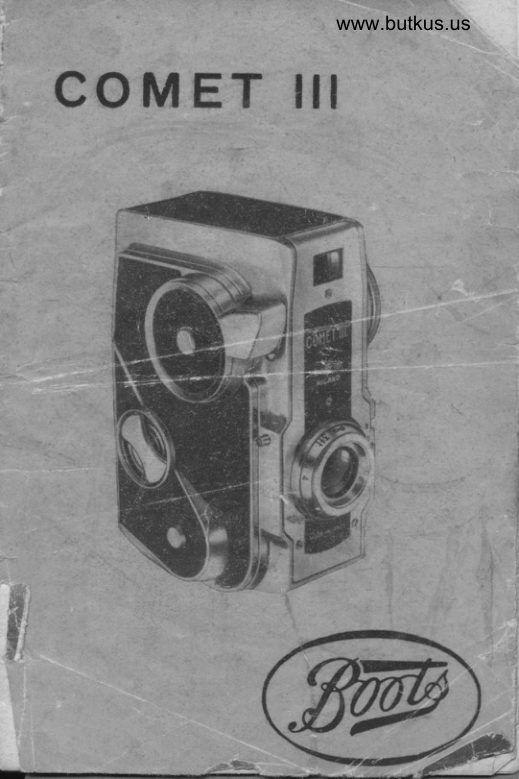
Bencini Milano COMET III User manual
User manual for Bencini Milano COMET III. 21 pages in English. Read the original PDF, download or print a copy without registration.
21 pagesEnglish4.4 MB PDF
Loading your manual…Open PDF directly
Document details
- Brand
- Bencini
- Model / document
- Bencini Milano COMET III
- Document type
- User manual
- Language
- English
- Pages
- 21
- File size
- 4.4 MB
- Category
- Film cameras
- Document date
- Not specified in catalog
Search available document text
Find a term, then jump to its page in the original PDF. Image-only pages may not be searchable; check the PDF for exact wording and diagrams.
Page 3 · Read text
www.butkus.us

   BOOTS COMET  ilt...
        ... is ols o unique, precision-mode comero, from one
    of Europds foremost designers.  lt hos elegont looks,
   o Eye-level Viewfinder.
     Eye-level Viewfinder
   Jh" eye-level viewfinder is exceptionolly cleor ond    ihe shutter releose comes eosily to hond and  is
    bolonced to minimise comero movement ond ensure
.   shorp pictures.
   An exceplionql lens.
     The lens of the Comet  lll hos o speciol cooting
    to increose its _efticiency ond this is one reoson why       it tokes such flne pictures.  li    f ocuses too, ond yor.l .  con gei needle-shorp results os close os 3 feet.
    lndoor Picfirres with << Flosh >.
     The Comet  lll  is o round-the-clock comero;    iti
    tokes indoor snops of ony time of d.:y or night with
    eosy-to-use  << tlosh  >>.
    Economicol lo use.
      Sixteen enprints the size of the picture oooosite    *   fsr which you need only one film,    cosi less.
   thon sixteen smoller snopshots token -with on or-    dinory box comero.                                    *    Simple lo use.
      There's no fuss w'r*h'the Comet  lll,  iust set the    {ocus, oim ond shoot. All oiher necessory settings
    hove been mode for you of the foctory.
   Get to know your Comet lll.
       This booklet is iniended to introduce you ond vour
   Comet  lll. Reod it ihrough corefully ond fomiliorise
    yourseli with the comero before octuolly usinq it'   ond you will flnd ii o flrm ond foithful friend. "
   THE COMET III TAKES 127 SIZE FILM.
  '    The lens ho,1 on operture oI Flll  ond the shufter
   works ot  l/50ih second with'provision for  tirne    ' exposure.
View original page 3Page 5 · Read text
Digitally signed by Mike Butkus

                                                  manuals, ou=butkus.org,    Mike Butkus DN:cameraemail=mike@butkus.org,cn=Mike Butkus, o=Butkus                                                         c=US
                                              Date: 2021.08.18 16:31:49 -04'00'


      THE MAIN PARTS OF THE COMET   ltl
                I  - Socket for coble releose.
        2 - Shutter releose.
        3 - Fiim winding knob.
        4 - Flosh contoct.
        5 - Accessory shoe.
        6 - Locking k"y.
        7 - Focusing lens mount.
        8 - Time iever.

\
View original page 5Page 6 · Read text
www.butkus.us


     LOADING THE FILM.


    :        Conveniently the filrn mechonism slides completer;
1       ,)ut oi the comero body so thot oll pcrts ore eosity
       ,:ccessible. Turn the lockinq cotch onti-clockwise.. I
t
View original page 6Page 7 · Read text
www.butkus.us


       ... then gentiy slide oui tlre ponel on the opposite
  side of the comero. The empty film toke-up spool
 should be of ihe top, wiih one end engoged in ihe
  film winding knob so ihot it revolves os the knob  is
    I urned, ond the other end in the hole in the leof
 spring.
\
View original page 7Page 8 · Read text
www.butkus.us


                   ?
                    ri
                 f"


   Fit the new film so thot one end of the spoor firs
into ihe hole ot the oiher end of the leof spring
ond the opposite end fits snuqly into the recess
provided.
View original page 8Page 9 · Read text
www.butkus.us


Breok the poper seol on the film, unwind o    f ew
inches ond threod it through the wider of the two
slots in the toke-up. spool. Turn the winding knob totoke u.p         ,ony slock, holding the film gently t"o preventit unwinding further. GivJthe windei o further whole
turn to secure ihe film, moking sure thot it is feed
ing evenly into the toke-up spool ond is not running
up og.oinsi one of the flonges, ond thot it is ridin!
snroothly over the two rollers.
  Slide the film mechonism into the body of the
comero; the film itself should fit snugly ogoinst the
sprung pressure plgte. When the side ponel is right
home, turn the locking coich to secure.
View original page 9
Page 10 · Read text
www.butkus.us


  With the bock of the cornero towords you turn rhe
'.vinding knob (it will go only one v.,oy) ond wotch
the lower of the two red windows. Af ier o    f ew
turns, printing, usuolly dots or letters, will oppeor,
ot which stoge wind slowly to ensure thot the frgure  1
ahich follows immediotely ofterwords comes into the
centre of the window. There is iust one more im-portont operotion bef ore you ore reody to toke
vour first picture...
View original page 10
Page 11 · Read text
www.butkus.us


 FOCUSING
   Unscrew the lens cover; meosure or estimoie ihe
 distonce in  f eet between comero ond subiect ond
 rotote the lens until the oppropriote distonce is set
 ogoinst the red mork on the lens mount. You will
 notice thot the figures ore engroved so os to be
 reod with the bock of the comero towords you -  its
r noturol position.
View original page 11
Page 12 · Read text
www.butkus.us
  TAKING THE PICTURE.
    For horizontol Piciures,
   hold the comero os shown.
  The viewfinder should be
   close up to your eY€, Your
   finger resting lightly on the
   shuiter releose. lt  is  im-
   rrortont to hold ihe comero
   crbsolutely still ot the time
   of ioking ond you will flnd
    it will help to hold it ogoinsi
   the cheek; you will gei od-
   <litionol support by keeping
   \iou( elbows tucked ogoinsi,.I    i:'e body. Compose the sub-
                                os   ieci in the viewflnder                               the    ',vorrt it to oppeor in   finished picture, hold your
   ';reoih  f or on inston j  ondil gently ond s-m-o-o-t-h-l-y de-          [-.);  --1 r!  iire sitirticr rc L-ai:.'].


                                For upright pictures hold the
                           comero like ihis.
View original page 12Page 13 · Read text
WINDING ON.

                                                                                                                                                                                                                                    i: --
(rvindow: for the second, turn the winder until 4fre          ,i14
 \'For  the first picture the figure I wos in the lower    E
  some figure 1 oppeors in the centre of the upper
   rvindow. For the third picture the figure 2 should   I                                                            'J  be in the centre of the lower window, ond for ihe
   fourth it  shou ld be in the centre of the upper  j
  window: ond so on until you ho-ve token the six-    i
   teenth picture when the figure B will be in ihe                                               -*1   upper windorry.

  UNLOADING.
     After toking the lost picture on the film wind on
   until you see the end of the protective poper poss
  both windows: give o few more turns ond then
   unlock the comero ond toke out the film mechonism.
  The frlm should be entirely wound into the top spool.
  Remove it moking sure thot it does not unwind,
   double the end over ond seol it with the gummed
  poper provided.

                   I)t
View original page 13Page 14 · Read text
www.butkus.us


 ?1
.J+

c


      BRIEF TIME EXPOSURE.
      8y roising the smoll lever lust beside the lens     you con control yourself the length of time ihe
       shuiter is open. You will noi wont to use ihis unless
      you ore toking pictures in very poor light, ond indoor
      without << flosh >. Wiih ihe lever in the' roised po-
       sition the shutter opens lvhen you press the irigger
      orrd.stoys open until you releose it.  lt is       tor the comero to be kept obsolutely stili the"r."iIiolwhole
      time, ond ii will help to rest it on o firm floi surfoce
     ond to use o < coble releose , ovoiloble from Boots.
View original page 14Page 15 · Read text
FLASH PICTURES.
   Flosh pictu.es ore oven eosier to toke becouse you
ore not depencl.eni on the voqories of the weother:
inexpensive flosh bulbs ovoilo-ble from Boots ensure
ihot you hove the righi onrount of light lust whereond when you wont it. Boots ore speiiolists in flosh
ond will be pleored to iell you oll' obout it.
  The Comet lll  is o flne <r flosh >r comero. lt hos
o built-in << shoe > oi the side into which the flosh-
cun frts, ond o speciol contoct in ihe shutter io flre
the bulb os you toke the picture. Simply fit the gun
into the comero ond conneci fhe leod on the flo1h-
gun io ihe flosh contoct, put o bulb into ihe gun ond                                                -will                                               oetoke your piciure in the normol woy. You
delighted with the pictures you get both indoors
onci outdoors when the light v,,ould otherwise be
too poor for picture-toking.
DEVELOPING AND PRINTING.
Bcots Developing ond Printing Service hos o notion-
wide reputotion ond is especibily good for Enprints  -
the lorge-size big - volue pictures illustroted. We
suggesi,/ou toke your exposed fllm to ony bronchof Boots onC osk for " Develop ond Enprinis ".
View original page 15
Page 17 · Read text
:                                                             .    -.
     CARE OF THE CAMERA.
        Keep your Comet lll free from dust' The cose will
       help to keep it dust free ond moke it eosier to corry
            piot.ct it ot the some time. O*,itq to the speciol
       "ninoirf" of the cooting the lens should be dusied only
          *itii  in" softest moleriol - on often woshed hond-                                                         sof i  brush'        t"r.ni"t  o(, pref erobly, o very
       The comero requires no other mointenonce ond
      vou should noi otiempt to moke odiustments your-                                                       ony        seif: Boots will be very pleosed to undertoke           v,,irich moy become necessorY                                                                                   I
       ACCESSORIES.
         Boois stock the following ronge of occessories for
         the- Comet  lll ond will be-pleosed to show them to
      you ond exploirr their use.
       Ever-Reody Cqse. lnvoluoble {or protecting your
       comero, ond the most convenient method .of corrying            'need to remove the comero when toking           it. No
          pictu res.
      Lens Hood. Cuts out unwonted light ond improves
       most pictures. Screws into lens mount.
        Light Yellow Filter. Brings out the clouds in. londs-
         .o--p"r, Screws inio the len's mount ond is  itself
       threoded to toke the lens hood obove.
                                                                                                                                                    f eet'        Close-up Lens. For pictures closer thon three
                                                      be        ls interchongeoble with the filter obove or con
        supplied in !imilor screw-in holder.
        Accessory Cose. To toke Lens Hood, ond Filter. Fits
       onto corrying cose stroP.
       Coble Releose. Speciolly useful to eliminote comero
       movement. Screws into shutter releose.
        Tripod. Keeps the comero obsolutely steody. Screws
         into soeciol  ' bush' in comero bose.


ftr
;ti
Is^BL'{!F '
View original page 17Page 19 · Read text
TO HEIP YOU GET BETTER PICTURES...
  Hold the comero very still ond squeeze the shutter
qently to ovoid 'comero-shoke' in your picture' Most
[hotogrophs look better when the sun is shining frombehind you or over your shoulder. Never let the sun
shine directly onto the lens - use o lens hood.
                                                           ./
                                                                                                        .l
               'outdoor pictures in deep shode ond  Avoid toking                                            I'in ihe eorly morning ond lote evening unless you
use flosh to light up your subiect. Flosh is usef ul
even in sunlight to relieve the deep shodows from     {I{oreheod ond nose which often obscure detoil in         .l  I
 foces.                                                                                                                                                                            Ii
  Do not try to toke pictures of sublects moving          I
                                                                  J quickly ocross the front of the comero.
      ' Close-ups' of people, ond onimols, moke es-
 peciolly effective pictures ond becouse the Comet  lll
 focuses os close os three feet it is ideol for them.
 Alwoys ollow o little more spoce over the subiect's
 heod in the viewfinder thon you think you need
 this compensotes for the slightly differeni position
 of the viewfinder in relotion to the lens.


 TAKE GOOD CARE OF YOUR NEGATIVES.
   Your negotives ore precious - often irreploceoble,
 ond your will wont to hove reprints ond enlorgements
  f rom your  f ovourites. They should be kept where
 they will be sofe fro mdust ond scrotches.

                  .:.'......          ,.8Li   --
View original page 19From the M. Butkus archive. Original publisher and archive notices are retained.
Check the model and edition against your equipment.
PDF verified 2026-10-10.