Flashes & lighting
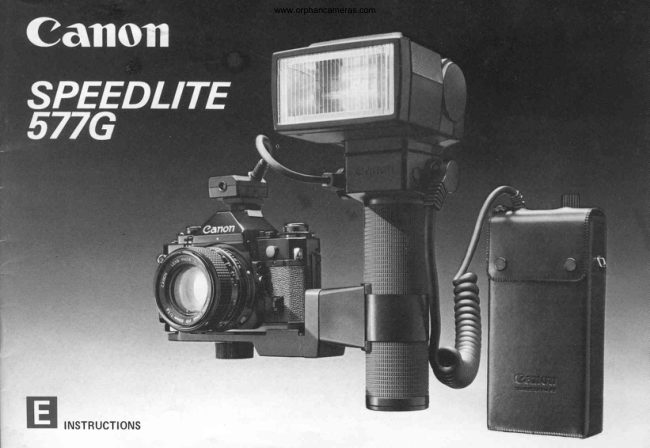
Canon 577G Speedlite User manual
User manual for Canon 577G Speedlite. 40 pages in English. Read the original PDF, download or print a copy without registration.
40 pagesEnglish4.2 MB PDF
Loading your manual…Open PDF directly
Document details
- Brand
- Canon
- Model / document
- Canon 577G Speedlite
- Document type
- User manual
- Language
- English
- Pages
- 40
- File size
- 4.2 MB
- Category
- Flashes & lighting
- Document date
- Not specified in catalog
Search available document text
Find a term, then jump to its page in the original PDF. Image-only pages may not be searchable; check the PDF for exact wording and diagrams.
Page 3 · Read text
INTRODUCTION        www.orphancameras.com                                                   . , *

                                                              €

The  Speedlite 577G  is  Canon's    cial features and accessories offer   Adapter 577G-2O,an optional ac-
most powerful electronic computer     all  of  the necessary options for   cessory.With special synchro cords
flash unit with many impressiveau-    obtainingbeautifuland professional  which are availableon the market
tomatic and professional features.    results. For control of shadows and    for connecting other Canon Speed-
With Canon SLR cameras, it goes    better modeling of the subject, the    lites, synchronizedmultipleflash is
well beyond the conventionalmean-   flashhead tilts upward up to 12O"   anotheroption.
ing  of automatic in  flash photo-   and swings to the  left and  right    * Since the Canon Speedlite577G
graphy. On a Canon New F-1, A-1 ,   12O" each way. lts unique bracket    does not have an internal power
AE-1 PROGRAM,AE.1, AL.1 or AV-1   design insures quick releaseof the      source, use of the Canon Tran-
camera, it will automaticallyswitch    flash unit for varying the distance      sistor Pack G, which accepts
the shutter speed to the flash sync   between the flash and the camera.      either six C-size batteries or the      'f
speed of 1/60 second. (1/90 sec-   And since it has a carefullymated,    Canon rechargeableNi-Cd Pack      ,.
ond in the case of the New F-1.)   separate sensor which remains in     TP, is required.                  ?
Even the aperture will be set auto-   the camera's hot shoe, correct ex-
maticallyfor the New F-1 (Shutter-   posure is obtained even when the
 PriorityMode),A-1, AE-1 PROGRAM,  flash itself is not aimed directly at
and AE-1 as long as the lens is on    the subject.
"A". lf using one of the New F-1's or   The 577G normallycovers the angle
A-1's slower shutter speeds is de-    of view of lenses having a focal
sirable,that is possible too. Flash   length of at least 35mm, but with its
photographywith the 577G is as   Wide Adapter 577G-24, flash photo-
easy as turning on its power switch,   graphy can also be done with 24 or
selecting one of three apertures by   28mm lenses. Even flash photo-
sliding one switch and waiting for   graphy with a 20mm lens can be
its pilot lamp to glow. lts many spe-   accomplishedby attachingthe Wide
View original page 3Page 4 · Read text
www.orphancameras.com


Assemb1y............                            ,..p.6
TransistorPackG ...........                     p g
HowAutomaticFlashControlWorks             ...p.11
Settingthe ASA FilmSpeed.......                  ...p.1A
Settingthe ShutterSpeed                         .....p.12
Settingan Apertureon the Flash                  ....p.14
Settingthe Apertureon the Camera....          .....p.1S
Pre-ShootingChecks........                     ....p.16
Shooting                                   .......p.20
View original page 4
Page 6 · Read text
www.orphancameras.com


                                                 SENSOR
CLAMPINGBRACE                                                     @                                                                @

                                                                @
                              @                                                                     oo
                              @
@                                                              TRANSISTOR                           @
                                                              PACK G
                              @
CAMERASUPPORTBRACKET
o FlashHead                O AUTO/MANUSwitch        @ Motor DriveMF Adapter
@o Slow-SyncTransistorPackAUTO/MANUG ConnectingSwitch  @@ AutoPilotLampCheck(FlashLampTestButton)   @ AttachmentFramingGuidesSite
  Socket              @ SensorUnitSocket        @ Tripod SocketScrew
@ SynchroGord Socket       @ PositioningGroove        @ Wide Adapter 577G-24
o AutoShootingDistanceRange   @ BracketCouplingPin        @ Lock Nut
  Scales              @ TighteningScrews         @ SynchroCord A Socket
@ ASA FilmSpeedSettingDial    @ SlideLock ReleaseButton     @ Sensor
O AttachmentGroovefor Wide and  @ ThreadedAttachmentPoint     @ ConnectingPlug
  Tele Adapters           @ CameraPlacementPositioning    O CouplingIndex
@ ApertureSelectionWindow        G roove              @ PilotLamp
I  ApertureSelectionSwitch     @ TripodScrewSocket             69 PowerSwitch
@ TiltingAngleIndicatorWindow   @ BracketCouplingPin Socket
View original page 6Page 7 · Read text
www.orphancameras.com
ASSEMBLY


       Slide lock button to left. While        Screw large tripod-type screw         Adjust positionof supportbe-
                                                                                fore completing.       holding it in, pull flash section          into the threaded end of the
       apart f rom camera suPPort.           groove.I


      A l i g n the index on the clamP          After sliding clamP on griP, re-         Align    f lash  section  with
       with positioninggroove on the          tighten the two screws on flash       camera support section and
       g n p .                                   section.                        pushthem together.
View original page 7Page 8 · Read text
www.orphancameras.com


(1) Bracket to Camera              (21 Bracket to 577G's Grip            (3) Flash  Section   to  Gamera
                                                                      Support Section
1. Slide the lock button on the flash   1. With a coin or a similar object,   Align the flash and camera support
  section of the bracket to the left     loosenthe two large screws on the   sections of the bracket and push
  and, while holding the button in,      flash section.Separatethe clamp   them together (Photo 6). The lock
  separatethe flashsectionfrom the     from the rest of the section.         buttonon the flashsectionwill spring
  camerasupportsection(Photo1).    2. Align the index on the clamp    to the right when the two parts are
2. Screw the large tripod-typescrew     with the positioninggrooveon the   lockedtogether.
   into the camerasupport sectionof      grip and slidethe clamp as far up     * To separate the two sections of
  the bracketto the screw thread at     aroundthe grip as you want (Photo     the bracket,slide the lock button
  one end of the groove(Photo2).        4).                             on the flash sectionto the left and
3. Screw the tripod-typescrew part-   3. Realignthe flash section with the     push it in. The lock button must
  way into the tripod socket on the     clamp and  retighten the  two      also be in this position for cou-
  camera's base. Before screwing it     screws (Photo 5). The clamp      pling the two sections as above.
   in the rest of the way, shift the     should be positionedon the grip
  camera support back and forth     so that, when assembly is com-
   until the ridges acrossthe front of      pleted, the flash will be facing
    it are right up againstthe front of      straightahead,in the same direc-
  the  camera. Make  sure  the      tion as the lens.
  camera is not sitting on top of
  these ridges. Also  adjust the
  support sidewaysfor the best fit.
  Then finish tighteningthe screw
  (Photo3).
View original page 8Page 9 · Read text
www.orphancameras.com


(4) Sensor Unit G20 to Camera      attached.See p. 31.
   and Flash                    A flash coupler must be used to
Ratherthan havinga built-insensor,     attach the sensor to the Canon
the 577G has a separateone which      F-1. Three are available as oP-
slips into the camera's accessorY     tional accessories.Flash Coupler
shoe. lt is very finely attuned to the     F is especiallyfor this combina-
particularSpeedlite577Gwith which      tion. Flash Coupler D or L may
it comes so that it can give the best     also be used.
results possible.                    Since the 577G and the sensor
1. Loosenthe sensor'slock nut and     provided with it are so carefully
   slide it into the camera's acces-    matched to  each  other, they
  sory shoe so that its eye is facing     should be considereda set. Do
  forward. lf the accessoryshoe is      not use the 577G with a different
  a hot shoe, be carefulto push the     sensorunitG20.
  sensor all the way in so that Pro-
  per electricalconnectionwill be
  made.Thentightenthe lock nut.
2. To connect the sensor with the
  577G,alignthe index on the Plug
   at the end of  its cord with the
  index on the 577G'ssensorsocket
  and pushthe plug in all the way.
*   lf the camera does not have a hot
  shoe, Synchro-CordA, an op-
   tional accessory, must also be
View original page 9
Page 10 · Read text
TRAIVS/STORPACK www.orphancameras.comG


This accessoryprovides power for   accessory),which is rechargeable.
Speedlite577G.                 The Ni-Cd pack should be  fully
Proper Batteries:Six new C-size al-   charged.
kaline-manganesebatteriesor the
Canon Ni-Cd Pack TP  (optional


        Turn off the transistor pack's             Insert the set of six alkaline-            Insertthe transistorpack into
        power switch.                     manganese  batteries  into                its case and rehook the cord.
                                                    battery m agazine TP.


         Align the plug's index with         Turn on  transistor pack's         Turn 577G's AUTO/MANU
         the  577G's power  source         powerswitch.Lamp next to it           switch to AUTO for auto-
        socket index. Push plug into          shouldlightup.                     maticflashcontrol.
         socket.
View original page 10Page 11 · Read text
www.orphancameras.com
                                                t.
1. Unhook the Transistor Pack G's     (Photo 4).                                               t   lf you do not expect to use Tran-       t
  cord from its case and remove the    6. Turn on  the  transistor pack's      sistor Pack G for a long time, re-
  pack from the case.                power switch. The lamp next to     move  the  alkaline-manganese    I
2. Turn  off  the  transistor pack's      the power switch should light up      batteries from the magazine. Ni-         i
  power switch (Photo 1).                (Photos).                         cd Pack TP may be left inserted
3. Insert  the   set   ot   six   al-    7. Make sure the usual preparations     but the power switch must be off
  kaline-manganese batteries into     as  described  in  the  tollowing      to  prevent  corrosive  battery      ;
  battery magazine TP as illustrat-     pages  have  been  made  on     leakage and other potential dam-
  ed. Then align the contact on the     camera, flash and lens and wait     age.
  magazine with  the  transistor      for the 577G's pilot lamp to glow.    * Be  sure  the  transistor pack's
  pack's and insert the one into the     Then take the picture (Photo6).       power switch is off whenever it is       ;
  other(Photo2). ..                       * The transistor pack's operation    notinuse.
  OR                             lamp glows as long as the power    * Should the battery temperature
   Insert a fully-chargedNi-Cd Pack      switch is on and there is power.      rise in continuousshootingwith C-                                                                                                    '  TP into Transistor Pack G the     However,even when it is glowing,     size batteries, you may rest at
  same way as battery magazineTP      the batteries should be replaced     ease,for it is a normal condition.
   is inserted.                           with new ones or the Ni-Cd Pack   + There is a protective lining be-
4. Reinsert the transistor pack into    TP should be recharged if the     tween Battery Magazine TP and
   its case as shown in the photo.      flash  unit's recycling time  be-      TransistorPack G.
  Thenrehookthe cord (Photo3).      comeslongerthanusual.            Before using, remove this lining.
5. Align the index on the plug at the     * When the batteries wear out, re-           lt may be thrown away.
  end of the transistor pack's cord      place all of them at the same time
  with the index on the 577G's ex-      with a set of new ones which are
   ternal power source socket. Push        all of the same brand.
  the plug securely into the socket
View original page 11Page 12 · Read text
HOW AUTOMATIC FLASHwww.orphancameras.com
CONTROLIIWRKS

The 577G's sensor acts something   In order to do this properly, the   To make its decisionon when the
like  the  camera's photocell;  it   sensormust, like a camera'sphoto-   subject has receivedenough light,
measuresthe intensityof light from    cell, be as closeto the film as possi-   the sensor must know three things:
the flashwhich is reflectedback from   ble and facingthe subject.Sincethe    1) the f ilm speed,2) the apertureand
the subject.When it decidesthat the   577G's sensor is separate in the   3) the shutter speed. You must
subjecthas receivedenough light,it   camera'saccessoryshoe,it is always   alwaysset the ASA film speed on the
automaticallycuts off flashemission.   in the best positionto measurethe   flash by hand, but dependingon the
                                          light correctlyeven while the flash  camera you use, the flash may set
                                       unit itselfcan be aimed in many dif-   the aperture, the shutter speed or
                                    ferentdirectionsfor the best lighting  both automatically.The table on the
                                          effect.                                      left shows the variousways that the
                                                                     aperture and shutter speed may be
                                                                           set with variouscameras.


                 A-1, AE-1 PROGHAM,  Automaticallyswitches   Automatic(When
                AE-1, New F-1 (Shutter- to                                       X-sync unless on     using FD lens set on
                                                                                               il8"                     Priority AE Mode)                                "A" mark)
               AL-1,AV-1,New F-1     Automaticallyswitches
                  (Aperture-PriorityAE      to X-sync unless on
                  or Manual Mode)             rrBrt


                                                                                                                            1 1
View original page 12Page 13 · Read text
SETTING THE  SETTINGwww.orphancameras.comTHE
AS4 FILM     ST'UTTERSPEED
SPEED
The sensor must know the ASA film   Canon New F-l               GanonA-1 Camera
speed  to  give  correct  exposure.   Normal Flash Photography: Once   Normal Flash Photography: Make
Make sure it is set correctly on both     the 577G  is  attached to  the     sure   the  577G's  slow-sync
the camera and the flash. To set it on     cameraand its pilot lamP is glow-    AUTO/MANU   switch   is  on
the 577G, rotate the calculator dial      ing, the camera switches auto-     "AUTO".Exceptfor "B" (Bulb),the
until the film speed index is aligned     maticallyto a sync speed of 1/90     AT dial and AE mode selectormay
with the ASA speed which corres-      sec., providedthe shutter dial is     be on any settingand the shutter
ponds to  that of the  film  in the     not on "8".                      speedwill switchto 1/60 sec.,the
camera.                        Slow Sync Flash: Set the 577G's          f lash  synchronization  speed,
                                   slow sync switch to MANU.Then      automatically as soon  as  the
                                        turn the camera'sshutter dial to     577G'spilot lamp glows.lf the AT
                                  any speed from 1/60 sec. to B       dial is set to "="', you will be in
                                      sec.                                control of exposuredurationjust
                                                                   as you normallyare with "8".
View original page 13Page 14 · Read text
www.orphancameras.com


Slow Sync Flash: Set the 577G's  Ganon AV-l                       Other Cameras
  slow-sync AUTO/MANU  switch  The shutter speed will switch to the   Set the shutterspeed dial by hand to
  on "MANU". Set the AT dial to a     ffash sync speed of 1/60 sec. auto-   the camera'sX flash synchronization
  shutterspeedfrom 1/60 sec.to 30   maticallywhen the 577G'spilot lamp   speed:e.9.,to 1/60 sec. or sloweron
  sec. The picture will be taken at   glowsif the selectordial is on the red   the CanonF-1.
  the speedto which the dial is set.  @  (the preferable setting). tt witl
                                   stay on 1/60 sec. continuouslyif the
                                         dial is set to "60                                                         +".  lf the dial is on
                                  "A  Self" or  "Self                                                               k",  the shutter
Canon AE-1 PROGRAM, AE-l,   speed will be 1/60 sec. and the
and AL-1                             flash will be synchronizedwith the
Exceptfor "8", the shutterspeed dial   camera for a delayed shot by self-
may be on any settingand the shut-   timer.
ter speed switch to the flash sync
speed of 1/60 sec. automaticaily as
soon as the 577G'spilot lamp glows.
lf the dial is set to "8", "8" will be the
exposureduration.
View original page 14Page 15 · Read text
www.orphancameras.com
SETTING AN APERTURE
ON THE FLASH

You set an aperture with the aperture   Each positionhas a corresponding  to check that the camera is within
selection switch on the back of the   apertureand auto shootingdistance   that range: either by reading the
577G. The switch has three color-   range. The auto aperture is the f-    lens' distance scale after focusing
coded positions: red, green and Yel-   number which is directly opposite   or by the autochecklamp (seep. 16).
low. As you slide the switch, the color   the dot which is the same color as  When you are decidingwhich of the
of the  position you have set  will   the positionof the apertureselection  three positions of  the  selection
appear in one of three windows on    switch.lt changeswith the ASA film   switch you should set, place Prime
the back of the flash.               speedyou haveset on the calculator  importanceon the shootingdistance
                                          dial. For instance,if you haveset the   range.lf the actualshootingdistance
                                  apertureselectionswitch to the red    falls within the range of two or all
                                     position,the auto aperture will be   three positions,take depth of field
                                                                    f /2.8 at ASA 100 but f /5.6 at ASA 400.   intoaccount.
                                                                                                 * The indicated auto shootingdis-
                             The auto shootingdistancerange is     tance rangesonly hold true if the
                                   indicatedby the straightwhite line     flash is pointing straight at the
                                which is directly opposite the set-     subject. lf the flash head is tilted
                     2Jn{E.2f0..-{r{-i'                    I imrs6rt)                  ting of the apertureselectionswitch.     or swung for bounce flash, or  if
                               There are three lines,one for each     the flash is held some distance
                                    positionof the switch. Each repre-    from the camera,rely on the auto
                                  sentsthe rangeof distancesfrom the     check lamp to tell you if you are
                                   subjectfor which that positionof the      within the correct range (see p.
a) Auto Shooting Distance Ranges      selectionswitchwill give correctex-      26). These ranges also change if
 b) Auto Aperture Indices             posure.lf the camera is out of that     a wide or  tele adapter is  at-
c) SelectionSwitch Position           range, the subject will be over- or     tached. See p. 23 and "Specifi-
   Indicators                      underexposed.There are two ways     cations",p. 35.
View original page 15Page 16 · Read text
www.orphancameras.com
           SETTING THEAPERTURE
          ON THE CAMERA

                         New F-1 (Manual, Aperture-Priority  New F-1 (Manual, Aperture-Priority
                              Mode), A-1, AE-1 PROGRAM,and   Modes) and Other Cameras
                            AE.1                           Turn the aperturering to the same
                          oFD Lens: Leave the lens on "A".   apertureyou have set with the selec-
                              The apertureyou have set on the   tion switch on the flash or to a dif-
                                       flash will be set on the camera   ferent apertureif you wish to correct
                                   automaticallywhen the 577G's  exposure.
                                          pilot lamp glows. The settingsof       1.3m(4.3ft.)                                    the A-1's AE mode selectorandk--                            AT dial do not matter (except in
                                      relationto shutterspeed,p. 12).tlf
                                you wish, you may remove the
                                  aperturering from "A" and turn it
                                         to the auto apertureyou have set
                                on the flash or  to a  different
                                   apertureto make an exposurecor-
                                      rection.ln this case,rememberto
                                     reset the aperture each time you   v                       reset the selectionswitch on the
                                577c.1
                            oFL  Lens: See "Other Cameras",
                                   next column
View original page 16Page 17 · Read text
www.orphancameras.com
PRE-SHOOTINGCHECKS


l. Test Firing and Auto Shooting      correct, press the pilot lamp after     ll. Checking Viewfinder Infor-
  Check                                                   it glows.A flash should be fired. lf      mation
                                      the auto check lamp next to the    The Canon New F-1, A-1, AE-1
                                             pilot lamp lights up right after-    PROGRAM,AL-1, AE-1 and AV-1             S P E E D L I T E 5 7 7 G
                    CANON  JAPAN                wards for about two seconds, it     have special viewfinderinforma-
                              meansthatyour shootingdistance     tion for flash photography.You
                                               will give correct exposure. lf  it     can check  it by pressing the
                                 does not glow,eitherset the aper-      shutter button halfway after the
                                         ture selection switch to a better      pilot lamp glows.
                                       position or move closer to your
                       \ a b c                           subject.This method of checking  New F-1 Information
                                    shooting distance is especially  (1) Full Autoflash Mode: Shutter-
 A) AUTO/MANU Switch                 helpfulwhen the flash is tilted or        PriorityAE Mode (with AE Motor
 b) Pilotlamp                     swungfor bounceflash(p. 25).         Drive FN or AE Power Winder
 c) Auto Check Lamp                        * The auto check lamp tells you     FN attached, FD lens on "A"
                                  whetheryou are close enough to     and shutterdial not on "8").
  Now that  all camera, lens and     your subjectbut not whetheryou
   flash settings have been made,      are far enough away. Even if you   (example)
   turn  on  the  power  switch on      are too close to  get a  well-
   Transistor Pack G. After the flash    exposed picture,it will still glow,
   reaches sufficientcharge for f iring,    so  always keep  the  shooting
   the pilot lamp will glow and you     ranges given on the back of the
   can take a flash picture anytime.       flash in mind and double check
      lf you wish to check the flash and     the lens'distancescaleif you think               30
   whether the shooting distance is     you mightbe too close.
View original page 17Page 18 · Read text
www.orphancameras.com


   Film Speed of ASA 100; Aper-      Manual Mode: Turn the lens ap-   A-1 Information
    ture Selection Switch at  red        erture ring to the same aperture    (1) Full AutoflashMode: FD lens on
    positioni   Slow-Sync  AUTO/       set on the flash. The aperture      "A" and nf diatnot on "8".
  MANU Switch on AUTO.             needle points to the aperture
     *                                           that has been set on the lens.     (example)      Shutterspeed is automatical-
       ly  set  to  1/9O sec., even
                                        Aperture-PriorityAE Mode: Film     though shutter speed display
                                Speed of ASA 100; Aperture     shows what has been set on
                                        SelectionSwitch at red position;      Film Speed: ASA 100, Aperture     the shutterdial.
                                  Slow-SyncAUTO/MANUSwitch      SelectionSwitch: Red position,
(2) AutomaticShutter Setting Auto-      on AUTO.                       Slow-syncAUTO/MANUSwitch:                                                                 on AUTO.   flash Mode: Manual Mode or      ffi@|
   Aperture-PriorityAE Mode (the                                                     *    latter mode with AE Finder FN,        Manually set the aperture to                                                                               (2) AutomaticShutterSettingAuto-   shutterdial on "A").                    the lens the same aperture
                                                                              flash Mode: FD lens off "A" and                                              that has been selectedfor the(example)                                                  AT dial not on "8".                                             flash.
                                                     *                          (example)                                   The camera switches auto-
                                         matically to  X-sync (1/90
                                           sec.) and the meter needle
                                          points to the right of 1/60                                                                        Film Speed: ASA 64, Aperture                                          sec.
                                                                          Selection Switch: Yellow posi-
            30                                                                    tion, Slow-sync AUTO/MANU
                                                                        Switch:on AUTO.
                                                                                                                            1 7
View original page 18Page 19 · Read text
www.orphancameras.com


60 ..........indicatesshutter speed is      in the viewfinderfor  both  flash         (lf the displayblinkswith an aper-
       1/60second.               modes.Automaticflash control is      ture which is the same as the lens'
F ............indicatessufficientcharge    possibleon "B".                maximumaperture,exposurewill
         for firingflash.                                              be correctanyway.)                             (example)2.8,9.5...isthe apertureset on flash.                                           2. Aperture display blinks showing
      Even if you turn the aper-                                       aperture of 1/16 to t/32: means
        ture  ring  to  a  different                                       aperture set on flash may be too
       aperture from that set on                                          small. Check the apertureset on
        the flash,the viewfinderwill    * The aperturedisplaymay be one     the flash.lf it is the same or larger
           still show the aperture on      half f/stop off the one set on the     than the lens' minimumaperture,
        the flash.However,the pic-     flash.This is becausethe aperture    exposure will be correct. Other-
        ture willl be taken at the     display is rounded off to  half     wise, set the 577G'saperturese-
        aperture you have set on      f/stops;it will not affectexposure.      lectionswitchto a largeraperture.
       the lens.                                                          (example)
M...........remindsyou that you have
       taken the aperture ring off   A-1 Warnings
        "A" to set an aperture by   1. Aperture display blinks showing
       hand.                  maximum aperture: means the
* With an FL lens, viewfinderinfor-    apertureset on the flash is pro-
  mation on aperture is not always    bably  larger than  the  lens'
   reliable.Make sure the aperture   maximumaperture.Set the aper-
  ring is set to the aperturechosen     ture selectionswitch to a smaller
  on the flash.                         aperture. Be sure to check the
*  lf the AT dial is on "8", "bu" re-      aperture  set on the flash  if  this
  placesshutterspeed information    happens.
View original page 19Page 20 · Read text
www.orphancameras.com


AE-1 PROGRAM,AE-1 lnforma-       finder. lt reminds you that you   AL-1, AV-1 Information
tion                                have taken the aperture ring off   (1) AutomaticShutterSettingAuto-
 (1) FullAutoflashMode:FD lenson       "A" for manual aperturesetting.)      flash Mode: Selectordial not on
    "A" and shutterspeeddial not   AE-1 PROGRAM Warnings               ,,8".
     o n                  t t B t t .                      The aperture selected on the flash     *  Synchronizedflash photography
   (example)                              will blink in the viewfinderif that ap-         is possibleonly when the meter
    Film Speed: ASA 100; Aperture   erture is larger than the maximum      needlepointsto 1/60 second.
    SelectionSwitch:Red position.    apertureof the lens.
                                  AE-l Warnings
                                        1. Underexposure warning lamp
         2.8                          blinks:meansthe apertureset on
                                      the flash is larger than the lens'
                            maximumaperture.Set the aper-
                                        ture selectionswitch to a smaller
                                    aperture(lamp shouldstop blink-
                                         ing).      tr                          2. Meter  needle  swings   into
                                   overexposure  warning   zone:
 AE-1 PROGRAM    AE-1         means aperture set on flash may                                                                            AL.1           AV-1                                 be too small. Check it. lf it is the
(2) Automatic Shutter Setting Auto-    same or  larger than the lens'
   flash Mode: FD lens off "A" or     minimum aperture,exposurewill
   FL lens. ("M" mark will flash in     be correct. lf it is smaller,set the
   AE-1 viewfinder,and will light     aperture selection switch to  a
   up  in AE-1 PROGRAMview-      largeraperture.
View original page 20Page 21 · Read text
www.orphancameras.com
SHOOTING


Onceall preparationsdetailedon the    You can continue flash photo-      shutter curtain is open, the 577G's
precedingpages have been made,     graphy if the pilot lamp is  still       pilot lamp will glow and the f lash
makesurethe subjectis in focusand     glowing after the shutter is re-     may fire. In this case, correct ex-
that the 577G'spilot lamp is glowing.     leased. lf the pilot lamp does go     posure cannot be guaranteed.
Thenpressthe shutterbuttonto take      out after a flash shot, you can   PROBLEM BACKGROUNDS
 the picture.lf the auto check lamP     take a shot in the normal AE    Certain types of background may
glows immediatelYafterwards, it    mode while waiting for it to glow    lead to incorrect exposure. A verY
meansthatyou werecloseenoughto      again. (This, however, does not    small subject againsta very dark or
 the subjectfor correctexPosure.        apply when the shutter speed is    distant background maY turn out
 *  ln delayedflash photographywith      set to "8" or when the camera is    overexposed.On the other hand, if
   the camera's self-timer,do not      not  set  for AE  photography.)   the surroundings are bright white
   pressthe shutter button to set the    Make sure that the shutter speed    with strong reflections,the subject
   timeruntilthe pilotlamPglows.        or aperturewhich will be used for   may be underexposed.
 * Whenthe shootingdistanceis less     normal AE photographywill give
   thanone meter,the differencebe-      correct exposure,too.
   tweenthe optical axes of the lens    When the   f lash  is no  longer
  and the flashmay resultin uneven    necessary, be sure to turn  off
   lighting.                           the Transistor Pack G's Power
 x Since it is possiblefor viewfinder     switch to prevent battery drain.
   informationin the New F-1, AE-1,     With the power switch off,  it is
   AL-1, or AV-1 to be the same in      possibleto shoot normallywithout
   flash photographyas  in normal     detachingthe flashor the sensor.
  AE photography,it is advisableto     While Performing normal AE
   check that the PilotlamP is glow-     photograPhYas the flash recYcles,
   ing beforeshooting.                 there is a possibilitythat,whilethe
View original page 21
Page 23 · Read text
www.orphancameras.com


WideAdapter577G-24                       ..........p.2g
ManualFlashPhotography..                   ...p.24
BounceFlash                                .p.Zs
BounceFtashon Manuat....................................:.:.::.:.;:t6
Slow-SyncFlash Photography...,.....      .,............F.2g
  (with Canon New F-1 and A-1 only)
MultipleFlash                                .....p.30
Useof 577Gon CamerawithoutHot Shoe
View original page 23
Page 24 · Read text
www.orphancameras.com
WIDE ADAPTER 577G-24


Normally,light from the 577G is    ln all otherrespects,the flashmay be
spread wide enough to cover the   usedas usual.
angle of view of a 35mm or longer    * With  Wide  Adapter  577G-24
lens. lf  it were used with a wider     attached, the  577G's  guide
angle lens,the edges of the picture     n u m ber becomes28 at ASA100.
would be too dark. With the Wide    *   lf you usethe flashwith WideAda-
Adapter 577G-24, the flash unit's     oter 577G-24and a 24mm lens to
lightis diffusedenoughto cover the     copy a  flat subject, the picture
angle of view of 24mm and 28mm       will be dark around the edges.
lensesalso.(lt may also be usedwith     This combinationis mainly for
lenses longer than 2Bmm). At the     taking pictures of three-dimen-
same time, the unit's power is re-      sionalsubjects.
duced and the farthestdistancesat     * For using the flash with a lens
whichyou can shoot are closerthan     having a focal length down to
theyusuallyare.                  20mm, Wide Adapter 577G-20is
To attach the wide adapter,simply     availableas an optionalaccessory.
slide it in the grooves of the flash
head so that the colored distance
scaleson its one side are facing the
back of the flash. These distance
scales, which show the reduced
shooting ranges, replace the ones
below the calculatordial. They are
color-codedto match the three po-
sitionsof the apertureselectiondial.
View original page 24
From the M. Butkus archive. Original publisher and archive notices are retained.
Check the model and edition against your equipment.
PDF verified 2026-10-10.