Film cameras
Chinon AP600s / 300s User manual
User manual for Chinon AP600s / 300s. 14 pages in English. Read the original PDF, download or print a copy without registration.
14 pagesEnglish1.6 MB PDF
Loading your manual…Open PDF directly
Document details
- Brand
- Chinon
- Model / document
- Chinon AP600s / 300s
- Document type
- User manual
- Language
- English
- Pages
- 14
- File size
- 1.6 MB
- Category
- Film cameras
- Document date
- Not specified in catalog
Contents
Search available document text
Find a term, then jump to its page in the original PDF. Image-only pages may not be searchable; check the PDF for exact wording and diagrams.
Page 2 · Read text
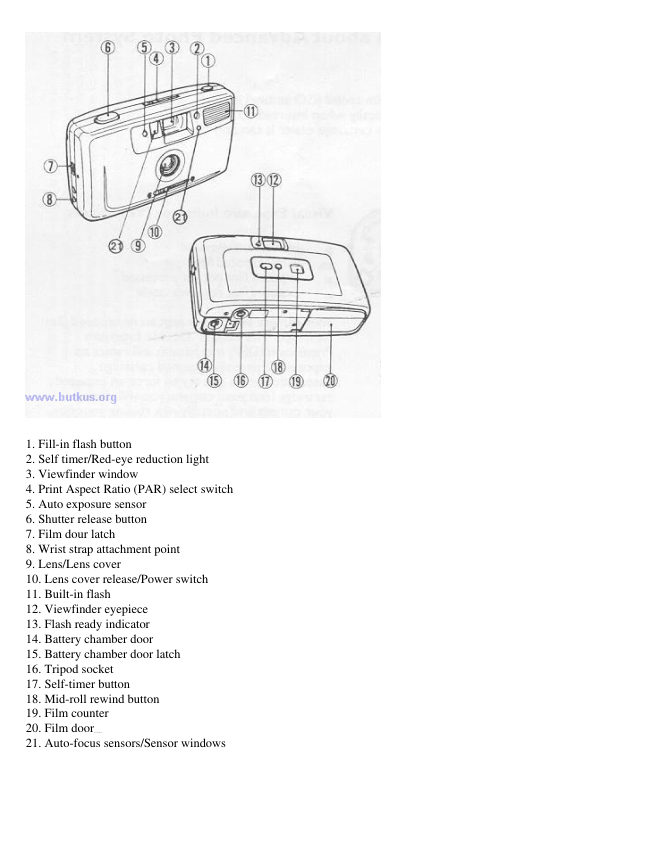
1. Fill-in flash button
2. Self timer/Red-eye reduction light
3. Viewfinder window
4. Print Aspect Ratio (PAR) select switch
5. Auto exposure sensor
6. Shutter release button
7. Film dour latch
8. Wrist strap attachment point
9. Lens/Lens cover
10. Lens cover release/Power switch
11. Built-in flash
12. Viewfinder eyepiece
13. Flash ready indicator
14. Battery chamber door
15. Battery chamber door latch
16. Tripod socket
17. Self-timer button
18. Mid-roll rewind button
19. Film counter
20. Film  doorwww.4.butkus.org
21. Auto-focus sensors/Sensor windows
View original page 2
Page 12 · Read text
Trouble Shooting

Flash "ready" indicator doesn't light:

Auto battery power saving may be in operation. Press shutter release, self-timer or the lens cover switch to reactivate
flash charging.
Battery may be exhausted, inserted incorrectly, or missing.
Battery contacts may be dirty, clean them with a pencil eraser.

Blank or dark pictures:

Too far from your subject for flash pictures.
Covering the lens or flash with your fingers.
Film door was accidentally  opened.www.4.butkus.org

Bright over exposed pictures:

Using flash too close to your subject
Using 400 ISO film in very bright sunlight
View original page 12
Page 13 · Read text
Blurred pictures:

Standing too close to your subject
Not holding the camera steadily
Moving the camera while taking the picture.
Fixed focus has been set incorrectly.

Shutter release button doesn't work:
Lens cover closed.
Battery may be exhausted, inserted incorrectly, or missing.
Battery contacts may be dirty, clean them with a pencil eraser.

Caring for your camera NEVER apply any cleaning liquid direct onto camera, always apply to cloth first Do not use
solvents, alcohol or abrasives to clean the camera      www.4.butkus.org

Specifications

Type: Advanced Photo System motorized camera with with and C selectable Print Print Ratios.

Film: Advanced Photo System cartridge film.

Lens: 24mm, F4.5 Glass lens.

Focusing: Two steps infrared system auto focus.

Focusing range: 0.8m to infinity.

Shutter: Electronic programmed shutter EV100 - EV/ISO 200.

Film speed: ISO 100 and ISO 200 (ISO 400 useable).

Photograph modes:

1. Auto flash mode

2. Fill-in flash mode.

3. Self-timer mode - 10 seconds delay

4. Continuous shooting mode.

Viewfinder: Bright frame viewfinder with H. P and C interchangeable frames.

Picture area: over 75% Magnincation:0.57.www.4.butkus.org

Partmaster, our accessories and spares service, can provide accessories. spares and replacement instruction books for
this. and virtually any other domestic electrical item you may have -with most items being dispatched within 24 hours!

So, whatever your requirements. simply telephone 01442 888444 and we'll give you a free quotation.
View original page 13
From the M. Butkus Camera Manual Library. Original publisher and archive notices are retained.
Check the model and edition against your equipment.
PDF verified 2026-10-10.