Film cameras
Color-Flex Reflex User manual
User manual for Color-Flex Reflex. 8 pages in English. Read the original PDF, download or print a copy without registration.
8 pagesEnglish0.6 MB PDF
Loading your manual…Open PDF directly
Document details
- Brand
- Color-Flex
- Model / document
- Color-Flex Reflex
- Document type
- User manual
- Language
- English
- Pages
- 8
- File size
- 0.6 MB
- Category
- Film cameras
- Document date
- Not specified in catalog
Search available document text
Find a term, then jump to its page in the original PDF. Image-only pages may not be searchable; check the PDF for exact wording and diagrams.
Page 1 · Read text
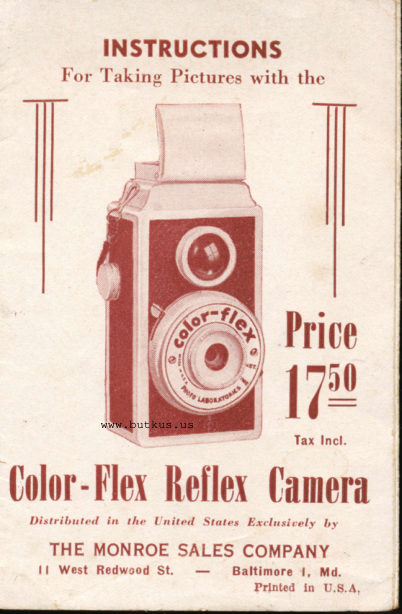
INSTRUCTIONS
            l, 'or 'l'aking Picturcs with tht:


 {
                   Price
             www.butkus.us     I7w-
                                         far lncl.
0olor-flex fteflox Camera
     I)istriltutetl     in  the   I nited   .Starr,.r f.tr./rr.sir.el-y   fr-r.
   THE MONROE SALES COMPANY
       ll West Bedwcod St.        Baltimore l. Md.
View original page 1Page 2 · Read text
The COLOR,FLEX camera is designed ro
 afford unlimited picture,taking opportunities.
 Built for a wide range of uses, this reflex camera
 will take group scenes, time exposures or action
 pictures. Follow the instructions given herein
 carefully, and your COLOR,FLEX camera will
 repay you with prize winning photographs.

MECHANICAL DESCRIPTION OF CAMERA
A. PERISCOPIC VIEW FINDER
  The periscopic view finder has been con,
 structed to give the amateur photographer an
actual size reflection of the picture being taken
in the same proportioiis as the finished print.

AA. WHEN TAKING PICTURES
  Open top cover carefully and look down
into ground glass enclosed under cover. point
lens of camera at object you want to photograph.
By moving camera closer or farther from object,
you can reach the proportions desired in fin.
ished print. When this position has been
reached, press shutter trigger (B) down firmly,
and tlr.e picture has been taken.
View original page 2
Page 4 · Read text
ts. SHUTTER
  The shutter has been carefully adjusted to
 give the maximunr trtility for the greatest num,
 bcr of standard shots,:rnd u'ill prodrrcc exccl,

            AA
                                                     t


     E

    B

                          c


                                                     Digitally signed by Mike Butkus                                        DN: cn=Mike Butkus, o=Butkus camera         D
                                           manuals, ou=butkus.org,  Mike Butkus  email=mike@butkus.org, c=US
                                              Date: 2021.07.25 11:33:26 -04'00'

lent results when takin g  landscapes, groups,
portraits, indoor shots lrnd  regular action shots.
View original page 4Page 5 · Read text
c. SHUTTER ADJUSTMENT
  The instant and time adjustments on the
 COLOR-FLEX camera is made by moving rhe
 indicator at the right .side of camera to either
 INST or TIME.
FOR INSTANTANEOUS PICTURES
  Be sure that indicator is pointing at INST.
 Hold camera firmly. Sight object in ground
 glass view finder. Press shutter trigger'Failuredown firmly, and the picture is taken.           to
hold camera absolutely still while taking pic,
 tures may result in a blurred photograph.
FOR TIME EXPOSURES
  Move lever to TIME. Place camera on any
stable support such as window sill or tabllso that camera will be absolutely motionless.
Never hold camera in your hands for time
shots. Sight object through ground glass view
finder, press down shutter frigger ind holdtrigger down in this position until you have
counted the required number of seconds,  ( t
seconds as a general rule, depending on amount
of light and type of film in use). No* release.If you wish. to return to INST. daylight shoor,
ing, remember to push lever back from TIME
to INST.
D. LENS
  The COLOR,FLEX lens is a fixed focus super,
speed Graf lens. _ The only precaution .t"ce.iuryis to keep the lens clean. Be careful not to
scratch or break lens when handling camera.
View original page 5
Page 6 · Read text
TO OPEN AND CLOSE CAMERA
  On the back of the COLOR.FLEX Camera
 is a knob that unscrews by turning. I.Jnscrew
 this knob as far as it can go. When this has
been done, the back cover may be easily re.
moved without any excessive pulling or pres,
sure. When replacing back cover, see that
 ridged slots at bottom of back cover are on
both sides of protruding ridge in camera case.
Push back cover on case forward, and turn
knob from left to right as far as it will  .go,
without excessive twisting, and the COLOR,
FLEX is ready for action.

TO LOAD AND UNLOAD CAMERA
  Always load and unload camera in subdued
light, never in bright sunlight. Place empty
spool in receptacle containing winding key
at top of camera with slotted end in contact
with winding k"y.  Place film in  receptacle
at extreme opposite end (under the film re.
tainer spring) at the bottom of camera.
  Break seal and pull in the red paper toward
empty spool and thread through broadest side
of the spool. Turn winding k"y (E) two or
three times until paper rolls on empty spool.
Replace back on camera.
View original page 6
Page 7 · Read text
TO WIND FILM
  Turn winding knob (E) slowly, while watch,
ing lower red window on back of camera. When
the figure " I't appears in the center of the
lower red window marked "A", the camera  is
ready for the first picture. Now, wind knob
forward until figure "1" appears in red window
marked "B", then take second picture. In this
manner, two exposures are taken for each num,
                               *A*-bcr appearing on the film roll. One in
one in "8".
 When number 8 appears in ccnter of "B!r
r,vindow, you will have taken 16 pictures.
  When you have taken all the pictures, keep
turning the knob (E) in the same direction
until the complete roll of film (including the
red paper which protects it) is all wound on
the top roll. Open back of camera as when
loading in subdued light, remove roll of film;
norv seal roll with piece of gummed paper which
you will find on the end of the roll, so that it
cannot run loose.
View original page 7Page 8 · Read text
REMEMBER THE FOLLOWING THINGS
 l. Advance film after each exposure, to avoid
    spoiling your pictures by double exposure.

2. Before and after using, always clean lenses
   with soft dry cloth to remove dust and
    finger prints.

3. Do not take pictures facing the sun. The sun
   should be behind your back in taking pictures.
4. Always center your objcct in the view finder.

t. To obtain best results, object to be photo,
   graphcd should be at least 8 feet away from
    camera.

6. The COLOR.FLEX can be loaded with any
   standard roll film, either EASTMAN No. 127
   or AGFA A,8 or equivalent. It makes 16
   exposures per roll.
View original page 8From the M. Butkus archive. Original publisher and archive notices are retained.
Check the model and edition against your equipment.
PDF verified 2026-10-10.