Light meters
Courtenay Flashmaster User manual
User manual for Courtenay Flashmaster. 6 pages in English. Read the original PDF, download or print a copy without registration.
6 pagesEnglish0.4 MB PDF
Loading your manual…Open PDF directly
Document details
- Brand
- Courtenay
- Model / document
- Courtenay Flashmaster
- Document type
- User manual
- Language
- English
- Pages
- 6
- File size
- 0.4 MB
- Category
- Light meters
- Document date
- Not specified in catalog
Search available document text
Find a term, then jump to its page in the original PDF. Image-only pages may not be searchable; check the PDF for exact wording and diagrams.
Page 3 · Read text
www.orphancameras.com

ELASHMASTER 1 -

Designed to measure incident flash illumination and indicate correct
exposure for films of ISO 12 to 800.

A direct reading Is given by a red LED which illuminates under the aper-
ture scale. The meter is of the cordless type and will measure all of the light
Incident upon the cell during the 1/60th second after the start of the flash
pulse,

Preparation

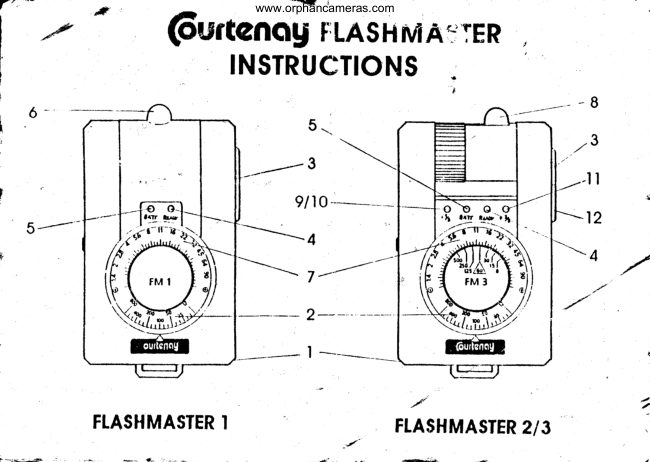
Slide back the battery compartment cover (1) and fit a 6LR61 9volt
alkaline battery and replace the cover. Set the ISO value of the film in use
by turning the meter dial (2) until the correct value is opposite the indicator
mark.

Using the FlashMaster 1

Press the réd button (3) to activate the meter, a green LED (4) will indi-
cate that the meter is ready to make a reading. If the red LED marked ‘batt"
(6) illuminates at this point it indicates that the battery is low and unreliable
ieadings will result————-———=—_,

Place or hold the meter in the subject position with the white dome (6)
pointing towards the camera. Fire the flash by using the “open flash" or ‘test*
button on the flash unit. A red LED will iltuminate through the aperture scale
(7) to indicate the correct exposure setting.

’
View original page 3
From the M. Butkus archive. Original publisher and archive notices are retained.
Check the model and edition against your equipment.
PDF verified 2026-10-10.