Film cameras
Ernemann Minatur Ernoflex User manual
User manual for Ernemann Minatur Ernoflex. 12 pages in English. Read the original PDF, download or print a copy without registration.
12 pagesEnglish1.2 MB PDF
Loading your manual…Open PDF directly
Document details
- Brand
- Ernemann
- Model / document
- Ernemann Minatur Ernoflex
- Document type
- User manual
- Language
- English
- Pages
- 12
- File size
- 1.2 MB
- Category
- Film cameras
- Document date
- Not specified in catalog
Search available document text
Find a term, then jump to its page in the original PDF. Image-only pages may not be searchable; check the PDF for exact wording and diagrams.
Page 2 · Read text
mm ASAT AGG ns

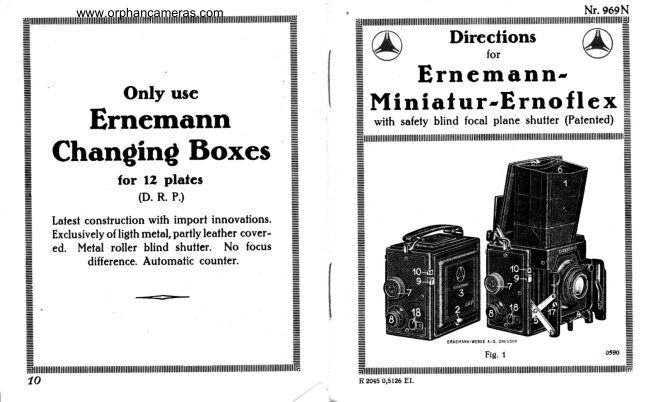
Only use
Ernemann

Changing Boxes

for 12 plates
(. R. P.)

Latest construction with import innovations.
Exclusively of ligth metal, partly leather cover-
ed. Metal roller blind shutter. No focus

z
t
:
a:
|
E
i] difference. Automatic counter.
=

A

SN
10

ZANT

Nr. 969N

@ Directions @
Ernemann-

Miniatur-Ernoflex
with safety blind focal plane shutter (Patented)
nee AA

Fig. 1 0590

ZHAN
201505126 EL.

r
E
I
View original page 2
Page 3 · Read text
www. orphancameras.com
nN

It is necessary to read the
directions carefully before
using the camera and to
try cach part of the manipulation separately. The
manipulation of the camera is so simple that dam-
ages are absolutely excluded provided these direct-
ions are followed. Should occasionally one or
the other ofthe manipulations not becarried
out with perfect ease, do not use force under
any circumstances. In such cases determine first
of all whether or not all rules have been observed
as stated in the directions.

The Ernemann-Miniatur-Ernoflex, in addition
to the usual rear focussing screen, is equipped with
‘an upper one provided with alight hood 4. The pict-
ure caught by the lens is thrown on the upper screen
by means of a mirror inclined at 45° and can be
seen there up to the moment of exposure.

Takethecamera into
Opening of the Camerai thelefthand with the

handle directed up-
ward while the focussing screen frame snugly follows
the left wrist. After the catch bolt 2 has been pushed
upward, the front cap 3is raised as far as possible,
the lens front part pulled out by means of the two
knobs 4 until the two stiffening braces 5 audibly
snap. The apparatus is now ready for use and ad-
justed to “Infinity” = ©. The light hood which un-

SN

2

Te

ZATION

folds when opening the front cover is now being
completely erected and stiffened by the two strips 6.

The focal plane shutter is
‘ocal Plane Shutter} wound up by turning the
knob 7 to the right. It is
equipped with safety blind i. e. it can be wound up
when the plate is uncovered without exposing the
latter and adjusted in any position from the outside
without any danger of damage. The shutter is set
for the various exposures by lifting and turning the
milled knob . The numbered disc surrounding the
setting knob states the width of slitin mm. For Time
and Bulb exposures the width of slit is automatically
adjusted to the largest width.

On the upper side below the leather carrying
handle a speed table has been arranged; the length
of exposure for instantaneous pictures is controlled
by varying the width of the slit and alteration of the
tension.

The focal plane shutter permits three kinds of
taking pictures viz.:

1. Instantaneous Exposures up to ‘im! of
a second: Turn the line on the knob 8 to the
width of slitrequired. One pressure upon the rel-
ease 9 respectively upon the wire release to be
screwed on fo connecting piece 10. Regulation
of exposure byaltering the width of slitand spring.

ATTA
3
View original page 3
From the M. Butkus archive. Original publisher and archive notices are retained.
Check the model and edition against your equipment.
PDF verified 2026-10-10.