Film cameras
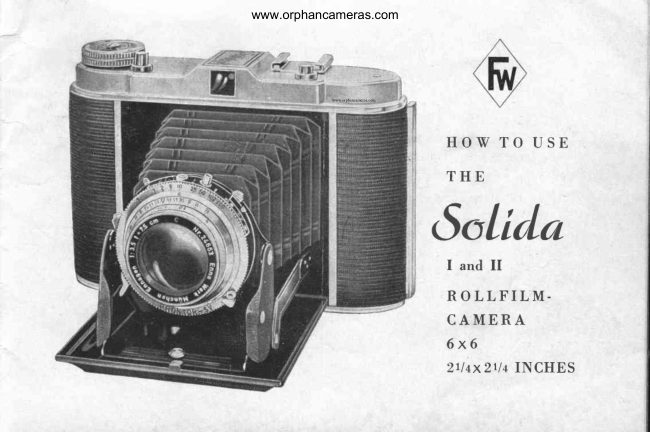
F/W SOLIDA I / II User manual
User manual for F/W SOLIDA I / II. 17 pages in English. Read the original PDF, download or print a copy without registration.
17 pagesEnglish1.6 MB PDF
Loading your manual…Open PDF directly
Document details
- Brand
- Various brands
- Model / document
- F/W SOLIDA I / II
- Document type
- User manual
- Language
- English
- Pages
- 17
- File size
- 1.6 MB
- Category
- Film cameras
- Document date
- Not specified in catalog
Search available document text
Find a term, then jump to its page in the original PDF. Image-only pages may not be searchable; check the PDF for exact wording and diagrams.
Page 3 · Read text
www.orphancameras.com


/    t t l
   l\/   e thank  you  for  the  confldence you have bestowed  on our
 products by  acquiring  the "Solida" camera.
 For well-nigh  40 years we have been manufacturing  cameras, and
 our  experience  in camera  construction  gained  over  such a long
 period  will  not disappoint  you.
 Furthermore,   your  dealer   will  be  glad  to  assist you  with   his
  advisory  service  so that you  will  achieve beautiful  pictures.
 Before you begin operating  your'camera,   kindly  read  carefully
 the  instructions   while   practising   the  several  manipulations   at
  leasure. This  will save you many a disappointment  und annoyance.
 Under no circumstances  attempt  to correct  trouble  yourself  or by
 force. Almost  invariably  matters  will  thus be aggravated.

                                  Frnnka-IVerk
                                  Camera-Works   establ. 19f0
                                             Bayreuth
View original page 3Page 5 · Read text
www.orphancameras.com
it protludes  from  the narrower  slot. Fold the upper' spool  carrier  (36) with  the empty
spool back into the spool chamber;  for  this purpose   it  is necessary  to  pull  out the  film
winding  knob  (27). Turn  this  film winding  knob  (27) in the  direction  of the arrow  until
its catch clutches the slot of the empty spool, hereby
enabling  the  fiIm  winding  knob  to spring  back  into
its former  position.
Wind  2-3  layers  of  the  protective  paper  onto  the
empty  spool (35), and mind  that  the  fiIm  paper  is
running   absolutely   straight   without   crumpling   at
the edges of the  spool. Now,  fold up the back (31)
with  the lock (28) catching.
Wind  the  film  farther  until  dots become visible  in
the  fllm window  (32) and now wind  cautiously  until
the number  1 bis appearing. Then the film  is ready
for the  first exposure.
After  taking  a picture,   it  is advisable  to move the
fllm  at once to the next number.
                                   3? 37Removing the Exposed Filrn:
                                                                         Picture 3
After  the last exposure turn  the  fllm winding  knob
(27) until no more of the protective paper  is visible through  the film window. Then open
the bad< (31), wind  the  fllm  tight upon the spool and close  it with  the attached adhesive
strip.  Pull  out  the  flIm  winding  knob  (27). swing  the spool  carrier  with  the  full  spool
upward and take the film  out.

4
View original page 5Page 6 · Read text
www.orphancameras.com
Changing  the Empty  Spool: Take  the empty  spool out  of  the  lower  film chamber  and
insert  it into the upper filmchamber as described above.
fDroteelivtr Lid  for
Itanr.hronr:rti c tr'ilms
The sensitiveness of the pan-
chromatic   film   is  so  great
that the intrusiron of  light  for
hours or days through the red
film  window  might  possibly
mak'e the  film  hazy.  There-
for,e the camera  is equipped
with  a  device  to  cover  the
film   wi,ndow.   This   cover
ought to be kept shut  all the
trime and  shoul,d be opened
merely  in order to control the
numbers  while  moving   the
film  by  p,ushing upward  the
small button  (37) on the back
of the camera.
lDpcning    of  cflrrreril
After  pressing the button  (26)
the  base-board  (22)  will   fly
View original page 6
Page 8 · Read text
www.orphancameras.com

7  feet,  is  not  indicated  on  the  mount,
then  set the  front  lens  in  such a way
that  the han'd (1a) rests between  6 and
B  feeti   or,     if   p,ossib,le, change   t'he
distance  of  the  object   to  s,ome such
distance as in'dicated on the  front  l,ens
(0 resp. B feet). Af,terr the €Xposur€, an'd 1 b
b,efore  closing  the cam era, always  p,ut 2
the  front  lens back  to oo otherwise  the  1 a
protruding   lens  cannot  be  housed   in
the  case. The  strong  pres,sure  of  the
closed  bas e-board  on  the  lens  would
cause  the  bendi,ng  of  the  lens  carrierr
&rr'd unsharp   pictures   woul,d  be  t'he
r esult.

Depth    of focus
In setting a ,definite distance, say 4 feet
not only exactly thi,s point is s,harp,but
al,soa certain range before and behind
the 4 feef mark.  This  irS the ,socalle,d
depth of   f ocus. The smaller the  ,dia-
p'hragm opening, the greater the de,pt,h
erf focus.                                                                               Pictiu,re  6
View original page 8
Page 9 · Read text
www.orphancameras.com
Depth  of focus adjnntment   ring
On the front  of the shutter  there  is the ring  (?) for adjusting  the depth  of focus by means
of whidr  the  effective  depth  of focus may be a,scertained:
To LEFT  and RIGHT   of the ind,i,cator (1a) are the diaphr'agm  value;s in the same order
from  3.5 resp. 4.5 through  22.
Und,erneath   it  is the distance-setting  ring  (8) with  numbers  in  feet. The depth  of focus
is thus limited  by the indicate,d feet under  the diaphragm  valu,e on the  left and the feet
indicated  under  the equa'l diaphragm  value on the  right.
Obviously  the values  of depth  o,f focus  wrill change with  any  alterat,ion  irn the  setting
of the lens.


Generally,  the following  shutters  are being use,d in the  ,,Solida" cameras:
Vario:         Speeds: B  -  7125-   1/50 -   Il2A0 sec, with  flash  synctrronizati,on
Pronfo:        Speeds: B  -  7125-  1/50 -  1/100 -   ll2}0 ,sec, with  built.in   self-timer  and
                 flash syndrronizati,on
P r o n g o r S V S , S p e e d s : B  -  1 - l l 2 - L l 1 : 1 / 1 0            - 1 1 2 5  -  1 i 5 0 -  1 / 1 0 1- 0 1 i 3 0 0s e c , w i t h
  6'.--'            built  in self-ti,mer and flash syndrronization.  See special instruction.
Setting  of shuttor  speeds                                                            ,.
Th,e setting  of  t,tre shuttrer spee,ds is effected  by  turning   the rimmed  adjustment   ning  (6)
until  the indicator  (1b) shows the des,ired speed.
For "B"  (:  indicating  tiime exposures  :)  the shutter  stays open as long as the release  is                                                           rfbeing preSsed. '1B" is used for any  exp,osur,e greater  than  those marked  on the  shutter.

I
View original page 9Page 11 · Read text
www.orphancameras.com                                                      l
With  a small  opening,  however,  corre,spo,ndingly  less tight  can penetrate,   therefo,r,e we
nee,d more  time  for  the exposure.
But, the greater the diaphragm  aperture  the I'ess is the depth of focus, whereas the smaller
diaphragms  achieve greater  depths  of focus.                                                                                                         t'
The  adjusting  of the diaphragm   is effected by moving  the diaphragm  indicator  (2) onto
the desired diaphragm  values  (3).
Self-Timer     (Delayed    Aetion    I)eviee)    (Picture 5)                                                              r                                                                                                                                                                                                                                                                                          '
The  built-in  self-timer  permits you  to take your own  portrait  without  outside help, even
when  taking  group  pictures  the photographer  may  join  the group.                                                                           i
Pronto
Mode  of Use: After  setting the speed (6) and cocking the shutter  (4) the lever  (9) on the
lower  side of the shutter  is turned  to the  left  until   it stops. The release of the shutter  is
effected  in  the customary  manner  when  the delayed-action  device  will  begin  to work,
releasing the shutter  after about 10 seconds. The self-timer  can b,e used for any momen-
tary speed from  1---11250seconds, but never  for  "B".
                                                                                                                                                                         b
lDrontor    llVS.   (Picture 6)
Set the desired speed (6). Cock shutter  (4) and set lever  (10) to V. The setting can be done
before  the cocJring or viceversa.  Furthermore   the speed can be modifled  after  cocking               :
and the retarder  (selftimer)  can be turned  off as well.                                         e
Release see above.

10
View original page 11Page 12 · Read text
www.orphancameras.com

Rody   Belease
The release of the shutter  is effected by easily and evenly
pressing upon the body release (24\.
 "T" Time Exposures
For  long  exposures, when  taking  pictures   at  night,   of
interiors,  with  insufflcient  illumination,   or operating  with
flashlight powder  etc., a wire  release with  adjusting screw
is used, which  is mounted  in the wire  release socket of the
shutter. Set shutter on "8", press wire  release and tighten
adj usting  screw.
The shutter  will  stay open as long as the  adj usting screw
is not loosened again. These long exposures can be made
only with  a tripod  or some other firm  and steady support.

tr'lash Syneh ronizing
The flash synchronizer  respect; the connecting  nipple  (b) is
on the right upper part of the shutter. rn order to use them
it  is essential to insert the cable of the flashlight device into
the connecting  nipple  (b) and  to screw the flash bulb  into
t he  tripod  soehet of  the  camera,  or  to push   it  into  the
holder  (23) (see picture). When  the shutter  is released the
synchronized flash bulb  is automatically  ignited.                         Picture  3
View original page 12
Page 13 · Read text
www.orphancameras.com
                      ffolder   for Supplementary   Equipment
                  On  the  top  of  the camera  there  is a holder  for  supplementary
                     equipmenf  (Zg), suctr as a flash bulb, range finder  etc. These parts
                             frive  standards guide plates to be pushed into the holder.

                  Yiew-Finder
                    The camera  is supplied  with  the  well-tried   optical  telescop  fin-
                        der  (2b). When  ,rring  this  flnder,  bring  the small  aperture  in  its
                         rear close to your  eye. The view  through  the front  lens gives the
                         picture  area.

Film    reeording      disk    (Solitla  rr  onlv)
As a further   novelty  we have  introduced  a film  recording   disk.  Inserted  into  the  fllm
ii"".port    button,   it is  to show you which  film  is  in  the camera. On  tl.e  film  wrappers
you dnd the values  for  sensitivity  and other  standards  valuations'
The adjustment   is effected  by turning  the recording  disk  until  the index  marker  points
to tfre sensitivity  value  r""p.  Ltir"t  standardized  values  of the fi1m in use. A small button
is added to  facilitate  oPeration.
iFor  color  flIms  square  color  K  for   artifical   light  respectively   color  T  for  daylighl
is to be used.

12
View original page 13Page 14 · Read text
www.orphancameras.com
Donblc  Esposure
BlockinE   l)eviee
The Solida  is furnished  with  a catdr  pre-
venting double exposure. After  eadr expo-
sure the shutter release is locked, therefore
do not use force. The catch is opened only
by winding  the  film  to the  next  number.
The  red  signal  bes,ide the  shutter  release
indicates that the catctr is removed and the
camera ready  for  the next  picture.
Attention!   When   handling   the  camera
without  a  fllm,  mind  that  after  the appe-
arance of the red signal you must give the
film  winding  knob one more  turn.  This  is
not the case with  the film  installed,  for then
you always wind as far as the next number.

Taking  Pielures
In  order  to achieve perf ect pictures    it  is
essential  to hold  your  camera  right.  Pic-
ture 9 shows the correct way how  to hold
y'our camera  while  taking   pictures.  Hold                         Picture  9

                                                                                   13
View original page 14Page 15 · Read text
www.orphancameras.com
                                   camera  fast  with  both hands, bring  flnder  close
                                                to €ye, and focus your  obj ect into  the center  of
                                           the picture  area. Then press the body-release  (24)
                                          slowly  and gently  right  through.  For  pictures  of
                                          longer exposure than Ll25 second always use your
                                              tripod  or  something  else   f or  a steady  support.

                             Snapshot  Adiustment

                                         Usually  you do not  flnd  the  time   f or  a correct
                                       adjustment  of distance and diaphragm when you
                                      want  to take pictures  of a quid<ly changing scene,
                                             or scenes wose distance varies  all  the  time,  as
                                                                     f.  i. playing  children  or sport  events.

                                   To this end you use the socalled snapshot adjust-
                                       ment. On the diaphragm  scale, between B and 11,
                                          there  is a red  point,  and  the  distance  scale  is
                                        provided  with  red points and red flgures respect-
                                                 ively, between 2.5 and 3 meters for close upS, bet-
                   Picture  10             ween 6 and 10 meters  for  long distance pictures.

Diaphragm  and distance are adjusted  to these red marks  and the values are valid  for  all
possible cases. Exposure  time,  according  to  light  conditions,  between  1/50 and 1/100 sec.

l+
View original page 15Page 17 · Read text
www.orphancameras.com
In the window  on the top of flnder body the no'se shows the found metered number  of feet.                         !
This distance  is adiusted  at frontlens'
Advieos  on Better  PieturesAlways  keep the lens clean, wiping    it with  the lenscloth  only. {ever  use ordinary  cloths     II
for they might  scratdr  the lens.Do not  try  to take pictures  at distance's under 3 feet, as they  will  be unsha'rP.                            l:
For speeds lohger than 1/25 seoond always use your  tripod  or some other means of steady                  i           'Ihe             camera boasts sockets.support.
Under normal  light  conditions the most favourable  camera-setting  is f  : 11 and 1/50 second.
For fast moving  objects take 1/100 second. For very  fast movements  as in sports etc. 1/200
resp. 1/250 sec. hereby  of course the wider  diaphragm  4'5 or  3'5'
On  dull days open the diaphragm  to  f  : 8 or  f : 5'6'
On very  bright  days with  sunshine on water  or snow,'red,ui,e the dinphragm  to   f :22 w
 f :32. Of very good aid are the  opticai  exposure meters as supplied  by your  dealer'
 If  stres,s is laid on particulary   exact exposures,  or   if you must  operate under  difficult
 conditions  regardini   light  and surroundings,  the employment   of an electrical  exposure
meter  is deemed advisable.


 Printed  in W-Germany

 16
View original page 17From the M. Butkus archive. Original publisher and archive notices are retained.
Check the model and edition against your equipment.
PDF verified 2026-10-10.