Film cameras
F/W Solidar Jr, I and II User manual
User manual for F/W Solidar Jr, I and II. 17 pages in English. Read the original PDF, download or print a copy without registration.
17 pagesEnglish5.4 MB PDF
Loading your manual…Open PDF directly
Document details
- Brand
- Various brands
- Model / document
- F/W Solidar Jr, I and II
- Document type
- User manual
- Language
- English
- Pages
- 17
- File size
- 5.4 MB
- Category
- Film cameras
- Document date
- Not specified in catalog
Search available document text
Find a term, then jump to its page in the original PDF. Image-only pages may not be searchable; check the PDF for exact wording and diagrams.
Page 1 · Read text
www.butkus.us


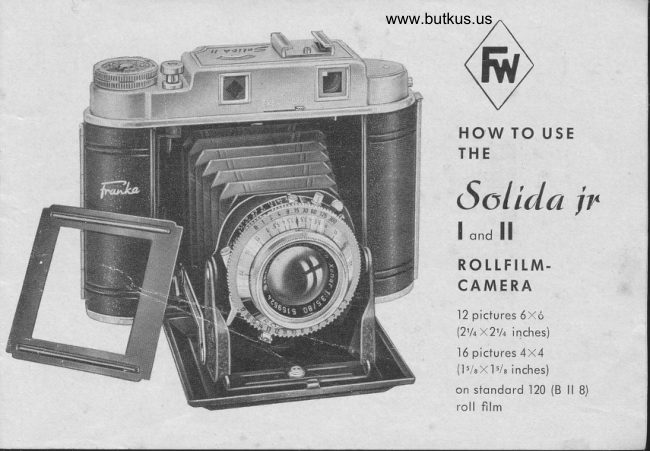
     HOW TO USE
       THE
    Solida ir
              | ."a ll
       ROtLFItM.
      CAMERA
             12 piclures 6x6
              (21/+X21/e inches\
             16 pictures 4x4
               (l'leX1'/' inches)
          on stondord 120 (B ll 8)
              roll film
View original page 1Page 4 · Read text
www.butkus.us
                           looding the Cqmerq
                          The "Solido" is constructed for roll films B ll or No. .|20
                             Never use ony other films.
                            Opening of Bqck of Cqmerq:
                                Push the flonged end of bock lock (28) in direction of orrow
                                          Digitally signed by mike butkus     ond open bock (31) which is hinged.
                               DN: cn=mike butkus,
                                o=orphancameras, ou=29,mike butkus email=mike@butkus.org, c=US       Inserting Film:
                                    Date: 2020.06.30 18:44:41 -04'00'      Pull out the film winding knob (27) ond swing out the film
                              spool corrier (36) thot hos the shope of o holf cylinder.
27                            Ploce on empty spool in the spool corrier (36), hereby
                                      inserting ihe pin on the right ofr the spool corrier into the24                              round operture of the spool. The slotted end of the spool
                                towords film winding knob (27). Swing out the holf cylinder
25                              of the lower film chomber (33) ond ploce o new film in  it
                                       in such o woy thot the pointed end of the protective poper23                                          (34) poinis to the upper spool. The block side of the protec-
                                     tive poper must foce the lens. Breok the odhesive strip of
                                  ihe film, pull out the protective poper lo reoch the toke-up
26                            spool ond swing the spool corrier bock into the spool
                                 chomber.
                                 Bring up the pointed end of the proteciive poper (34) inio
               Picture 2              the wider slot (35) of the upper empty spool so thot  it
View original page 4Page 5 · Read text
proirudes from the norrower slot. Fold the upper spool corrier (36) with the empty spool bock
 into the spool chomber; for ihis purpose  it is necessory to pull out the film winding knob (27).
Turn this film winding knob (27) in ihe direction of the orrow until the key of the winding
knob is engoged in the slot of the empty spool, hereby enobling the film winding knob to
spring bock into its former position.
Wind 2-3 loyers of the protective poper on to the empty                      Picture 3
spool (35), ond check thoi the film poper is running
obsolutely stroight without crumpling ot the edges of
ihe spool. Now, close the bock (3.|) so thot the lock
cotches.
Open the bock window by pushing lever (37) to the left.
Wind 2-3 loyers of the proteciive poper on io ihe empiy
dow (32) ond now wind coutiously until the number  l
oppeors. Then ihe film is reody for the first exposure.
Close bock window by pushing lever (37) to the right.
Afier toking o picture, il is odvisoble to move the film
of once to the next number. Then the comero is ogcin
reody for the next picture.                                                          www.butkus.us
Removing the Exposed Film:                                                                                  lll                                                             32After the lost exposure turn the film winding knob (27)                     38 37
until no more of the protective poper is visible through the film window. Then open the bock
(31), wind the film tight upon the spool. Pull out the film winding knob (27), swing the spool
corrier with the full spool upword ond toke the film out. Seol the roll with the ottoched
odhevise poper. Looding ond unlooding the film should noi be corried out in bright sunlight.

4
View original page 5
Page 6 · Read text
www.butkus.us
 Chonging the Empty Spoo!:   Toke the empty spool out of tne lower film chomber ond insert
                                               it into the upper film chomber os described before.
 Protective Lid for
Pqnchromqtic Films
 (Solido I qnd ll)                                                            26
The sensitiveness of the pon-                                                                                                                                                                                                                                                         I
chromqtic film is so greot ihot
the intrusion of light for hours
or doys through fhe red film
window might possibly moke
ihe film hozy. Therefore the
comero is equipped wiih o
device io cover the film win-
dow. This cover ought to be
kepi shut oll the time ond
should only be opened in order
to control the numbers while
moving the film by pushing up-
word the smoll button (37) on
the bock of the comerq.
Opening of fronl
After pressing ihe button  (26)
the bose-boord (22) will   fly
View original page 6Page 7 · Read text
open. Pull down the bose-boord (22) until
                         both struis click oudibly into the notch,
                            otherwise the bose-boord will notbefixed
                    ond ihe lens will not be of  correct
                           distonce from the film. This moy couse
                          unshorp pictures.
                        Closing the front
                            Press down on the bor (Picture 7) under
                           the lens ond fold froni closed. Note: Do
                                                                                                                       is                        not close the front unless the lens
                             turned to the infinity mork (oo).
                     The Lenses Focussing fhe lens:
                          Turn the lens mount so thot the stop indi-
                             cotor (1o) points to m, thus the comero is
                           focussed for "infinity", thot is for diston-
                       ces beyond 50 feet or 15 meters. For
                            obiects of o lesser distonce ihe odiust-
                       ment is effected by seiting the mount of
                            the front lens on the desired distonce  in
                               feet or meters.www.butkus.us                                                 J udge, or better meosure, ihe distonce
                         between the obiect qnd the comero, ond
                      moke the octuol number of feet or meters
                                folly with the slop indicotor (lo) on the
View original page 7Page 8 · Read text
www.butkus.us
 lens mount. lf the oscertoined distonce,
 for instonce 7 feet or 5 meiers, is not
 indicoted on the mount, then set lhe front
 lens in such o woy thot the hond  (l o)
 rests between 6 ond 8 feet or 4 ond 6
 melers; or, if possible, chonge ihe dis-
tonce of the obiect to such distonce os                                              lb indicofed on the front lens (6 or 8 feet
 resp. 4 or 6 meters). After the exposure,
ond before closing the comero, olwoys
put the front lens bock to oo otherwise
the protruding lens connot be housed in
the cose. The strong pressure of the clo-
sed bose-boord on the lens would couse
the bending of the lens corrier ond un-
shorp pictures would be the result.
Depfh of field (Sotido I ond n)
In setting o definite distonce, soy 4 feef
or 4 meters not only exoctly this point is
shorp, but olso o certoin ronge before
ond behind the 4 feef or 4 melers mork.
This is the so colled depth of field. The
smoller the diophrogm opening, ihe greo-
ter the depth of field.                                                            Picture 6
View original page 8
Page 9 · Read text
Depth of field odiustment ring
On the front of the shutter there is the ring (7) for odiusting the depth of field by meons of
which the effective depth of field moy be oscertoined:
l'o LEFT ond RIGHT of the indicoioi (1o) ore the diophrogm volues in the some order from
3.5 trough 16 resp.22.
Undern6oth it is'the distonce-setting ring (8) with numbers in feet or meters. The depth of field
ii thus limited by the indicoted feei or meters under the diophrogm volue on the left ond the
feet or meters indicoted under the equol diophrogm volue on the right.Obviously the volues of depth of field will chonge with ony olterotion in the settrng of the lens.     f
Shutters                                                                                  IGenerolly, the following shutters.|il00ore being used in the "Solido" comcros:
singlo:     speeds: B - l/30 -       sec. with flosh synchronizotion
                                     1i50 -11200 sec. with flosh synchronizotionVqrio:      Speeds : B -1125 -
                                                      1/.|00 - l/200 sec. with flosh synchronizotionVero:       Speeds: B - 1125- li50-
Pronto:    Speeds: B - l/30 -1160 -11125 -11250 sec. with built-in self-timer ond flosh
              synchronizotion
prontor 5V5: Speeds: B - 1-112-114-118-1115-  l/30 -1160-11125 - 1/300 sec. built in
                self-iimer ond flosh synchronizotion. See speciol instruction.
Setting of shutler speeds
Singlo: Set time-setting-lever on ihe upper side of the shutter to the desired speed.
Vor'io - Vero - ProntJ- Prontor-SVS, The setting of the shutter speeds is effected by turningthe rimmed odiustmeni ring (6) until the indicotor (1b) shows the desired speed.
I
View original page 9Page 10 · Read text
www.butkus.us
    For "8"  (:   indicoting time
    exposures :)  the shutier sfoys
    open os long os the releose is
    being pressed. "B" is used for
    ony exposure longer thon those
    morked on the shutter.
    Cocking the Shutler:
    Before ony exposure the shut-
     ter must be cocked by turning
     the cocking-lever (4) to the left.
    Setting of DiophroEm
    As o ruie, the lens hos the fol-
    lowing diophrogm opertures.
    f:22-16-11    -8-5.6-4
              3.5.        -
     f :22 is the smollest, f  : 3.5 the
    lorgesi opening. lf the dio-
   phrogm is wide open oi the
  22 moment of exposure, there is
    more light folling on the film,
  21 fherefore  little time only moy
   be used for exposing.
View original page 10Page 12 · Read text
www.butkus.us
                       "T" Time Exposures
                      For long exposures, when toking pictures of night or of inte-
                            riors with insufficient illuminotion, etc., o coble ieleose is used
                     which is threoded into the releose socket of the shutter. set
                         the shutter on "8" ond press the plunger of ihe coble releose.
                       The shutter will stoy open os long os the plunger is depressed.
                                   It will shut when this plunger is releosed by fhe hond. These
                       long exposures con be mode oniy with o tripod or some other
                    form of steody support.

                     Flqsh Synchronizing
                      Connecl flosh gun to comero. Connect flosh gun coble to con-
                         necfor (5) (see instruction on poge 6).
                        Attention! Electronic flosh guns ore not to be used with ihe
                         S_olido ir. comeros. - Therefore only use flosh bulbs such os
                      Generol Eleciric, Westinghouse No. S,11,22,Sylvonio No. 8, etc.
                   Accessory Shoe for Supplementdry Equipment
               On the top of the comero there is o shoe for supplementory
                     equipment (23), such os o flosh gun, ronge finder etc. These
                         occessories hove stondords guide plotes to be pushed inio ihe
Picfu;"e 8                   shoe.

                                                                                                       11
View original page 12Page 13 · Read text
View-Finder
                   The comero is supplied with the well-tried opticol finder (25). When
                       using ihis finder, bring the smoll operture in its reor close to your
                        eye. The view through the front lens gives the picture oreo.
                    Film recording disc (Solido  ll onlv)
                     The comero is fitted with o film recording disc. lnserted into the film
                        ironsport button,  it is to show you which film is in the comero. on the
                         film wroppers you find the volues for sensitivity ond other stondords
voluotions. The odiustment is efiected by turning the recording disk until the index morker
                                                                                                                                                             ispoinis to ihe sensiiivity volue or stqndordized volues of ihe film in use. A smoll buiion
odded fo focilitote operotion.
For color films squore color K for oriificiol light respectively color T doylighi is to be used.
Double Exposure pre\tention Device
The Solido is furnished with o cotch preventing double exposure. After eoch exposure the
,r,rtt",, releose is toiLeo, iherefore do not use force. The cotch is opened only by winding.th.e
fi!m to the next nu*bur. The red signol beside the shutter releose indicotes thot the cotch is
removed ond the comero reody for ihe next picture'
Ariention! When hondling the comero without'o film, mind thot ofter the oppeoronce of the
red signol you *uri giu"-tn" film winding knob one more turn. This is noi the cose with ihe
nir  in-rtott"d, for then you olwoys wind qs for os the next number.
When using o coble releose in ihe shutter ihe double exposure prevention does not come
info operotion.

 1.)
View original page 13Page 14 · Read text
www.butkus.us
 Toking Pictures
 ln order to ochieve perf ecl pictures it  is
 essentiol to hold your comero right. Picture9
shows the correct woy how to hold your
comero while toking piclures. Hold comero
fosi with both honds, bring finder close io
eye, ond focus your obiect into the centre of
the picture oreo. Then press the body-releose
 (24) slowly ond gently right through os for os
 it will go. For pictures of longer exposure
thon l/25 second olwoys use your tripod or
something else for o steody support.

Snopshot Adlustmenl
Usuolly you do not find the time for o cor-
rect odiustment of distonce ond diophrogm
when you wont to ioke pictures of o quickly
chonging scene, or scenes whose distonce
vories oll the iime, os ploying children or
sport events.
To this end you use the so colled snopshot
odiuslment. On the diophrogm scole- bei-
ween 8 ond l'1, there is o red point, ond the
distonce scole is provided with r,ed points                           Picture 9
View original page 14
Page 15 · Read text
ond red figures respectively, between 4 ond 6 feet
                                      for close ups, between l2 ond 20  f eet for long
                                         distonce pictures.
                                 Diophrogm ond distonce ore odiusted to ihese red
                                 morks ond the volues ore volid for oll possible
                                           ccses. Exposure time, cccording to light conditions,
                                           either 1160 or l/,|25 sec.

                                Two-size equipment
                                 The comero boosts o two-size device.  lf size 6X5 is
                                   used merely the centrol film-window is to be con-
                                              sidered.
                                                              lf size 4X4 is used o piciure mosk must be inserted
                                    before looding the film. The ongulor ends ot the
                                     smoll side of the mosk ore inserted between the
                                   comero cosing ond the film guide roller'
                            When operoting with size 4x4, lhe outer film-win-
                              dow 4x4 is used.
                                                                                                        .|20
                                          Size 4X4 hos the odvontoge thoi, on o     size film,
                              you obtoin 16 pictures or tronsporencies in block
Piciure'10                           ond white or colour, so colled Super-Slides, which
                                con be used in olmost oll the lotest 35 mm slide
                                              pro jectors.

l4
View original page 15Page 16 · Read text
I
 I                                               www.butkus.us
iII       Closing lhe front of cqmero
Il>
 !                                                                                                                     setting. I        Before closing the front of comero olwoys turn ihe focussing ring (8) to infinity
I       Avoid shutter (4) ond selftimer (9) being cocked. Pressure on the light button on the block
I         troverse of boseboord underneoth the shutler releoses the struts in such o woy thot the bose-
r       boord con be folded up. The lens front folds outomoticolly into the comero.

        Hints for Better Pictures
        Alwoys keep the lens cleon, wiping it wiih the lenscloih only. Never use ordinory cloths for
         they might scrotch the lens.
       Do not iry to toke pictures oi disionces under 3 feet or 1 meier, os they will be unshorp.
         For speeds longer thon l/30 second olwoys use your tripod or some other meons of steody
         support. The comero hos o stondord tripod socket.
        Under normol light conditions the most fovouroble comero-setting  is f : l1 ond l/60 second.
         For fost moving obiects ioke l/.|25 second. For very fost movements os in sports etc. l/200 or
          l/300 second hereby of course the wider diophrogm 4.5 or 3.5. On dull doys open the dio-
       phrogm to f  : 8 or f  : 5.6. On very bright doys with sunshine on woter or snow, reduce the
        diophrogm to f : 16 or f ,:22. Of very good oid ore the exposure meters os supplied by your
         deoler. lf stress is loid on porticulory exoct exposures, or if you must operole under difficult
         conditions regording light ond surroundings, the employment of on electricol exposure nreter
           is deemed odvisoble.

                                                                                                                15
View original page 16Page 17 · Read text
Rongefinder
Not everybody  is oble to estimote comero-to-subiect distonces occurotely. A seporote
rongefinder, however, might become o nuisonce.
We hove iherefore developed o rongefinder incorporoted in our models which will
enoble you to find the occurote distonces.

Dislonce meosuremenl
Upon looking through the view finder window you will see o picture section ond within
if o light Q, showing port of the some picture section.
By iurning the rimmed odiusting disc ot the upper finder body edge the picture moves

                                                                                                                                                                                                                               :to the yellow Q.
Direct rongefinder to ihe desired subiect ond turn odiusting disc until contours cover
eoch other in such o wqy thot only one picture remoins visible.
In the window on ihe top of the finder body the pointer shows the meosured distonce
in feet. This distonce is then set on the distonce setting ring (8).
This rongefinder is not coupled. Never forget lherefore lo lrqnsfer fhe disfonce on lhe
rongefinder to the distqnce setling ring.

                                                                                                                 Druck: Julius Steeger & Co. Sayre!t:
View original page 17From the M. Butkus archive. Original publisher and archive notices are retained.
Check the model and edition against your equipment.
PDF verified 2026-10-10.