Film cameras
Falcon V-16 User manual
User manual for Falcon V-16. 13 pages in English. Read the original PDF, download or print a copy without registration.
13 pagesEnglish2.4 MB PDF
Loading your manual…Open PDF directly
Document details
- Brand
- Falcon
- Model / document
- Falcon V-16
- Document type
- User manual
- Language
- English
- Pages
- 13
- File size
- 2.4 MB
- Category
- Film cameras
- Document date
- Not specified in catalog
Search available document text
Find a term, then jump to its page in the original PDF. Image-only pages may not be searchable; check the PDF for exact wording and diagrams.
Page 1 · Read text
www.butkus.us

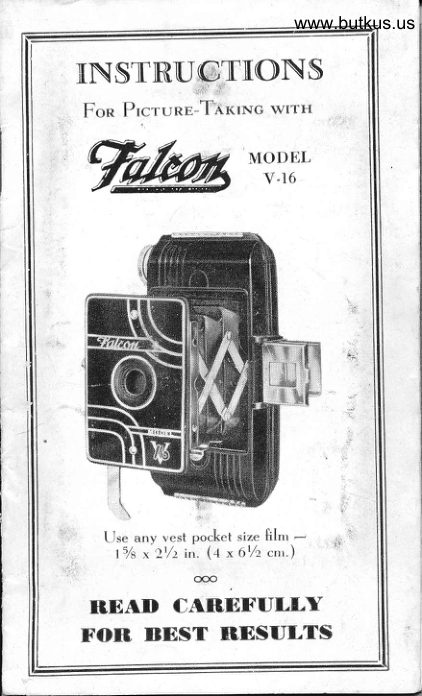
[NSTRU"(@TNONS
 Fon Prcrunr-Thr<txc wt'rrr
W*$rP"


              -.""f6q€Ir
         |\
    tJse a.y vest pocket size filnr -       l5/s *t1/). in. (4 x 67r c,r'.)

 RDAD CARBFULLY
rOA I|EST BDSULTS
View original page 1Page 2 · Read text
]tZ   rvant you to get the fullest
satisfaction f.om yout Falcon cam-
era. You will  if you follow the simple
instruction. which are contained in
this booklet. Please .ead them thor-
oughly befor" commencing to use the
camera.

Olean Lens frnportant
   It is very important tho,t you cl"un
the lense with a solt .Iotl, o, hond-
Izer.hief, before using camera, to in-
sure securing bright pictures.

                   ooo
ljrrlrry MnNuEacruRrNG Co.
                  lncorporated
261 Frrrn Ave., NEw Yonrc, N. Y.

                                                  i.  1
View original page 2Page 3 · Read text
www.butkus.us
  (6uursntrr

This rrr*.rrT-16 Camera
is unconditionally guaranteed
against defective wo.Lma.tship and
material for a period of ot" year.
FOR SERVICE return camera to
factory with this guarantee at-
tached and twenty-ftve cents in
stamps to cover hattdlittg and
postage.
IMPORTANT' Before removing
ba.k to load or remove ftlm, push
BOTH top and bottom slides in the
direction      "TO OPEN".         -ar[.ed
                 ooo
Unlrrv MeNurecruRrNc Co.
                Incorporated
261 FrrrH Avr., Nrw Yonr<, N. Y.
View original page 3Page 4 · Read text
The F'aleon V-I6 Camera

                             Mike Butkus  DigitallyDN:email=mike@butkus.org,Date:cn=Mike2026.05.12signedButkus,by20:03:59Mikeo, ou=Butkus.org,Butkusc=US-04'00'

--


 A,- LEws
              FoR Opnr.trt.to Fnoxr   IJ - BurroN O - CInRTAGE Rrsr D ,- Trrtrn Exposunr Lrvrn
 E ,- Srop OpewrNc Lrvrn
 F - Top Locn G - Borrou Locn H          Krv    -,Wrntort.tc    I ,- Vrsw Frt.lpen
  J,- ExposuRE Lrvnn
View original page 4Page 5 · Read text
www.butkus.us
To Load Carnera
 /Cr*n"s  load attd unload camera
                           neuer inU    in a subdued Iight ,-
 bright sunlight. Hold bacL o[ camera
toward you and push IIOTH top and
bottom slides "F" and "G" in thedirection marLed "TO OPEN" a.
far as they will go without forcing
and the.t remove bacl of came.a.
  See that the empty spool is in the
TOP receptacle with the notched
end in contact with the winding key.
  Place the ftlm in the lower recep-
 taclr:. Now breaL the seal with which
the roll is held in place. Pull the end
of the red paper toward the empty
spool. Th.ead the end of thc red
paper through the broaclest side of
the slit in the empty spocrl. Now turn
the key two or three times to the
right so that the paper rvill begin to
roll .n to the empty spool.
  Replace the back, push BOTH top
and botto- slider bacL to original
position as fa" as they will go in the
directions matked "TO CLOSE".
View original page 5Page 6 · Read text
The ftlm is now p.operly placed  itt
the camera and shut. Follow di.ec-
tions for winding very carefully.

                                                                                              1
                                                                                                                                                       iTo Wind Film
  Turn the winding Ley slowly,                tI
*hile watching the lowerredwindow
o.t back of cameta. When the ftgure
"  l " appears in the center of the lower
red window        (A) the camera is          -arLedr".dy for u.e. See illustration belo*.


         www.butkus.us

  As soon as you harre taken tlre pic-
ture be sure to wind .tumbe. 1 from
(A) window to (B) window. You
View original page 6Page 7 · Read text
www.butkus.us
are now ready to snap your second
 picture. Repeat process after eve.y
 picture.
  When nu-ber 8 appears in center
of (B) window you will have taken
 l6 pictures.
  When you La.re taken all the pic-
tures keep turning the Ley until the
complete roll of film (including the
.ed p.pe" which protects it) is all
wou.td on the top roll.
  Open b.c[. of camera as when
Ioading, remove roll of ftlm; .o*  se.l
roll with piece of gummed paper
which you will find on the end of
the roll, so that it cannot      loose.                      "un
To Open the Camena
  Simply press the button directly
beneath the etched plate, with a
downward motion, a.td the camera
will automatically spring into operat-
ing position.
 To bring the finder into position,
simply lift th" front fram", bringing
it to an upright position; the sight
will spring into proper position auto-
matically.
View original page 7
Page 8 · Read text
www.butkus.us
        How to HoId Camera
To Take Pietures
  Hold the camera with the sight as
 close to the eye as possible, keeping
 the camera ftrmly against the face.
Make sure the obiect or sublect you
 are taking is framed within the front
 frame of the ftnd...
  The camera MUST be held lenel.
 Should the subject be below your eye
 Ievel, Iike a s-all animal, the cam-
era should be held do*.r level with
the center of the subiect.
Tirne lDxposures
Directly behtnd the front door of the
camera you will find a Iever marked
View original page 8Page 9 · Read text
www.butkus.us
 "Time Down". This leve" should be
 pushed downward as fa. as it will go
  if time exposures are desired.
   In taking time exposures place the
 camera on a ftrm oblect such as a
 table or chair. Never hold camera in
 your hand. After sighting your object
 press shutter        keeping your               "elease, linger on it, counting the number of
 .ecottd. of exposure desired. When
 the required numbe. of seconds has
 expired  and not until then    re-           -,                        - move your fttrg". f"om the shutter
 release. If no more time exposures are
 desired, adiust for instantaneous  pic-
 tures, bv pushing lever ma"Led
 "Time Down" up as far as it will go.
Stop Openlngs
  The came.a hm two stop openings.
Use the Iarger one for ordinary pic-
 tures under ordinary .onditiotts. (Jse
the small stop opening when the sun
is very bright, or for distant views.
Sultable Llght Condlllon
  In taking instantaneous pictures.
be sure that the sun is directly behind
you. bo"k. If sun shines directly into
ih" Iens, pictures will be f"Sg"d.
View original page 9
Page 10 · Read text
TMPONTANT
  Whe.' tating VERTICAL pic-
tures, hold the camera in position as
rhowt in illustration below.


          www.butkus.us
 HOLD CAMERACAMERA FIRMLYFIRMLY
  Hold camera steady against the
fiace,- thumb on shutter lever, index
ftnger around bottom of front'.plate.
PLEASE NOTE: Holding comero in tlrese
opposite positions is necessif ated by the
lqc] ]hot in producing sirfeen exposures
lrom an eight exposure roll film, we pro-
duce fwo seporofe picfures on eoch V. P.
size negofive.
View original page 10Page 11 · Read text
Venmo @mike-butkus-camera  Ph. 2083
PayPal Name  Lynn@butkus.org      www.PayPal.me/lynnbutkus
View original page 11
Page 12 · Read text
www.butkus.us
     IMPORTANT
  Whe" taking HORIZONTAL
 pictures, hold the camera in position
ar sho*n in illustration below.

            t!;:.:r''llri,1


  HOLDHOLD CAMERAFIRMLYCAMERA
  Hold camera steady against the face
,- index finger on shutter lever,- rrse
thumb to Ievel camera.
PLEASE NOTE: Holding comero in fhese
opposite positions is necessif ated by the
lact that in producing sixfeen exposures
irom sn eigDr exposure roII film, we pro-
duce twd seporote picfures on eoch V. P.
size negofive.
View original page 12Page 13 · Read text
AQIIIBGEA'9           CONTACT
      PBNTS


  Most photo ftnishers throughout
 the country are equipped with con-
 tact enlargment printers that pro-
duce approximately 3x4 prints from
the negatives you get with this
Falcon V-tO Ca-."..
   Retail prices for these enlarged
prints vary in different sections of
the lJnited States. However, in most
cases they cost only slightly more
than ordinary quality prints. See
your deale. for further information.

             o@
u'rtlrrv MeNur,rcruRrNc Co.
                    lncorJrorated
261 Frrrn Avn., Nuw Yonr, N. Y.
View original page 13From the M. Butkus archive. Original publisher and archive notices are retained.
Check the model and edition against your equipment.
PDF verified 2026-10-10.