Film cameras
Folmer Graflex Home Portrait User manual
User manual for Folmer Graflex Home Portrait. 5 pages in English. Read the original PDF, download or print a copy without registration.
5 pagesEnglish1.3 MB PDF
Loading your manual…Open PDF directly
Document details
- Brand
- Graflex
- Model / document
- Folmer Graflex Home Portrait
- Document type
- User manual
- Language
- English
- Pages
- 5
- File size
- 1.3 MB
- Category
- Film cameras
- Document date
- Not specified in catalog
Search available document text
Find a term, then jump to its page in the original PDF. Image-only pages may not be searchable; check the PDF for exact wording and diagrams.
Page 1 · Read text
www.butkus.us

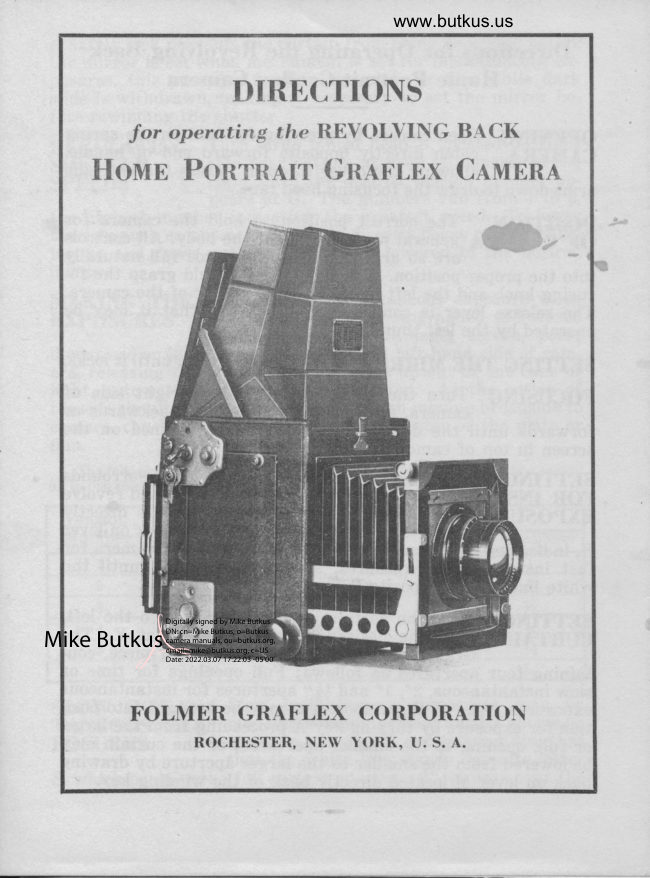
          DIRECTIONS
        for operating the REVOLVING BACK
   Honnn PontRAIT GnrpLEx Cennnn,q.


                                        Digitally signed by Mike Butkus
                              DN: cn=Mike Butkus, o=Butkus
                              camera manuals, ou=butkus.org,Mike Butkus email=mike@butkus.org, c=US
                                   Date: 2022.03.07 17:22:03 -05'00'

     FOLMER GRAFLEX CORPORATION
              ROCHESTER, NEW YORK, U. S. A.
View original page 1Page 2 · Read text
Directions for Operating the Revolving Baek
       Home Portrait Graflex Camera

 OPENING Open camera by pressing forward on the spring                                                          handle, dAMERA catch directly opposite forward end of              allowing the cover to open. Press the two side
 arms down to draw the focusing hood taut.                              ^. r, -..ii
                                                                                                                                 -". POSITION The correct position to hold the camera for OF CAMERA general work is against the body. All controls                                              t;'l.l"truiy
  into the prop* fiii,ifl,i'Til3?1r1ll"iiff lfJ,$t cusing knob and the left hand the front corner of the camera.
 The release lever is conveniently located so that it may be
 operated by the left thumb.
 SETTING THE MIRROR Press lever H down until it locks.
 FOCUSING Turn the large round head on right side of
   f orwards,,,til'?ff"'?;,?,"ff n:::r'lYffi ilff ''u3ff SyiT-rfl I
                                                     s  screen in top of camera.
                            Depress disc D, which surrounds . SETTING SHUTTER. FOR INSTANTANEOUS the shaft of lever H and revolve                                           stands directly DXp-OSUIES             it until letter I                               opposite the white mark on lever
 H, indicating instantaneous exposures. When using camera for
 fast instantaneous exposures, also revolve disc C until the
 white line stands opposite R,
 SBTTING Wind the curtain by turning key A to ttre left,                                          appe_ars at F. The eUntAlX  until the desired aperture              Graflex curtain is made in one long piece, con-
  taining four apertures as follows: Full openings for time or
  slow instantaneous, 2", L" and 14" apertures for instantaneous
  exposures. Any of these apertures may be brought into posi-
  tion for exposure by turning key A proceeding from the large,
  or full, opening to the smaller apertures; or the curtain may
 be lowered from the smaller to the larger aperture by drawing
 back on lever M located directly back of the winding key.
View original page 2Page 4 · Read text
www.butkus.us
    A safety lock prevents the curtain from being re-wound before
       the mirror is set when mechanism is set for instantaneous ex-
       posures, this prevents fogging the plate or film while dark
        slide is withdrawn, making it necessary to set the mirror be-
        fore rewinding the shutter.
    REGULATING Turn large milled head B, located on right                          side near bottom at back of camera, to the    SHUTTER
                                                                      ap-    SPEEDS     right unti] the desired tension number                        pears at G. The numbers run from 1 to 6,
       the highest number indicating the greatest speed. To lower
        tension, push escapement button P, directly below winding but-
       ton up and down until the tension is lowered to the desired
       number.
    MAKING THE To make an instantaneous exposure when    EXPOSURES the object to be photographed is focused                       sharply upon the focusing screen, press
      downward on lever E, near the front on left-hand side of cam-
        era, releasing the mirror, which travels up out of the cone of
        light, automatically releasing the shutter. As the action of
        these is simultaneous, the object, although moving broadside to
$i      camera, can be located perfectly in the center of the plate or
         film.tr
           The following table gives approximate speeds in fractional parts of a second        up to one seconda  -ft
        Tension           CURTAIN APERTURE
       Number      %l1
                     I              150             45               l0                 I
               2             200             50               15               Yi
                3            260             65              20                        r/z
               4            340            80             25        %
               D             410             95              30       %
               6              500            120            35       %
    SLOW INSTAN- Slow instantaneous exposures may be
                     made by winding curtain until T shows on    TANEOUS EX.                          aperture index at F, and turning disc C so   POSURES                           that the white line stands opposite letter
        S, which permits the full curtain aperture, 8", to pass over the
View original page 4Page 5 · Read text
recording field, giving exposures as indicated in fourth column                -indicatedon speed plate,         as the 8" curtain aperture column.
Howbver, these slow instantaneous exposures may be increased
by winding curtain up until the 2" registers at letter F, which
will permit ttre 2" and 8" curtain apertures to pass the record-
ing plane, giving a 25r( increased exposure to that shown inthe fourth or 8" curtain aperture column. It is not recom-
mended that the entire number of curtain apertures be allowed
to pass the recording plane.
                 Depress' disc D and revolve until letter TTIMEIXF-OSURES stands opposite the white mark on lever H,               turn disc C until the white line stands oppo-
site letter R. Wind the curtain until T shows at the curtain
aperture F. Set the mirror in the usual nlanner. After focus-
ing, relea-"e the mirror, which travels up out of the cone of
light. Begin the exposure by pressing lever N[ and terminate
the exposure by a second pressure on lever M.
RISII\G The swinging, rising and falling front is controlled                                     upper corner ofFRONf by milled head J at right-hand         front. Being operated by beveled gear and quick
thread, it locks automatically at any desired point, but should
be centered as indicated by the line on right-hand side before
closing front of camera.
REVOLVING The revolving back may be released for turn-
nlC[(         ing to a horizontal, vertical or intermediate                 position by pressing inward on small button
directly below shutter-winding mechanism.
FOCUSING The focusing hood may be released by pressingHooq               fi:v,ffiu'ff#ril"'f,:'l;*J;',3i  ffll iffi3i'ttcleaning the ground glass

      FOLMER GRAFLEX CORPORATION
             Rochester. New York. IJ. S. A.


                                                                           Printed in U. S. A.
View original page 5From the M. Butkus archive. Original publisher and archive notices are retained.
Check the model and edition against your equipment.
PDF verified 2026-10-10.