Film cameras
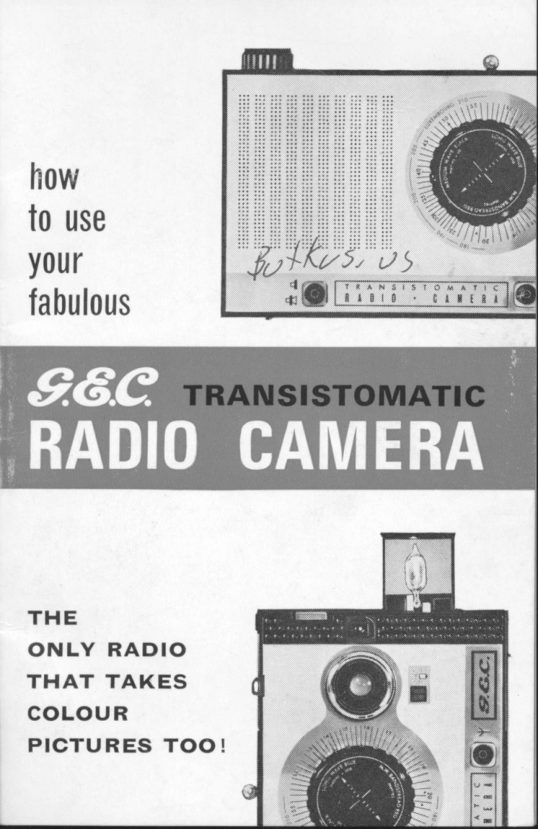
G.E.C Radio Camera User manual
User manual for G.E.C Radio Camera. 12 pages in English. Read the original PDF, download or print a copy without registration.
12 pagesEnglish2.9 MB PDF
Loading your manual…Open PDF directly
Document details
- Brand
- Various brands
- Model / document
- G.E.C Radio Camera
- Document type
- User manual
- Language
- English
- Pages
- 12
- File size
- 2.9 MB
- Category
- Film cameras
- Document date
- Not specified in catalog
Search available document text
Find a term, then jump to its page in the original PDF. Image-only pages may not be searchable; check the PDF for exact wording and diagrams.
Page 6 · Read text
OPERATING INSTRUCTIONS
  GEC GA22 TRANSISTOMATIC
       RADIO CAMERA
 The G.E.C. Radio Camera is a unique new product
 devised by G.E.C. engineers. A superb new radio has
 been coupled with the remarkable Kodak  , lnstamatic'
 Camera to constitute an outstanding dual purpose
 entertainment unit.
 Study the following instructions carefully and you will
 obtain the best results from both the radio and the
 camera.
           RADIO
 Your battery operated transistor radio has been specially
 designed to give the highest quality reproduction com-
 bined with long battery life. lt receives programmes on
 the long and medium wavebands and incorporates an
 additional "Band-Spread" wave range feature specially
 for Luxembourg listeners.
 OPERATION (Long and Medium Wave)
 (1) Check that the battery is correctly inserted and con-
 nected (to obtain access to battery see illustration).
 (2) Switch on the receiver by rotating the off/on volume
 control knob in a clockwise direction.
 (3) Set the wavechange lever to the waveband that you
 require,
 (a) Set the tuning knob arrow to the wavelength  (station)
 that you require and tune for the clearest reproduction.
OPERATION "BAND-SPREAD'' FORLUXEMBOURG
An additional, "band-spread" wave range is included to
 eliminate the "hair-line" critical tuning which has pre-
viously been a problem in tuning in to the very popular
Radio Luxembourg. This "easy-tune" band also includes
several other continental stations-Monte Carlo: Han-
over: Nice: Vienna and Vatican City.
Set the wavechange knob to the band-spread  position
and tune for the best reception.
Best results are obtained from Luxembourg during the
evening.
View original page 6Page 7 · Read text
www.butkus.us

        (2) Place a 'Kodapak' Cartridge
       in the camera with the larger
         cylindrical end down and toward
        the lock button, as illustrated.


                                      Digitally signed by mike butkusmike             DN: cn=mike butkus,
                              o=orphancameras, ou=29,
                               email=mike@butkus.org, c=US
                                 Date: 2017.10.27 17:49:41 -04'00'butkus                                    i

         (3) Close the camera by pressing
       the back against the camera body
         until it locks. The film name and
      number of exposures per cart-
        ridge appear in the wtNDow on the
      back of the camera. Close the
        flashbulb holder compartment.

       (4) Push the rtt-u aovance lever
       toward the  f ront of the camera (as
         illustrated) and allow  it to return;
        repeat untilthe lever locks-about
      a dozen full strokes (as the film
      advances, a series of arrows
       appears in the window). You are
     now ready for the first picture.
       After each picture, operate the
       film advance lever until it locks
         (1{ to 2 strokes). The number that
      appears in the window on the
       back of the camera (see illustra-
       tion) serves as your exposure
        counter.


     One or two of the same numbers           I
     may appear in the window, as
       shown.
View original page 7Page 8 · Read text
CAMERA UNLOADING
           (1) After the last picture, operate the film advance
        lever until all the yellow paper has been wound
        past the window (an "X" in the window indicates          that the backing paper has not been fully wound
          into the take.up chamber).
            (2) Slide the lock button and open the back of the camera.
           (3) Lift out the exposed 'Kodapak' Cartridge and re-load
1        with a fresh one.
       NOTE: Partially used 'Kodapak' Cartridges cannot be inter-I       changed or removed from the camera except in a darkroom.
          Therefore, do not open the back of the camera after loading
           until the yellow paper has been wound past the window.
          Otherwise, some of the pictures will be spoilt by "light-fogging."


 SHUTTER RELEASE        OUTDOOR PICTURES
              O  Keep the sun behind you.                          Your subject should be in bright        -                           or hazy sunlight.  lf cloudy, but      :flr**   w
      *:{S,  flll,             Flashbright,Pictures."see note under "Taking               i cu *F'r  ", r.
              O Keep at least 4 feet (1.2 m)                                                                                               f rom your subject for  sharp
                                   pictures.  J*fl                                        I  View the picture with your eye         close to the rear opening of the viewfinder, as shown.
                                                           picture             Holding                                                               by                           camera                    the radio                                                          still,                                          take theI       (4)                                             RELEASE                                    sHUrrER                 pressing          steadily                                                            way.                    down the                                                                        all the
 I         (5) Operate the film advance lever until it locks ('lt to 2
          strokes). You are ready for the next exposure.
        NOTE: Your pictures cannot be spoiled by "double exposures."
          After taking a picture, the shutter release is locked until the
            film is advanced.
View original page 8Page 9 · Read text
www.butkus.us
FLASH PICTURES
I  Films, Flashbulbs and Distances-Pictures indoorsby flash are as easy to take as outdoor shots. Just be
sure to use the correct bulb (clear or blue) for the film
loaded in the camera, and observe the recommended
camera-to-subject distance ranges as given below. For
handy reference, distance ranges are shown on the back
of the Flasholder.
I  For colour slides indoors, use 'Kodachrome-X' or'Ektachrome-X'  Film and AG-lB (blue) bulbs. The camera-
to-subject distance must be between 4 and 7 feet
(1.2-2m).
   For colour prints indoors, use 'Kodacolor-X'  Film andIAG-l (clear) bulbs. Camera-to-subject distance must be
between 4 and 10 feet (1.2-3m).
I  For black-and-white prints, indoors, use'Verichrome'Pan Film and AG-1 (clear) bulbs. The camera-to-subject
distance must be between 4 and 10 feet (1.2-3m).

FLASH BATTERIES

Two Ever Ready HP16 batteries
(size AAA) are provided. To fit
new batteries, remove back cover
of radio, unscrew the lens ring
lrom the front of the camera and
remove the camera unit complete
by pulling backwards. Open the
battery com partment at the botto m
of the camera, as shown, by sliding
the raised nte of the battery cover
to the opposite end of the recess. Insert the batteries-
one base down, the other base up-as illustrated. Press
down the batteries while sliding the cover back to close
the compartment. The cover must be all the way back to
complete the electrical circuit.
N.B. Replace HP16 batteries at least every 12 months even
though they may not have been used. Only Ever Ready HP16,
Berec HPl6 or Mallory Mn-2400 batteries should be used.
To refit the camera, engage boss "A" into slot "B" and
slide the camera home. Ensure that the radio escut-
cheon fits snugly in the grooves on the camera front-
mouldings. Replace lens ring, taking care not to cross
the thread, then tighten down.
View original page 9
Page 10 · Read text
TAKING FLASH PICTURES
                                             (1) To raise the Flash-
                                         older,   f irst press the
                                           RELEASE enn to"pop-up"
                                       the Flasholder slightly;
                                   then grasp the Flash-
                                       older and raise it into
                                       the picture-taking posi-
                                       tion. The Flasholder
                                  must be all the way up
                                   to make the electrical
                                            contact.
       NOTE: With the Flasholder all  the  way  uF,  the
         shutter speed is automatically set to a  nominal 1140
         second; with the Flasholder down, to a nominal 1/90 second.
        To permit acceptable exposure of outdoor pictures under less
          favourable light conditions than that recommended  (i.e. when
          cloudy, not bright) raise the Flasholder (remember to remove
          the.bulb  if one is fitted) to obtain the slower shutter speed'

                                                                 (2',) Insert an AG-{t                                   type Flashbulb (g
                                  Flashbulbs type
                                AG-1 are supplied,
                                             stored in the Flash-
                                  bulb holder conl-
                                            partment) by sliding
                                        the narrow edge of
                                  the  glass  base
                                         in  between the
                                                Flasholder coNrAcrs
                                        and pressing  it back
                                          against the ejector
                                                  finger until it is lock-
                                 ed in place. To re-
        lease a bulb, press the bulb EJEcroR as far as it will go
        toward the centre of the camera. Do not touch bulbs
        during or after firing-they  will be extremely hot'
       NOTE: A fresh bulb can remain in the Flasholder, without
             firing, when the Flasholder is retracted into the body. Therefore,
        you can always be ready lor a quick flash shot-simply raise
         the Flasholder  all the way and shoot.
View original page 10Page 11 · Read text
www.butkus.us
                           (3) A  transparent                               plastic  FLAsHGUARD
                                   is packed with your
                         G822. When taking
                                 close-upsand groups,
                               the use of the Flash-
                            guard is recommen-
                              ded. Never take flash
                                     pictures in an explo-
                         siveatmosphere.
                             After   inserting a
                             flashbulb hold the
                             Flashguard by  the
                              raised rAB, and as
                                        illustrated, seat one
                                narrow end inside the
                                     left   f rame,  f lex the
 Flashguard slightly; then seat the opposite narrow
 end inside the right frame. Remove the  Flash-
 guard before ejecting the bulb or retracting the Flash-
 Holder.
 (4) The distance from the flashbulb to the subject is
 important for correctly exposed pictures. Therefore,
 make sure that the subject is not closer than 4 feet
 (1.2m), and not farther away than 7 feet (2m) with
 blue bulbs or farther than 10 feet (3m) with clear bulbs.
 NOTE: The most pleasing appearance of the subject's eyes
 will result when the flash picture is taken in a brightly lighted
 room, and the subject is not looking directly at the camera.
 (5) View the picture with your eye close to the rear
opening of the viewfinder, and steadily press the shutter
release to flash the bulb and take the picture.
IMPORTANT TIPS
  Don't obstruct the lens (with fingers or strap) and DO
REMEMBER TO REMOVE THE LENS CAP.
  Keep at least four feet away from the subject.
  Hold the RADIO CAMERA steady.
  Keep the camera lens and viewfinder clean by dusting
with a clean well-washed handkerchief, or cleaning  if
necessary with 'Kodak' Lens Cleaner.
'lnstamatic' and product names quoted thus   'Kodak'- aretrade marks                                     -
View original page 11Page 12 · Read text
G.E.G. [TD.
            LAI{GLEY PARK, SLOUGH, BUCKS.

       Model : G822             Serial No:
I      DEALER PLEAEE COMPLETE THIS SECTION
r     We the undersigned hereby certify that the receiver specified
       above has been purchased from or hired through us at
           full list/H.P. price.
l           Date of Purchase/Hiring:...........
          Name and address of Dealer:


     CUSTOMER PLEASE COMPLETE THIS SIECTION

           Name


               l certify that I have obtained the receiver specified above
      and I have read and accept the terms laid out in the
        Guarantee.

             Signature
           Date  ...........
      The customer should retain this form. Please do not return
               it to the manufacturer.
View original page 12From the M. Butkus archive. Original publisher and archive notices are retained.
Check the model and edition against your equipment.
PDF verified 2026-10-10.