Film cameras
Go Photo Aqua Pix User manual
User manual for Go Photo Aqua Pix. 15 pages in English. Read the original PDF, download or print a copy without registration.
15 pagesEnglish1.2 MB PDF
Loading your manual…Open PDF directly
Document details
- Brand
- Various brands
- Model / document
- Go Photo Aqua Pix
- Document type
- User manual
- Language
- English
- Pages
- 15
- File size
- 1.2 MB
- Category
- Film cameras
- Document date
- Not specified in catalog
Search available document text
Find a term, then jump to its page in the original PDF. Image-only pages may not be searchable; check the PDF for exact wording and diagrams.
Page 2 · Read text
Thank you for purchasing this camera. Before using, please kindly read
these instructions carefully to ensure correct use and obtain optimum
qerformance.

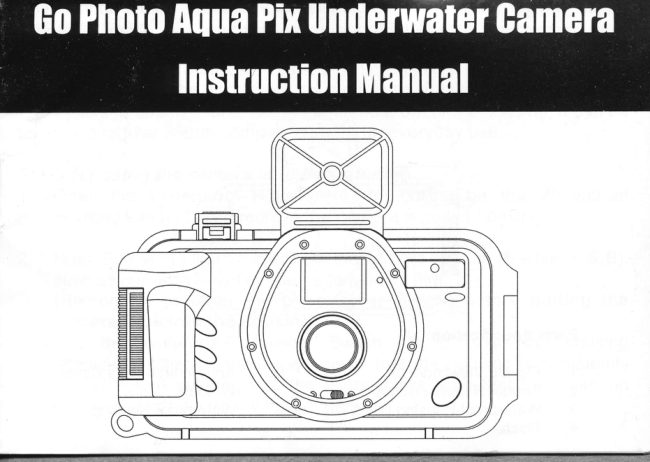
Underwater Housing Parts  :


        Parts Specification:
     1.  Flip-Up Viewfinder                       5.     Anti-Scratch Lens Cover
     2.  Shutter Release Button               Window
     3.  Waterproof Housing Latch           6.     Waterproof Housing
     4.  Flash           www.butkus.us
View original page 2Page 3 · Read text
lnstructions:
 1 The Aqua Pix is a dual use camera, which functions both on land and
 I undenrater. With the waterproof housing, the camera can be used for up    to 6 meters in depth. After taking the camera out of the housing,  it can be I
   used as a regular 35mm compact camera for everyday use.i i
   Steps for using the camera in underwater:\I  1. Open the Waterproof Housing (6) by pulling on the Waterproof
 .      Housing Latch (3) and remove the camera from the housing.
  2. Note: Follow the instructions from the camera manual (Section A & B),
       such as correctly inserting the batteries and film.
      (Remember to open the Lens Cover Switch before putting the
      camera back into the housing).
     Use the Waterproof Housing Switch (3) to close the housing
        aftenrvards. Check carefully to ensure that the housing is completely
       closed before entering into the water. Make sure that there are no
        obstructions or dirt on the rubber gaskets.
                                                                                                2
View original page 3Page 4 · Read text
3.  Taking pictures underwater is difierent from taking pictures on land.
   You must frame your subject using the Flip-up Viewfinder (1) then
    press the Shutter Release Bufton (2) once to take your picture.

4.   During the low light or while underwater, the Flash (4) will activate
     automatically.

    Note: Take pictures only after the Flash Ready Signal lights up.
     It takes about 6-8 seconds after the film is advanced to
    recharge the flash. This camera will provide an auto saving power
     function.  lt will shut off when not used for two minutes. The camera
      will re-activate after you press the Shutter Release Button (2) once.
5. To remove the film when finished, follow these instructions: You
    must wipe all water from the surface of the housing prior to opening
    the housing and removing the camera. Pay particular attention to not


3                       www.butkus.us
View original page 4Page 5 · Read text
getting any excess water on the camera. Should this occur, wipe off the
     camera immediately.
 6. Open the housing by pulling on the Waterproof Housing Latch (3).
    Remove the camera from the housing, and follow the instructions
      (Section D) for power rewinding and unloading the film.
17.  lt is highly recommended that you use fresh water to completely rinse
      the Waterproof Housing (6) after each use. This will remove all salt and
       dirt from the unit.
 8. Store the housing and camera in a well-ventilated, cool and dryI     for next uses.                                                    place

 Note: Since there are temperature differences on land and underwater. Fog
       could appear on the surface of the Housing when the camera is first
       placed undenrater. This is normal and you should wait a couple of
       minutes for the temperature of the camera to stabilize. Do not take
      any pictures while fog is present since this will decrease the picture
         quality.
View original page 5Page 7 · Read text
PARTS DESCRIPTION
 1.  Shutter Release            12. Eyepiece
 2.   Battery Compartment Cover 13. Film Chamber
      Rewind Switch               14. DX Film Window.3. ' 4.   Film Counter                15. Back Cover
 5.  Big Vievufinder            16. Film Rewind Shaft
       Light Sensor Lens            17. Film Sprocket Wheelr 6. 7.  Red-Eye Reducing Lamp     18. Fllm Take-up Drum
 8. Flash                        19. Back Cover Release Latch
 9. Lens                         20. Tripod Socket
 10. Cover Switch               21. Strap Socket
 11. Flash Ready Signal
View original page 7Page 10 · Read text
PROPER CARE OFYOUR CAMERA
1. Do not expose the camera to extreme high or low temperature of direct sun light.
2. Avoid excessive force or impact caused by handling, bumping or dropping.
3. Always keep the lens covered when not in use. Do not touch the lens directly.
  Should dust accumulate on the lens, use a blower to remove the dust.
4. Remove the batteries if you do not expect to use the camera for an extended
  period. Store the camera in a well-ventilated, cool and dry place.
5. This camera is not water-proof and must not be used in the rain or in water.
6. Never attempt to disassemble the camera, as it contains a high-voltage  circuit.
7. Do not place the camera near equipment that has strong magnetic fields.

A. INSERTING THE BATTERY
The camera will not operate unless the batteries are correctly installed. Use a coin to
flip open the battery compartment cover. Insert the recommended  fresh Alkaline
batteries. Ensure that the + and - on the battery are aligned according to polarity
diagram inside the battery compartment. Snap the battery door closed.
B. LOADING THE FILM
*Always avoid direct sunlight when loading the film.
Push the back cover release latch upward to open. Load the film cassette into the film
9
                       www.butkus.us
View original page 10Page 11 · Read text
chamber and onto the film rewind shaft until the cassette is fully seated. Pull out
enough film leading to the left and place over the film take-up drum. Make sure the
film lies flat. " Click" shut the back cover. Press the shuffer release button once
and the film will be advanced to the first exposure automatically.

C. TAKING PICTURES

Open the lens shield by sliding the Lens Cover Switch. Bring the camera up to
your eyes and frame your subject within the back viewfinder. For a sharp picture,
stand at least l.5m (5 ft) from your subject. Fully depress the shutter button to take
the picture. In dim light, such as indoors or outdoors in heavy shade, or on dark
overcast days, you will need the flash. This camera features an automatic flash that
fires when you need it, and it also helps to minimize red eyes in flash pictures.
When the flash ready signal lights up, press the shutter release button halfway  - the
lamp for red eye reduction will light. When pressing fully, you can take the picture.
Allow l0 seconds for the flash to recharge. To ensure proper exposure, make sure
your subject is positioned within the effective flash range.
          rso 100            rso 200            ISO 400
              t.4 - 2.0M             r.4 - 2.5M             1.4 - 3.0M                                                                     10
View original page 11Page 12 · Read text
Tips for better pictures
o To take clear pictures, hold the camera steady and properly, or use a tripod.
o Be careful not to place your fingers over the lens or the flash window.
r Take pictures at the subjectis level. Kneel down to take pictures of children or pets.
r Hold your camera vertically to capture tall, narow subjects, such as a waterfall,
   skyscraper, or a single person.
o Keep the sun behind you. This provides the best subject illumination.
o We suggest that you become familiar with your new camera by shooting and
  processing at least one roll of film before using your camera to record an important
   occasion.
D. REWINDINGTHE FILM
After the last exposure, the motor will stop and you will not be able to fire the shutter
anymore. The film counter should also show a number that approximates the number
of frame specified on the film cassette. Generally one or two more frames than
specified may be taken. To rewind, close the lens cover and push the Film Rewind
Button, hold it until the motor stops. The film counter will count down to "S" after
 ll                        www.butkus.us
View original page 12
Page 13 · Read text
rewind has fully completed. You can also do this when you wish to develop the
film before reaching the end of the film. Push the back cover release latch to pop
open the back cover. Remove the film, put it in its protective container and have it
                                                                                                                                               Ipiocessed as soon as possible
E. CARE AI\D STORAGE

 1.  Do not expose the camera to extreme high and low temperature or direct sun
      light.
2.   Avoid excessive force or impact caused by handling, burning or dropping.
3.   Always keep the lens covered when not in use. Do not touch the lens directly.
4.  Remove the battery if you do not expect to use the camera for an extended
     period. Store the camera in a well-ventilated, cool and dry place.
5.   This camera is not water-proof and must not be used in the rain or in water.
6.   Never attempt to disassemble the camera, as it contains a high-voltage circuit.
7.  Do not place the camera near equipment that has strong magnetic fields.
r'CAUTION: Keep all batteries away from small children and immediately
              dispose of any used batteries safely. Batteries are small objects and
             could be ingested. Do not open battery dispose of in fire, or attemp!,
               to recharge
View original page 13Page 14 · Read text
F. TROUBLESHOOTING


          Problems                 Causes                   Solution
   Camera does not operate  Batteries exhausted, or   Replace or reload the
                           improperly loaded, or     batteries. Open the lens
                             lens cover is closed or    cover completely
                           not completely opened
   Camera does not        Film is improperly       Reload the film
   advance the film         loaded
   Camera does not rewind  Rewind not activated     Slide and hold the
   the film                                       rewind button for rewind
   Bluned pictures        Out of focus or Camera  Aim the subject within
                           shake                    the focusing range or fix
                                                       the camera
  No Flash                  Batteries exhausted or    Replace batteries or wait
                             the flash is rechareine     until the flash readv lieht

 13
                       www.butkus.us
View original page 14Page 15 · Read text
G SPECIFICATIONS

Shuffer Lock           The shutter will be locked when the lens shield is closed
Lens                 F9 30mm 1-element plastic lens
Focusins                Fixed focus
Focusine Ranse            1.5 meter to infinity
Viewfinder              2-element Reverse-Galilean Albada finder
Shutter Soeed            1/125 second
Built-in Flash            Automatic Flash
Flashine Operatine ranqe ISOI00 - 1.4m to 2.0m
                     ISO200 - l.4mto 2.5m
                     ISO400 - 1.4m to 3.0m
Flash Recvcline Time    8 seconds with 2 fresh alkaline batteries
Flash Readv Indicator    Green LED beside the viewfinder
Power Source           2 x AA[R6) alkaline batteries
Dimensions             119.5mm (W) x 63.5mm (H) x 39mm (D) without date back
Weieht                 142e without batterv
                                                (v.1.0)                                 A
View original page 15From the M. Butkus archive. Original publisher and archive notices are retained.
Check the model and edition against your equipment.
PDF verified 2026-10-10.