Film cameras
Ricoh AF-40 User manual
User manual for Ricoh AF-40. 12 pages in English. Read the original PDF, download or print a copy without registration.
12 pagesEnglish1.9 MB PDF
Loading your manual…Open PDF directly
Document details
- Brand
- Ricoh
- Model / document
- Ricoh AF-40
- Document type
- User manual
- Language
- English
- Pages
- 12
- File size
- 1.9 MB
- Category
- Film cameras
- Document date
- Not specified in catalog
Search available document text
Find a term, then jump to its page in the original PDF. Image-only pages may not be searchable; check the PDF for exact wording and diagrams.
Page 3 · Read text
www.butkus.us

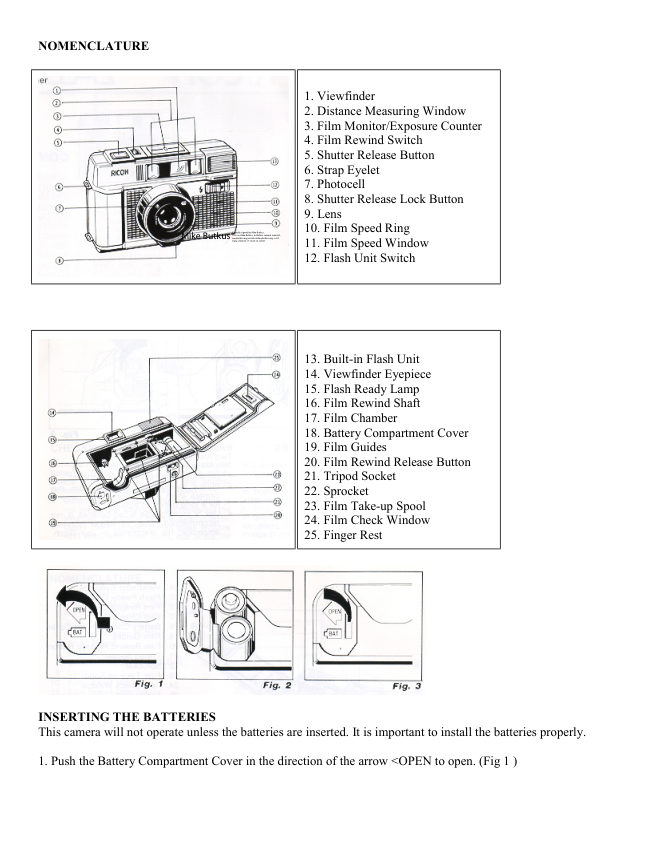
2. Insert two batteries, checking that the (+) and ( - ) on the batteries are lined up correctly, according to the
polarity diagram inside the battery compartment. (Fig. 2)

3. Close the Battery Compartment Cover by pushing it in the direction of the arrow. (Fig 3)


Batteries to use
Two Alkaline penlight batteries or Two Manganese penlight batteries.

· Do not use Nickel Cadmium batteries.

· Please remove the batteries from the camera when you do not use the camera for a long period of time.

· Use of rechargeable Nicad batteries is not recommended. Due to higher internal amperage, the electronics in
your Ricoh camera/flash unit may be damaged. If damaged due to use of Nicad batteries occurs the warranty
Will be considered null and void.

CHECKING THE BATTERIES


Remove the Lens Cap before you check the batteries. If the lens cap is left on, a safety device will operate to
prevent the Shutter Release Button from being activated.

* Make sure the Shutter Release Button is not pressed in when you are removing the lens cap, as a frame may
be taken in error.

1. Cover the Photocell (small glass window next lens) with your hand, and press the Shutter Release Button in
halfway. (Fig. 4)


2. If the red Camera Shake Warning Signal    in the Viewfinder blinks, then the batteries are in working order.
(Fig. 5) In normal temperatures (at 20°C and with new Alkaline batteries) without using the Flash Unit,
approximately 70 rolls of 36 exposure film can be taken. If the flash Unit is used for every frame, then 7 rolls of
36 exposure film can be taken. Please change both batteries to new ones of the same kind in the following
cases:


A. The red Camera Shake Warning Signal   does not blink when you have covered the Photocell with your
hand and the Shutter Release Button is pressed in.
View original page 3
Page 4 · Read text
B. The shutter cannot be released (remember to remove the Lens Cap).

C. The Flash Ready Lamp takes more than 30 seconds to light up. I

D. The Film Advance or Film Rewind does not operate.

E. The batteries have been in the camera for more than one year (even without using the camera, batteries will
run down naturally).

· Generally, in cold conditions, the capacity of the batteries decreases, and in some cases, the camera may not
operate properly. You should either warm the batteries or keep a spare set in your pocket, inserting them just
before you use the camera. Incidentally, batteries that have lost their capacity in cold temperatures, will recover
in normal temperatures, so do not throw them away.

LOADING THE FILM


1. Push the back cover lever downwards in the direction of the arrow OPEN to open. (Fig. 6)

2. Load the film in the Film Chamber. (Fig. 7)

3. Pull out the film leader and place it over the Film Take-up Spool. Please see that the film is within the Film
Guides. (Fig. 8) (Fig. 9) (Fig. 10)


4. Push the back cover shut so that the back cover lever is back to its original position. (Fig 11 )

5. Press the Shutter Release Button to advance the film until the number '1' appears in the Exposure Counter
Window.
View original page 4
Page 5 · Read text
www.butkus.us

If no number appears in the Exposure Counter Window, the film is not loaded correctly. Please reload the film.
(Fig. 12)


· The Film Monitor is a mechanism ensures that if the film is not advancing correctly the Exposure Counter will
not move forward.

· Always avoid direct sunlight when you load the film.

· If the film is removed from its carton and left in high temperatures or humidity before it is loaded, it may not
advance to the end of the film.


SETTING THE FILM SPEED
1. The film speed is indicated on the outer packaging of the film: e.g. ASA 100 (ISO 100/21°)

ASA 400 (ISO 400/27°)(Fig. 13)

2. Turn the Film Speed Ring to set the speed of the film you are using in the center of the Film Speed Window.
(Fig. 14)

· Please set the Film Speed Ring to click stop positions. Do not use mid-way positions.
If no number appears in the Exposure Counter Window, the film is not loaded correctly. Please reload the film.
Fig. 12)

· The Film Monitor is a mechanism ensures that if the film is not advancing correctly the Exposure Counter will
not move forward.

· Always avoid direct sunlight when you load the film.

· If the film is removed from its carton and left in high temperatures or humidity before it is loaded, it may not
advance to the end of the film.
View original page 5
Page 6 · Read text
SETTING THE FILM SPEED
1. The film speed is indicated on the outer packaging of the film: e.g. ASA 100 (ISO 100/21°)
ASA 400 (ISO 400/27°)(Fig. 13)

2. Turn the Film Speed Ring to set the speed of the film you are using in the center of the

Film Speed Window. (Fig. 14)

· Please set the Film Speed Ring to click stop positions. Do not use mid-way positions.

VIEWFINDER (Fig. 15)


1. Field of View Frame

2. Parallax Correction Marks

3. Flash Ready Lamp

4. Auto-Focus Frame

5. Field of View Frame

The subject such as people or scenery that you wish to take should be set within this frame.

2. Parallax Correction Marks
When taking a picture of a subject that is between 1 ~ 1.2m (3 - 4 ft) away from the camera, it should lie within
these marks.
Anything outside the marks will not be included in the picture even though you can see it through the
viewfinder.

3. Flash Ready Lamp When the flash is fully charged and ready for shooting, this lamp will light up.

4. Auto-Focus Frame The Auto-Focus Frame focuses -automatically on the subject that lies within it.

5. Camera Shake Warning Signal If this lamp blinks when the Shutter Release Button is pressed halfway, then
you should change to flash photography.
View original page 6
Page 7 · Read text
www.butkus.us


SHOOTING ON AUTO-FOCUS


1. Set the subject you wish to take within the Auto-Focus Frame in the center of the Viewfinder. (Fig. 16)

2. If the Camera Shake Warning Signal does not light, gently press the shutter Release Button in fully to take
the picture. The film will advance automatically as soon as the shutter has been released. (Fig. 17)

· Please be careful not to cover the Distance Measuring Window at the front of the camera accidentally, as the
focusing will not be correct.

· Please keep the Distance Measuring Window clean so that the focusing is accurate. If it gets dirty, please wipe
it clean with a soft cloth.

· There may be rare cases where the subject cannot be properly focused.

(For instance subjects that do not reflect light well, glossy subjects, or subjects taken through glass.)

Shooting Distance
For subjects that are less than 1 m away from the camera, it is not possible to obtain a sharp focus.

PRE-FOCUS SHOOTING
When the subject you wish to focus on is outside the Auto-Focus Frame, or if the subject is difficult to focus on,
you should use the "pre-focus" feature.

When the subject is outside the Auto-Focus Frame


1. If you want to photograph two people, there may be cases where neither of them can be set within the Auto-
Focus Frame in the center of the Viewfinder. If you release the shutter, the background will be in focus, and the
people which are the main subject will be out-of-focus. (Fig. 18)

2. Move the camera so that one of the people is within the Auto-Focus Frame. (Fig. 19)
View original page 7
Page 8 · Read text
3. Press the Shutter Release Button halfway. Keep your finger pressed down on the Shutter Release Button.
This will automatically lock the focus on this subject.

4. Return the camera to its former position so that both people are in the Field of View Frame, then press the
Shutter Release Button fully to take the picture. (Fig. 18)

Then the subject is difficult to focus on

1. When you take subjects that are difficult to focus on, find another subject at about the same distance from the
camera. Use that subject in the same way as described above.

· When you remove your finger from the Shutter Release Button, pre-focusing will be cancelled, so you can
then go on to focus again as many times as you wish.

REWINDING THE FILM


When the end of the film has been reached, an electronic sound will be emitted. Please rewind the film
immediately.

1. Push the Film Rewind Release Button on the underside of the camera. (Fig. 20)

2. Push the Film Rewind Switch on the top of the camera in the direction of the arrow. (Fig. 21)

3. As you rewind the film, the Exposure Counter will run backwards. When the "S" appears in the Exposure
Counter window, slide the Film Rewind Switch back to its former position. Film rewinding is now completed
and you can unload the film. (Fig. 22)

· Do not open the back cover until the "S" has appeared in the Exposure Counter window.

FLASH PHOTOGRAPHY


Change to flash photography when the Camera Shake Warning Signal (    ) in the Viewfinder blinks when the
Shutter Release Button is pressed halfway.
View original page 8
Page 9 · Read text
www.butkus.us

1. Push the Flash Unit Switch in the direction of the arrow ~ and the Flash Unit will pop up turning the power
source on automatically. (Fig. 23)

2. Check that the Flash Ready Lamp in the Viewfinder is lit, then take the picture. (Fig. 24)

Flash photography distance
Shooting range:
1 m/3.3 ft - 4.3 m/14.1 ft (ISO 1 00)

1 m/3.3 ft - 5.2 m/17 ft (ISO 400)

1.4 m/4.6 ft - 5.5 m/18.2 ft (ISO 1000)

· Always push the Flash Unit back in when not in use. (If it is left up, the batteries will wear out faster.)

· If the Shutter Release Button is kept pressed halfway with the Flash Unit on, the Flash Unit will not be
charged. Allow the flash to charge by removing your finger from the shutter release.

· Be careful not to put your finger in front of the flash window.

· If the Shutter Release Button is pressed before the Flash Ready Lamp lights up, the picture will be under-
exposed.

· You can use the Flash Unit as a fill-in light for daytime photography too.


OTHER FEATURES
1. Shutter Release Lock
When the lens cap is put on, the shutter will be locked. This is a convenient mechanism that prevents you taking
a picture with the lens cap in place, or releasing the shutter by mistake. (Fig. 25)

2. Film Check Window
You can confirm whether a film is loaded or not by looking through the Film Check Window. (Fig. 26)

3. Diopter Correction
There is a Diopter Correction Adapter to enable people who are near or far sighted to see more clearly through
the viewfinder. Please use the Diopter Correction Adapter for the RICOH SLR cameras. It slides on the
Viewfinder Eyepiece. (Fig. 27)
View original page 9
Page 10 · Read text
FLASH PHOTOGRAPHY

Change to flash photography when the Camera Shake Warning Signal (    ) in the Viewfinder blinks when the
Shutter Release Button is pressed halfway.

1. Push the Flash Unit Switch in the direction of the arrow ~ and the Flash Unit will pop up turning the power
source on automatically. (Fig. 23)

2. Check that the Flash Ready Lamp in the Viewfinder is lit, then take the picture. (Fig. 24)

Flash photography distance

Shooting range:
1 m/3.3 ft - 4.3 m/14.1 ft (ISO 1 00)

1 m/3.3 ft - 5.2 m/17 ft (ISO 400)

1.4 m/4.6 ft - 5.5 m/18.2 ft (ISO 1000)

· Always push the Flash Unit back in when not in use. (If it is left up, the batteries will wear out faster.)

· If the Shutter Release Button is kept pressed halfway with the Flash Unit on, the Flash Unit will not be
charged. Allow the flash to charge by removing your finger from the shutter release.

· Be careful not to put your finger in front of the flash window.

· If the Shutter Release Button is pressed before the Flash Ready Lamp lights up, the picture will be under-
exposed.

· You can use the Flash Unit as a fill-in light for daytime photography too.


OTHER FEATURES

1. Shutter Release Lock
When the lens cap is put on, the shutter will be locked. This is a convenient mechanism that prevents you taking
a picture with the lens cap in place, or releasing the shutter by mistake. (Fig. 25)

2. Film Check Window
You can confirm whether a film is loaded or not by looking through the Film Check Window. (Fig. 26)
View original page 10
Page 11 · Read text
www.butkus.us

3. Diopter Correction
There is a Diopter Correction Adapter to enable people who are near or far sighted to see more clearly through
the viewfinder. Please use the Diopter Correction Adapter for the RICOH SLR cameras. It slides on the
Viewfinder Eyepiece. (Fig. 27)

MAJOR SPECIFICATIONS

Type: 35 mm lens shutter type with automatic focusing

Lens: 38 mm F2.8 Color Rikenon lens, 4 elements 3 groups filter diameter 46 mm

Focusing: Automatic focusing with pre-focus facility.

Distance measuring (shooting) range 1 m ~ 00

Shutter: Programmed AE type electronic shutter

Viewfinder: Albada type with bright frame viewfinder (with parallax correction marks).

Magnification: 0.46 X Field of View 83%, Diopter Correction Adapter can be attached.

Viewfinder information: Field of View Frame, Parallax Correction Marks, Auto-Focus frame, Camera Shake
Warning Signal, Flash Ready Lamp.

Exposure Adjustment: With Cds Photocell, Exposure Coupling Range EV6 ~ EV17 (ISO 100)

Film speed Range: ISO 100 ~ ISO 1000

Film Advance/Rewind: By electric motor with Film Check Window

Film Loading: RICOH Auto-Load system

Exposure Counter: Additive, reversed when rewinding

Built-in flash: Flash photography by turning of Flash Unit Switch

Guide Number: 12 (ISO 100) m. Exposure adjustment through flash-matic system.

Interval between flashes: About 7 seconds

Number of shots possible: With new Alkaline batteries (under normal temperatures of 20°C)

  Without using flash unit: more than 70 rolls of 36 exposure film.

  When using the flash unit repeatedly: more than 7 rolls of 36 exposure film.

Power source: 2 penlight Alkaline batteries or 2 penlight Manganese batteries. (Do not use Nickel Cadmium
batteries.

Dimensions: 129 mm (W) x 79 mm (H) x 55 mm (D)
View original page 11
Page 12 · Read text
Weight: 330g (without batteries)

Specifications and appearance of this camera are subject to change without notice.

PROPER CARE OF YOUR CAMERA

* If there is dirt on the lens or Distance Measuring Window, do not touch directly with your fingers. Use a
blower to blow the dust away, or wipe the surface gently with a soft cloth.

* Camera malfunction can be caused by shock humidity, salt, etc. After using the camera at the beach or places
where there are chemicals, wipe it particularly carefully.

* Take care not to expose the camera to sudden changes in temperature, as they may cause malfunction.

* Do not expose the camera for a long period of time in extremely high temperatures, such as in your car or on
the beach, as this may cause malfunction.

* When using a tripod, do not try to force a long screw into the socket. (The screw length should be less than
5.7mm, JIS 5.5mm.)

* Do not place the camera near equipment that has strong magnetism such as television or radio.

* Remove the batteries before storing the camera, and keep the camera in a place that is free of dust and
humidity.

* Avoid keeping the camera in a closet, etc. where the camera may be affected by mothballs, insecticides, etc.
View original page 12
From the M. Butkus archive. Original publisher and archive notices are retained.
Check the model and edition against your equipment.
PDF verified 2026-10-10.