Film & darkroom
GraLab 300 Darkroom Timer Product booklet
Product booklet for GraLab 300 Darkroom Timer. 1 pages in English. Read the original PDF, download or print a copy without registration.
1 pagesEnglish1.6 MB PDF
Loading your manual…Open PDF directly
Document details
- Brand
- Gralab
- Model / document
- GraLab 300 Darkroom Timer
- Document type
- Product booklet
- Language
- English
- Pages
- 1
- File size
- 1.6 MB
- Category
- Film & darkroom
- Document date
- Not specified in catalog
Search available document text
Find a term, then jump to its page in the original PDF. Image-only pages may not be searchable; check the PDF for exact wording and diagrams.
Page 1 · Read text
www.butkus.us

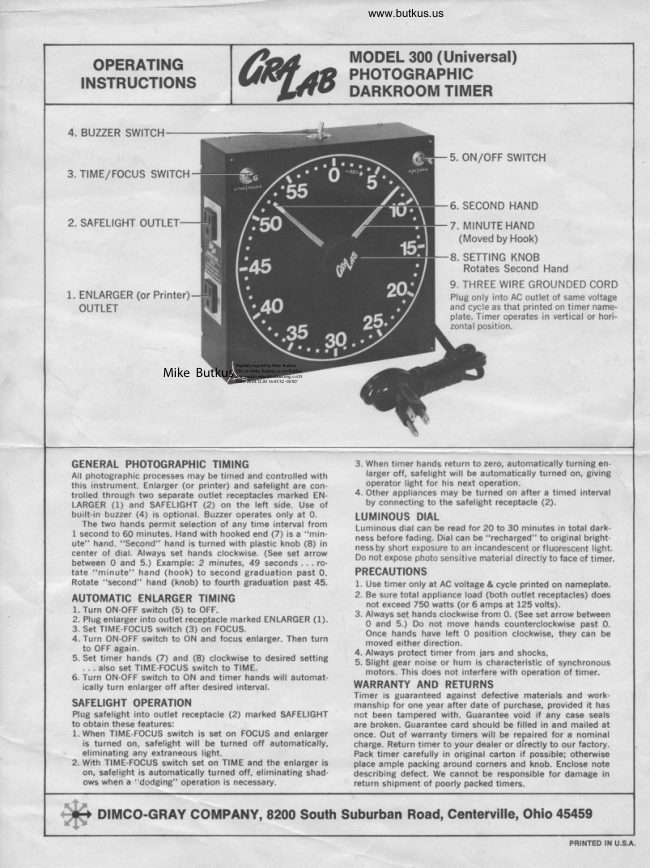
                           MODEL 300 (Universal)   OPERATING                            PHOTOGRAPHIC  INSTRUCTIONS                          DARKROOM TIMER


   BUZZER SWITCH
                                                                                         s. oN/oFF swtTcH
   TrME/FOCUS SWTTCH

                                                                                   6. SECOND HAND
   SAFELIGHT OUTLET                                                          7. MINUTE HAND
                                                                       (Moved by Hook)
                                                                                   8. SETTING KNOB
                                                                             Rotates Second Hand
                                                                                       9. THREE WIRE GROUNDED CORD
  1. ENLARGER (or Printer)                                                          Plug only into AC outlet of same voltage
   OUTLET                                                                   and cycle as that printed on timer name-
                                                                                                          plate. Timer operates in vertical or hori-
                                                                                                 zontal position.


                                                                                                     Digitally signed by Mike Butkus
                                                                           DN: cn=Mike Butkus, o, ou=Butkus.               Mike Butkus org, email=mike@butkus.org, c=US
                                                                                        Date: 2024.12.05 16:47:52 -05'00'


  GENERAL PHOTOGRAPHIC TIMING                     When timer hands return to zero, automatically turning en-
   All photographic processes may be timed and controlled with          larger off, safelight will be automatically turned on, giving
   this instrument. Enlarger (or printer) and safelight are con-         operator light for his next operation.
   trolled through two separate outlet receptacles marked EN-        4. Other appliances may be turned on after a timed interval
  LARGER (1) and SAFELIGHT (2) on the left side. Use of        by connecting to the safelight receptacle (2).
   built-in buzzer (4) is optional. Buzzer operates only at 0.      LUMINOUS DIAL    The two hands permit selection of any time interval from
   I second to 60 minutes. Hand with hooked end (7) is a "min-       nessLuminousbeforedialfading.can beDialreadcantorbe 20"recharged"to 30 minutesto originalin totalbright-dark-
   ute" hand. "Second" hand is turned with plastic knob (8) in      ness by short exposure to an incandescent or fluorescent  light.
   center of dial. Always set hands clockwise. (See set arrow     Do not expose photo sensitive material directly to face of timer.  between 0 and 5.) Example: 2 minutes, 49 seconds . . . ro-
  tate "minute" hand (hook) to second graduation past 0.     PRECAUTIONS
  Rotate "second" hand (knob) to fourth graduation past 45.         l. Use timer only at AC voltage & cycle printed on nameplate.
                                                                               2. Be sure total appliance load (both outlet receptacles) does  AUTOMATIC €NLARGER TIMING                                                                         not exceed 750 watts (or 6 amps at 125 volts).    l. Turn ON-OFF switch (5) to OFF.                                                                               3. Always set hands clockwise from 0. (See set arrow between
   2. Plug enlarger into outlet receptacle marked ENLARGER (1).      0 and 5.) Do not move hands counterclockwise past O.   3. Set TIME-FOCUS switch (3) on FOCUS.                                                     Once hands have left 0 position clockwise, they can be   4. Turn ON-OFF switch to ON and focus enlarger. Then turn                                                         moved either direction.     to OFF again.                                                                              4. Always protect timer from lars and shocks.   5. Set timer hands (7) and (8) clockwise to desired setting        5. Slight gear noise or hum is characteristic of synchronous         . . . also set TIME-FOCUS switch to TIME.                                                                   motors. This does not interfere with operation of timer.   6. Turn ON-OFF switch to ON and timer hands will automat-
       ically turn enlarger off after desired interval.            WARRANTY AND RETURNS
                                                         Timer is guaranteed against defective materials and work-
  SAFELIGHT OPERATION                                  manship for one year after date of purchase, provided  it has
   Plug safelight into outlet receptacle (2) marked SAFELIGHT     not been tampered with. Guarantee void if any case seals
   to obtain these features:                                       are broken. Guarantee card should be filled in and mailed at
    1. When TIME-FOCUS switch is set on FOCUS and enlarger      once. Out of warranty timers will be repaired for a nominal
      is turned on, safelight will be turned off automatically,       charge. Return timer to your dealer or directly to our factory.
     eliminating any extraneous light.                           Pack timer carefully in original cafton if possible; otheruise
   2. With TIME-FOCUS switch set on TIME and the enlarger is      place ample packing around corners and knob. Enclose note
     on, safelight is automatically turned off, eliminating shad-      describing defect. We cannot be responsible for damage in
    ows when a "dodging" operation is necessary.                   return shipment of poorly packed timers.

    DIMCO-GRAY GOMPANY, 8200 South Suburban Road, Genterville, Ohio 45459.tttF

                                                                                                               PRINTED IN U.S.A.
View original page 1From the M. Butkus archive. Original publisher and archive notices are retained.
Check the model and edition against your equipment.
PDF verified 2026-10-10.