Film cameras
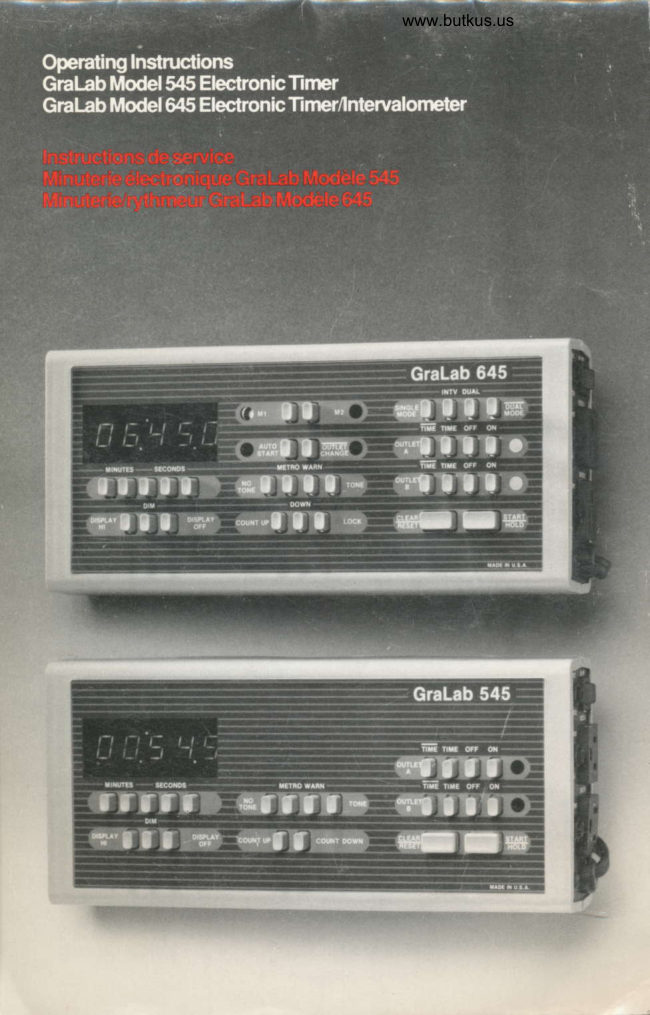
Gralab 545 / 645 timer User manual
User manual for Gralab 545 / 645 timer. 28 pages in English. Read the original PDF, download or print a copy without registration.
28 pagesEnglish6.0 MB PDF
Loading your manual…Open PDF directly
Document details
- Brand
- Gralab
- Model / document
- Gralab 545 / 645 timer
- Document type
- User manual
- Language
- English
- Pages
- 28
- File size
- 6.0 MB
- Category
- Film cameras
- Document date
- Not specified in catalog
Search available document text
Find a term, then jump to its page in the original PDF. Image-only pages may not be searchable; check the PDF for exact wording and diagrams.
Page 2 · Read text
Gralab[tlodel                Accessodes
54{i ElecffonicTirner                Gralab 560 Footswltch
Gralab lvlodel O45 Elecfronic      The Gralab 560 Footswitch plugs into the                                  FOOT SWITCH jack of GraLab electronic'limer/lnbryalometer
                                                    timers and acts as an gxlension of th€
The new GraLab 545 and O45 timers otfer      START/RESET bar.  lt is compact and
r€liable push-button  time control in tsnths of      features an 8 loot cord, skid-proot base, light
seconds lrom .1 second to 59 minutes, 59.9       toot pressure r€quirements and heavy tr€ad
seconds with automatic reset and quartz        on the actuating treadl€.  lt is rated at 7 AMP,
crystal rep€atable accuracy. Half-inch high       125-250 VAC.
                       LED             in                           five-digitnumbers            the                   bright,                                    display    Contents                                    or          read             and                 can                     b€ dimmedare    easily
turned ofl at the touch of a bufton.                                             Features and
                                                                                                        1Both timers feature switching capability for    Baslccontrols545/645
most inductive loads, a choice of count up ol     Addltlonal controls 545/645      4
count down modes of operation, two inde-
                                                                                6pendently controlled 600 watl AC outlets     Precautlons
with parallel logic-level compatible output     Spoclflcatlons                 6
jacks, four audio signal options, and a foot                                          Operatlng Instrucilons          7switch iack tor convenient, "hands-free"
StarUHold operation with an optional            Slngle-cycle swltchlng
                                                                          8GraLab 560 Accessory Footswitch.        operatlon
                                       Gralab 645 Intervalometelln addition to all ol the features of the 545,                            op€ratlon                      12the GraLab 645 Timer/lntervalometer also
features two ind€p€ndently programmable      Gralab 645 dual and d-ual
memories  for enhanced op€rating potential.    mode operatlons               19
Dual memory versatility for totally indepen-
dent as well as dual, interactive timing and
switching control of the 645's AC outlets.
Both GraLab 545 and 645 modeltimers are
compact, lightweight and durable. They
measule2l/1" X41/2" X93/t", have non-skid
leet and r€movable incline stands tor table-
top operation, as well as two molded-in key
slots on the base tor quick and €asy wall
mounting.

Featuresand
BasiccontrclsStS/815
1 POWERCORD
2 ON/OFFMASTERSWITCH
3 ACCESSORY FOOT SWITCH JACK
4 ACOUTLETS
5 LOGIC LEVELOUTPUTJACKS
 Provide logic level compatible signals
 parallel to power status of corresponding
 AC outlet.
View original page 2Page 3 · Read text
www.butkus.us

                                     Gralab 545

                       dt  @m@   Iffi  @!€I:+) @@  @@


6 FIVE.DIGIT LED DISPLAY               11 ACOUTLETCONTROLS
Begisters time settings trom one-tenth of a     ON and OFF buttons control AC power
second through 59 minut€s, 59.9 seconds.       independently of timer. TIME puts outlet
                                              undertimer control (Outlet A cvcles on-tim€,
7 TIME ENTRYCOiITROLS                    Outlet B cycles otf-time). TIME keeps outlet
Five time entry push bufions, one for €ach       under timer control, but reverses on/otf
digit. A light tap will advance conesponding        status. LED indicators adiacent  to ON but-
digit one unit. Steady pressure  will advance      tons light wh€n outlets are supplying power.
digit continuously.                       Settlng l).escrlptlon of outlet status
8 DISPLAY IiITENS]TY CONTROL                     durlng cycle
                                      OutletA OutletB Outl€tA OutletB
9 AUDIOSELECTION CONTROL       TIME TIME ON   ONSettlng  t)escrlptlonNO TONE No audio signal         n_ME fl[,-E ON   OFF
METRO Metronometon€beepson    TIME TIME OFF  ON
              every second          TIME T|ME OFF  OFF
WARN  Tone b€eps on thirty second     12 CLEAFYRESETBUTTON
              increments, lhen at one           Erases or clears unwanted time settings
            s€cond intervals from 1 0         wh€n timer is at rest; stops count and
             seconds to zero, and a one         restores original setting whon pushed during
            second end of cycle tone                                          count{own; stops count and establish€s
                                       new s€tting at stopping point when pushedTONE  Soundsaonesecond€ndof
            cycletone                          during count-up.
10 COUNT DIRECTION CONTROL         13 START/HOLDBUTTON
                                                              Initiates timing cycle(s). Pushed duringSettlng  D$crlptlon
COUNTUP Ascendingcounl-                   cycle,  it freszes the countdown. One more
              elapsed tim€                    push restarts cycle.
DOWN Desc€nding count-
              remaining time
LOCK   Fixeslastcountsel€ctorand
(645 only) audio signal in m€mory being
           programmed
View original page 3Page 4 · Read text
o
Minuteft 6lectrcnQue Gralab    Les minuteri€s GraLab Moddles 545 et 445
ItlodileS4S                                  sontdurabftouteses. Ef deuxles mesurentcompactes,21/r xl6gdres41/z x 9/tet po
Minutedd4fthmeur Gralab            €t sont munies d'une base antid6rapante, de
Modele645                               supports inclin6s amovibles pour utilisation
                                          A plat, de m6me que de deux entailles
Les nouvelles minuteries GraLab 545 et 645     moul6es A la base, pour laciliter un montage
oftr€nt un r6glage du temps liable, a             mural rapids.
boutons-poussoirs, en dixidmes de
secondes de 0,1 seconde a 59 minutes, 59,9   Accessoircs
secondes avec remise A z6ro automatique et
pr6cision A quartz reproductible. Los          Commulateur e p6dale GraLab 550
nombres d'un demi-pouce de hauteur de        Le commutatsur a p6dale GraLab 560 se
l'atlichage lumineux LED d cinq chiffres sont     branche d la orise de raccordement "FOOT
laciles a lire. On peut r6duire leur intensit6 ou    SWITCH" des minuteries 6l€ctroniques
                                           GraLab  et sert de suppl6ment d la barre deles 6teindre en eflleuranl un bouton.
                                           d6marrage/remise d z6ro.  ll 6st compact et
Les deux minuteries ont une capacit6 de          est muni d'un cable de 2,5m, d'une semelle
commutation pour r6pondre d la plupart des      6paisse st d'un€ base antid6rapante. ll
charges inductives, 19 choix de compte            n'exige qu'une faible pression du pied.
ascendant ou de compte d rebours, deux        Courant nominal de 7 AMP, 1 25 A 250 VCA.
prises CA de 600 watts a commandes
ind6pendantes avec prises d€ sortie com-    TabledesrnatiAes
patibles de niveau logique en paralldle,
quatre options de signal sonore, de mdme       Caract6rlstlquos et Controles d€
qu'une prise commod€ de commutateur a    base545/645                 2
p6dale qui p€rmet d'actionn€r/maintenir  la     Commandes  addltlonnelles
minuterie en marche sans utiliser les mains.   du545/645                     5
Le commutateur a p6dale Gralab 560 est    Mesurosdepr6cautlon     6
oftert en suppl6ment.               Flchetechnlque              6En olus de toutes les caracloristioues du
545, la minuterie/rythmeur GraLab 645     Moded'emplol               7
oossdde aussi deux m6moires               Commutatlon i un seulcycle     8
programmables ind6pendantes qui
                                                     Utlllsatlon du GraLab 445 commeaugmentent son potentiel. Donc, deux                          rythmeur                       12possibilil6s de 169lage alternatif et de com-
mulation des orises du 645.                       Utlllsatlon du GraLab 645
                             enmodeDOUBLE(DUALETDUAL) 19

Caract6ristiques et Conh6les
debase5451O4{i
1 CORDON D'ALIMENTATION
2 INTERRUPTEUR PRINCIPAL
  MARCHE/ARRET (ON/OFF)
s coln UrATEURAPeDALE
  ACCESSOIRE
4 PRISES CA
5 PRISES DE SORNE DE NIVEAU
 LOGIOUE
 Signaux compatibles de niveau logique, en
 rapport avec la puissanc€ nominale d€ la
 prise CA conespondant€.
View original page 4Page 5 · Read text
www.butkus.us


                                     Gralab 545


                                 EFw                              i-ilm        d                   ffi                   CI  @m@ @mrc   Iffi   @-!€I:e^, @@@


6 AFFTcHAGE Leo A ctlo cxtrrRes      11 COMMANDESDE PRISESCA
Inscrit les 169lag€s de temps de un dixidme      Les boutons "ON" et 'OFF" contr6lent l€
de seconde jusqu'd 59 minutes, 59,9             courant CA ind6pendammsnl de la
secondes.                                        minuteri€. La commande TIME" place la
z CoMMANDES oe REctlce ou              prise sous le contr6le de la minuterie (La
TEMPS                                                priss A boucl€ un cycle en minutage, la
Cinq boutons-poussoirs de r6glage du             prise B boucle hors minutage).TifrE
temps, un pour chaque chitfre. La touch€         maintient la prise sous le controle d€ la
d'un bouton suttit A faire avancer le chitfre        minuterie, mais inverse l'6tatde latension
conespondant d'une unit6. Une pression         'on/off. Les indicateurs LED adiacents aux
maintenue lera avancer l€s chiftres                                           boutons'ON"  s'allument lorsque les prises
continuellem€nt.                                                fournissentdu @urant.
8 coMMANDE D'tNrewsr€ oe                                    R6glage Indlcatlon de l'6tat de la prlsoL'AFFICHAGE                                                     durant le cycle
9 CoMMANDE oe sEleclott luoto         Prise A  Prise B  Priss A  Prise BR6glage t,g3crlptlon        NME TIME ON   ON
NOTONE Aucunsignalsonore        flME TIME ON   OFF
               Signal sonoreMETRO                         du m6tronome e  TIME TIME OFF  ON                  seconde           chaque
                       TIME N-ME OFF  OFFWARN  Signal sonore A inlervalles de
               trent€ secondes, puis a         12 BouroN ANttullttoNnernse A
                 intorvalles d'une seconde ds     zEno (clelnvnEsET)
                                            '| 0 secondes A z610, et signal                 ll efface ou annule des valeurs de r5glage
            de lin de cycle d'un€ second€.     non d6sir6es pendant qus la minuterie est a
TONE   Signal de fin de cycle d'une         valeuran6t;  iloriginaleintenomptsi onle compt€le prossoet pendantrevienl a l€la             seconde.                                         compte e rebours;   il intenompt le compte et
10 CoMPTEUR DE NUMERATION                6tablit un nouveau 169lage dos qu'on
R6glago llescrlptlon                         I'andte durant un compte ascendant.
COUNTUP Compteascendani-                                     13 BouroNDEoEulnnlcel            temos 6cou16                                     MAINTIEN (START/HOLD)
DOWN Compt€ a rebours-                                    ll amorce le cycle do minutago. Quand on le
            temps r6siduol                   pousse durant un cyclo,  il bloque  le compte
                                           A rebours. Actionn6 un€ nouvolle  fois, ilfait
LOCK(645 Enregistrelesdemiers            red6maner le cycle.
 soulement) nombro et signal sonore
               s6lec{ionn6s dans la m6moire
             sn programmation.
            o
View original page 5Page 6 · Read text
oAdditional conbols 54{l/645

                                     GraLab 645
 Iffi   ffiffi @o@@oD @@

www.butkus.us

14 IIEIIORY SELECTION CONTROL        17 MEMORYIIODECONTROL
Determines which memory  is being         Sottlng lloscrlptlon
programmed and displayed. LED indicators   SINGLE One memory switches both
adiacent to control buttons show which    MODE AC outlets
memory  is in use.                    tNw       Int€rvalom€t€r mode   f acilitat€s
15 AUTOSTARTBUTTON                                   the altornate switching  of the
Automalically recycles memory(s) in the                         outlets by the two memories
SINGLE MODE, DUAL mode, and DIAL                                 DUAL     Each memory swilches a singleMODE, and automatically allornatos                                                             outlet- in €tfect, two indep€n-botween memories  in th€ INTV
(intervalometer) mode. LED indicator                        dent timers that can run singly                                                                   or in paralleladjacont to button lights when AUTO
START  is activated.                DUt     Same as pr€vious mode,
ro qmTEicxlNGEBurroN          MODE     exceot bolh memories can be                                                                       started, stopped, resst orPrevents outlet change at end of cycle. LED                                                           cleared simullaneouslyindicator, adjacent to button, lights when
CI.JTLET CHANGE is activated.
 o                            18     o
 0                  6

                                          19
 o         o
18 INCLINING SUPPORT STAND          20 NON.SKIO FEET
19 NAITEPLATE                       21 KEYSLOTS FOR WALL IIOUNfl NG
View original page 6Page 7 · Read text
www.butkus.us
Gommandes additlonnelles du !4SO45

                                     Gralab 645
                                                                                 INM
        @m@mnnd    d                           GrTR---ilj__!J_]J_]J_IJ__Y\                                                                   \                                                                         fi-il@     a Iffi                   m   @eo@   ffiffi--------g:-                 -                                  Ict,,!t         |  |     trDd\                                                                        \rat           tt       tru/  @ruI:e., edED

rl sEucreuR oe mEuotne             rz sEucrsun oe uEuorne 6rEMoRY)
ll d6termine quelle m6moire esl visualis6e    R6glago Descrlptlon
et on cours de programmation. Les indica-   SINGLE Une seule m6moire com-
tours LED adjacents aux boutons "ON"    MODE  mands la commutation des
montrent quelle m6moir€ €st en usage.                    deux prises CA.
15 BoUToND'AUToDEMARRAGE      INTV     Les deux m6moires du mode
(AUTOSTART)                                               rythmeur commandent tour a
 ll tait r6p6ter automatiquement le cycb a la                     tour la commutation des prisos.
minuterie ou aux m6moires dans les modes                                                              m6moire                                                    Chaque                                                    @mmandeSIMPLE, DOUBLE et DGI, et fait alterner   DUAL                                                                         d'une                                                                                seulo                                                                                     la commutationles m6moires automatiqu€menl dans ls                                                                           prise. En fait, deux minutedesmode Rythmeur (lNTV). L'indicateur LED                                                        ind6pendantes qui peuventadlacont au bouton s'allume quand on                                                               fonctionner s6par6ment ou enappuie sur"AUTO START.                                                                      paralldle.
  BOUTON DE CHANGEMENT16                      DE     DIm       Similaire au mode pr6c6dent,            CHANGE)PRrsE(cur-fEf                                                                sauf que les deux m6moires ll empoche  le changement de prise A la fin                                                            peuvent 6tre simultan6mentdu cycle. L'indicat€ur LED adlacent au                                                   d6man6es, an6l6es, remisesboulon s'allume quand on appuie sur                                                         dz6ro ou vid6es."CI.JTLET CHANGE".
 o         o
 B                  6
                                        t9
 o         o
18 SUPPORTINCUI{E                  20 BASEA}MDERAPANTE
T9 PLAoUE SIGNALETIQUE             21 ENTA|LLES moulEes pouR MoN-
                                TAGE ITURAL
View original page 7Page 8 · Read text
o     Precautions                       llllesurcsde prccaution
        . Only use timer at AC voltage printed on       . Ne brancher la minuterie que sur une
           the nameplate.                                 source de courant alternatif, selon f indi-        . Be sure outlet load does not exceed               cation de la plaque signal6tique.
         maximum specified on outlet receptacle.      .  S'assurer que la charge ne d6passe pas
        . AlwayS set timer "On/Off master switch" to          la limite sp6cifi6e sur la prise.
       r "OFF" position before plugging-in or          . Toujours 169ler l'interrupteur marche/
        . Alwaysremovingprotectpowertimerand fromaccessoryjars andplugs.shocks.         arr6tbrancher,de la deminuteriecouper ale"OFF"courantavantou de
        . Avoid spilling liquids on timer.                  d6brancher les accessoi res.
                                                      .  Prot6ger en tout temps la minuterie
      Specifications                              contre les chocs.
                                                      .  Eviter de renverser des liquides sur la
        Size                                                minuterie.
         2Vt" X4Vz'X93/t'
       Accuracy                        Fichetechnique
         Better than 1.015% @ 10 seconds (20'C
        ambient, no load)                          Dimensions
                                                       2ltx 4Vzx93/tpo
        Repeatability
       1.005% @ 10 seconds (20'C ambient, no        Pr6cision
                                                                           +0,015o/o @ 10 secondes         load)                                         Sup6rieure i
                                                   (20"C ambiant, sans charge)
       Temperature Range
       OoC to 55oC, no load                             Reproductibilit6
                                              t0,005% @ 10 secondes (20'C ambiant,
       Humidity                                    sans charge)
        0 to 95% non-condensing
                                                  Plage de temp6rature
       Voltages                                  0'C a 55'C, sans charge
         Input voltage 100 to 130 VAC, 50 or 60 Hz
         (U.S. and Canada). 210 to 250 VAC, 50 or 60    Humidit6
       Hz for use in othercountries.                    0 a 95% sans condensation
                                                 Voltages      Power rating, AC outlet @ 120 VAC
      Maximum lamp load 600W, maximum resis-      Voltage d'entr6e 100 a 130 VCA, 50 ou 60
          tive load 1200W, maximum motor load /e HP.    Hz (E.-U. et Canada). 210 a 250 VCA, 50 ou
                                                  60 Hz pour autres pays.
      Power rating, AC outlet @ 240 VAC
      Maximum lamp load 1200W, maximum         Courant nomlnal, prise CA @ 120 VCA.
          resistive load 2400W, maximum motor load      Charge de lampe maximum 600W,
        1/sHP.                                              r6sistance de charge maximum 1 200W,
                                                      charge de moteur maximum 7gHP.
       Loglc level output lacks
      A logic levelcompatible signal parallelto the     Courant nominal, prise GA @ 240 VCA
        adjacent AC outlet is accessible through        Charge de lampe maximum 1200W,
        output jacks. The signal is provided by an         r6sistance de charge maximum 2400W,
                                                  charge de moteur maximum 7sHP.          optically coupled transistor. lts on/off state
         parallels that of the AC outlet. The emitter        Prises de sortie de niveau logique                 \
       and collector  of the transistor are connected,    Un signalde niveau logique compatible,
         respectively,  to the shield and tap of the            paralldle d la sortie CA adjacente, est ac-
        output jack. [BV* = 30V. 1"max = 30mA.l        cessible par la prise de sortie. Le signalest
                                                                  fourni par un transistor accoupl6
                                                     optiquement. Son 6tat ouverVferm6  est en
                                                             paralldle avec celuide  la prise CA.
                                                       L'6metteur et le collecteur du transistor sont
                                                                     reli6s respectivement au boitier et d la prise
                                                  de sortie. (BV""o=3Oy.  1
                                                               "max=3gmA]
E-                                                                                                                                                                                                                                       "'
View original page 8Page 9 · Read text
E!r-*                                         www.butkus.us

   Operating instructions          Moded'emploi
    Both the Gralab 545 Electronic Timer and       La minuterie 6lectronique GraLab 545 et la
    the 645 Electronic Timer/lntervalometer are      minuterie/rythmeur 6lectronique Gralab
    designed to be easy to operate and use.         645 ont 6t6 congues en vue d'un emploi
    Control groups are located  in a left to right         facile. Les commandes ont 6t6 plac6es pour
     utilization pattern.                                        s'utiliser de gauche i droite.
     After plugging your new GraLab timer into       Apr6s avoir raccord6 votre nouvelle
   an approved outlet (checktimer nameplate       minuterie Gralab i une prise approuv6e
    or specifications listed in this book), plug            (v6rifier  la plaque signal6tique ou lafiche
    device to be controlled into timer's AC           technique de ce livret), brancher I'appareil i
     outlet. set timer "On/Off master switch" to         contr6ler dans la prise CA de la minuterie,
    "ON" position, set device power switch to          r6gler I'interrupteur marche/arrdt de la
 J "ON" position and follow the appropriate          minuterie a'ON", r6gler I'interrupteur de
    directions below.                                        I'appareil aussi d "ON", puis suivre les
                                                         instructions appropri6es ci-dessous.   The following instructions are applicable to
    both the Gralab 545 Electronic Timer and       Les instructions suivantes peuvent
    the 645 Electronic Timer/l ntervalometer,          s'appliquer aussi bien i la minuterie
    unless otherwise indicated. All step-by-step      6lectronique Gralab 545 qu'A la minuterie/
    procedures are indicated on illustrations of       rythmeur 645, a moins d'indication
    the 645 control panelwhich has the same         contraire. Le proc6d6 graduelest  illustr6 sur
    basic controls as the 545.                            les illustrations du tableau de commande du
                                                     645, dont les fonctions s'apparentent d
                                                            celles du 545.


            o
View original page 9Page 10 · Read text
o     Si ngletyde sulitcfiing          Commutation a un seul cycle
   operdion                                                             Afin d'utiliser le GraLab 545 ou 645 comme
    To use a GraLab 545 or 645 as a single-          minuterie commutatrice A un seulcycle,
     cycle switching timer, plug the equipment to     brancher l'6quipem€nt a controler dans la/les
     b€ controlled into tho AC outl€t(s) of the            prise(s) CA de la minuterie, puis tourner le
      timer, and tum ths squipment power switch      s€ctionneur d'alimentation i la oosition "ON".
      lo the "ON" position.


                                         Digitally signed by Mike Butkus
Mike Butkus DN:org, cn=Mikeemail=mike@butkus.org,Butkus, o, ou=Butkus.c=US
                                    Date: 2025.01.16 20:49:49 -05'00'                   Gralab 64.5
  Iffi3            @oD@    ffiffi   (T']on_*n@ @@

   1.  Setdisplay intensity  level.                  R6gler le niveau d'intensit6 lumineuse.


                                        Gralab 64.5

                                                                     ffinEF    q                      ffi
              @fDe@ilEuu    c  Iffi3   ffiffiD      @rurc @@    @re

     www.butkus.us
    2.  S€t outlet controls: Outlet A, press           R6gler les commandes de prises: Prise A,
            TIM-E; Outlot B, press TIME.              appuyer sur "TlME"; Prise B, appuyer sur
                                                                  '"flME',.
View original page 10Page 12 · Read text
@

                                     Gralab 645

                                                                                         ilirru     q                     ffi

      n@     .lw                IFn Iffi3  GIIID @COD @ffi     @re


     Press desired audio seleclion conlrol      Appuyer sur le bouton-s6lecl€ur audio
      button.                                        d6si16.

                                     Gralab 645
 Iffi3  ffibffi @@     @@


7.  Press desired count dir€ction control       Appuyer sur le compteur de num6ration
     button.                                       d6si16.

                                     Gralab 645


       nD      |rcu                res Iffi3  GIIID @CICID
                                                                                      /lltatt          |  |      tr&\                                                        \Mt            I  I      tru/ @@


    645 ONLY- After setting audio and       645 SEULEMENT-Apr6s  avoir 16916le
    counl direction controls, press th6 LOCK    s6lecteur audio et le comDteur de num6ra-
     conlrol button to lock the settings in the       tion, appuyer sur le bouton "LOCK" pour
    memory (M  l ) being programmed.          enclencher les 169lages dans la m6moire
                                            (M  l )en programmation.
View original page 12Page 13 · Read text
www.butkus.us


                                     Gralab 645
                qgHQ*)
             @fooDiliiru     r  d Iffi          @foD  ffibffi @@     @re

9. PTessSTART/HOLDbuttontob€gin         Appuyer sur le bouton de d6marrage/
     timeroperation.                              maintien "START/HOLD" pour mettre la
                                                    minuterie en marche.

NOTE: To adjust the controlled €quipment     REMAROUE: Pour ajuster l'6quipement
priorto the timing operation: Set oullet           sous conlr6le avant le minutage:  regler la ou
control(s)  to ON position to supply continu-        les commandes de prises A "ON" de laQon a
ous power to outlet, make desired                 fournir un courant continu a la prise,
adjustm€nts  to equipment, and then reset        proc6der aux ajustements desir6s, puis
outlst control(s)  to TIME orT|ME position.        remettre la commande de prise a la position
                                         "TIME'ou "TIME".
Conversely,  either outlet can be made
inactive at any time by sstting outlet             Par contre, I'une ou I'autre prise peut 6tr€
control(s)  to OFF position.                      rendue inactive a n'importe qu€l moment en
                                                   169lant la commande de prise d "OFF".
NOTE: Pushing the START/HOLD button
during a cycle initiates a hold in the timing      REMARQUE: L€ lait de pousser le bouton
op€ration. Pushing the button a sscond time     de d6marrage/maintien (STABT/HOLD)
restarts the timing operation trom the point  it     durant un cycle arrote et retient le minutage.
was stopp€d.                                 Actionn6 une nouvelle lois, le bouton lait
                                         red6maner le cycle d'oi   il 6tait. Si on presse
Pushing the CLEAR/RESET button during a                                                                  le bouton annulation/remise i z6ro
COUNT DOWN cycle stops the oporation       (CLEAFYRESET) pendant le compte a
and rosets the timer to its original time                                                    rebours, on interrompt l€ cycle et la
setting.                                                    minuterie retourn€ e son 169lage initial.
Pushing the CLEAWRESET button during a                                                 Presser  le boulon "CLEAF/RESET" pen-
COUNT UP cycle stops the op€ration and                                                 dant un COMPTE ASCENDANT a pourestablishes a new tims setting at that point.                                                             €tf€t d'intorrompre le cycle et d'6tablir un
                                            nouveau 169lage e ce point.


            o
View original page 13Page 14 · Read text
@
Gralab64SlnHvalomebr          tltilisation du Gralab O45
operaton                   comme4fhnreur
To use the Gralab A[5 as an intervalomoter,      Afin d'utiliser le GraLab 645 comme
plug iho equipment  to bo controlled into the       rythmeur, brancher l'6quipement A
AC outlet B ot tho timer, and tum the equitr       contr6ler sur la orise B de courant alternatif
mont power switch to the'ON'position.          de la minuterie, puis lourner le sectionneur
                                                   d'alimeniation a la position "ON".

 Iffi3   ffiffi @@     @re

1 .  Setdisplay intensity  level.                   R69ler le niveau d'intensit6 lumineuse.


                                     GraLab 645
 Iffi3   ffiffi @@     @re


                                                                                                                                                                                                                                                                        .2.  Press memorycontrol butlon M1.            Presser le bouton-s6lecteur de m6moire M1
View original page 14Page 16 · Read text
GraLab 645
       @If@
    @@  ffibffi  ffire@   @@

     Press desired audio sel€ction conlrol   Appuyer sur le bouton-s6lecteur audio
   button.                                  d6sir6.

                                     Gralab 645
 rffi3@ntr!:T-  dtrb  ffi@ffi   @@

   www.butkus.us
7.  Press desirgd count diroction control   Appuyer sur t€ compteur de numoration
   button.                                  d6sir6.

                                     Gralab 645
                                               u
 Iffi  dffibffi @@    @@

8.  After setting audio and count direc,tion Apr6s avoir 16916 le s6lecteur audio et le
     controls, press the LOCK control button compteur de num6ration, appuyer sur le
      lo lock the settings in memory Ml .         bouton "LOCK" pour enclencher l€s
                                                  r6glages dans la m6moire M1.
View original page 16Page 18 · Read text
@

                                     Gralab 64.5


         5m    W                      ID* Iffi3  GAIID @IO@  ffi@     @re


1 2. press desired count direction control       Appuyer sur le compteur de num6ration
     butlon.                                       d6si16.

                                     Gralab 645


      m    w                  fD* Iffi3  GEIID @IED  ffiffi     @re


1 3. tter setting audio and count direction      Aprds avoir 16916 l€ s6lecteur audio et le
     controls, press the LOCK control button    compteur de numeration, appuyer sur le
     to lock the settings in memory M2.          bouton "LOCK" pour €nclencher les
                                               169lages dan la m6moire M2.

                                     Gralab 645
                @f!nn@iiiruRM *  q

        5m     w               mn Iffi  OOIID @IED
                                                                                   /fltatt          |  |     tE&\                                                                        \Elt           tt       tru/  ffiffi


14. Press AUTO START button.                Presser  le bouton d'autoddmarrage (AUTO
                                   START.
View original page 18Page 20 · Read text
@
NOTE: To adjust the controlled equipment     REMARQUE: Pour ajuster l'6quipement
prior to intervalometer operation: Set outlet      sous contrOle avant le d6marrage du
control B to ON position to supply continu-       rythmeur: 169ler la commande de prise B i
ous powerto outlet, make desired                     la position "ON" afin de fournir un courant
adjustments  to equipment, and then reset        continu  i la prise, proc6der aux ajustements
outlet controlto TIME position.                   d6sir6s, puis remettre  la commande de
                                                       prise d la position "TlME".
NOTE: Pushing the START/HOLD button
during a cycle initiates a hold in the timing     REMARQUE: Le fait de pousser  le bouton
operation. Pushing the button a second time     de d6marrage/mai  ntien (START/HOLD)
restarts the timing operation from the point  it      durant un cycle arrdte et retient le minutage.
was stopped.                                 Actionne une nouvelle  fois, le bouton fait
                                            red6marrer le cycle d'oir  il 6tait.
View original page 20Page 21 · Read text
www.butkus.us
Gralab645dtnlanddual            tltilisation du Gralab O45
modeopetations            enmodeDOUBLE
                      (DUALETD-IAt)Ooeration  of the Gralab 645 in the DUAL
mode facilitat€s use of tho two m€mories as       L'utilisation du GraLab 645 en mode
two ind€pend€nt  tim€rs that must be         DOUBLE (DUAL) facilite I'utilisation des
startsd, stopped, resot and cl€ared inde-       deux m6moires comme minuteries
pendently. This allows equipment              independantes qui doivent Ctre d6marr6es,
connecl€d to OUTLET A and OUTLET B lo       arr6t6es, remises d z6ro ou videes
be op€rated simultaneously or indep€n-         s6par6ment. Ceci permet a l'6quipemenl
dsntly ot each other.                                     reli6 i la PRISE A et d la PRISE B d'6tre
Changing lrom the DUAL to the DIFL                utilis6 simultan6ment ou ind6Dendamment.
MODE setting when programming the           Le changement du 169lage "DUAL" d
GraLab 645 for this mode of operation                       " DI.AL MODE" en programmant le GraLab
facilitates the simultaneous. indeoend€nt        645 facilite l'utilisation simultan6e et
operation  of the two memories using a           ind6Dendante des deux m6moires a partir
single START/HOLD command.                  d'un seul signal de d6marrage/maintien
To use the GraLab 645 in the DUAL mode,      (START/HOLD).
plug the equipment  to be controlled into the      Pour utiliser  le GraLab 645 en mode
AC outlet of the timer, and turn the equip-        "DUAL", brancher l'6quipement d contr6ler
m€nt pow€r switch to the'ON" position.         dans la Drise CA de la minul€rie, puis
                                                 tourner l'interruoteur d'alimentation d la
                                                       oosition "ON".


                                     Gralab 64.5


       nm   w                 lDs                                         *lId                               il
                                                         /dnrd   |  |  |  |  |  |  | n\ Iffi                      \l__1J_u_u_]J_Yz  GEOOD @eO@
 @@

1. Setoisptayintensitylevel.                   R6gler le niveau d'intonsit6 lumin€use.
View original page 21Page 22 · Read text
@

                                     Gralab 645
 Iffi3  offi.ffi @@     @re


     Set outlet controls: Outlet A, press          R6gler les commandes de prises: Prise A,
     TIME;Outtet B, pr6ss TIME.               appuyer sur "T|-ME"; Prise B, appuyer sur
                                               .TIME".

                                     Gralab 645
 Iffi  c-ffiffi @@     @@

   www.butkus.us
3.  Press remorycontrol button M1.           Presser  le bouton-s6lecteur de m6moire M1  .


                                     Gralab 645
 Iffi3  ciffi.ffi @@     @@

4. PressmodecontrolbuttonDUAL.           Press€r  le bouton de contr6le "DUAL"
View original page 22Page 24 · Read text
GraLab 645
                                                                                               Nq[
 ;ffiGIIID @IE@ @@     @re


      Atter setting audio and count direciion       Aprds avoir 16916 le s6lecteur audio et le
     conlrols, press the LOCK control button    compteur de num6ration, appuy€r sur le
     to lock lhe settings in memory Ml  .          bouton "LOCK" pour enclencher les
                                                  r6glages dans la m6moire M l  .

                                     Gralab 645


           re    w                 |Ds Iffi3  GIIID @IO@ @@     @re

9. PressmemorycontrolbuttonM2.            Presser  le bouton-s6lecteur de m6moire M2.


                                     GraLab 645
 Iffi3  ffibffi                            6T-T--IG\\rlEt           |  |      tru/ ffi@


10. settime.                                   R6gler le temps.
View original page 24Page 26 · Read text
@

                                     GraLab 645


         rntm    *qd              rms                                       iii  u: q  q Iffiffi  CIIID @OI@ @IOD @rt@@@@


14. Press mode control button DfRt.           Presser  le bouton de cont16le " DUAL".


                                     Gralab 645
                  @!r-ot@ilir*Gtw wa d

                 rti|,E     cdB            Emm Iffi  w  GIIID @OI@ @rore ffi@     @re


15. press SrlnT/HOLD button to begin        Presser  le bouton "START/HOLD" pour
    simultaneous operation.                commencer I'oodration simultan6e.
View original page 26Page 27 · Read text
www.butkus.us

NOTE: To adjust the controlled equipment     REMARQUE: Pour ajuster l'6quipement
prior to the timing operation: Set outlet          sous cont16le avant le d6but du minutage:
controls to ON position to supply continuous      169ler les commandes de prise a la position
power to outlet, make desired adjustments      "ON" afin de fournir un courant continu e la
to equipment. and then reset outlet controls       prise, proc6der aux ajustements  d6sir6s,
to TIME or TIME position.                         puis remettre les commandes de prises d
                                          "TlME"ou "TIME".
Conversely,  either or both outlets can be
made inactive at any time by setting outlet       Par contre, I'une des prises ou les deux
control(s) to OFF posilion.                      peuvent ctre rendues inactives  al n'importe
                                                  quel moment en reglant les commandes de
NOTE: Pushing the sTART/HOLD button                                                     orises d "OFF'.
during a cycle initiates a hold in the timing
operation. Pushing the button a second time    REMARQUE: Le fait de pousser le bouton
restarts the timing operation from the point  it     de d6manage/maintien (START/HOLD)
was stooDed.                                  durant un cycle arrete et retient le minutage.
                                             Actionn6 une nouvelle  fois, le bouton tait
Pushing the CLEAR/RESET button during a                                             red6marrer le cycle d'oi   il 6tait. Presser le
COUNT DOWN cycle stops the operation                                               bouton "CLEAR/RESET" pendant un cycle
and resets the timer to its original time                                           de compte a rebours (COUNT DOWN) a
setting.                                         pour effet d'interrompre I'op6ration  et de
Pushing the CLEAF/RESET button during a     ramener la minuterie   ir son 169lage de
COUNT UP cycle stops the operation and       temos initial.
establishes a new time setting at that point.                                                 Presser  le bouton "CLEAF/RESET" pen-
                                                 dant un COMPTE ASCENDANT a Pour
                                                               eflet d'interrompre le cycle et d'6tablir un
                                            nouveau 169lage A ce point.
View original page 27From the M. Butkus archive. Original publisher and archive notices are retained.
Check the model and edition against your equipment.
PDF verified 2026-10-10.