Light meters
Tiger grey card and exposure instructions Reference guide
Reference guide for Tiger grey card and exposure instructions. 2 pages in English. Read the original PDF, download or print a copy without registration.
2 pagesEnglish0.1 MB PDF
Loading your manual…Open PDF directly
Document details
- Brand
- Various brands
- Model / document
- Tiger grey card and exposure instructions
- Document type
- Reference guide
- Language
- English
- Pages
- 2
- File size
- 0.1 MB
- Category
- Light meters
- Document date
- Not specified in catalog
Search available document text
Find a term, then jump to its page in the original PDF. Image-only pages may not be searchable; check the PDF for exact wording and diagrams.
Page 1 · Read text
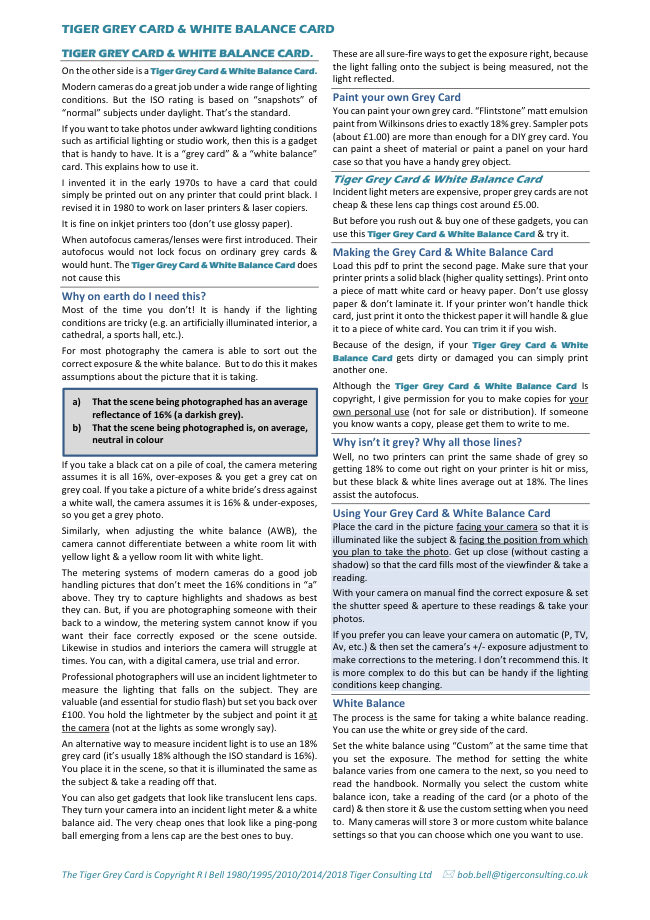
TIGER GREY CARD & WHITE BALANCE CARD
TIGER GREY CARD & WHITE BALANCE CARD. These are all sure-fire ways to get the exposure right, because
the light falling onto the subject is being measured, not theOn the other side is a Tiger Grey Card & White Balance Card.
light reflected.
Modern cameras do a great job under a wide range of lighting
conditions. But the ISO rating is based on “snapshots” of Paint your own Grey Card
“normal” subjects under daylight. That’s the standard. You can paint your own grey card. “Flintstone” matt emulsion
paint from Wilkinsons dries to exactly 18% grey. Sampler potsIf you want to take photos under awkward lighting conditions
(about £1.00) are more than enough for a DIY grey card. Yousuch as artificial lighting or studio work, then this is a gadget
can paint a sheet of material or paint a panel on your hardthat is handy to have. It is a “grey card” & a “white balance”
case so that you have a handy grey object.card. This explains how to use it.
I invented it in the early 1970s to have a card that could TigerGreyCard&WhiteBalanceCard
simply be printed out on any printer that could print black. I Incident light meters are expensive, proper grey cards are not
revised it in 1980 to work on laser printers & laser copiers. cheap & these lens cap things cost around £5.00.
It is fine on inkjet printers too (don’t use glossy paper). But before you rush out & buy one of these gadgets, you can
use this Tiger Grey Card & White Balance Card & try it.
When autofocus cameras/lenses were first introduced. Their
autofocus would not lock focus on ordinary grey cards & Making the Grey Card & White Balance Card
would hunt. The Tiger Grey Card & White Balance Card does Load this pdf to print the second page. Make sure that your
not cause this printer prints a solid black (higher quality settings). Print onto
a piece of matt white card or heavy paper. Don’t use glossy
Why on earth do I need this?
paper & don’t laminate it. If your printer won’t handle thick
Most of the time you don’t! It is handy if the lighting
card, just print it onto the thickest paper it will handle & glue
conditions are tricky (e.g. an artificially illuminated interior, a
it to a piece of white card. You can trim it if you wish.
cathedral, a sports hall, etc.).
Because of the design, if your Tiger Grey Card & White
For most photography the camera is able to sort out the
Balance Card gets dirty or damaged you can simply print
correct exposure & the white balance. But to do this it makes
another one.
assumptions about the picture that it is taking.
Although the Tiger Grey Card & White Balance Card Is
a) That the scene being photographed has an average copyright, I give permission for you to make copies for your
reflectance of 16% (a darkish grey). own personal use (not for sale or distribution). If someone
b) That the scene being photographed is, on average, you know wants a copy, please get them to write to me.
neutral in colour Why isn’t it grey? Why all those lines?
Well, no two printers can print the same shade of grey so
If you take a black cat on a pile of coal, the camera metering getting 18% to come out right on your printer is hit or miss,
assumes it is all 16%, over-exposes & you get a grey cat on but these black & white lines average out at 18%. The lines
grey coal. If you take a picture of a white bride’s dress against assist the autofocus.
a white wall, the camera assumes it is 16% & under-exposes,
so you get a grey photo. Using Your Grey Card & White Balance Card
Place the card in the picture facing your camera so that it isSimilarly, when adjusting the white balance (AWB), the
illuminated like the subject & facing the position from whichcamera cannot differentiate between a white room lit with
you plan to take the photo. Get up close (without casting ayellow light & a yellow room lit with white light.
shadow) so that the card fills most of the viewfinder & take a
The metering systems of modern cameras do a good job reading.
handling pictures that don’t meet the 16% conditions in “a”
With your camera on manual find the correct exposure & setabove. They try to capture highlights and shadows as best
the shutter speed & aperture to these readings & take yourthey can. But, if you are photographing someone with their
photos.back to a window, the metering system cannot know if you
want their face correctly exposed or the scene outside. If you prefer you can leave your camera on automatic (P, TV,
Likewise in studios and interiors the camera will struggle at Av, etc.) & then set the camera’s +/- exposure adjustment to
times. You can, with a digital camera, use trial and error. make corrections to the metering. I don’t recommend this. It
is more complex to do this but can be handy if the lightingProfessional photographers will use an incident lightmeter to
conditions keep changing.measure the lighting that falls on the subject. They are
valuable (and essential for studio flash) but set you back over White Balance
£100. You hold the lightmeter by the subject and point it at The process is the same for taking a white balance reading.
the camera (not at the lights as some wrongly say). You can use the white or grey side of the card.
An alternative way to measure incident light is to use an 18% Set the white balance using “Custom” at the same time that
grey card (it’s usually 18% although the ISO standard is 16%). you set the exposure. The method for setting the white
You place it in the scene, so that it is illuminated the same as balance varies from one camera to the next, so you need to
the subject & take a reading off that. read the handbook. Normally you select the custom white
You can also get gadgets that look like translucent lens caps. balance icon, take a reading of the card (or a photo of the
They turn your camera into an incident light meter & a white card) & then store it & use the custom setting when you need
balance aid. The very cheap ones that look like a ping-pong to. Many cameras will store 3 or more custom white balance
ball emerging from a lens cap are the best ones to buy. settings so that you can choose which one you want to use.
The Tiger Grey Card is Copyright R I Bell 1980/1995/2010/2014/2018 Tiger Consulting Ltd bob.bell@tigerconsulting.co.ukView original page 1Page 2 · Read text
TIGER GREY CARD & WHITE BALANCE CARD The Tiger Grey Card is Copyright R I Bell 1980/1995/2010/2014/2018 Tiger Consulting Ltd bob.bell@tigerconsulting.co.ukView original page 2
Related documents and language editions
From the M. Butkus archive. Original publisher and archive notices are retained.
Check the model and edition against your equipment.
PDF verified 2026-10-10.