Film cameras
Holga 120 TLR User manual
User manual for Holga 120 TLR. 11 pages in English. Read the original PDF, download or print a copy without registration.
11 pagesEnglish2.4 MB PDF
Loading your manual…Open PDF directly
Document details
- Brand
- Holga
- Model / document
- Holga 120 TLR
- Document type
- User manual
- Language
- English
- Pages
- 11
- File size
- 2.4 MB
- Category
- Film cameras
- Document date
- Not specified in catalog
Search available document text
Find a term, then jump to its page in the original PDF. Image-only pages may not be searchable; check the PDF for exact wording and diagrams.
Page 1 · Read text
HOLGA
‘TWIN LENS REFLEX CAMERA,
WITH BUILT-IN COLOR FLASH

MODELS 1207LR

TLR

OPERATION INSTRUCTIONS
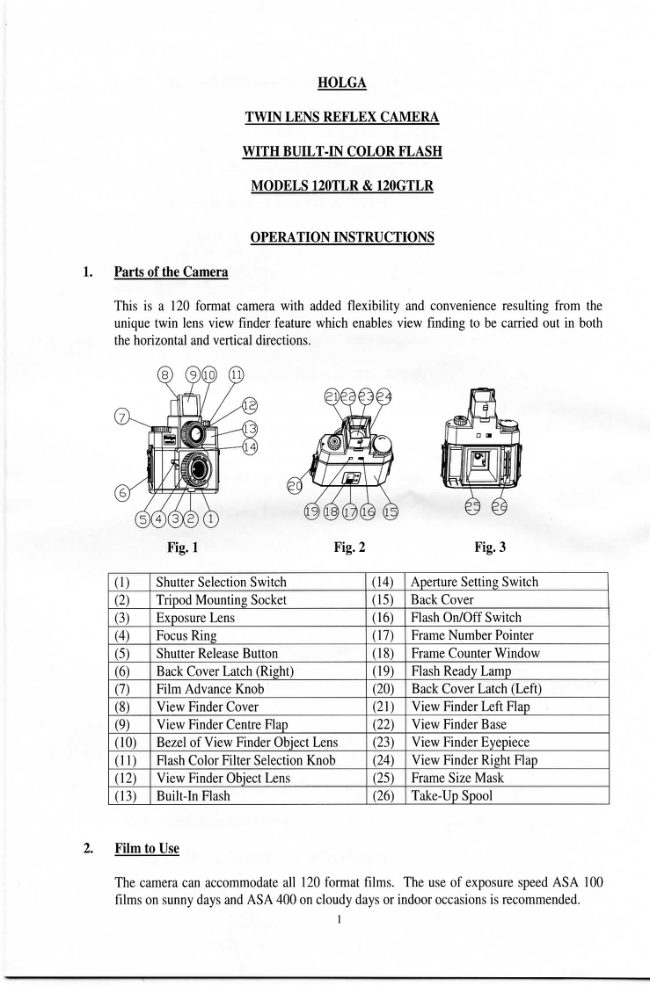
Parts of the Camera

This is a 120 format camera with added flexibility and convenience resulting from the
unique twin Jens view finder feature which enables view finding to be carried out in both
the horizontal and vertical directions.

® OO «

Fig Fie3
@_[ Sha [Aperture Sting Switch
(2) | Tripod Mounting Socket (15)| Back Cover

(@)_| Exposure Lens (16)_| Fash Ow OFF Sich
[Focus Ring (F7)_| Frame Number Pointer
(S)_| Shutter Release Buon (18)_| Frame Counter Window
(6) | Back Cover Latch (igh) (19) | Fash Ready Lamp
(@)_[ Film Advance Knob (20)_[ Back Cover Latch (Le
(8)_| View Finder Cover (21) | View Finder Left Flap
(©) | View Finder Cente ap (22) | View Finder Base
(10)_| Bezel of View Finder Object Lens | (23) | View Finder Eyepiece
(11)_| lash Color Filter Selection Knob | (24)

(12) | View Finder Objet Lens 25)

(3) | Builtn Fash 2)

Film to Use

‘The camera can accommodate all 120 format films. The use of exposure speed ASA 100
films on sunny days and ASA 400 on cloudy days of indoor occasions is recommended.
1
View original page 1
Page 2 · Read text
Setting Frame Size/Number of Frames per Roll of Film

‘The camera is provided with two different Film Size Masks o set the numberof frames per
roll of film - one for 16 frames of 6 x 4.Sem each in size and the other 12 frames of 6 x
em. There i the number “16” or “12” respectively embossed in the tp lft hand comers
of the Film Size Masks for identification. Follow the steps below to set the film
size/number of frames (see Fig. 4,5 and 6) -

(@) Push downward the Back Cover Latches on the two sides to unatch and remove the
Back Cover.

(b) Note the number of frames embossed in the top left hand comer of the Film Size
“Mask inside the camera, If the mask is not the one desired, swap it with the one for
the desired numberof frames.

(6) Slide the Frame Number Pointer on the Back Cover to point a the numberof frames
Which matches that of the Frame Size Mask used, and also to reveal the appropriate
Frame Counter Window atthe same time

(@)__Re-install the Back Cover and latch it onthe two sides.

Fig.4 Fig.5
Installation

‘Two AA batteries are required for operating the BuiltAn Flash. Take following steps to
install the bateres =

(a) Push downward the Back Cover Latches on the two sides to unlatch and remove the
Back Cover.

(b) Remove the Frame Size Mask to expose the battery compartments on the two sides
(Gee Fig. 7)

(©) Load an AA battery into each of the two compartments, aligning the polarity
according tothe indication inside the compartments (see Fig. 8)

(@) Put back the Frame Size Mask and the Back Cover and then latch the Back Cover in
place.
View original page 2
From the M. Butkus archive. Original publisher and archive notices are retained.
Check the model and edition against your equipment.
PDF verified 2026-10-10.