Film cameras
HOLGA 135 Panaromic Camera User manual
User manual for HOLGA 135 Panaromic Camera. 7 pages in English. Read the original PDF, download or print a copy without registration.
7 pagesEnglish0.2 MB PDF
Loading your manual…Open PDF directly
Document details
- Brand
- Holga
- Model / document
- HOLGA 135 Panaromic Camera
- Document type
- User manual
- Language
- English
- Pages
- 7
- File size
- 0.2 MB
- Category
- Film cameras
- Document date
- Not specified in catalog
Search available document text
Find a term, then jump to its page in the original PDF. Image-only pages may not be searchable; check the PDF for exact wording and diagrams.
Page 1 · Read text
‘Welcome to owning this new species of Holga plastic camera!

‘This is the first Holga camera where the lens can be changed!

This 135 film type panoramic camera is not only equipped with a standard SSmm f/8 lens, it also

‘comes with an interchangeable 0.25mm diameter {/236 pin-hole lens!

Enjoy!
L

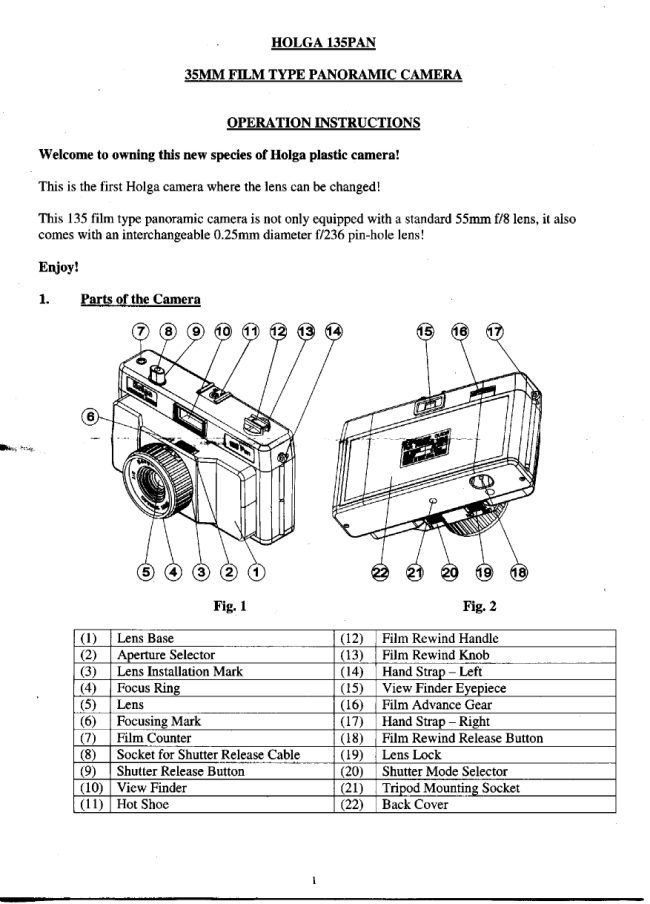
()_[ Lens Base __ (2)_| Film Rewind Handle

(2)_| Aperture Selector 3)_| Film Rewind Knob
(3)_| Lens Installation Mark (14) | Hand Strap — Left

(4)_| Focus Ring (15) _| View Finder Eyepiece

()_| Lens (6) | Film Advance Gear

(©)_| Focusing Mark (Q7)_| Hand Strap — Right

(7)_| Film Counter (8) _| Film Rewind Release Button
(8)_| Socket for Shutter Release Cable | (19)_| Lens Lock

(9)_| Shutter Release Button (20) | Shutter Mode Selector
(0) | View Finder (21) | Tripod Mounting Socket
‘(1 | Hot Shoe: (22) [Back Cover
View original page 1Page 2 · Read text
2 Eilm to Use

‘The camera can accommodate all 135 format films. For better effects, we strongly
recommend the use of films with ASA 400 or higher speed.

3. Eilm Loading

Film Compartment Film Advance Sprockets Film Tongue 1”

@

Oo

Slot on Take-Up Spool
Fig.3 Fig. 4 Fig. 5

Grab the Film Rewind Handle to pull up the Film Rewind Knob. - the latch for the
Back Cover will be released and the Back Cover will pop open. (Fig. 3)

Insert a new film roll into the Film Compartment and push the

iim Rewind Knob back

ane am ome engage into the film roll. If the knob cannot be pushed back; tartrTOtCw hatter

ccan be done so.

(©) Pull on the Film Tongue to pull out the film until the tip of the tongue reaches,
approximately, but not beyond, the hinge for the Back Cover.

m

(d) __ Insert the tip of the Film Tongue into the slot on the Take-Up Spool. Press the film
so that the tip of the film goes into the Take-Up Spool and the film becomes more or
less flat. (Fig. 4)

(©) Tum the Film Advance Gear slightly while adjusting the Film Advance Sprockets at
the same time to enable the sprockets to engage into the holes on the two sides of the
film.

(Snap the Back Cover back into place.

() Tum the Film Advance Knob to advance the film until it cannot turn any further and
then press the Shutter Release Button.

(t) Repeat (g) again until the number “I” appears in the Frame Counter (Fig. 5). The
camera is now ready for taking pictures.

4. Focusing
4.1. When Using S5mm Lens
View original page 2
From the M. Butkus archive. Original publisher and archive notices are retained.
Check the model and edition against your equipment.
PDF verified 2026-10-10.