Film cameras
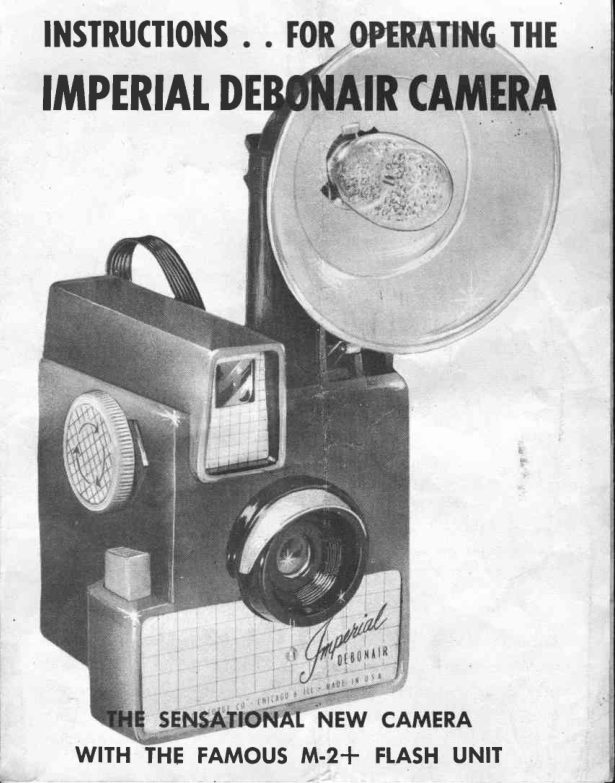
IMPERIAL DEBONAIR CAMERA User manual
User manual for IMPERIAL DEBONAIR CAMERA. 9 pages in English. Read the original PDF, download or print a copy without registration.
9 pagesEnglish1.0 MB PDF
Loading your manual…Open PDF directly
Document details
- Brand
- Imperial
- Model / document
- IMPERIAL DEBONAIR CAMERA
- Document type
- User manual
- Language
- English
- Pages
- 9
- File size
- 1.0 MB
- Category
- Film cameras
- Document date
- Not specified in catalog
Search available document text
Find a term, then jump to its page in the original PDF. Image-only pages may not be searchable; check the PDF for exact wording and diagrams.
Page 3 · Read text
WRIST


          FITM
       WINDING                           VIEW FINDER
        KNOE

                                    TAKING
         SHUTTER                        tENS
         RETEASE


Your Debonoir Comero is o fine precision instrument,designed
to toke consistentlycleor ond beoutiful pictures.

           NOTICE: READ CAREFUIIY
 Eefore uring  your comero Reod rhe inrtructionr  in  thir  Boo|let.  They
  will help you get better picturer ond more enioymenl from your cj1meio.
          ?,Oiar 6klt4o lo  ?,/oe
Eosfmon Kodok Verichrome or Ansco Plenochrome # 620  is
recommendedfor either Indoor or Outdoor pictures. They will
give cleor ond shorp pictures under normol conditions. How-
ever, if you wish to toke Oufdoor pictures on dull doys, then
o foster filln such es, Eosfmon Super XX or Ansco Superpon
# 620 is recommended.www.orphancameras.com
                                  _.,                                                                      ,
View original page 3Page 4 · Read text
l.  Removefront of Comero by forcing
the locking clip ot bottom of Comerq    -,/,
downword. Hold bqck of Comero with t/         /
one hond ond with other slide front of
Comero forword.

 2. Ploce roll of film in the lower portion of the focol box opposite
w i n d i n g k n o b . T h i s  i s d o n e b y   f o s t e n i n g  t h e s p o o l   i n t o  t h e
                          two pivots. Be sure the bock side of the
                              -\\      film is downword ond roll it ploced over
                            the retoiner spring. You will see empty
                           spool on opposite side held by the wind-
                            ing knob. To be sure, turn the winding
                        knob severol time to see thot empty
                           spool turns with knob.

 3. Threod pointed end of the poper into
 the lorge slot of empty spool. Be sure
 pqper is centered on empty spool so  it
 will wind evenly. Give the winding knob
 one full turn -  iust enough to ossure q
 firm grip on the spool.
                                4.  After Comero hos been looded, in-
                              sert focol box into bock of Comerq ond
                              slide to originol position.
                               After  position  is set, press foref inger N                      \\             firmly on center of locking clip which                )
                                   will snop locking edge  into  position.
                         (Do not press tip of locking edge.  lt will
                            nof snop into position.)
View original page 4Page 5 · Read text
The omozing M-2 Plus Flosh Gun hos the newestscientificollyde-
  signed reflector for better qnd eosier oli 'round flosh photog-
   ro phy"
  The M-2 Plus hos been engineered so you cqn use the new revo-
     futionory low priced M-2 Bulb os well os the mony boyonet
  bosed bulbs without ony odiustments,or even the use of odopters
  necessoryon  oll other flosh guns. Just insert bulb into socket
  ond you ore reody for picture toking.
  Try it! You'll love its versotility ond eose of use.
               *  Potented feotures mokes eosy operotion ond better f losh pic-
  tures.
 UNIQUEFEATURESMAKE EASYTO OPERATE

                                    EJECTORI.EVER


                                    -COVER


             COVER LATCH                   PINS-FIT INTO                              www.orphancameras.com CAr!{ERASOCKETSr Pslcnl Applicd For
View original page 5Page 6 · Read text
T0 Rtitovt BACK(Ftc. | )

 To remoye cover, push cover lotch

 in firmly with o downword motion.

 Be coreful not to drop cover.
                                                  Flg.   I


                          T0 |NSERTBATTTR|IS(Ftc. 2l
                                Push botteries down  ogo inst bof-
                                         Iery  springs ond  slip  into  pf oce.
                            One  tip up ond one  tip down  in
                                 occordonce with  instruction on  in-
                                     side of F.G. body.


   I0 RIPLACEBACK(Ftc. 3)
Insert cover eors into body  recess
ond  press bottom  of  cover down
ogo inst body.  Moke  sure  cover
lotch is inside body ond pqsses thru
hole.                                                     flc.
View original page 6Page 7 · Read text
ATTACH TO CAMERA
Flosh gun  is instolled by pushing flosh gun  pins into  receptocles on  c<lmero.
              INSERTFTASHBUTBS
To insert bulb, push ony of the following listed bulbs into (either boyonet boses
or  M'2 bqse) socket until   it  cotches. The  M-2 Plus uses the  following  flosh
bulbs: the new revolutionory M-2 bulb or the boyonet bqsed bulb produced by
Generol Electric, Sylvonio, Westinghouse or Norelco.
                EJECT FTASH BULBS
Push eiector lever down  until bulb releoses. Sometimes it  is necessqry to  tip gun
downword to couse bulb to drop out.
            REMOVE REFTECTOR
To remove reflector from flqsh gun body, turn  reflector counterclockwise until  it
is releosed.
             REPTACEREFTECTOR
To insert reflector, line up  slots in  reflector with socket eqrs, push down  into
ploce ond turn clockwise until reflector is firmly  in ploce.


A.  Insert flosh bulbs  in  flosh unit before replocing flosh  unit bock  into the
   comero.
B. Use only Press Flosh ft 5 o, Sylvonio No. 25  f losh bulbs.
C.  Flosh gun is instolled by pushing flosh gun pins into receptocles on comero.
D. Flosh bulbs ore inserted by slipping into socket ond pus{ring down gently  till
   you heor it click into ploce.
E. To eiect "Hot"  bulbs pull  lever on side of flosh-housing stroight bock-this
    releqses bulb-turn  upside down to drop bulb.
F. When toking  flosh pictures, use o quick firm pressure on  shutter qrm ond
   complete exPosure in one continuous motion, pressing shutter olt  the wqy
   down, letting go, ond  letting shutter orm return itsetf. DO NOI  press shutter
   orm slowly, os the flqsh bulb                           www.orphancameras.comcqn go off premoturely cousing loss of exposure.
View original page 7Page 8 · Read text
I.  Hold the comero steody when snopping pictures, os the
 slightest movement will couse blurring.
 2.  Hold the comero fevel.
 3.  Don't try to get too much into one picture, qnd be sure you
see your subiect in the view finder before snopping ?he shutter,
moking sure everything you wont to toke is visiblJ in the view
 f inder.
4. Lood or unlood film in the shode only.
 5. Wind  film immediotely ofter toking eoch picture to ovoid
double exposure.
 6. Hove eoch roll of exposed film developed os soon ofter  it is
exposed os possible.
 7. Do not ever ottempt to cleon the lenses with your fingers.
Use only o  dry, soft cfoth or lens brush.
8. When toking.pictures hove the sun behind you.  Subiect
should be in bright sunlight or open shode with unobstrucied
.199r sky obove. Do not toke picfures facing the sun, os this
will couse flore spots on your picture.
9, Enlorgements up  to 8 x  I 0 con be mode  f rom o ll shorp
negofives.
10. When using flosh ottochment, be sure to use o new flosh
bulb for every new picfure.
l.l .  stoy 8 feet or more owoy from your subiect. lf you get too
cfose your picture will be luzzy ond indistinct.
           l"lsq{i*E'  Beflib'              ta#u}9,ll',*i*fi-                                                                                                                      '  ' ..ffsr1t'uilitt.,''b                                                                          giffii,r:i;                 $**1O,,*t$#*5i:',rrl**Uf::lig5U5*d:1,;r:+l
 ,  ss6:,ffi gt,,.'ff     '.,,,.###fti                        $--##
 ,,1'+f#t$tl?tf$f+ti                                   ffi     ,',' .   fl-            +t
View original page 8Page 9 · Read text
Your  Comerq   is  only  guqronteed   qgqinst   defective
workmonship   qnd  mqteriql   for  q period  of one  yeqr.
 If service is required return the comero to the foctory, filling
out the informotion requested below together with $ I .00  i;
either currency or stomps to cover the cost of postoge ond hon-
dling. Moke sure you pock securely!
Pleose return negotive so we con determine foult in comero,
 if ony.

               P R I N T P L A I N T Y
Your nome-
Street
City-
Stote-
When purchosed
Noture of comploint


                          www.orphancameras.com
View original page 9From the M. Butkus archive. Original publisher and archive notices are retained.
Check the model and edition against your equipment.
PDF verified 2026-10-10.