Film cameras
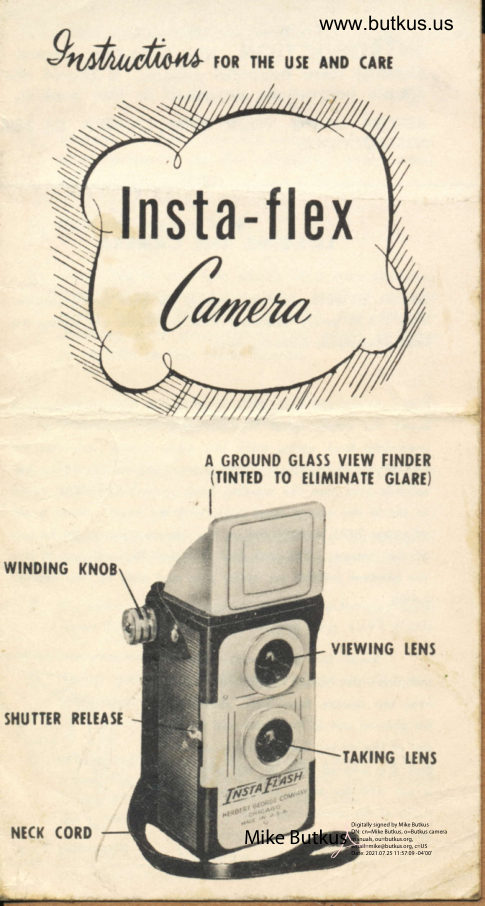
Insta-Flex User manual
User manual for Insta-Flex. 8 pages in English. Read the original PDF, download or print a copy without registration.
8 pagesEnglish1.1 MB PDF
Loading your manual…Open PDF directly
Document details
- Brand
- Insta-Flex
- Model / document
- Insta-Flex
- Document type
- User manual
- Language
- English
- Pages
- 8
- File size
- 1.1 MB
- Category
- Film cameras
- Document date
- Not specified in catalog
Search available document text
Find a term, then jump to its page in the original PDF. Image-only pages may not be searchable; check the PDF for exact wording and diagrams.
Page 4 · Read text
www.butkus.us
 INTRODUCTION The tnsto-Ftex comero is o
  sis?ently cleor beourifuf pictures. lt should olwoys
 simple inslruclions described in this booklet.
 BEFORE USING YOUR NEW CAMERA BE SURT
 INSTRUCTIONS:


        TOADING THE CAMERA

 Rcmovc rhe bock covor by purhing thc bock rpring (illurrrc-
 tionr I & 2) gently bockword wirh rhe rhumb ond rliding thc
 bock downwqrds removing bock.


 Pull our rhc ftlm rewinding |rnob (note rpring oction) ond
 inrcrl lhc cmpty rpool provided wirh lhe comcro. lel  the
 rewinding knob rpring bock into ploce moking 3urc rhor lhe
 cnd of the :pool engoge3 thc pinr on the knob. To be ob-
 rolufely turo lurn the winding knob rcverol timer ond wolch
 lo 3ec if the empry spool turnr wirh rhe knob. Inrert q roll '-
 of cithcr ?62O or P820 film in the comportment of the boilom
 of lhe comero. You will ftnd rhor thir film will iurt fit into
 lhe groover locoted on either ride ond held by lhc retoincr
 rpring.


       Ereok the tcol on the film
ond drow thc popcr (illurrrorion 3)
ovcr lhe 3quo?c focql box. Threod                 www.butkus.us
thc pointed end of thc poper into fhe
rlot of thc cmpty rpool rnofring sure
thot rhe colored ride of thc poper
ir out ond rhc block ride foccr the
inridc of lhe rquore focol box. Moke
sure thol the popcr is cenlered on
                                                  lllurtrolion 2
View original page 4Page 5 · Read text
s d fine precision inslrument designed to loke Gor-
oys be hondled corefully in occordonce with the few

T TO FAMII.IARIZE YOURSETF WITH THESE SIMPTE


                                   lhe emply rpool in order thot  it will
                              wind  evenly. Now  give the wind-
                                   ing knob obout one  full  rurn-iurr
                              enough to bind the poper ond osrure
                            o firm grip on the spool.


                                                        It moy be  nece3iory ol  limer  lo
                                 hold the  roll of film on the bottom
                                     of comero wilh one finger until lhc
              lllurlrolion 3            film hor been threoded.


             WINDING THE FIIM

                      You ore now reody lo reploce lhc
     bock by locling  it in irc prope? ploce ot the boilom  firrt,
    ond then prers with your thumb ot the top unril rhe bocl
     spring rnopr rhe bock firmly clored.

    Now lurn the winding knob unril the         <G
     figure I oppeorr in the red window         ,@
    on lhe bqck of the Inrto-flex com-
    e?o (illustrorion 4). An indicoting
    hond ond o .ow of dotr will op-
    peor rhorlly before fhe figure  I
    oppcori, Your Insto-Flex comero is    www.butkus.us
    now reudy to loke your firrt piclure.
                                                        lllustrotion 4
View original page 5Page 6 · Read text
www.butkus.us
 Either Eoslmon t62O Verichrome or Agfo pB2O
 Phnochrome fifm is recommended. Either of
 these porticulor fifms will give cleor shorp pic-
 lures under normof light conditions. you con
toke pictures eorly in the doy, ol noon or eyen
 lote in the ofternoon.


        TO TAKE A PICTURE

Ploce rhe neck strop oround your neck, hold
the comero wqist high ond frome lhe subiect
you wish to phorogroph in the brillitrnt view
finder. The subiect should nol be closer thon 6
feet from lhe comero. A singte downword stroke
of the shutter releose operoles the shutter qnd
snqps the picture. After fhe first picf ure hos
been loken, turn the winding knob until figure 2
oppeors in the window. Repeot this operotion
until l2 pictures hove been snopped.


        REMOYING THE FILM

After the  | 2th picture hos been token turn the
winding knob until the poper disoppeors com-
pletely from view in the red window. Remove
lhe bock. The exposed roll con now be re-
moved ond its end fostened with the glued
poper found on the end of the film. Before re-
plocing the bock, move the remoining emply
spool to lhe lop of the comero ogoin to be reody
for o new roll of film.
View original page 6Page 7 · Read text
Alwoys hold the comero steody when snop- l.    ping pictures os the slightest movement
     will couse q blur.

 2. Hold the comero level.

  ].  Don't try to gel too much into one picture,
   ond be sure you see your subiect in rhe
    view finder before snopping the shutter
    moking sure everylhing you wont to toke
      is visible in the view finder.

 {. Hove the comero in lhe shode when lood-
     ing or unlooding the film.
 t. Wind film immediotely ofter loking eoch
     picture.

 6. Hove eoch roll of exposed film developed
    os soon ofter it is exposed os possible.

 7. Do nol ever ollempl lo cleon lhe lenses with
    your fingers, buf use only o dry, soft cloth.

 8. Toke your fnsto-Flex comero wilh you
    wherever you go.

 9. When toking piclures olwoys remember to
    hove the sun behind you. DO NOT EVER
   TAKE PICTURES FACING THE SUN.

10. Enlorgemenls up lo 8xlO con be mode from
     oll shorp negotives.
View original page 7Page 8 · Read text
www.butkus.us
  :{;6S666FS666S66.%:                                 ql 15
  g GUARAN"]TEtr                 H  15qi  '#SRRSSSSSfifrSSRd:


The Insto-Flex Comero is guoronteed ogoinst
defective workmonship ond moteriol for o pe-
riod of one yeor.
 lf service is required relurn lhe comero lo lhe
fcclory, filling out the informotion requested
below together wiih 5Oc in either currency or
slomps to cover lhe cost of postcrge ond
hondling.

           PRINT PIAINLY                            I
Your nome
                                                                                                     Itl!lStrebt          ,

Ciry                                                                                                                                       ,lt
Stole                                                                     *
When purchosed

Where purchosed
e{iltrehl lnotan- (ompan4-
   3II NORTH DESPTAINES STNEET
     CHICAGO 6, IIIINOIS
View original page 8From the M. Butkus archive. Original publisher and archive notices are retained.
Check the model and edition against your equipment.
PDF verified 2026-10-10.