Film cameras
Kalimar 44 User manual
User manual for Kalimar 44. 3 pages in English. Read the original PDF, download or print a copy without registration.
3 pagesEnglish0.9 MB PDF
Loading your manual…Open PDF directly
Document details
- Brand
- Kalimar
- Model / document
- Kalimar 44
- Document type
- User manual
- Language
- English
- Pages
- 3
- File size
- 0.9 MB
- Category
- Film cameras
- Document date
- Not specified in catalog
Search available document text
Find a term, then jump to its page in the original PDF. Image-only pages may not be searchable; check the PDF for exact wording and diagrams.
Page 3 · Read text
www.orphancameras.com

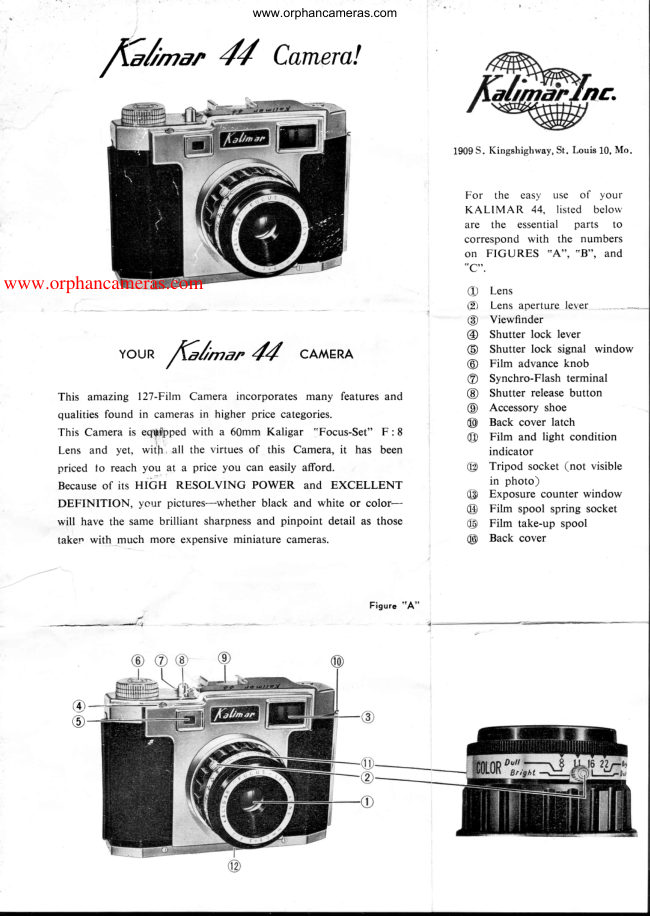
      TO LOAD THE                    @ @ @ @ @                     44,             7Glnur
                               ( See Figures B and C  )
 Kalimar 44 takes 12 pictures on No. 127 Roll  Film,  color  or
 black and white.
 Loading and unloading of film should be done in the shade.   @
    I  . Raise back cover latch @ and open camera back @.    @
   tr.  a.  Place empty  film  spool  in  camera  into  right  hand,         take-up corilpartment under the film advance knob @.   o
       b.   Insert roll  of 127 film  into  left-hand  compartment  of
          -- csmera, with one end of the spool engaged in  spring
        Sbekef@- an_d other end fixed  in the upper socket.
       c.  Pull out the leadcr paper of the film and insert  it into
          the slot of the film take-up spool @.
         Secure the  paper  leader by turning the film advance                                                 ceB"                                                                                                                           Figure
        knob @ several turns in the direction  of  its arrow.
 m.  a.  Close the back cover @ and lock the back cover latch
       49  Oy edhing     it  al! the way -dor+n.
      b:  Turn  the film advance knob @  until No.   I appears in
          the exposure count  window €9 on  the back  of  the           SPECIALNOTE
         camera. You  ate now ready for the  first exposure.
                                                                                                        *                                                                     (eC"              Do  not take pictures at distance                                                              Figure   @I     @                                               closer than 6 feet.
                                                I                                                                                       *                                                          When camera is not  in use,
                                                               move shutter lock lever @
                                                                          so  signal window @  is
                                                                                         red, to prevent accidental
                                                                          exposures.


                 ro rAKEptcruREswtl{ rHE         44                                               lGtl-u,
 I .  Slide the shutter lock lever @ until the shutter lock signal window  (i) is black.
tr. When using color film, take outdoor pictures preferably between 9 a. m. and 3 p. m. In midsummer,
    take pictures between 8 a. m. and 5 p. m.
     a.  For bright sceneswhen shooting color, set the lens aperture lever @ at F: 11. On dull days, use F:8.
     b. When using black and white roll film, set the lens aperture lever @ at F :22 on  bright days, and              '        at F:16  ior duii iight conditions.                                             -
                                                                                                                                                                 ' cA"     c.  See film and light condition indicator @l in Figure
          for a simple guide to the correct lens setting.
                                      lever (D hold the camera asm. After  setting the lens aperture'cf)"     illustrated  in  Figure       and, looking  through the view-                ''frame"
     finder @          your  desired picture.
[\r.  Holding the camera VERY STEADY,  push down  on  the
    shutter release button @ SLOWLY  and FIRMLY   until   it
     clicks. Release the button.  You have taken  a picture.
    Use a flash gun when taking indoor  pictures.
V . Turn the film advance knob @  until No. 2 appears in the
    exposure count window  f9  at the back of the camera.
   Make   it your  habit  to  wind  the  film  immediately  after
    taking  each picture  to  avoid  double-exposures.   Repeat
    the above operations until 12 pictures have been exposed.
     After  the last picture (No. 12) has been exposed, continue
     to wind  the film abvance knob  until   all the  paper  is on
    the film take-up spool. Open the camera back.   Holding
    the film  roll  with  your  fingertips, push  it down toward  the
    bottom  of  the camera  to  disengage  it  and  remove the
    exposed roll  of  film from  the camera.


                                                                                                                                   Printed  in Japan
View original page 3From the M. Butkus archive. Original publisher and archive notices are retained.
Check the model and edition against your equipment.
PDF verified 2026-10-10.