Film cameras
KIN-DAR Stereo User manual
User manual for KIN-DAR Stereo. 12 pages in English. Read the original PDF, download or print a copy without registration.
12 pagesEnglish2.1 MB PDF

Loading your manual…Open PDF directly
Document details
- Brand
- Kin-Dar
- Model / document
- KIN-DAR Stereo
- Document type
- User manual
- Language
- English
- Pages
- 12
- File size
- 2.1 MB
- Category
- Film cameras
- Document date
- Not specified in catalog
Search available document text
Find a term, then jump to its page in the original PDF. Image-only pages may not be searchable; check the PDF for exact wording and diagrams.
Page 2 · Read text
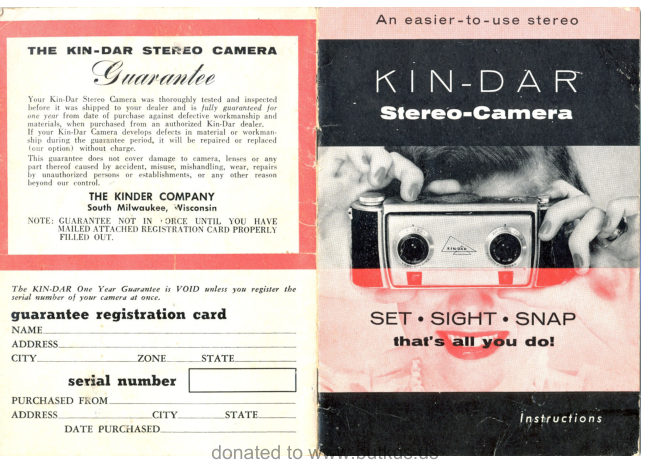
An  easier  -tc  - use  stereo


          tSET   $!e F-iT. $l*!,{P
    lhal's    all  yorr  do!
View original page 2Page 3 · Read text
You ore obouf fo reolly enioy phofogrophy.
When you take a picture, you want that picture
 to re-create for you the things you saw when you
 took  it.  Stereo photography  is best able to do
 this.  Looking  at a stereo slide you are back again
 at a favorite  vacation  spot, you are again
pre_sent at some treasured moment  of the past,
and people seem almost to talk.   It  is an exciting
and  re\ rarding  experience -   rir?beflevable
when experienceu  for  the  first  time,
This  delightful  and  thrilling  kind  of  picture
making should not be reserved for those few who
can buy an expensive camera.    I have  felt
that a camera could be designed that would be
excellent  in every way  including   its  lenses,
and yet  sell at a popular  price.
In  the KIN-DAR     I  believe  I have accomplished
this.   It  is a fine camera  in every way -ln
appearance,  in ease of  handling,  in  rang.e of
settings, and in the magnificent  stereoscopic
                     pictures  it produces. fts lenses
                    are the well known Steinheil
                   Cassars, made by the  first
                company ever to manufacture
                   photographic  lenses.
                 The KIN-DAR   is inexpensive,
                     not becau,se of any cheap-
                    ening, but because of careful
                 and advanced design
                    Ieading to real manufacturing
                  economies.

                  Designer


                     www.orphancameras.com
View original page 3Page 4 · Read text
Color Sfereois simple-   with o l(lN-DAR
You're about to get acquainted with an easier-
to-use stereo camera. The precision built
KIN-DAR  is as easy to make friends with as a
simple box camera.
F or- simplicity, all controls are clearly marked.
You don't have to memorize instructions.
 Yqu'll get good stereo-picturesfrom the first.
Despite its simplicity the KIN-DAR   is a real
professional's stereo-camera-capable of bringing
 out the best in a good photographer.
 If you have any questions-  ask your dealer.
He knows more about cameras than anyone
 else in town.


   s h u t t e r   r e l e q s e  b u f l o n  (sn a p s             fo cu sin g  d io l  (focuses cam er a,
   p ic t u r e )                                         s h o w s d i s i a n c e , g i v e s  r a n g e o f
   q d v q n c e    f i l m  k n o b     I a dva n ce s             s h a r p n e s sa n d   l e n s o p e n i n g  t o u E e
     f i l m , a u t o m a t i c a l l y c o c k s s h u t t e r )           fo r   { la sh )
  rewind   c r q n k    ( r e c e s s ed in                  t/3.5   cooled  lenses  (precision-
   c a m e r a   t o p ,   f l i p s o u t )               ma tch e d , h iq h ly color - cor r ected
                                        S i e i n h e i l - C a s s a ra n a s t i g m a t s)   e x p o s u r e   c o u n t e r    ( t e lls n u mb e r
   o f  s t e r e o p i c t u r e s  l e i i    i n co me ra )           shutter   indicotor


                     \\
View original page 4Page 5 · Read text
*i,'l.',1'...
The view-rangefinder  window  is located
at the lOWef gdgg Of thg baCk Of yOUf      i"";"".;""'"'.'.".'i
KIN-DAR   to give you a sighting  position
r,vhich braces the camera firm  and  flat
against your  forehead.  This  is the
steadiest, most comfortable  position from
which  to focus and snap, and the camera
is naturally  level (as  it should be for
best stereo results ) when held this way.


                     www.orphancameras.com
View original page 5Page 7 · Read text
is cocked.


20 exposure  roll    36 exposure  roll   20 exposure slereo  roll
   7 Set Exposure counter as shown, for
     the filrn carttidge used' Counter may
     be set by pressing down and turning.
       i5i*  is ; positive-typecounter and
          it will record each picture you take
     and show-touchpictures left to be taken'
     Don't             it again until next time
     you load the camera'

                  www.orphancameras.com
View original page 7Page 8 · Read text
N E X T .    LET'S  SET!
       To make your settings all you have to do is
         turn the camera's lens rims.

       Turn this rim to the        Turn  this rim  to the
        lens opening (f-number)    desired shutter speed.
        you want.  F -numbers      Speeds are marked
        from  3.5 to 16 are           fiom  L/I0  to L/200 of
       marked on rim.*             a second on this rim.
                                                               ( Markings  are in
                                 whole numbers:
                                  10 means 1/L0,
                                  50 means I/50,  etc.)
                                   There  is also a B
                                       (bulb) marking; on B,
                                        shutter stays open as
                                      long as you hold down
                                     your shutter release
                                        button.
             ;'Your KII{-DAR is marked uith the "full-


      HOW  DO  YC,U I(NOUY
     W H A T  S E T T I N G S   T O M A K E ?
         Erposure  settings  f or ?tour KIN-DAR  Stereo
          a.re fi,gured the same wa?l as f or anA single lensil         co"mera, and o,n?Jchart  appl?ting  to the one
          applies equally to the other.I        So the simplest way  to select exposure
          settings  is to follow  the easy-to-read  charts
           that come in the  rolls  of  film you buy.
           You'll  get  fine results,  too.
View original page 8Page 10 · Read text
Cqution
     When the Exposure Counter reaches No. 1
      you have come to the end of your film. After
       taking this last picture DO Ir{OT ADVAI{Ctr
       the film farther. Lift  the Film Advance Knob,
       turning   it  slightly  in a clockwise clirection.
     You  can now proceed with  the unloadingf-    directions.
It
View original page 10Page 11 · Read text
DEPTH  OF  FIELD

The sharpest part  of any picture
is the object focused upon.  Objects
both nearer and farther  from  the
camet&, within  a certain range,
depending upon the lens opening being
used, will  also be acceptably sharp.
This  range  of  distances  is called    'Depththe           of  Field'.
To read the depth of  field lor  anji-selii"F,?aE+he   two=-    ---
distances on the focusing dial opposite the dots for the lens
opening being used. For example, if  f:8  is being used the
near distance will be i4dicated by the dot at 8 on the left side
of the index mark while the far distance will be indicated
by the dot at f8 on the right side of the index mark.  Every-
thing between these two distances will be acceptably sharp.
If   it  is desired to include distant objects such as scenery
as well as near objects, the greatest possible depth of field                                                            'INF.'will be obtained by setting the focusing dial so that
is at the dot for the lens opening being used. The near
distance can then be read opposite the conesponding dot
to the left of the index mark.www.orphancameras.com
View original page 11
Page 12 · Read text
-".d--    t*C,4.
 THE     lN-   R STEREO  GAlu

       -; 4'-sJ    .-l"n YE      9oo^nruhn
b'Wiipfl$";     fi?"fthil      *u, thoroughlytestedand inspected
   before  it was shipped  to your  dealer and  is  lully  guaranteed Io,
   one year from daie of purchase against defective workmanship and                                                                                                 -   materials, when purchaied  from  an authorized Kj-n'Dar  deaier.
     If  your  Kin-Dar  t"*"ru    develoix   rlelee*-s*t:.iinaferial  or workman'
   ship  dr:ring the guaran*r.eeperiod,  it  will  be repaired  or  replaced
      ( our option )  without  charge.
   This guarantee does not cover damage to camera, lenses or any
    part thereof caused by accident, misuse, mishandling, wear, repairs
   by  unauthorized persons or  establishments, or  any  other  reason
   beyond our  control.
         THE KINDERCOMPANY
              South Milwoukee, Wisconsin
  NOTE: GUARANTEENOT IN FORCE UNTIL YOU HAVE
       MAILEDATTACHEDREGISTRATIONCARDPROPERLY
       FTLLEDOUT.


                                                                                                                                                                                              . l Y t d                   l c t l z A                 t \ l l l       T - l l l Y l
View original page 12Related documents and language editions
From the M. Butkus archive. Original publisher and archive notices are retained.
Check the model and edition against your equipment.
PDF verified 2026-10-10.