Film cameras
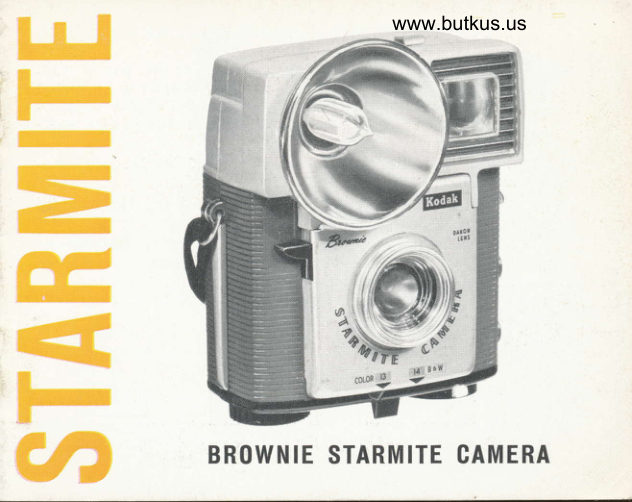
Kodak Brownie Starmite User manual
User manual for Kodak Brownie Starmite. 17 pages in English. Read the original PDF, download or print a copy without registration.
17 pagesEnglish3.6 MB PDF
Loading your manual…Open PDF directly
Document details
- Brand
- Kodak
- Model / document
- Kodak Brownie Starmite
- Document type
- User manual
- Language
- English
- Pages
- 17
- File size
- 3.6 MB
- Category
- Film cameras
- Document date
- Not specified in catalog
Search available document text
Find a term, then jump to its page in the original PDF. Image-only pages may not be searchable; check the PDF for exact wording and diagrams.
Page 2 · Read text
Yoi.rr: Flrownie Sta,rrnite Ta,kes All 3
You are ready for picture{aking indoors or out, day or night
with your Brownie Starmite Camera. ln addition to its built-in
flash, the Starmite features compact design, double-exposure
prevention, pictures in full color - prints or slides - plus black-and-white.
I Kodak Verichrome Pan Film-produces 3Vz x 372-inch stand-
ard enlarged black-and-white  prints.
2 Kodacolor Film-produces 3/z x 3Vz-inch standard enlarged
color prints.
3 Kodak Ektachrome Film for Daylight for daylight pictures
and Kodak Ektachrome Type F Film for flash pictures-produce
super slides 2 x 2 inches, picture size 11/z x lVz inches.
  See your photo dealer for processing, prints, and enlargements.
                                           Kodat(      I(odeh      Kodacolor                                         Eklachroms      Verlchrome
      Fan Film                                        DAYIIOHI
  WM
                                    for  I 2 color o        o snopshois   HJ::i[lri
View original page 2Page 4 · Read text
Venmo @mike-butkus-camera  Ph. 2083
PayPal Name  Lynn@butkus.org      www.PayPal.me/lynnbutkus
View original page 4
Page 5 · Read text
i.,  " " 1,.-iL (tltt'tttls itr srrltrlttttl liql,l           t"
\orr:    Il rotr rrc praclicing uith lrr cllll)l\ crr)tefii rnri llltl  llte shlltcf
 rt'lcirsc (shorrn ()n l)itgc fl) ci!nr)()l bc pressrti rloun. lrrrrr lhe rrinri krrolr
on lhe l)()lt()nr Ol thc eltrrent  lr lLrll ltrrn.
 I  ItLrrh the I I:\'r R on thc bottont of tltc cirnrellr to Ol,lrN:  tltcn
rrithtlnrw thc  I lL\t uot-DLR fronr thc cluleta as illLrstrlrterl.
2  |hc e nrptl :pool :horrlrl bc ovcr thc \\'rNl) xrorr. ll'the cnd of
the:pool docs uot cngltgc thc *ind knob, turn thc *irrd knob.


             HOTDER
View original page 5Page 6 · Read text
www.butkus.us
3 l)lacc thc entl of thc full filrrr spool bctu.een the fork of thc
slnrNc pointed out by thc uorrl Lo.,ro on the film holcler. push
trp against thc springl then su,ing thc other cnd of thc sDool in
and lct it snap into thc llor.t   .
4 Brcak thc lllm scall thctr clr.arv thc papcr, colore(l sicle out.
ovcr thc          lalge opcning in tlrc filr-n holdcr ntarked FIL[,{ THIS                'lSID[:].  hrcad thc enrl of thc pape-r evcnll, into the slot of the
cnrpty spool.-furn thc r.r'iud knob tuo full turns anC at the same
trrre appll,slight prcssur.e on thc pupcr to []e ccrtain it is wourtd
on thc spool straight and tight.


                                                                                                                                       Digitally signed by Mike Butkus
                                                                                                      DN: cn=Mike Butkus, o=Butkus camera manuals,
                                                                                                                 ou=butkus.org, email=mike@butkus.org, c=US              Mike Butkus Date: 2022.12.07 20:03:26 -05'00'


     HOIE
View original page 6Page 7 · Read text
5 With the lock lever at OPF.N. rcplace
               the fllm holder; make sure it is all the way
                   in. I-ock it in place by moving the lever all
               the way to LocK.
              6 Look into the recl window on the camera
               back. Wind the film until the warning ar-
           row appears; then slowly wind until the
                 "l"  is centered in the window. -lhe film
           name precedes each of the l2 numbels.
               Before making any important pic-l                tures a trip or somc special event-
                            it is wcll to shoot a roll of film out-
               dools and indoors with flash. -this
                     uill provide a cheek on lotrr eqrrip-
               ment. Your Kodak dcaler will be
                 glad to help.
               Kecp the lens clean. Wipe the
                surface gcntly with Kodak Lens
 '..\          Cleaning Paper or Kodak Lens
                 Cleaner and a soft, lintless cloth.
View original page 7Page 8 · Read text
www.butkus.us

               Neaer in bri,ghtfINLOAD                              or d'ireet li,ght

 t After the 12th snapshot, wind until the end of the paper passes
the window and is completely wound on the take-up spool.
2 Push the lever to opEN. withdraw the roll holder. Grasp the
end of the film spool near the forked spring and swing the film
spool out.
3 Fold the end of the paper under. seal it with the paper sticker.
4 To reload the camera, move the empty spool to the winC knob
side of the roll holder.
h'rponr,lNr: Do not leave exposed film in bright light. Always have
film developed as soon as possible.
View original page 8Page 9 · Read text
OUTDOOR SNAPSI{OTS
I Select the proper lens opening by pressing in the LENS opENrNc
LEVER and moving  it all the way to the end of its slot.
    o Set the lever at COLOR 13* for Kodak color films. The
 .      best outdoor color snapshots are made in direct sunlight.
    o Set the lever at 14 B&W for Kodak Verichrome Pan Film.
         It can be used on sunny, hazy or cloudy-bright days.
                           Never set the lever be-
                                tween these positions.

                      2 Keep at least 5 feet away
                             from the subject when using
                               the 13 setting-at least 4 feet
                                 with the 14 setting.
                      3 With the sun behind you,
                          compose the picture in the
                             eyeJevel finder located on
                                    *Exposure-value numbers
View original page 9Page 10 · Read text
www.butkus.us
       the back of the camera, at the top left side. place your eye close
       to the finder so that all four corners of the front finder frame are
        visible.l
    a Hold the camera steady while slowly pressing the suurrEn
      RELEASE all the way down.
     Nors: The shutter release remains
      locked after it is tripped until the
       winding knob is turned. This feature
       prevents accidental double exposures.
      A silver band will appear behind the
        lens to indicate that the film should be
       advanced.
    5 Advance the film.
I    The picture shows lhe recom mended
     woy lo hold the comero. lt's imporlont
        lhot you get o firm grip on lhe comero
     qnd lhot your finger or lhe neck sfrop
         is nol in fronl of the toking lens.
View original page 10Page 11 · Read text
IAMP EJECTOR

      FLASFI SNAPSFIOTS
Flash snapshots are just as easy as outdoor snapshots. Just insert
an AG-l flash lamp and shoot. For color slides indoors use
Kodak Ektachrome Film Type F and clear flash lamps. With
Kodak Verichrome Pan or Kodacolor Films use clear lamps.
I Two lresh lVz-volt photoflash penlite BATTERIES are re-
quired. Weak batteries may cause flash failures. To install the
batteries, unscrew the coin-slotted screw located above the red
window on the back of the camera and remove the battery cover.
Make sure that battery and camera contacts are clean; then insert
                                                                    asthe batteries - both bases toward the shutter release side -illustrated. Replace the battery cover.
2 Push the flash lamp base into the reflector socket until it clicks
into place.

10
View original page 11Page 12 · Read text
www.butkus.us
3 Thc sctting of the lens-opening lever ancl the distance from thc
camera to the subject are very important. Keep within the tlis-
tun((.\'li.sted lor tha filrtrs in the tublc bclov or otr the hucl; ('or,(r
pluta, urtd ud jtt.st tlre lcns opetrirtg le ye r  u<,conlin1gl1,.
4 Compose the picture in the finder.
5 Slowly press the shutter release to flash the lamp ancl take the
pictLrre.
6 Press the I'ln.rp E.f ECt'oR to thc left (from pictLrre-taking posi-
tion) to eject the usecl lamp. Do not touch lamps dLrring or im-
mecliately after flashing - they are extremely hot.
  IIVD()OR T'LASII E>(POSIIn,E TABLE

                            TENS          CAMERA-TO.SUBJECT   KODAK FItM                    OPENING            DISTANCE
  Verichrome Pon               14                   5-14 feet
  Kodocolor or                  l3                      5-8 feet
  Ektochrome F                  t4                    4-5 feet
   Although the comero is morked COTOR l3 ond B & W 14, pictures
   con be mode ol lhe l4 setting with color films for shorler disionces.
  Norr: Since lamps may shatter when flashed, use of a trans-
   parent guard, over the reflector, is recommended. Never flash
   lamps in an explosive atmosphere.
View original page 12Page 13 · Read text
WATCFI OUT FOR TI{ESE
      You'll take better snapshots if you avoid the six common mistakes
      pictured below. Watch out for these when making pictures.
        I CAMERA MovEMENT, during the exposure, results in a blurred
      picture. Hold the camera steady and press the shutter release
     with a slow, steady motion.
    2 To avoid pictures with a foggy effect, don't make pictures with
     a DIRTv LENS. Clean your lens with Kodak Lens Cleaning Paper
     or Kodak Lens Cleaner and a soft lintless cloth.
    3 lf voun FINGER oR THE NEcK srRAp rs rN FRoNT oF THE LENS.
l2    you'll get a picture similar to that shown below.
View original page 13Page 14 · Read text
www.butkus.us


       .r56

4 CLUTTERED BAcKcRouNDs    trees, wires, poles   steal interest                              -                     -from the subject. Look beyond the subject before you shoot.
5 suBJEcr MovEMENT. Don't snap moving subjects unless they
are moving slowly and directly toward or away from the camera.
6 When your suBJEcr rs roo cI-osE to the camera (closer than 5
feet at the 13 setting or 4 feet at the 14 setting),  it will appear                                                                      -feetfuzzy. Your camera will give sharp pictures of subjects 5
and beyond.

                                                                                                    1.3
View original page 14Page 15 · Read text
PI{OTO AIDS
o "How to Make Good Pictures" is perhaps the most famous and
  popular picturetaking book of all time. See your Kodak dealer
  for this and other publications.
o The Kodak Close-up Attachment No. 6,4. is slipped over the
 ' lens for close-ups of people, flowers, etc. The lens-to-subject
  distance must be 2 to 3 feet at the 13 setting; I3/q to 4  f eet at
  the 14 setting.
e The Kodak Cloud Filter 6A captures fluffy clouds by making
  the blue sky appear darker. Use it with Kodak Verichrome Pan
  Film - never with Kodak color ftlms.
e The Kodak llluminated Pocket Viewer or the Kodak Pocket
  Viewer lets you enjoy your slides inexpensively.
o The Kodak 500 Projector, Model B shows you the full beauty
  of your slides brilliantly projected onto a screen.
o The Brownie Starflash and Starmite Carrying Case will protect
  your camera.
See your pltoto dealer for these and otlter photo a'ids.
t4
View original page 15Page 16 · Read text
www.butkus.us
     GTIAR,ANTEE
WITHIN o yeor ofter purchose, ony repoirs necessory to this Brownie
Slormile Comero due to o defecl in mqleriols or workmonship will be
mode or, ot our oplion, the comero will be reploced without chorge. No
other worrqnly or guoronlee, express or implied, sholl be opplicoble lo
this equipment. Nor ore we responsible for loss of film, for olher ex-
penses or inconveniences, or for ony consequenliol domoges occosioned
by the equipment.
   In cose of unsotisfoclory operolion, lhe comero should be senl directly
or through o Kodok deoler lo Eostmon Kodok Compony or o repoir firm
oulhorized by us lo moke such repoirs.  lt should be occomponied by o
descriplion of lhe irouble encounlered ond other ovoiloble informofion
regording lhe comero, including the dote ond ploce of purchose.
EASTMAN KODAK COMPANY o Rochester 4, New York
View original page 16From the M. Butkus archive. Original publisher and archive notices are retained.
Check the model and edition against your equipment.
PDF verified 2026-10-10.