Film cameras
Mamiya C330 Single Exposure Attachment User manual
User manual for Mamiya C330 Single Exposure Attachment. 5 pages in English. Read the original PDF, download or print a copy without registration.
5 pagesEnglish1.4 MB PDF
Loading your manual…Open PDF directly
Document details
- Brand
- Mamiya
- Model / document
- Mamiya C330 Single Exposure Attachment
- Document type
- User manual
- Language
- English
- Pages
- 5
- File size
- 1.4 MB
- Category
- Film cameras
- Document date
- Not specified in catalog
Search available document text
Find a term, then jump to its page in the original PDF. Image-only pages may not be searchable; check the PDF for exact wording and diagrams.
Page 2 · Read text
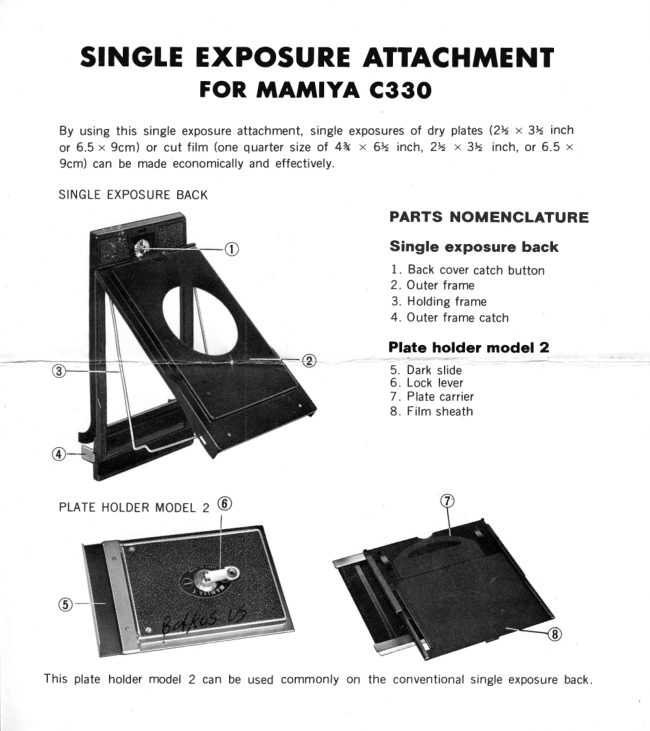
SINGLEEXPOSUREATTACH'NENT
         FOR ftIAftIIYA C33O

  By usingthis singleexposureattachment,singleexposuresof dry plates(24 x 34 inch
  or 6.5 x 9cm) or cut film (onequartersize of 4% x 6tt inch, 24 x 3k  inch,or 6.5 x
  9cm) can be madeeconomicallyand effectively.

  SINGLEEXPOSUREBACK
                                PARTS NOMENCLATURE
                                            Single exposure back
                                                              1. Back covercatch button
                                                             2. Outer frame
                                                            3. Holdingframe
                                                             4. Outer frame catch

                                                   Plate holder model 2
                                                            5. Darkslide
                                                             6. Lock lever
                                                   7 . Platecarrier
                                                            8. Film sheath


  PLATEHOLDERMODEL2 @


This plate holder model 2 can be used commonly on the conventionalsingle exposureback.
View original page 2Page 3 · Read text
CHANGING THE BACK COVER
    Replacethe cameraback coverwith the singleexposure
 back.
 Detaching Method
    Releasethe back cover catch button and opqn the back
' cover halfway.
     In this condition, slide the back cover in the arrow
 direction(as sho'wn in the photo) while pressingthe back
                        'until cover hinge release     the back cover is detached.When
 replacingthe back coverwith the tripod attached,it is easily
 detachedafter fully opening the back cover by sliding it
 horizontally,while pressingthe tip of the back cover hinge
 releasefrom the inner side of the back cover.
 Attaching  Method
   When installing the back cover,pressthe h inge release
 with the hinge portionof the coverwhileinsertingthe hinged
 shaft of the back cover in the body receiver,sliding the back
 cover in the reversedirection f rom detachingit. In th is
 manner,the back cover can be simply installed.


LOADING THE PLATE HOLDER
 Using Dry Plates
    At first,drawout the darkslide(5)from the plateholder
 and raisethe lock lever(6) locatedon the rear side of the
 plateholder.By turning it a q uarterrevolution,the plate
 carrier(7) will springout.
   When using a dry plate,previouslyremovethe film sheath
 (8) by sliding it horizontally.In this condition,gently insert
 the dry plate into the plate carrierQ) from the lateralgroove.
When insertingthe dry plate,alwaysface the emulsionside
 o utward.
    After insertingthe dry plate, pull out the lock leverand
 fold it upward after turning it a q uarter revolution,then
 insert the dark s lide (5).
 Using Cut Film
   When using cut film, previouslyinsertthe film into the
 film sheath (8), then insert the film sheath into the plate
 carrierin the same procedure as the dry plate.

                         www.orphancameras.com
View original page 3Page 4 · Read text
NOTE:                                            FILM SHEATH
 f nsertinga dry plate(orcut film) into the.plateholdermusl
be done in a dark room. Further, never expose the plate
holdercontainingthe dry plateor cut film to directsunlight
or leaveit in a bright room.
When the plate holder is not loaded,pull out the dark slide
(5) from the plateholder.By doing so, it can be immediately
determinedwhetheror not a dry plateor cut film is inserted.
When using one quartersize of 4% x 6% inch cut film, use
the type J film sheath.To divide this film into four equal    TYPEJ     TYPE D
parts under darkroom conditions,MAMIYA providesa con-
venient cutter. When using 2?" x 3% inch or 6.5 x 9cm
film, use the type D film sheath.
                                              'the   When insertinga dry plate or cut film, if     lock lever
 is folded upward, a figure will appearin the lo.werwindow.
Utilizethis figure for a memo of the photographs.Figures
on plate holders,1 to 3 are provided.


TAKING PICTURES
    Beforeinsertingthe plateholder,alwaysremovethe spool
 in the camera,and installthe preparedplate holderon the
singleexposureback.Initially,when pressingthe outer frame
catches@) inside,while gripping them from the right and
 left, the outer frameQ) can be opened.Fully open the outer
frameQ) and the holdingframe(3), attachingthe plateholder
to the back cover.Closethe holdingframe(3) and the outer
frame(2) as they werewhilekeepingthe plateholderin proper
position.Lock the both outer frame catches(4) while tightly
pressingboth lowerends of the outer frame(2).
    After confirming the catcheslock on both sides,pull out
the daik s lide (5).
View original page 4Page 5 · Read text
When turning the lock lever(6) a quarterrevolutionafter
raisingit, the dry plateor cut film is shiftedto the focal plane
by spring action, and photographscan be taken in this
condition.
   When f inishing taking pictures,pull out the lock lever
 (6) and fold it downwardafter turning it a quarterrevolution.
 With this operation,symbol E will appear,indicating"EX-
 POSED':Reinsertthe dark slide without fail.


CHANGING THE PLATE HOLDER
   Releasethe outer frame catches(4) by pressing them
inward, then open the outer  f rame. Next, raise the plate
holderapproximately90' agdnst the camerabody by holding
the lowerend of the plate holder,detachingit from the upper
portionfirst. Now the plate holdercan be detachedfrom the
holdingframe.
   When replacingthe plate holder,if handledonly by hold-
ing the dark slide, this method will cause light leaks. Pay
a tieiition to th is point.

NOTE:
The conventionalsingle exposureback and plate holder for
the MAMIYAC seriescan not be usedwith the C330. However,
 this plate holder M odel 2 can be used on the conventional
singleexposureback.


          TIAftIIYA  CAftTERA CO.. LTD.
                                                                               Printedin Japan.
                       www.orphancameras.com
View original page 5From the M. Butkus archive. Original publisher and archive notices are retained.
Check the model and edition against your equipment.
PDF verified 2026-10-10.