Film cameras
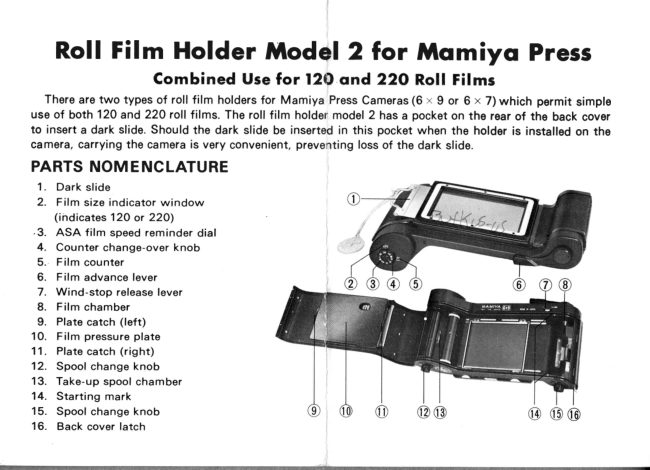
Mamiya Press Roll Film Holder Model 2 User manual
User manual for Mamiya Press Roll Film Holder Model 2. 5 pages in English. Read the original PDF, download or print a copy without registration.
5 pagesEnglish0.8 MB PDF
Loading your manual…Open PDF directly
Document details
- Brand
- Mamiya
- Model / document
- Mamiya Press Roll Film Holder Model 2
- Document type
- User manual
- Language
- English
- Pages
- 5
- File size
- 0.8 MB
- Category
- Film cameras
- Document date
- Not specified in catalog
Search available document text
Find a term, then jump to its page in the original PDF. Image-only pages may not be searchable; check the PDF for exact wording and diagrams.
Page 2 · Read text
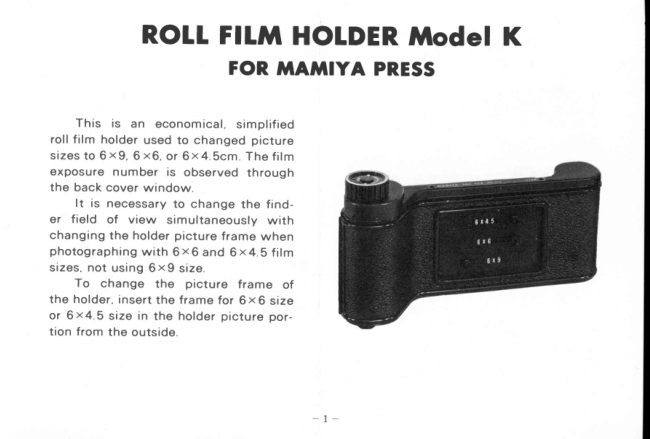
ROIL Flttl HOTDERModel K
            FOR ffTAMIYA PRESS


    This   is an  economical,  simplified
roll film holder used to changed picture
s i z e s t o 6 x 9 , 6 x 6 , o r 6 x 4 . S c m . T h e  f i l m
exposure  n um ber  is observed  th roug h
the back cover window.
       It  is necessary to change the fand-
er  field  of  view  simultaneously  with
changing the holder pictu re frame when
p h o t o g r a p h i n g w i t h 6 x 6  a n d 6 x 4 . 5   f i l m
s i z e s , n o t u s i n g 6 x 9  s i z e .
    To  change  the  picture  frame   of
the holder, insert the frame for 6 x 6 size
o r 6 x 4 . 5  s i z e  i n  t h e h o l d e r p i c t u r e p o r -
tion from the outside.
View original page 2Page 3 · Read text
Attoching method of picture frome
                  Insert  the  picture    f rame  so  that
            the folded portion enters the dark slide
              s i d e ( i n n e r s i d e ) N o w ,   i n s e r t  t h e c l a w s
           on  both ends  into  the  grooves  of  the
             p i c t u r e p o r t i o n w h i l e s l i g h t l y b e n d i n g t h e
              pictu re frame as shown  in the photo.
              To change  the  finder field of view,
            u s e a f i n d e r m a s k f o r 6 x 6 o r 6 x 4 . 5 s i z e
             exclusively used for the respective lens.
          W h e n  u s i n g    t h e  M a m i y a  P r e s s
           S u p e r 2 3 a n d / o r M a m i y a U n i v e r s a l , a t -
            tach a  f inder mask for 6 x 6 size in front
               of the top cover (Th is mask  is for the
             1 O O m m l e n s )
               To attach  this mask, raise the  flat
             spring  attached  in  front  of the  mask,
                          t h e n    i n s e r t  t h e 6 x 6 m a s k  t h r o u g h   t h e
              ra ised spring,  f itting the mask to the top
            cover  front  frame  and  releasing  the
                      r a i s e d f l a t s p r i n g .
             When  taking  6 x 6  size, by  setting
                          t h e   f i g u r e    i n   t h e  c a m e r a   f i n d e r - f r a m e

www.butkus.us
View original page 3Page 4 · Read text
W h e n  u s i n g a M a m i y a P r e s s o t h e r
                                                                                                       t h a n t h e S u p e r 2 3 o r M a m i y a U n i v e r s a l ,
                                              use a finder mask for the Mamiya Press
                                                  instead  of the a bove- mentioned   f inder
                                  m a s k
                                                 There are masks for 6 x 6 and 6 x4.5
                                                     sizes, both  masks used  by  attaching
                                            them  to  the   f inder window     f rom  the
                                                    o u t s i d e


                                                         FItfiI LOADING iIETHODi n d i c a t o r w i n d o w   t o 2 5 0 , a b r i g h t  f r a m e
for the 25Omm lens can be observed in         W h e n      l o a d i n g  o r  u n l o a d i n g   f i l m ,
t h e  f i n d e r D e t e r m i n e  t h e   f i e l d o f v i e w          avoid d irect su n lig ht
center based on th is f ra me                            While pressing the back cover toward
    T h e    f i n d e r m a s k   f o r  6 x 4 5   s i z e           the holder, by pulling out the back cover
should be inserted from the back side of             latch, the back cover can be oPened.
the a bove- mentioned mask, attached  in                              I n s e r t a n e w  r o l l o f  f i l m   i n t o  t h e  f i l m
the same method as above                           c h a m b e r , a n d p u l l o u t   t h e  f i l m b a c k i n g
    T h e   f i n d e r m a s k   f o r   t h e M a m i y a         paper to insert  its end  in the  slit of the
P r e s s S u p e r 2 3 a n d / o r M a m i y a U n i v e r s a l                    t a k e - u p s p o o l ;  t h e n   t u r n   t h e   f i l m w i n d
i s p r e p a r e d o n l y  f o r a 1 O O m m l e n s                   k n o b o n e  f u l l  t u r n
View original page 4Page 5 · Read text
T a k e - u p s p o o l


    With  the back cover latch pulled out,              The first picture frame is now read-
close and  lock the back covor by push-             ied for photography, so attach the hold-
ing  in the  latch while  pressing  the back             er to the camera, and  pull out the dark
cover toward  the holder. While  observ-             slide. Each time a picture  is taken, open
ing the window  which  should indicate           the back window  and take up the film
the  picture  size  to  be  photographed,           by turning the knob until the next figure
turn the film wind knob clockwise until          appears in the window.
f i g u r e 1 ( p r i n t e d  o n  t h e b a c k i n g p a p e r )            When  removing the holder from the
appears in the window.                        camera while the film  is in the camera,
   When  opening  the  back window,           always  insert the dark  slide completely.
avoid d irect su n lig ht.

               mAm|YA cAmERA CO., LTD.

                                                                             P r i n t e d i n J a p a n
                          www.butkus.us
View original page 5Related documents and language editions
From the M. Butkus archive. Original publisher and archive notices are retained.
Check the model and edition against your equipment.
PDF verified 2026-10-10.