Film cameras
Mamiya Super 16 User manual
User manual for Mamiya Super 16. 3 pages in English. Read the original PDF, download or print a copy without registration.
3 pagesEnglish0.7 MB PDF
Loading your manual…Open PDF directly
Document details
- Brand
- Mamiya
- Model / document
- Mamiya Super 16
- Document type
- User manual
- Language
- English
- Pages
- 3
- File size
- 0.7 MB
- Category
- Film cameras
- Document date
- Not specified in catalog
Search available document text
Find a term, then jump to its page in the original PDF. Image-only pages may not be searchable; check the PDF for exact wording and diagrams.
Page 2 · Read text
INSTRUCTIONS
                                   For use oF
                                 The
         MAMIYA  5UFER.16
                      THE GREAT MII'GET  I:.-wIERA
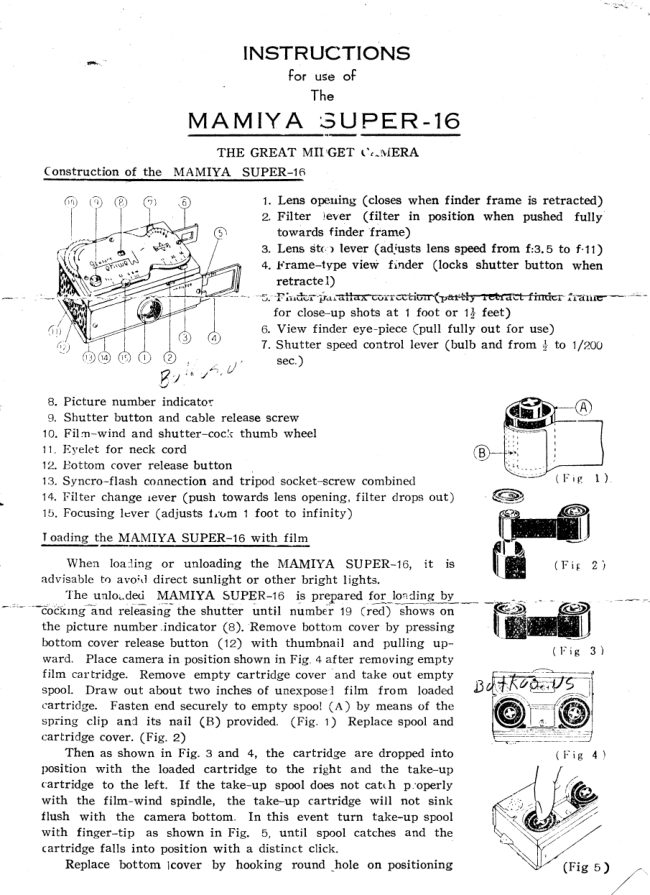
  Construction of the MAMIYA  SUPER-16

                                            1. Lens operring (closes when  f inder frame  is retracted)
                                           2. Filter   ]ever  (filter   in  position when pushed  fully
                                      towards finder frame)
                                           3. Lens Stc,r lever (adjusts lens speed from  f:3.5 to f.11)
                                            4. ^t'rame-type view  finder  (locks  shutter  button  when
                                            retracte l)
                                           -F ie^ftr--ir.r ^altarco  rr cctiorr(ffiirnici-                                .irar i re-                                                                     I"'
                                                for close-up shots at 1 foot or 1+ feet)
                                           6. View finder eye-piece (pull  fully out for use)
                                           7. Shutter speed control lever (bulb and from + to 1/2OO
                                         sec.)                                                             t^;  U

   B. Picture  number  indicator
   9. Shutter  button  and cable release screw
  10. Fil m-wind  and shutter-cock   thumb  wheel
  11. Eyelet  for  neck cord                                   G
  12. Bottom  cover release button
  '13.      Syncro-flash   connection  and  tripod  socket-screw  combined
  14. Irilter  change  rever (push  towards  lens opening,  filter  drops  out)
  15. Focusing  lcver  (adjusts  litrm  1 foot  to  infinity)
 Toadins tISJg
    When loa:ling or unloading the MAMIYA SUPER-IO, it   is
  advisable  to avor,l direct  sunlight  or other  bright  lights.
        'I'he
            unloide<i  MAMIYA   SUPBR-16    ry prepar"d   fgl_tgg!3g-[_*_---6ockrng-?nd
                  reieasingi  tfre shutter    until   numbei     I g  Crea j   sfto*t;n
  the picture  number.indicator   (B).'Remove  bottom  cover by pressing
  bottom  cover  release button   (12)  with  thumbnail   and  pulling   up-                                                                                                                                                     ( I r i e  3 )
  ward.   Flace camera  in position shown  in Fig. 4 af,tet removing  empty
  film  ca.r'tridge.  Remove  empty  cartridge  cover  and take  out empty
  spool.  Draw  out  about  two  inches  of unexpose'l   film   from   loaded        ll
  cartridge.   Fasten end securely  to empty  spoo! (A ) by means  of  the
  spring   clip  an.l   its  nail  (B)  provided.   (Fig.  1)  Replace spool and
  cartridge  cover.  (Fig.  Z)
     Then  as shown  in  Fig. 3 and  4,  the  cartridge   are dropped  into
  position   with   the  loaded  cartridge   to  the  right  and  the  take-up
  c'artridge  to  the  left.     If  the take-up   spool does not  catth   p.'operly
  with   the    f ilm-wind   spindle,   the  take-up   cartridge    will   not  sink
  flush   with   the  camera  bottom.    In  this  event  turn   take-up  spool
  with   finger-tip    as shown  in  Fig.   5,  until   spool  catches  and  the
  cartridge  falls  into  position  with  a distinct  click.
      Replace  bottom  lcover  by  hooking   round  _hole on  positioning                     (Fig s )      /-...
                                                                                                                                            /
View original page 2Page 3 · Read text
screw  and  snapping   shut.  Make  two  blank  exposures  to take up
exposed  portion   of   film,   watching   picture  number  indicator  until
No. 1 appears.
Takins  piglures  with  the MAM.IYA  SUPER-16
     Pull  out  view  finder   (4)  and eye-piece  (6).  Set lens stop  (3)                                                                                                 (Fig.  6)
anl  shutter  speed  (7).  Determine   distance  between  camera  and
subject,  and set focusing  lever  (15)  accorJingly.  Aim   at  subject
through  ei e--piece and view  finder.  Press shutter  buttor  gently  but
firmly.  For  qi:ick  picture  taking  at distances  of over 6 feet, set  fo-
cusing  lever beforehand  at mark  between  6 and  co. Stopping  down
the lens as much  as  permissible  sharpens  the  picture  and  gives
greater  depth  of  focus.
       . The _ MAMIYA  SUPER-16  is  fitted  with  an extra  high  quality.
hard-coatei   anastigmat   leas  with  a speed  of    f  : 3. 5  and  a focal
length  of 25mm.   It has high resolving  power and considerable depth
of  focus,  so  focusing   is  not   critical   at  distances of over 6 feet.
At  distances  less than  3 feet  care rnust be exercised  to  focus accu-
rately.   More  over,  at  close range  the view  finder must  be correctcd
for  parallax  by  setting  at  suitable   position  as  indicated  by  the
notches  cut  on   f inder   f ra rne (5).     It  is  better  to  s.et shutter  speed
before winding  film"  To use  f ilter,  push  filter  lever towards  finder
frame.   Retracting   vier,v finder  automatically   clears  lens  of  filter.
The MAMIYA   SUPER-I6   is furnished with a Y-2 (yellow, double exposure  tirne)  filter.
For cleaning or changing  filter,    firsi   pull  out view  finder  then push  filter  change lever
toward iens opening,  filter  will drop out when camera is set right side up.
Holdir.rgthe MAMIYA  !UEPR-16  CFig. 6)
    Fig. 6 shows two  ways of holcling the  MAMIYA-16  wl.en  taking  pictures. Any other
comfortable way of holding the camera may be useC, but care must be taken not to lct any                                                                                                                      -sloivlf*-i;u
finger cover the teai  ;ffi              shutler  release  buf ton  sh ould  be  presseii*                        t
f irmly.
    The camera must  not be jarred  while  a picture  is t,eing taken.
pilr or tng ruI4tvllYe_QV.3Pts"--l"q
    1 . 5  f t 16 rnm or Dbl.  I ntm rnovie fiLm avaiiable  for  reloading  cartridge.
Depth  of  field  table  f or  MAI\IIYA    -qUPER-1 6  ( C ircie  of  conf usion   '/ n, nnm )


        Distance           c o          1 2 '
           h n    I    3 . 5      co ^-28      21 -     I      7-5                                    +- 0. 3// '----0. 3           11

                       ?1
                                                                                                                                              II  m - 1 8      ,  3 6 -  7      9 - - 4 . 5  3 . 5 - 2 . 6   + 1 . 3 - - 1 . 1    + 0. 5^,-0.  5        O       5 . 6      I
                                                                       l
           a                                                       +-2   .- -1  .5   + 0. Z --0.  6
        J                  COa,  9                         4 . 3 - - 2 . 3   -+2.8 - -2.  1  + 1 . 0 - - 0 . 8
                          www.orphancameras.com
View original page 3From the M. Butkus archive. Original publisher and archive notices are retained.
Check the model and edition against your equipment.
PDF verified 2026-10-10.