Film cameras
Mansfield Holiday II User manual
User manual for Mansfield Holiday II. 9 pages in English. Read the original PDF, download or print a copy without registration.
9 pagesEnglish2.2 MB PDF
Loading your manual…Open PDF directly
Document details
- Brand
- Mansfield
- Model / document
- Mansfield Holiday II
- Document type
- User manual
- Language
- English
- Pages
- 9
- File size
- 2.2 MB
- Category
- Film cameras
- Document date
- Not specified in catalog
Search available document text
Find a term, then jump to its page in the original PDF. Image-only pages may not be searchable; check the PDF for exact wording and diagrams.
Page 1 · Read text
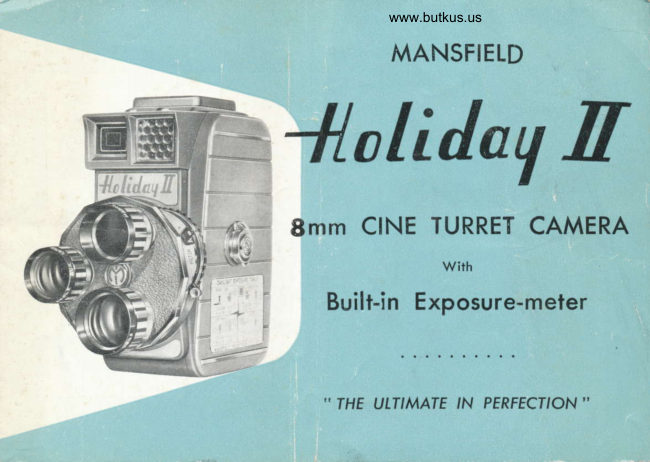
www.butkus.us
       MANSFIELD


8mm CINE TURRET CAMERA
                     wirh
    Built-in Exposure-meter


     " THE ULTIMATE    PERFECI'ON  ''
                'N
View original page 1Page 3 · Read text
www.butkus.us
     }IOW TO TAKE PERFECT MOVIES                                     !
                  l.   Lood the comero             5.  Seleci proper filter
           2.  Wind the spring fully        6"  Frome subiect in view finder
           3.  Select lens                        7 .   Press operoting lever (downword)
           4.  Adiust lens opening diol       8.  Wind the spring ofter eoch scene
     OPENING COVER
        To open the comero cover, turn the cover lotch to the left (counter clockwise) ond lift
            gently.
     TOADING CAMERA                                                                          \
       When looding or removing film from comero, moke sure to do so in subdued light.
         The spool with the full lood of film is ploced on the top spindle. Pull out obout 6 or
        8 inches of film ond in ert through the film gote, the lighter side of the {llm toword the
         lens. Remove the empty spool one insert the end of the film into the slot, then
          reploce spool on lower spindle. Depress the operoting lever for obout two seconds
         ond check tc see thot the film runs smoothly through the film gote, ond thot the fllm
        winds properly on the toke-up spool. The comero should now be reploced ond the
         cover lotch turned to the right (clockwise).
     ADJUSTING TURRET
          Seleci the lens, normol, telephoto (Gruenex) or wide ongle (Roydex) lo be used, ond
           rolote the furret so lhof the lens is in the toking posilion.
J          This is done by grosping the lenses ond rototing the turret in  eilher direction. When
                                                               The  lens selected should be{tII          directlyodiustedbeneothcorrectly,the honeycombthe turret willelectricclickeyein window,position.
 *'Gl;F;n!rr.                         .ntrt
View original page 3Page 5 · Read text
USING THE VIEW FINDER
  The view finder is so designed thot you moy see ol once the entire field of view thot
  you wish to photogroph.
  When using ihe normol lens, the field of view is sighted within the oreo outlined by
   the yellow rectongle.
  When toking movies with the telephoto (Gruenex) lens, the field of view is sighted
   within the oreo outlined by the smoll red rectongle.
  When you use the wide ongle lens, the totol oreo sighfed in the view finder represenls
   the whole field of view.
ADJUST IENS OPENING DIAI
  When you foce your comero toword the subiect, the needle
   of the built-in exposure-meter will outomoticolly indicote the
   oppropriote ASA figures, (for instonce, 1.8, then you turn
   the Lens Opening Diol to  I .8 position, ond so on).


       View Finder                                                                                                                  Iens
                                                                                                          opening
                                  Field of View for Wide Angle Iens (Roydex)                                           diol
                                  Field of View for Normol Lens {Yellow Rectongle, Cineporl
                                  Field of View for Telephoto lens (Red Rectongle, Gruenexl
View original page 5Page 6 · Read text
www.butkus.us
KODACHROTIE FIttrI SPEEDS
  The meter colibrotions in red ore for outdoor film (ASA 1O)
  The meter colibrotions in block ore for indoor film (Type A, ASA l6)
POSITIONING FITTERS
  For oll normol exposures the letter N should oppeor next to the lens opening slop.
  When using o conv,ersion filter (Type A) the letter A will oppeor in the some position.
  Follow the'.some procedure when using the hoze filler. Move the lever to obtoin ony
  of the obove posilions.
   "A". filter is used with Type A (indoor type) Kodochrome film when shooting oufdoors
   in doylight. " H "  filter is used with color film photogrophing open scenes ot the
  beoch or mountoins.
                                                             Top spindle

                                       Roydex
                                wide ongle


                                                                  Toke-up spool   Lower spindle
View original page 6Page 7 · Read text
I                   q
     END OF FltM                 4                                II
        When the footoge indicotor reoches " C  't  stop toking pictures, then cover the lens
           with your hond ond run the comero to Ex posed. The comero cover con now beI
          opened ond the soool removed for tronsferr ing io the upper spindle.
I
                                                                                                             turnI         Remove empty spool from the top spindle. After removing the lower (full spool),
                                                                          os before, us-I                it over, ond ploce it on upper spindle, threoding the film ogoin exocily''          ing the empty spool on the lower foke-up spindle. Moke sure the lighter side of the
.             film is toword the lens, following fhe some procedure used in the looding of comero
           *ith new roll of film. After the film hos possed through the comero the second timeJ,rr        remove the full spool ond reploce in the originol metol con. The con should then be
         .   ploced in ihe originol corton, ond sent to the processing loborotory.

                                                                                                    D.
                                                                           E
      PRINCIPAT FEATUR ES                                 IfrL
                       I )  Lenses: Mons fielield " CCINEFNEPAR t'  Ilf/r.8.8 TIX€rii eded f<toculUS l3mm Normol lens, with two                                  'Oo                 lens furret GRU EN:NEX TIIELEPI-EPHOT                                              onoondJRAItAY.DEXU XWvlrDE ANGLE AUX. lenses.
       2  Body: Die-cosst.;t.                                                                                                                                                                                                                                 .Sizelze.  3Xl: 5.35.3.3X,x6'tltl         Weight :   2.4lbs.
        3)   Filnr Speed :       I16l6 frommesspersp(     lonrndrnd co ndrsinqlsiringl,yle fr lme.
          4l  Exposure Guidete.3. On)n thethe left sideideleeofof the,bbod,dy..n'"
        5)  Eosy drop-in rollll-1,l-lood  rmode It.
        6)  All revolving po: rtsrts orel mmodeeof oil-)il-l                                                                                                                          - less meltolrl whicw  ichr not only eliminote necessity
                of oiling but ovroi<oid onvrvy1trououble dueeto  oilirnqg.

                                                                             ft
View original page 7From the M. Butkus archive. Original publisher and archive notices are retained.
Check the model and edition against your equipment.
PDF verified 2026-10-10.