Film cameras
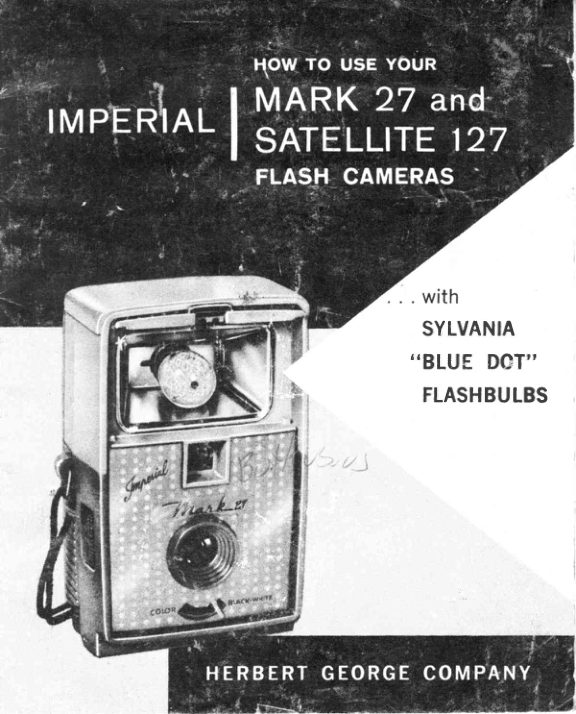
Mark 27 and Satellite 127 User manual
User manual for Mark 27 and Satellite 127. 13 pages in English. Read the original PDF, download or print a copy without registration.
13 pagesEnglish1.2 MB PDF
Loading your manual…Open PDF directly
Document details
- Brand
- Mark
- Model / document
- Mark 27 and Satellite 127
- Document type
- User manual
- Language
- English
- Pages
- 13
- File size
- 1.2 MB
- Category
- Film cameras
- Document date
- Not specified in catalog
Search available document text
Find a term, then jump to its page in the original PDF. Image-only pages may not be searchable; check the PDF for exact wording and diagrams.
Page 4 · Read text
l.  Turn lock-knob to "Open," and remove back. Place end of
film spool in hole in the lower spring on side opposite winding
knob. Lift upper spring and slide spool into place.
2. fnsert empty spool in same way. Turn winding knob until
spool engages. Thread end of film into slot in empty spool
 (be strre paper is centered). Wind knoh a full turn to insure
that film is tight.
3. Replace and lock back. Wind knob rrntil figure 1 appears
in red windolr..

AND UNLOAD

                  oo


Caution.' Never unload camera in bright, direct light.
l. A f ter 12th picture has been taken, wind knob until encl
of paper has passed red window.
2. Turn lock knob to "open" and remove back.
.3. Grasp film spool near upper spring and pull outward.
                                          3
View original page 4Page 5 · Read text
Getsetfor0UTD00RSNAPS
o  To make color slides outdoors, use Ekta-
   chrome or Anscochrome Daylight films. For
   color snaps, use Kodacolor film.
O Set aperture lever to "COLOR"    f or color           o'B&W"    film, or to           for black-and-white films.
  NEVERSET LEVERBETWEENTHESE
  POSITIOI\S.
O Hold camera steady. Press shutter button
  down quickly and then releaseit.

ANdFLASHSNAPS
   This camera was designed erpressly for use
   rvith popular Sylvania "Blue Dot" M-2, I{-28
  and Sylvania's famous Zirconium-filled \t-25
  and N{-25B flashbulbs. Use nvo standard I %
   volt penlite batteries.
  To replace batteries, unscrew battery cover,
  and remove. Push batteries down against
   springs and slip into place as illustrated on
   inside of battery cover. Replace battery cover.
     l.  Raise Flash Cover and slide back.
   2. Push Sylvania "Blue Doto' flashbulb into
     socket until  it clicks.
   3. Aim, and press shutter firmly to insure
      proper flashing of bulb.
   4. To eject used bulbs, press ejector lever
     down.


                       www.butkus.us
View original page 5Page 7 · Read text
l.  Turn lock-knob to "Open," and remove back. Place end of
film spool in hole in the lower spring on side opposite winding
knob. Lift upper spring and slide spool into place.
2. Insert empty spool in same way. Tttrn winding knob until
spool engages. Thread end of film into slot in empty spool
(be sure paper is centered). Wind knob a full turn to insttre
that film is tight.
3. Replace and lock back. Wind knob rrntil figure 1 appears
in red window.


AND UNLOAD

C a u t i o n :  N e v e r
u n l o a d c a m e r a   i n
bright,  direct  light.
 l. After 12th picture
  has been taken,              \,
  wind knob until
   end of paper has passed red window.
                     o'open"2. Turn lock knob to       and remove back.
3. Grasp film spool near upper spring and pull outward.
6

                       www.butkus.us
View original page 7Page 8 · Read text
To make color slides outdoors, use Ekta-
                      chrome or Anscochronle Daylight  type
                               films.
                         Set aperture lever to "COLOR"  {or color
                               film and to "B&W"  for black-and-white
                              films. I\EVER SET LEVER BETWEEN
                   THESE POSITIONS.
                O Hold camera steady.Aim, and press shut-
                               ter button down quickly and then release
                                            it, without moving camera.
   AND FLASHSNAPS
                   To rernoae back (FIG.  7)
                  Remove cover, by inserting coin
                RETI.ECIOP into slot on sides and twist. Cover     EJECTOR            IEVER           rvill come off easily.     (PUSHDOWN)
                    To insert batteries (FIG.2)           F I G . 1
                   Push batteries down .against bat-
                         tery springs and slip into place, in
                     accordance with instruction on in-
                       side of Flash Gun Cover.
                    To replace back  (FIG.  3)
                      Put cover back into position and
                      press gently.
                      Attach to Carnera-Push flash gun
                         into receptacles on camera by
                G R A S P I N G   F L A S H  G U N
                      T I T               P I                N S                   \                                                         I N T O  BODY. Do NOT insert or remove                   SOCKET             ME                 RA        R   CA S I. O T F O REM O YI N G               by grasping reflector.
EACKCOVER               Insert Flash. Bulbs    To  insert,
                    push a Sylvania "Blue Dot" flash-
                       bulb  into  socket until   it  clicks
                          into place.
                  E ject Flash Bulbs - Push ejector
                         lever dorvn until bulb releases.
View original page 8Page 9 · Read text
LET'STALKABOUTFILMSAND FLASH

Black-and.-white  films-use  clear Sylvania "Blue Dot" M-2
 bulbs for all black-and-white films. When you want ro cover
Lqtg" areas^-or take a "long  distance" snap, use a Sylvania
Zirconium-filled "Blue Dot" M-25 flashbulb,
 Yerichronte  Pan an.d All Weather  Pan-the  most popular
"snapshot" films. Use Sylvani a M-2 or M.25 flashbulbs.
Panatornic X ancl pupreme-Faster   films good for any kind
of flash snap. Use Sylvania Nt-2 or M-25 flashbulbs.
Super ?on Press and  rri-x-Ultra    sensitive; made for pic-
tures where the light is pretty dim. Use Sylvania M.2 or M-2s
flashbulbs.
Color  Films-Use  Sylvania "Blue Dot" M-28 or M-25B blue
bulbs with  Daylight-Type films and Sylvania ooBlue Dot"
M-2 or M-25 clear bulbs with Type-F films.
Anscochrorne  and  Ektachrome-For    sparkling  full  color
slides and transparencies. Use Daylight type outdoors; type
F indoors, H'ith flash.
 Koclacolor-For   sparkling full-color prints. For indoor flash,
use Sylvania M-2  or M-25 bulbs. For  outdoor  flash, use
Sylvania M-28 or N{-25B blue bulbs.
SUGGESTED CAMERA-TO.SUBJECT DISTANCES
WITH SYLVANIA "BLUE  DOT'' FLASHBULBS
                                        M.2     M-25
Verichrome Pan, All Weather Pan   B & W   6-16 ft.   12-18ft.
Kodacolor                          Color              8-12 ft.
Ektachrome, Anscochrome           Color            8-12ft.

For  color slides indoors, use Ektachrome or Anscochrome
Type F  filnr and clear flashbulbs.
B

                       www.butkus.us
View original page 9Page 10 · Read text
SNAPSHOTSARE
WHEREYOU LOOK!
 Here's one rule worth sticking  to: keep your co,mera and
 Syluania "Blue  Dot"  fl,ashbulbs handyl  There's always a
 picture just waiting to be taken.
Catch people  doing  things
Is Janie exasperatedwith her jigsaw puzzle? ls Johnny con-
centrating on that book he can't really read ? Is Debby whip-
ping up a storm in the tub ? They're all priceless moments;
moments that only a flash camera can catch-and keep.
There are loads of other picture opportunities. Take feast
and fun days, when everyone is "dressed to kill."  Parties are
great for snap!, too-and  so are dances and socials of any
kind. Even daily routines at home can make wonderful pic-
ture subjects.
If you own a pet-any  kind:  cat, dog, bird-it's  worth a pic-
ture anytime. Sylvania flashbulbs make  it easy; you can go
pet-stalking anywhere .  .  . and your light moves right along
with You.

EVEN IN DAYLIGHT,
SYLVANIAFLASHMAKES IT BETTER
One of the easiestways to get rid of the picture-marring black
shadows that go hand-in-hand with  bright sun  is  wittr a
Sylvania "Blue Dot" M-2 or Zirconium-filled M-25 flashbulb
for  "fill-in"  light.  It's easy     you aim, snap, just as you
would for any picture. Your flashbulb splaslres extra light
into those dense shadows.
No question about it: Flash is a big help when  ir comes to
Summer snaps-for  with Sylvania flash, any time is picture
time.
View original page 10
Page 11 · Read text
SOMEEASY-TO.REMEMBER

 YourCamera


  l.   Hold the camera level and steady when snapping; the
     slightest movement will cause blurring.
 2.  Don't try to get too much into one picture. Be sure you
    see your subject in the view-finder before snapping the
     shutter, making sure everything you want io take is
     visible in the view-finder.
 3.  Load or unload film in the shade only.
 4.  Wind  the film immediately after taking each picttrre
     to avoid double exposure.
 5.  Have each roll of exposed film developed as soon after
        it is exposed as possible.
 6.  Do not ever attempt to clean the lenses with your fin-
     gers. Use only a dry, soft cloth or lens brush.
7 .  When using flash attachment, be sure to use a fresh
    Sylvania "Blue Dot" flashbulb for each picture.
B.  Stay 5 feet or more from your subject. If you get too
     close, your picttrre will be f.uzzyand indistinct.
    Bef ore loading camera with  film  or attaching flash
      unit, operate shutter lever several times to see that  it
      is working properly. This insures smoother operation
     of camera.
10

                     www.butkus.us
View original page 11Page 12 · Read text
FORSNAPSYOU'LLBE PROUDOF


     Your Flash


        l.  Your Imperial  flash camera was engineered for use
                        o'Blue           with Sylvania       Dot" flashbtrlbs, For best results,
                rfse Sylvania M-2, M-2B, or famous Zirconium-filled
          N{-25 or M-258 bulbs.
     2. Use only fresh photoflash Penlite Batteries.
     3. Remove batteries from flash units lvhen not in use.
     4,  And  remember, freshly  fired flashbulbs are HOT  !
         Always use your ejector-not  your bare hands-to  re-
        move them from your flash gun.
           ;D.  Check the dot on your Sylvania "Blue Dot" flashbulb.
                  If  it's blue, fire away. But  if  it's pink, return  it to your
           dealer and he'll exchange it for you. One thing: even
                   if a flashbulb fails to fire - don't turn the film. You
           haven't wasted the exllosrlre.
     6. When taking flash pictures, use a quick, firm pressure
          on shutter arm. Complete exposure in one continuous
           motion, pressing shutter all the r,ray down, letting go,
         and letting shutter arm return  itself. DO NOT press
           shutter arm slowly, as the flashbulb might  fire pre-
           maturely.
                                             1I
View original page 12Page 13 · Read text
g/r-*,rt"


Yorrr camera is guaranteed against defective work.
manship and material {or a period oI one year.
If  service is required, return the camera to the
iactory, filling out the information requested below
tog:ether with $1.00 in either currency or stamps
to rover the cost of postage and handling. trIake
sure you pack securely!
Please return negstive so we can determine fault in
your camera, if any.
           PRINT PLAINLY

Y o u r N a m e

S t reet

City---

State

When Purchased-

N a t u r e o f C o m p l a i n l


  HERBERTGEORGECOMPANY
     3ll  N. DesplainesSt., Chicago6,  lll.
                  www.butkus.us
View original page 13From the M. Butkus archive. Original publisher and archive notices are retained.
Check the model and edition against your equipment.
PDF verified 2026-10-10.