Film cameras
Micro 16 User manual
User manual for Micro 16. 6 pages in English. Read the original PDF, download or print a copy without registration.
6 pagesEnglish0.5 MB PDF
Loading your manual…Open PDF directly
Document details
- Brand
- Micro
- Model / document
- Micro 16
- Document type
- User manual
- Language
- English
- Pages
- 6
- File size
- 0.5 MB
- Category
- Film cameras
- Document date
- Not specified in catalog
Search available document text
Find a term, then jump to its page in the original PDF. Image-only pages may not be searchable; check the PDF for exact wording and diagrams.
Page 1 · Read text
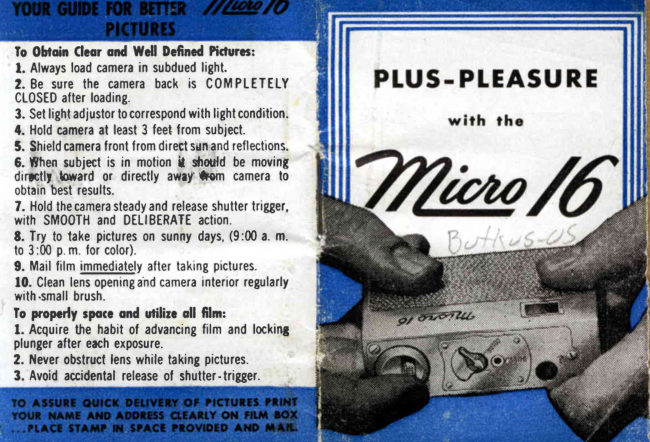
To 0hoin Cleorond t{cll DeftnedPitlurc:
 l. Alwaysloadcamerain subduedlight.
2. Be surethe camerabackis COMPLETELY
CL0SEDafterloading.
3. Setlightadjustorlocorrespondwithlightcondition.
4. Holdcameraal least3 feetlromsubject.
5. Shieldcameraf rontf romdirectsunandreflections.
6. flhen subjectis in motionI  dtottld be moving
dirrtll lowardor directlyaw.y'*em camerato
obtainbestresults.
7. Holdthecamerasteadyandreleaseshuttertrigger,
with SMOOTHand DELIBERATEaction.
t. Try to take pictureson sunnydays,(9:00a. m.
to 3:00p.m. for color).
9. Mailfilmimmediatelyaftertakingpictures.
10. Cleanlensopeningahdcamerainteriorregularly
with.smallbrush.
Io popcrly lpo(G ond utilirc oll ftlm:
l. Acquirethe habitof advancingfilm and locking
plungeraftereachexposure.
2. I{everobstructlenswhiletakingpictures.
3. Avoidaccidentalreleaseof shutter-trigger.
View original page 1Page 4 · Read text
OPERATING   I NSTRUCTIONS


Locking ond Unlocking Film Advonce Plunger

Plungerin
0pen
Posifion


To releaseplunger,holdcametawith the trade
nameMicro16 on top and presson plunger.

Plunger
locked


To lockplungersimplylurncameraon its back
(tradenameMicrol6 down)andpushplungerall
the wayintothe case.
View original page 4
Page 6 · Read text
HOW TO TAKE PICTURES

O L I G H T A D J U S T O R
 Block ond White Film:
 Turnlrghtadjustorarrowto BRIGHTfora sunnyday.
 Turnlightadjustorarrowto DULLfora cloudyday.
 Turnilghtadlustorarrowto C0L0Rfora verydark
  day. (Bestpicturesareobtainedon a sunnyday.)
 Color Film:
 Turnlightadlustorarrowto C0L0R.(Sunnydaysare
 necessaryfor colorphotography.Truecolorscanbe
 obtainedonlyfrom9:00a. m. to 3:00p.m.)
 Whentakingpicturesthe operatorand subject
 shouldbe posrtronedso that sun D0 ES N0T
 shrneon frontof camera.
O S N A P P I N G T H E P I C T U R E
 Yourprcturewillbeasyouseeit in theviewer.
  It rs mostrmportantthat the Microl6 be held
 steadyand thatthe releaseof the shutter,trigger
 be SMOOTHandDELIBERATE.
OADVANCING  FItfrI
 Releasefilm advanceplungerand pushoncefor
 eachnewpictureto be taken.Becomeaccustomed' to advancingthe film and lockingthe plunger
 aflereachexposure.
View original page 6
From the M. Butkus archive. Original publisher and archive notices are retained.
Check the model and edition against your equipment.
PDF verified 2026-10-10.