Film cameras
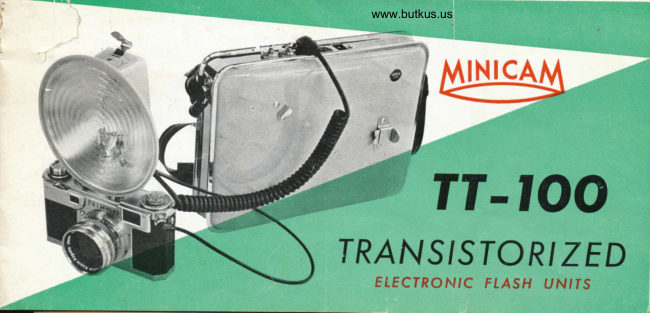
Minicam TT-100 User manual
User manual for Minicam TT-100. 13 pages in English. Read the original PDF, download or print a copy without registration.
13 pagesEnglish4.0 MB PDF
Loading your manual…Open PDF directly
Document details
- Brand
- Minicam
- Model / document
- Minicam TT-100
- Document type
- User manual
- Language
- English
- Pages
- 13
- File size
- 4.0 MB
- Category
- Film cameras
- Document date
- Not specified in catalog
Search available document text
Find a term, then jump to its page in the original PDF. Image-only pages may not be searchable; check the PDF for exact wording and diagrams.
Page 2 · Read text
€                                                                                 . .'.Now, you hold fhe sun in your hond

          Tronsistors hove revolutionized not only the rodio but now even Electronic Flosh Units. Nowl
           for. the first time, MINICAM unveils o revolutionory new high powered Electronic Flosh Unit
          with Triple Tronsistors, the MINICAM TT-,|00. The MINICAM TT-.|00, operoting on either stondcrd
           floshlight dry-cell botteries or on AC current, feotures  I 00 wott  - second (w/s) light output,
         three power tronsistors, ond full or holf power switch. Tronsistors combined with MINICAM
         design moke the newly designed unit neot ond compoct, economicol ond trouble free.

        Remember how mony unique opportunities you hove missed becouse your Electronic Flosh woi
        too weok !   With the MINICAM TT-100 there ore no more missed shots, whether the doy  ii
           dull or fcggy or whelher ot dusk or down or the dorkest night. See ond try the new TT- 100
           noy., cnd you will hold the sun in your hond.
View original page 2Page 4 · Read text
Venmo @mike-butkus-camera  Ph. 2083
PayPal Name  Lynn@butkus.org      www.PayPal.me/lynnbutkus
View original page 4
Page 6 · Read text
www.butkus.us
HGFTT CONTROT SWTTCH ( FUtt OR HArF)

     By the use of the power switch on the
  top, full light (100 w/s) ond holf light (50
 w/s) ore ovoiloble. This switch is for use
  only before floshing, ond hos nothing to do
 with recycling time. At the "FULL" position
 the flosh durotion is   i /300 second ond
 "HALF"  1 / 600. The Minicom System of
 high copociiors on low voltoges give o
 color temperoture closely opproximoting true
  sunlighf, eliminoting the necessity of color
  boloncing filters.
                                                                                                                       F TASH CORD
                                                                                                    TERMINAI.
View original page 6Page 8 · Read text
!                                                           www.butkus.us
    SYNCHRONIZATION             GUIDE NUMBERS
f,         The MINICAM SPEEDLIGHT will synchronize with             Guide numbers ore the most common method of
      ony shulter hoving "X" type synchronizotion. lT lS            determining exposure for electronic flosh. To orr-I    IMPORTANT TO SET THE SHUTTER ON "X'' POSI-              ive ot the correct lens setting the distonce from the
     TION BEFORE ATTEMPTING FLASH PICTURES.                    flosh lomp in feet is divided into the guide number I                                                          ond the onswer is the correct lens setting to use.
         For comeros which do not hove built-in "X" type                                                                                                 l. To eliminote the need of colculoting, the Minicom       synchronizotion,  it is possible to use the MINICAM                                                                   Exposure Colculoter on the flosh lomp tells you      SPEEDLIGHT for toking "open-flosh" pictures. To                                                                    exoctly whot exposure to use for every flosh     do this the comero is set on o tripod or steody sup-                                                                                          pictu re.
       port, the shutter is set on "B" ond the flosh is firedli                                                               2. Simply set the ASA speed of the film you plon     by pressing the open-flosh button on instont ofter                                                            to use ot the white triongle. The correc,l       opening the shutter.
                                                                              use will oppeor opposite theI                                                                        lens openings to             lf you ore not sure which type synchronizotion                "feet" 1                                                                             numbers.                                                                                                                                with I    the shutter of your comero hos, it is best to refer            The occomponying guide numbers for use
 \     to the instruction furnished by the comero monufoc-             the MINICAM SPEEDLIGHT ore termed "SUGGES-
    \.  trt"t.                                             TED GUIDE NUMBERS" becouse we hove leorned
   )
View original page 8Page 9 · Read text
through experience thot guide numbers do not      SPEEDLIGHT bosed on these figures ond experience.
cover every situotion ond hove therefore given you         Remember thot the type of subiect olso offects the
our opinion os to whot guide number we think you       exposure of flosh pictures. A generol rule to follow
should use for vorious films.                                 is: THE LENS OPENING SHOULD BE INCREASED
    It is recommended thot the photogropher estob-      BY ONE STOP WHEN PHOTOGRAPHING DARKER
lish his own guide numbers for the MINICAM       SUBJECT MATTER.


       GUIDE NUMBER TABLE OF MINICAM TT .  I OO

              Film               Kodochrome Doylite Ektochrome     Plus X            Tri X
              .. Speed                 Fuii, Sokuro Color   Anscochrome     Fuii, Sokuro SS  Fuii, Sokuro SSS

   Guide                                                                   (ASA-200)                           (ASA-  r o)                                         (ASA-32)    (ASA- | oo)     Numbers
   TT - r 00         45-56      60-80     140 - 160     200 - 240
View original page 9Page 11 · Read text
CAUTION:
  l. ln os much os the Minicom Electronic  Flosh     4. lf you wont io prolong lhe life of your bottery
    Unils hove comporoiively high voltoge output,        oncj shorten the recycling time, be sure to
      it is odvisoble noi to touch the electrodes of        reform the copociior. Plug your MINICAM
   the units. Contoct with lhe eleclrodes con       SPEEDLIGHT into home current outlet for l0
     result in on electricol shock.                    to l5 minutes if you hove not used it for
                                               one weeK or more.
 2. Chorging of copocitor will toke ploce only
   when the flosh lomp's spirol cord is inserted                                                    5. In os much os the speedlight units'corryingF
    into power pock receptocle.  lt is prevented                                                      coses ore mode of plostic composition,  il   is          f rom wosteful consumption of botiery,  if  the                                                             inodvisoble to ploce ihe units loo neor flome
    flosh lomp ond power pock ore disconnected                                                 or strong heot. The coses ore fully guoron-
    during corrying.                                                  teed ogoinst oll normol or climotic conditions,
 3. Moximum flosh output is obtoined within 3 - 5      ond with iust o little core should eosily lost
   seconds ofter the reody light goes on.  This        the life of the strobe units.
.   lime is required to insure thot the copocitors                                                              'D   qre in o ttote of "full chorge".

                                                                                        {                                              ADF
View original page 11From the M. Butkus archive. Original publisher and archive notices are retained.
Check the model and edition against your equipment.
PDF verified 2026-10-10.