Flashes & lighting
Minolta 220X Electronic Flash User manual
User manual for Minolta 220X Electronic Flash. 10 pages in English. Read the original PDF, download or print a copy without registration.
10 pagesEnglish1.1 MB PDF
Loading your manual…Open PDF directly
Document details
- Brand
- Minolta
- Model / document
- Minolta 220X Electronic Flash
- Document type
- User manual
- Language
- English
- Pages
- 10
- File size
- 1.1 MB
- Category
- Flashes & lighting
- Document date
- Not specified in catalog
Search available document text
Find a term, then jump to its page in the original PDF. Image-only pages may not be searchable; check the PDF for exact wording and diagrams.
Page 1 · Read text
-,
    H-
  -
MINOLTA                         trtr1
( E n g l i s h )
  Thank you for purchasingthis flash, designed for use with Minolta X-series
SLR cameras. lt features a compact design, and easy operation, including a
rotatableflash head for bounce-flashapplications,and a flash-distancecheck
lamp that enables you to confirm that your subject is within flash range prior
to exposure. Before using the flash, please take the time to read through this
manual, and then keep it handy for future reference.

 When used with the X-7OO,the camera can be operatedin A and M modes
  only, and TTL metering does not function.


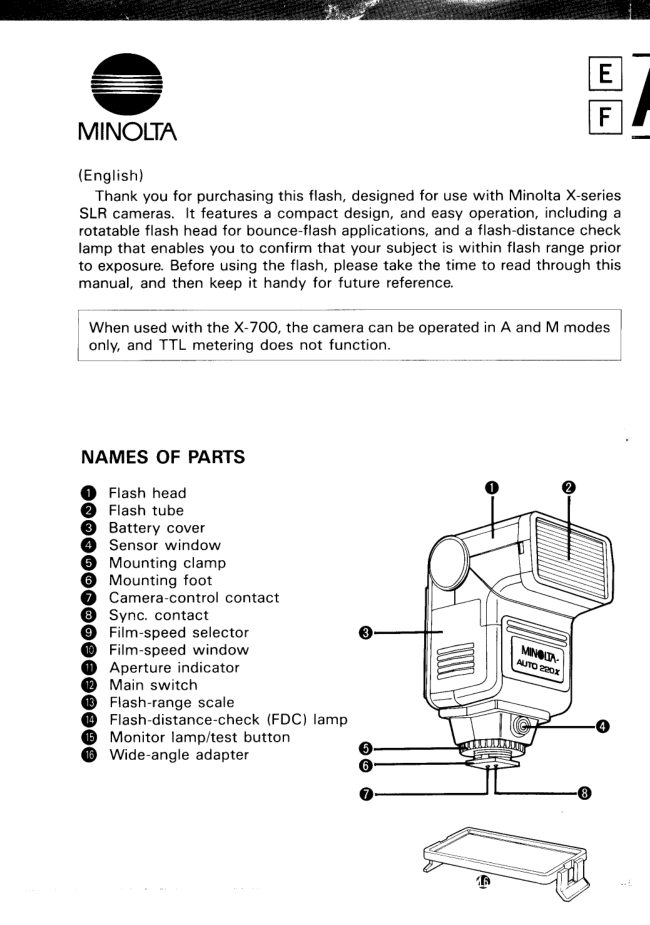
NAMES OF PARTS

    Flash head
    Flash tube
    Battery coveroo0
    Sensor window
    Mounting clamp@o
    Mounting foot
    Camera-controlcontact@o
    Sync. contact
    Film-speed selector@o
    Film-speed window
    Aperture indicator@o
@ Main switch
@ Flash-rangescale
@ Flash-distance-check(FDC) lamp
@ Monitor lamp/test button
@ Wide-angle adapter
View original page 1Page 2 · Read text
( F r a n ea i s )
  Merci d'avoir choisi ce flash, congu pour 6tre utilis6 avec les appareils reflex
Minolta s6rie X. Compact et simple d'emploi, il dispose d'une t6te orientable
permettant l'6clairage indirect et d'un t6moin lumineux de contrOle de la
distance flash-sujet permettant de s'assurer avant de prendre la photo que le
sujet ne d6passe pas les limites de port6e de l'6clair.Avant de commencer d
utiliservotre flash, veuillezprendreconnaissancedu contenu de ce manuel, puis
assurez-vousde le garder d port6e de main pour de futures utilisations.

 Lors de l'utilisationavec un X-70O, l'appareilne peut 6tre utilis6 qu'en modes
 A et M, et la mesure TTL ne fonctionne pas.


                  NOMENCLATURE

                                     T€te du flash                o
                                 Tube d 6clat
                                    Couvercle du logement des piles                               @o
                                   Fen€tre de la cellule
                                      Molette de fixation                            @o
                                   Sabot
                                   Contacts de contrOlepar l'appareil                            @o
                                    Contact de synchronisation
                                      S6lecteur de sensibilit6 du film                            @o
               @ Fendtre de I'indicateur de
                                         sensibilit6du film
                                       lndicateurd'ouverture de                o
                                 diaphragme
              @ Interrupteur principal
              @ Echellede port6e de l'6clair
              @ T6moin FDC de Contrdle de
                                                la Distance Flash-sujet
                       (D T6moin de disponibilit6/boutonde test
               @ Adaptateur grand angle


                         www.orphancameras.com
View original page 2Page 5 · Read text
22O(

      ( E n g l i s h )
    Notes on battery use
    o Keep battery contacts clean.
    o When using nickel-cadmiumbatteries,do not fire the flash more than ten
    times in succession since doing so may damage the unit.
    o  lf the charging time after taking a picture is longer than the time listed,
    the batteries should be replaced.

    Carbon-zinc: 30 sec.
   Alkaline-manganese:30 sec.
    Nickel-cadmium: 1O sec.

    Battery Cautions
    o Read and follow  all warnings and instructions supplied by the battery
    manufacturer.
     c When inserting battei'ies,make sure that tl'ie (*)and  (-)tei'minals face in
    the correct directions.
    o Never use batteries that show signs of leaking or cracking.
    o To prevent battery leakageor bursting, never mix batteries of different types,
    brands, or ages.
    o Used batteries should not be discarded in fire.
    o Keep batteries away from children.
    o  lf batteries are not inserted correctly, flash will not charge and leaking or
    bursting of batteries may result.
    o  lf the flash will not be used for more than two weeks, batteries should be
   removed.                             www.orphancameras.com
View original page 5Page 7 · Read text
( E n g l i s h )
  Once the flash is fully charged, the monitor lamp
w i l l  g l o w    ( F i g .  7 l ;  p r o v i d e d   t h e  c a m e r a ' s
mode/shutter-speedselector is set to any position other           A         r l-Isil---l                                                                                        [:,than B, the shutter speed will be set automatically to                             l"l            ft      m
                                                                                                                                  \Ji      f  ,3 -n-l        f  o7-tt-l1/60 sec.
  Flash-readyconfirmation is also availablethrough
the camera's viewfinder: once the flash has charged,
the number 60, within the viewfinder's shutter-speed                           /A\FDC  )At/MONITORscale,starts blinking at 3 Hz (Fig. 8).                                     v    zv:
  When the flash has charged and the required aperture                                PUSH TEST
has been set, simply releasethe shutter to take a flash         Fig. 7
picture.


                                                              Fig. 8
FLASH-DISTANCECHECK
  This flash includesa convenientfunction that enables
you to check, before taking the picture, that the flash
illuminationwill be sufficient for correct exposure. To
operate the flash-distance check function, prepare
the camera and flash as you would to take a picture;
when the monitor lamp glows, press it in to fire the
f lash.   lf the  illumination is suff icient for correct
exposure,the FDC lamp will glow (Fig. 9).  lf the FDC
lamp does not glow, try moving a little closer to your
subject and then test again.
                                                               Fig. 9
 Be sure to check that the camera-subject distance
  is beyond the minimum distance indicated in the
 flash-rangescale on the flash's back panel, since the
 FDC lamp glows irrespective of distance.                       www.orphancameras.com
View original page 7Page 8 · Read text
WIDE-ANGLEADAPTER
  Hs is, the fiash proviciessufficient coverage for lens
focal lengths down to 35mm. To extend coverage to
28mm lenses, snap the supplied wide-angle adapter
into place over the flash tube, as shown (Fig. 1O). With
the wide-angle adapter in place, the flash's distance
range will be less than otherwise; refer to Table 1 for
flash ranges with the wide-angle adapter in use.


                                                              Fig. 10
BOUNCEFLASH
   In standard operation the flash is faced directly
towards your subject. While this arrangementis often
suitable,it can also give rise to harsh subject shadows.
As an alternative,you can rotate the flash head so that
illuminationfrom the flash reaches your subject in-
directly, by "bouncing"  or reflecting from a nearby
surface. Bounced flash will generally create a softer
lighting effect and, in many cases, give more pleasing
results.
  The flash head can be rotated up to 9Oo from its
standard position, in which  it points directly towards
the subject, with click-stops at 0o, 60", and 9Oo
(Fig. 11). Many factors will  influence the  actual
exposurewhen you use bounce flash, includingangle
of the flash head (Fig. 121, and the distance and
reflectivity of the bounce surface. In any case, since
less light will reach your subject when bounce rather
than direct flash is used, using the FDC function
to check exposure prior to  taking the  picture is
recommended.


                                                                 Fig. 1 2                 ff'-:
View original page 8Page 9 · Read text
( E n g l i s h )
Tips on Selecting the Bounce Surface
o To obtain a soft, natural lighting effect, the bounce
surface should be able to disperse light broadly. A
mirror-like surface is not desirable.
o Since dark colors reflect less light and may thus
cause insufficient exposure,the surface should be as
light as possible.
o For color bounce-flash photos, the surface should be
as near white as possible, since colored surfaces will
affect the color rendition of the photo.
                                                               Bounce flash              Flash indirect


                           www.orphancameras.com                                                                              Direct flash                  Flash direct
View original page 9Page 10 · Read text
TECHNICALDETAILS                                   *t/
     Type: Clip-on-type flash unit with automatic camera control for Minolta X-series
     cameras
     Guide number: 22,in meters (72,inteetl,ISO 1O0 (15 with wide-angle adapter)
     Controls and indicators: Main switch; sliding control to set film speed, from
     64 to 1600, adjustable in 1/3-stop increments
     Apertureidistance range (lSO 1001: t12.8: 1.4 - 7.8m (4.6  - 26  ft.); f/5.6:
     o.7  - 3.9m  i.2.3 - 13  ',ft.ll',ft2.8i 1  - 5.4m (3.3  - 17 ft.); f/5.6: O.7 - 2.7m
      (2.3 - 8.9 ft.), with wide-angle adapter
     Flash duration: 1/25,000 - 1/1,OOOsec.
     Flash coverage: Normal coverage for lenses down to 35mm; down to 28mm
     with wide-angle adapter attached
     Flash-headrotation: 90" upward from horizontal, with click-stops at Oo, 60o
    and 90o
     Fower: 4 AA-size batteries, alkaline manganese, carbon-zinc, or nickel-cadmium
     type

     Battery performance:
                                Flashes per set

       Carbon-zinc
           -cadmium


     Sensor angle of acceptance: 15o
     Flash-camera contacts: Spring-loaded contacts  for  triggering flash  unit,
     automatic setting of X-sync. speed, viewfinder flash-ready signal
     Dimensions: 65 x 1O9 x 69mm (2-9116x 4-5116x 2-11116in.l
     weight: 1659 (5-13/16 oz.) without batteries
     Accessories: Wide-angle attachment  for 28mm coverage
     Specifications subject to change without notice.

   CAREAND STORAGE
     o Keep flash unit away from water and other liquids. Never handle the unit
      with wet hands.
     o The flash may not operate satisfactorily at temperatures above 5OoC (12OoF)
     o r b e l ow - 1 O o C (1 4 o F).
     o When dirty, the flash unit may be cleaned with a clean, dry cloth. Do not
     allow alcohol or other chemicals to come in contact with the flash.
     o Never subject the flash to shock. high heat, or high humidity. Be parti-
      cularly careful not to leave it in the glove compartment or other places in motor
      vehicles where  it may be subjected to high temperatures.
     o When storing the flash for more than two weeks. remove the batteries and
     store the flash in a cool, dry place away from dust or chemicals.
     o Never attempt to disassemble the flash. Any repairs should be done by an
lo    authorized Minolta service facility.
     o Fire the flash at least several times a month to keep it in good operating
      condition.
    To assure prompt  service, contact your nearest authorized Minolta service
      facility before shipping your flash unit for repair.
View original page 10From the M. Butkus archive. Original publisher and archive notices are retained.
Check the model and edition against your equipment.
PDF verified 2026-10-10.