Film cameras
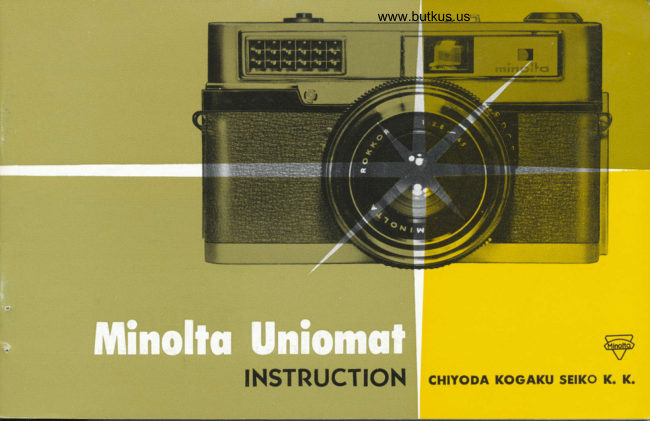
Minolta Uniomat User manual
User manual for Minolta Uniomat. 27 pages in English. Read the original PDF, download or print a copy without registration.
27 pagesEnglish10.3 MB PDF
Loading your manual…Open PDF directly
Document details
- Brand
- Minolta
- Model / document
- Minolta Uniomat
- Document type
- User manual
- Language
- English
- Pages
- 27
- File size
- 10.3 MB
- Category
- Film cameras
- Document date
- Not specified in catalog
Search available document text
Find a term, then jump to its page in the original PDF. Image-only pages may not be searchable; check the PDF for exact wording and diagrams.
Page 3 · Read text
www.butkus.us

Speciflcction of Mlnolto Uniomot
Film:  Standard 35 mm film (No. 135
         film) 24x36 mm picture size
Lens: Rokkor f 2.8 45 mm
Shutter: Optiper-Uni-Citizen B. /s to rr\ooo
       (EV6-18)
     M-X Flash synchronization Built
        in self-timer
Finder  : Bright framed range-view finder
View original page 3Page 8 · Read text
@Insert the encl of the film into
fi)To open the camera. pull  out                                           the slot of the take-up spooi
  the latch at the bottom of  tl-re        z'furn the take-up  spool rvith         with the emulsion sicle  ( light
   left sicle of camera Q) ancl open           1-our thumb until  the slot  is            sicle) of the film  torvarri the
  the hingecl bacii.                     on top.                                              lens.


                                                        www.butkus.us
View original page 8Page 9 · Read text
www.butkus.us


@Holding the magazine down, turn       @Close the back of the camera
  the take-up spool with  the           firmly and it will be locked au-
  thumb until the both side of film             tomatically.
  perforations engage the tooth of
  the sprocket.
View original page 9
Page 12 · Read text
Set the film exposure index


 l'lrt, Iilrn  ,'x1r<,sr.rrt' tn<lt'x ittrlit'irtor  tlilili.t': tht'
irlrsit .t'ltirtg  i,rr   tltt   tll)('  ,r{   fi ltrt r',,u  itrt'
 lslll{.
 Iit,'  ,rttlv irtiornrlrti.rrr vorr tr,'t',i lor   -r'ttitrg
rilr' ('\l){)sur-('-s('t ring 1r tht'  ,l\:.\   r)r' l)l\
Irlrn t,xposurt. inrit.x lortnrl,xr  1ltt. itt.trtr,'ti,,rr
-lit,r't ,,i  tlrt, Iilln  vurr rrst,.
['Lrll tlrt' ('xl)()sLrr('s('t rlllg  ilLlt .irgirtlr    :rtrtl
IrtItr rrntil tlrt. $'lritt.  rltll rrn tlrt, t'x1ro:trrt'-st,l
i:  rll)l)()sllU tlr('r'\l)():ur'('  itrrlt'x  ,,I  tirI   tilnl
lrrlt  ;1v'1' 115i11g llt'ttit'ttllrct-. lilrrrs  ltlir'.'  llotlt
,l;rvliglrt rrn,l tilttgst('n  ('xl)()sur(' ittrlt'xt'-.  \(i
, lr,rng,. tlrt' >t'tling ulrt'n  tltr t)pt' ol illLrtrtrrr;r'
llr )ll \'l)irltg('s.
View original page 12Page 13 · Read text
www.butkus.us

Exposure Volue

        The EV rins (11) is mechanically linked to the exposure meter. Point the meter (4)
             directly at your subject. The small red pointer will move across the scale according
           to the amount of available light. Turn the exposure-set ring until the "V"  of th;
           large green pointer straddles the smaller pointer(1).
         Under most conditions, you now have the correct setting of lens opening and shutter
          speed or exposure value EV and you are ready to focus and shoot.
         With poor light, an exposure may not be possible because of the existing light con-
             ditions. You will notice that the pointer is stationary or moves only slightly, not
           permitting an exposure value to be set. In this instance, auxiliary lighting-flashlamp,
          floodlamp or electronic flash will be necessary.


                                                                                                              11
View original page 13Page 14 · Read text
ffi',flns rhe Exposure vq,ue      ffi:z$Y
  For an accurate light reading,  it  is inrportant that you hold
                                               When using the filter   the camera level and point it  directly at the subject. Tilting
                                                                                                                   over   the camera slightly upward could give you a reading of the    When you take pictures with filters
                                                                                                             speed  sky and cause'under-exposure.  Tilting the camera down might      the lens, you can preadjust the Film
                                                                                             ahead of time.   give you a reading of the ground and result in over-exposure.     by means of filter factor
  You should take a close-up light reading of the principal subject    ASA speed of the emulsion is graduated
                                                                                                                             as    if there are strong contrasts in the picture. A reading of an      equally, and ASA 100 is twice as fast
   overall contrasting background could result in incorrect expo-    ASA 50.
                                                                                                               a   sure to the subject.                                  When the filter is used constantly having
                                                                                                           emulsion  On the lJniomat, exposure values are selected on a continuous      fa ctor number x 2. divide the
   basis, rather than at pre-set graduations found on most stand-      speed by 2.
                                                                                   100 will be reduced to   ard cameras. Therefore, there is no need for concern when the    For example ASA
  EV falls between two reference numbers on the scale.         ASA 50 for this instance.
                                                On the contrary, when one half the exposure
                                                                  value is required, set the ASA speed twice
                                                                as much, ASA 100 to ASA 200 for example.


t2
View original page 14Page 16 · Read text
qnd Composlng


      In the center of the frame is a square color
       area. You will notice the part of your subject
      which appears in this color area is double. As
     you turn the focusing ring you will note the
       double image will become one and then double
       again.
     When your subject becomes one in this color                                                                         In focus       area, you are properly focused.
      (Note) There are the distance scales in merer
      and in feet on the lens barrel.


I4
View original page 16Page 17 · Read text
www.butkus.us

             shulter Release


There are basically two ways to hold your Uniomat while taking pictur-
es: Vertical and horizontal. As long as you anchor the camera to your
forehead and squeeze the trigger, not jerk it, you can use whichever grip
or format is a most comfortable for you. It's always a good idea to
brace your camera if you can.
If the red dot on the exposure set ring is within the range of red line
on the lens barrel, do not attempt handheld exposure. The camera sho-
uld be mounted on a tripod or other steady base. If  it  is within the
range of green line, it  indicates that the shutter speed is fast enough
for hand hold picture taking.
These three EV numbers, as well as B, are in red to remind you that
when using them the camera requires a firm support.
View original page 17Page 19 · Read text
www.butkus.us

        ng the fllm


After you have taken your last picture, the film
counter shows 20 or 36-depending or whether you
are using a 20 or 36 exposure roll. The film must
be rewound into the magazine before the camera
is opened and the film removed.
Do not attempt to advance the film beyond the last
exposure, since the film might become detached
from the magazine and cannot be rewound.
To rewind the film, raise up the crank (10) on the
rewind knob. Holding down the rewind release
button on the bottom of the camera, turn the crank
clockwise until you feel the release of tension. This
indicates the film has been released from the take
up spool. Pull out the back latch and open the ca-
mera; removing the film magazine from the camera.
View original page 19Page 21 · Read text
www.butkus.us

      horogrophy


Your Uniomat has built-in flash synchronization.
New simplified automatic flashlamp exposure calculator el-
minates all your guesswork and caluculation.
By changing the M-X selector, it synchronize both with the
flashlamo and electronic flash.
For optimum result in use of  flashlamp, a B-C type flash
unit is required.
The Minolta B-C flash gun or any B-C flash gun with the
"shoe" may be used.
View original page 21Page 22 · Read text
Uhorosrcphy
      How lo set the flosh gun
     @ Slide the flash gun or the electronic flash unit into
             the accessory shoe.
    @ Irisert the plug of the flash gun's cord in the flash
               terminal.
    @ For M class flash bulbs, slide the M-X selector to
             the "M". For electronic flash, slide the selector to
             the "X"
        The red-dot synchronization indicator or the exposure-set
          ring should be refered before taking the flash picture.
              It should be within the orange line (M range) for M                                                      M-X selector           class flash bulb, and within the red line (X range) for
          electronic flash unit. If the indicator is not within
          the range, it is not advisable to photograph  at your plan-
         ned distance with the film you are using.


                                                                                     range linen                                                         M,X
View original page 22Page 23 · Read text
www.butkus.us


 Flosh exposure guide toble   (This chart is attachecl on the back of camera)
On the right si<le of the bo<ly, thcrc is  f lash exposure inrlex sca1e........A, I], (1, I). E.
I'lach letterr rcrpresernts thc rliIferent type of flashbulb or electronic: flash unit.
Once you picketl up the intlex letter barserl on the flashbLrlb or elcc:tronic  f lash which
you usually use. TI-re setting of exposure is very simple.


                                                                                ..1
                                                                                                                                         : :'   _                                  ,    '                                     interorets tha                                            :.'
View original page 23Page 25 · Read text
www.butkus.us


The following exclusive accessories are avail-
able for the Uniomat and are recommended      Minolta B-C Jr Flash Gun
in order to obtain the best results with  it.


Minolta filter UV (Haze) and Yellow
Lens shade (with leather case)


                   Cable release
View original page 25Page 26 · Read text
Other world fcrmous Minoltcr Ccrmeros
      Mlnolro SR slngle lens reflex photo system. New high in procticnl nutomqtlon.


Minolto SR-l                                     Minolfo SR-3
Lens :          f :1.8-55 mm Achromatic coated Auto-Rokkor    Lens:      f :1.4-58mm Achromatic coated Auto-Rokkor
           lens. (Bayonet mount)                                       lens. (Bayonet mount)
Shutter :  B. L-l/500 sec. Interchangeable lenses           Shutter : B. 1-1/1000 sec. Built in self'timer.                       l
          Built in self-timer.                                   Detachable exposure meter coupled with the
          Detachable exposure meter coupled with the              shutter dial.
          shutter dial.

SR cameras are completely automatic diaphragm control. Instant return mirror keeps the image visible ever after
the shutter is released. Other many features.
View original page 26Page 27 · Read text
s feqfuring rhe unsurpossed Rokkorwww.butkus.usLens


        Minolto Autocord                            Minofto 16 "n"
       The camera, that made, "Minolta" name world famous.     Imagine ! The camera that hides in your hand. Smaller
       Now, recognized as the standard quality of twin-lens      than a pack of cigarettes, the Minolta "L6" hides in
          reflex camera field.                                    your pocket, snuggles in your purse.  . . .  .
        Taking lens: f:3.5-75mm coated Rokkor 4 elements.      always ready to extend the fun of picture taking from                                                      an occasional prepared pleasure, to an on-the-impulse         View-lens :   f:3.2-75mm coated view Rokkor.
        Shutter:    Optiper Citizen MVL B. 1-1/500 sec.         delight.Lens :   12.8-22mm coated Rokkor Lens
                     Automatic shutter cocking.                    Shutter : B. ttru-)/roo  sec.
                     Other famous feature.                      Automatic shutter cocking and film winding.

                                                                                                                                           25
View original page 27From the M. Butkus archive. Original publisher and archive notices are retained.
Check the model and edition against your equipment.
PDF verified 2026-10-10.