Light meters
Miranda though the lens meter User manual
User manual for Miranda though the lens meter. 5 pages in English. Read the original PDF, download or print a copy without registration.
5 pagesEnglish2.4 MB PDF
Loading your manual…Open PDF directly
Document details
- Brand
- Miranda
- Model / document
- Miranda though the lens meter
- Document type
- User manual
- Language
- English
- Pages
- 5
- File size
- 2.4 MB
- Category
- Light meters
- Document date
- Not specified in catalog
Search available document text
Find a term, then jump to its page in the original PDF. Image-only pages may not be searchable; check the PDF for exact wording and diagrams.
Page 1 · Read text
www.butkus.us
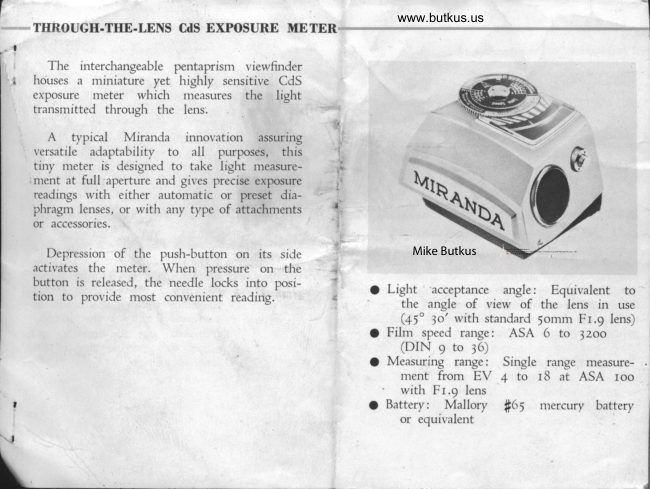
THROUGH-THE-LENS CrlS EXPOSURE METER

  The ir-rterchangeable pentaprism viewfinder
houses a miniature yet highly sensitive CdS
exposure meter which rreasures the light
transmitted through the lens.
 A  typical Mirancla innovation assuring
versatile adaptabilitv to  all  purposes,  this
tiny meter is designed to take light measure-
ment at full aperture antl gives precise exposure
readings with either automatic or preset dia-
phragm lenses, or with any type of attachments
or accessories.


                                                                                                                                                                                                                                                                                                                                                                                                                                                                                                                                                                                                                                                                                                                  DigitallyDN:Date:cn=Mike2024.04.22signedButkus,by00:43:48Mikeo=ButkusButkus-04'00'camera manuals, ou=butkus.org, email=mike@butkus.org, c=US  Depression of the pusl'r-button on its si.le                 Mike Butkus
activates the rneter. Wherr pressure on  tl're
button is released, the needle locks into posi-            Lieht acceptance angle:   Equivalent totion to provide rnost convenient readir-rg.                                                    the angle of view of the lens in use
                                                         (45" )o' with standard 5omm Fr.9 lens)
                                                 Film speed range: ASA 6 to )zoo
                                             (DIN 9 to 36)
                                                     Measuring range: Single  range measure-
                                              ment from EV 4 to  t8 at ASA roo
                                                      with Fr.9 lens
                                                      Battery: Mallory #65  mercury battery
                                                         or equivalent
View original page 1Page 2 · Read text
Preselection of Shulter Speeil


                                                                                                                                                                                                                Fujii    r
                                                                           &;i
                                                                             ffi'


  Turn the inner dial and alisn    Match the desired shutter     Sight the subject through the                                     -ofthe figure denoting the speed     speed to the red "Time" indi-   l'iewfinder, press tl-re push-button
the lens in use with the required   cator by turnins the outer dial.   to activate the meter ancl then
film speed rating. The                                              release it to lock the needle in
illustration shows correct setting"bou"                                        position. Read off the aperture
when using an F 1.9 lens an.l an                                   indicated by the neeclle and
ASA roo film.                                                      adjust the aperture ring of the
                                                                  lens accordingly.
View original page 2Page 4 · Read text
www.butkus.us
t   Preselection of Lens Aperture

    #:fi:4
             ]*?.8i'l.t'r 1.,{


   _ Match the  figr-rre denoting      Siqht the subject through the    Turn the outer dial and align
   the speeJ of the lens in use to     r.'iervfir-rder, press the push-button   the preselecteJ aperture settiig
   the required settir-rg on the filn-r   to activate the nteter and then    rvith the meter nee.lle. The ficure
   speed scale bv turning the inner    release it to lock the needle in   in Iine with the red "Time"
    dial.                                      position.                           indicator is the shutter speed
                                                              that shoulJ be employe.l' to
                                                                        assure correct e\posure.
                                                                                             I When taking exposure read-
                                                                     ings through preselection of
                                                                           either the shutter sDeecl or
                                                                             lens aperture, sce to it  that
                                                          the lens aperture is  fully
                                                                                open.
View original page 4Page 5 · Read text
Exposure Reading in Special Instances


                                                                       lF.
                                                        ;.;   '

                  @u
                                                      www.butkus.us

  In photornicrography or when     Sight the sublect through the     Turn the outer dial and align
using bellows, lenses of  un-    viewfincler, press the push-button    the rec-l indicator on the aperture
determinable f-nun.rber, etc.,   to activate the meter and then    scale with the position of the
match the red dot on the inner   release it to lock the needle in   meter needle. Adjust the shutter
dial to the desired settins on    position.                        speed dial to the setting indi-
the film speed scale as thotun                                     cated by the red "Time" indi-
in the illustration.                                                                  cator.
View original page 5From the M. Butkus archive. Original publisher and archive notices are retained.
Check the model and edition against your equipment.
PDF verified 2026-10-10.