Film cameras
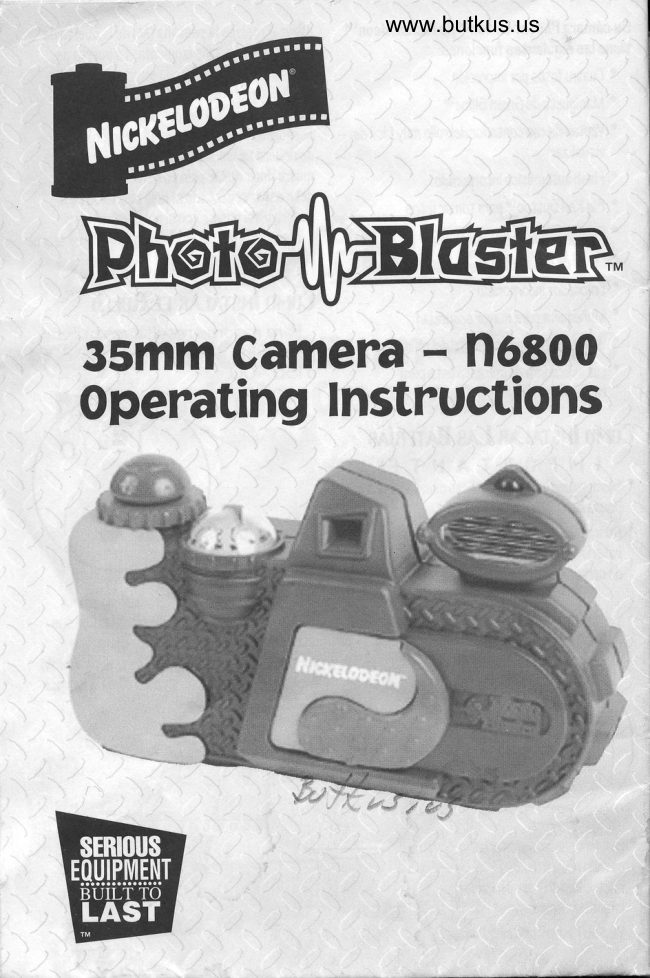
Nickelodeon Photo-Blaster User manual
User manual for Nickelodeon Photo-Blaster. 17 pages in English. Read the original PDF, download or print a copy without registration.
17 pagesEnglish6.4 MB PDF
Loading your manual…Open PDF directly
Document details
- Brand
- Nickelodeon
- Model / document
- Nickelodeon Photo-Blaster
- Document type
- User manual
- Language
- English
- Pages
- 17
- File size
- 6.4 MB
- Category
- Film cameras
- Document date
- Not specified in catalog
Search available document text
Find a term, then jump to its page in the original PDF. Image-only pages may not be searchable; check the PDF for exact wording and diagrams.
Page 3 · Read text
This camera contains high voltage components. To avoid risk
        of electrical shock, do not attempt to take the camera apart.

     Asour Youn PHoToBIASTERTM
                     M         Yo u r N ic ka lo d eonr   Thol,o1l a sfn{M      the Thoto5lasterrM usee any
          is a orecision 35mm camera that       standard 35mm film, No soecial
      takis four limes ao many pictures        pr o c essin g is r equir e d. J ust take th e
      per roll as an ordinary camera.The        exp osed film tn y our local film
       pictures  t he ?hot o7laslerrM takes    developing place. Ihe Thoto7lastn{M
      are one'auarter the size of           does all Ihe work of making trhe
      ordinary picf,ures, and come outr        pocketrsize prints.
      withfour differentr oictureE on each      Yo u sh o ul d f amili arize y o ur e elf
       orint,.You can cutT,hem inlo           with all the pafrs of your
       individual pocket prints and trrade     ?hotoblasterrM before ueingit for
     them withfriends.                   the firsi" time.
         this means that with a roll of 24
      ex?ooure film you cantake96
       pictures, andwilh a roll of 12             ?lease have an adult help with
       bx?osurefi  lnr you can Iake 4B                  in et allin g b alte  ri e s an d    I o a din g
         picT,uresl                                  film into you? ?holo7lagterrM.


                           -,.1"q                                             '.  G                                              a
     Plnrs loeNrncnrnN
   A Viewfinder               I  Film information    Q Ready liqhL
                             window     b-Frame counter                   R Rewind releaee
                                     Film ?reo6ure plale        butrtnn    C 7ia Red DutrtronrM    J
          sh"utter release    K Film door         5 Rewindknob
    D Film advance wheel   L Battery door      T Kewindlever
    E Wristr.slra?      M Dattery Door Tab    U Take-uVsVool
         af,T,achment      N Rewind fork      V Film canholder
    F Lenscover["i               O Film door        W RedFilmLeaderMark    G Lenses                    locks/releasee     X Film LeaderLabel
    H EleclronicFlash     ? )Vrockef,wheels
View original page 3Page 5 · Read text
Your Nickelodeonru                  baLtery door will pop o?en. Onbhe
       ?hotoblasterrM                         battrery door are a @and a Q,
     35mm Camera features:             lnserlthe 2AAbalLeries into the
                ' Four shobs per print             com?arlment makinq oure you put
                ' Green )limerM handle           Nhem in f acing Nhe corcecl                                @ and Q of the                ' Easy-view film counler             direclion,withthe                                     @ and Q                ' builX-in aulomalic flash             baLtreries matchingNhe
                ' 1igRed1u|;lonrM shulter release    on the baf,Iery door.
                ' Easy-wind film advance             TressLhe door backinto posiNior                                                                       unf,il you feel and hear Nhe click.        'FocusFreelens
                ' Duiltr-in view finder
                ' Wrisl strap for added securily   lxsnluNe Frw
                ' 1afety film door latch             Use 24 or 12 expooure film,l)O
                ' LED Flash-readv indicator       2OO or l9O 4OO for best, resulT,s.

       fNsrnllrNe Bnrrgnres
       IvPoRTANT!
                                                   b aLNeries,             ' Alw ays use fresh alkaline
         neverworn-oul or exhausNed ones.
                mix oldbatrIeries wi0h new             ' Don'T,
         oneo or differenttypes of
              b alT,eries (e.9. carbon with alkaline.)
             ' Always remove batteries when nol       Tlace y our Thot oblastre{M f ace          using y our Thoto1lasterrM  f or long                                       down on alablewiththelens door          periods.
                                                                  clo s e d. U sin g y o ur lhumb  n ails, p u sh
                                         Nhetwobuttons  (O) away from each                                                                 -fhe
                                                                                                                                                                                                                            i1                                                       other.      film door will ?o? u?, Open
                                            as far ao you can wilhout forcing it,
                                           Graso the rewind lever on the botlon


-0

           T urn th e 7h oto1l aslerlM
       upside-down. Tress lhe
       rab (M) onthebatrIery
       door (L) to rhe lefL. The
                               4
View original page 5Page 6 · Read text
Q andpull down,Tlacetheroll of film   TnrcNewww.butkus.usPrcruRps
intothe compar\menL as shown .?ul                                 Open the lens door. Kot ale theIhefilmleader over lhe sprockel                                                film advancewheel asfar asiT,willwheels (?) so lhe end of the film is                                          go. Hold lhe camera wilh 2 hands,aILhe red mark (X). Make sure the                                oneby Nhe Green SlimerM hand gripfilm lies flat and lhat the spro ckel                               andthe olher onf,he body nexNLoholes on Lhe film enqa ge T,he                                    Ihe purple parl of Ihe lens door,sorockel wheel,                                Make sure you do not cover Ihe  Close the film door. You will hear                                        lens,the flash, or Lhe viewfinderand feel iN click inlo place.                                    withyour fingers.  )pen Nhe lens door on the front                                       lndoors or inlow light condilionsof trhe camera, Tress Nhe Dig Ked                                make surelhaNbhe ready lighf onDulIonrM shutter release (C). Ler                                  Nop of f,he flash is ON. You maygo of the Diq Red DutronrM and                                 haveto wail afew seconds afEerIhen rotate the film advance wheel                                      opening lhe lens door for the lighf,(D). Note: lt will only turn a shorl                                     lo come on.distance. Repeat rhis 6 - B T,imes,
unbil Nhe frame counter reaches  1.     NoOe:  lf you leave the lens door
                                   o?en for longer xhan one minute
                                     wibhout Naking a picturethe
                                 camera  will automatically T,urn
                                                 itself off andNhe red ready lighl or
                                    top of Nhe flash will qo olF.To Nurn
                            Ifictccuoeon"         lhe cameraback on, close and re-
                                   o?en the lens cover. When Nhe lighl
            M{]re        comeo back on,Nhe ?hotoblastrerr
                                                      is again ready to take a piclure.
                                                Lo ok Nhrou gh the viewfinder and
                               com?oee the picture.You musf, be
                                    at leasl 4 ft. away from whatr you
                                    are photographing.lndoors or al,
                                             night, you should be closer lo your
                                  subjecLthanlO feet.
                                    TuEh Nhe biq Red DuIIonrM tro
                                     take the picture. Rotale the film
                                  advance wheel as far as it will go t,
                                   Lhe next frame. Do nol force the
Nota Theframe counter will only       wheel. Note: lt will only turn a shor
move if the film is loaded correctly.   disT,ance,  \
lf Ihe frame counler doesn'l move,      The counf,er  will show youhow
openthe film door again and make    many pictures you have taken.
sure the film sprocket, holes are      When you can no longer Lurnlhe
en ga gin g th e spr o cket whe el.             film advance whee| iN is lime Io
                                   rewindthe film.
View original page 6Page 7 · Read text
With your Lhumbnail, pull up Nhe    Fr-mH Frnrunr                                          rewind lever from I'he rewind knob
      Your Thoto1laslerlM has an             (T). Rotate the lever clockwise.You
      auf,om atic flaEh sensor, This means      will fe el some reeisf'ance but D O
       trhal th e ?hoilo1lasIerrM d etre ctrs    NOT FORCE THE LEVEK.The
tnr    thelight level and decides when  it,     resiElance will become leEs as You
)    needs to flash.lf Lhere iE notr          rewind lhe film.When there is no
     enou gh lighl the flash senEor will     more resislance you are done
     turntheflash  on, andthe redlighl     rewinding and can removelhefilm.
     on t op of the flaEh will light up. This
I    meansLhe ThoIo1lasl,errM  is ready                                 RrvovrNc TUE Ftt-u)    to use the flash when iN is needed.
                                                                                                  lJ sing y our trhumb nails, push the
          Frlm Speed    Flash Range       two butrtons (O) away from each
                                  4' - l0'            other.The film door will pop up,         lsO 200
         tsO 400                   ,l' -12'              Openit, asfar asyou canwitrhouN
I                                                forcinq  it, Grasp T,he rewind lever on              lf your ballerieE run ouf' or are      lhebottom (T) andpull down just as
                                                                                                   lo adin g the film. T ake the roll of        low,- trhe ?hof,o1lasl'errM wi   I I sti    | |      when
     work in brighl sunlighL. 7 icNures          film out of trheThotn7lasf'errM.
      traken inside or af' niahL will be dark.     You Ehould developtrhe exposed
                                                      film as soon as possible.Take your
n                                           filmlo any normalfilm devel.oper,    TunNnc THE CAMERA OFF
       To Nurn Ehe Thotro7lasf'errM off,l                                 DevrmprNe                   door.ThiE                          shuLs off     closethelenE,                                                                                                                                                           " 7h olo1l aet'er" in the sp e ci al                              W rit e                       flaEh unit.M     f,he         power tro lhe
                                                                    h an dlin g blo ck o n Nhe p ro c essin g
                                              envelope when you brinqyour film in   RswuuNG THE Flt-v
     IUPoRTANT!               forhiqhlydevautnmatndlabseloping. Otherwise,mayeomenolbe
       You mustr rewind the film before You   ableto zroceasitr asfast, as usua|
      oo en lh e b a ck of Ihe ?hofnblasfnrrM        F ilm p 7 6 6,s ssin g     I ab s a djust t h eir
      or thefif m will be raline.d                equipm ent  f o r the b estr b ri ghLn ess
                                            oi each frame of normal film.'he
                                               Thoto1laE|'errM camera puts 4 mini-
                                            picturesinLo one normalframel  lf
                                              piclures on one printr aref,akenin
                                                                                                                                                                                                                                                                                                                               I'                                         qreatrlyvaryinglightcondif'ions
rt                                      oomeVictruresmaybe  aiLher over or
                                            under exposed.
                                                                                            lf you w anl bigger pictures, Nry
                                                                                                                                                       " half fr am e pr o cessin g"                                                    this: Ask f or
        T ur n trh e ? holo5l a EI errM uV si de     when you haveyour film developed.
                                                                                                      litrtrle more, buf' you'll geI 2     down and Vushf'he rewind release       You'll ?ay a
     burron (K).
View original page 7Page 8 · Read text
half-size piduree on eachprint                             TnousLrsHoolNGwww.butkus.us
 instead of 4 mini Vrints.                                                                              lf your ThotoblaslerrM doeen'tr
 No'te: Whenyou gelyour pholos        work,  t ry trhese sugqestions before
 back from the develo?er you may      sending  it, in for repair:
  find thal trhe upper lefl picture on                                      Flash ready lighv doesn't come on.
                                   Checkthe batteries.They may be the first, print is black, or the last,          ' prinL only has two pictures on iL.                                             missing, dead or insf,alled wronq. This is a normal funclion of f,he                                                     . Make Eurethelens door is open. ThoLoDlasterrM.
                                                 . Autro- off feature may have turned
                                                                      t he Thoto7lasterrM  off. Close the
 Clnr AND MATNTENANCE               lens door and re-openiL
  When               Tno                      lonq                         Nhe               it          Iakes                             for                                                                 is enoughlight - ffash noI                                    'There
 ? h                       rr M    ofn1l                                   g e         aste                      tro r e                          ch ar                                Lh e                                        needed.
 fl ash it is lime tn chan qe trhe                                                                                         t                                      ?ictures areblurry. b atteri es. F oll ow th e dir e cti o ns                                                     , Holdlhe camera steady whenyou under "lnslalling Datteries" on page 4                                        are using iL Always hold the f,o open the b atLery door. Kemove                                         Thoto7l aslerrM wilh Lw o hands. the oldbatT,eries and dispose of
 properly. lnserL new b aNleries, being         ' Always keep the subject you're
 careful to insiall Lhem in the correcL      shoolinq aLleast 4 feel away,
 direction. Close the b att ery door.        Blank or dark picturee.
  To clean your Thoto7laslerrM, use                                 'Kemember,you musIbelO feet or
a sof| damo clothfn cleanLhe            closer for flash pictures.
out side ONLY. Do not use a clolh        o                                     Always checkto make Eurethefilmthatr is soaking wel. Do noN use                                                            is advancing when you wind the slr o n g s olv enLs (al c oh ol, b enzin e,                                                 film.'lhe film counter muEl move. lhinn er, s? r ay a er o s ol typ e cle an e r),
  To clean lhe lenses, genlly blow any    bright or overexposed pictures.
                                                       . Always stay atrleasT,4 feelfromdustoff.Do noluEe any cleaners.
                                                I e av e y o ur Thoto7l asLerrM       your subjectr.  D o n' t
 in places that, are exlremely hotr,            ' Don't point,the Thoto1laslerrM at
humid, dusty or cold, especially not     any b ri ght    li qht sourc e, esp ecially
in a bathroom, near z hei,2l67, 97         noL aIf,he sun or alamp,
inside a parked car ex?osed to
direcf. sunlightwitrhthe doors and
windows closed.                SpeuncnnoNS
  Alw ay s qras? y our Thot o1l aste{M   FilmType: 35mm film,lSO 2OO or
by rhe Green glimerM grip provided                 I9O 4OO recommended
or carry ilby Ihe attached wriEt,                                        Lens:     2Bmm fixed focusstrrap. D o notr Louch lhe lenseE, as
                                                   1/125 secondthis will make them dirLy and result    thutler:
                                                          "AA" batteriesin poor qualily pictrures.          Flash:  2 x1.5V
View original page 8Page 9 · Read text
TOIIG HAI.T I.IMITED II|ARRAIITY
   For a period of six months. from date.of purchase, Long Hall warrants that the NickelodeonTu product sold hereun-
   der will be free from defects in material and workmanslip.  This warranty applies onty to ttris unii. Long Hlil din-
  notbe responsible  for other losses or damages  of any kind resulting.from  cir in equipment failure. Thiwarranty
  !ry ttq!cover damage or failure caused by or attribrjtable to Acts tif God, abuse, misuse impioiieroiabnormal
   usage,.laufty  Installati_0n, improper maintenance, units purchased or serviced ouhide the United States, units
  which have been modified,or incorporated  into other,pioducts,  lightening or other nciOenie oiiiCeilive voitage
  or any repairs other than those provided by Long Hali, or transpdrtation-co$s,
  ln lhe.event of delect, malfunction or failure of the unit to conlom with this warranty, long Hallwill repair or
  furnish,a.rep.lacemenl  for those unils or componenh thereol which, upon test tnd-eiAminaiion uii|ng iliit,
  prove defective.
 THIS WARRANTY  IS LIMIIED SOLELY TO THE ABOVE AND THIS WARRANry AND ANY WARRANTIES  IMPLIED
 BY SIATE LAW wlLL APPLY 0NLY FOR THE PERIoD SET FoRTH, (SoME STATES uO 1rOi Ar[Ow rrNrinttOr'rS
 0N HOw L0NG AN lMPL|ED,wARt4ULv.t{q!ls,-s0 THE ABovE ilrurnrrol$llAv nroinppl ro Vbuj rHi
 WARRANTOR WILL NOT BE LIABLE FOR ANY LOSS, DAMAGE, INCIDENTAL OR CONSEOUiTilT onlune Ts oT
 Ally ILNq,WHETHEB BASED UpON WARRANry CONTRACT, 0R NEGLTGENCE AND ARtstNG rr!lOrrrrlrcrrorrr
                      REPAIR 0F THE PRODUCT, (S0ME SIATES D0 NOT ALLow nr ticrusroN 0R LIM- Wllllil S4Iq,_t]qE0R
 ITATION OF INCIDENTAL OR CONSEOUENTIAL DAMAGES, SO THE ABOVE LIMITATION UNY ruOT NPPTY TO
 ygq,) qNIESS 0THERWISE C0NTRARY I0 STATE LAW G0VERNING THE PURCHASE nr wRnnRlriOn'S
 LIABILITY SHALL NOT IN ANY CASE EXCEED THE CONTRACT PRICE FOR THE PRODUcT iTAMTD To gT
 DEFECTIVE OR UNSUITABLE.
 This warranty gives you specific legal rights, and you may also have other rights which vary from state to $ate,

 ll'l'WARRANTY REPAIR
 1, The purchaser or end user mu$ notify Long Hallwithin 30 days after the defect is discovered.
 2. The NickelodeonTM.product  claimed td be defective must be pdckd so as to avoid damage in transit and must
   be sent prepaid to Long Hall.
 3. The user must enclose proof of purchase and a return address.
 4. Long Hall will replace or repair the unit and return  it, prepaid freight.

                                                                                                                                                                                                                                                                                                                     'iOUT OF WARRANTY REPAIR
 1. For repair of an out of wananty Nickelodeonnproduct, follow steps 1 and 2 of ln-Warranty Repair (above),\
 2. The user must enclose a return address and telephone number  sri that Lono Hall                             can
   contact the user with regard to the out of warranty service charge. Long Hall reserrles the rightto substitute
   plod||tof equal or greater value, as they deem necessary. Prodlcts relurned for repair, or any que$ions
   should be sent to:
  LONG HALL TECHN()LOGIES,  L.L.C., 5OO EASTERI'I PAR|(WAY, FARMINGI)ALE, NY 11735

 N6AOOV2-4/98


                       @.1997 Long Hall Technotogies L.L.C.
                        Nickelodeon                                and                                                           all                                                       related-titles,                                                         loqos                                                      and charactershrilLoneTechnolligie  Halls. L.L.C.    are                           trademarks                                                 of                                    Viacom                                                                  Internatioi-ral                                                                                   lnc.
View original page 9Page 10 · Read text
www.butkus.us

  ffi      'Hti5ilm
                     Jl6EooCimera de 35mm -
 Manual de OPeraciones
View original page 10Page 11 · Read text
Esta cdmara contiene componentes de alto voltaie. Para evitar
 choques el6ctricos por favbr no intente desbaratar la cdmara

Acencl DE su PHotoBusnn'n
  5u TholoblaslnrT M de Nickelo deonT M es una        35 mm y no necesif,a  nin qun pr o ceso esp ecial p an
cAman de precisi6n de\5mm,la misma quetnma        revelarlo. Sololleve su rollo a unlocal de revelado
folns oor rollo cualro veces mAs aue una cAman        defolos. El?hotoblasherT[  se encarga dehacer
 ordiniria. Las loLos que el ?hou'6lasterT M lnma                                                            I as f ot o s d e tram allo d e billet era.
son un cuartn deltamafio de unalotro ordinaria,y          U stn d deb e f amiliarizar s e con ln das las
vienen cuatrro dilerentn fotns en cada impresion.      parks du su?hotn1lastnrrM antns de quela
tJsled las puede corlar en lotros de billetnra           use por primeravez.
individualesy cambiarlas con sus amiqos.
  Estn signilica que cln un rollo de24 fotns ustnd
puede tnnar 96 lotns y conun rollo de lTlotns          ?orfavor deje que un adultnlo ayude
ustnd p u e d e lnmar 40  f otn s,                       con alinslalaciin delasbaleriasy el rollo
  El?hol,oblastn{M usa elrollo st'andard de          en el?hotnglastnrr$,

Lsn DE PARTES
A. CuadrodeEnloque         J. ?laLinas de presion del rollo   R. 0ot6n para re'embobinar
                                                                                                                            re- embobinarb. Contrador delrollo           K. ?uertra del rollo             9. Vanecilla oara
C. \iqRed\utonrv para         L. ?ue*,adebaterb           T. Talanca oara re' emb obinar          rtt
   lomarfol,o                                |vl. ?est aia de la puerLa de       U. Carreleparaelrollo
0. Enb obinador del rollo              baleria                   V. Cajaparaelrollo\
E. Muffequera                N. Re'embobinador         W.Marca Roja guta de
 F. Cubiertadellente            0. Seguro dela puerta del rollo     pelbula
G. Lentes                    ?, Ruedas?ara enqranar elrollo   X. Rolulo de gub de
H, Flash el\ctrronico            8. Luz aue indica sila cAnara       pelbula,
                                                 estA'lisf,al. V entranilla de intormaci6n
     delrollo
View original page 11Page 13 · Read text
9u cilmara ?hotnblastnfu de Nickelodeonr[      abajo. Tres.ionela pestafia (M) dela puerta de
  tiene las siguientn s tuncioneg:                    batertas (L) hacia la izquierda. La pu,erta de
                              p or impresi\n                        baterta 5e va a abri. Enla puerl,a debaterhs     ' Cualro f ol,os
                                                   haylos siguientressignos:                        @ y O . ?onqalas       Mlaniguetra de Green glimeTM     '                                              dosbalerhs                                          AA en el compartimienloy
     '       Ventranilla con conl,ador del rollo muu fAcil de      asegirese de que esI6n enlaposiciln corcecl,a
       visualizar                                     de acuerdo a los siqnos antres indicados, Esto
      Flash autnmitico incoroorado                      quiere decn que el polo positivo delabaleria     '
     ' big Ked DultonTv pan Iomar tot os              debepuerlayeslaras(conecladomismo conalelpolopolopositivosneqalivo. dela
    '       F Acil re- emb obinador del rollo                         ?resione  la puerta en posiciln hasta que escuche
      Lenln de enloquelibre                                         el enaanche de la mismat.    '                                                                                  .
    '      Enfocador incorporado             Covo fNsrnmR EL RoLLo    '       Ivlufrequera ?an mayor seguridad                                        Tara mejores resu\ados utilizar    '     Seguro del comparLimiento  del rollo             pelfcula de 24 o l2tomas lgO 2OO
    ' Luzindicadora de que eslAlista para         o I9O 4OO,
     Tnmartol,o
                                                                 r/1Covo lNsrnun Lns BlrERiAs
                                       =@     I M P O R T A N T E!
   Siempre usebalerhs alkalinas nuevas,'nunca '
   pongabaterhs usadas o gastadas.
   Nunca mezclebalerias  nuevas con usadas o '   batrerbE de dilerentetipo (por ejemplo: baterbs                    s=V
   de carbon conbaterbs alkalinas.)
                                                        Tonqa su Thot oblast e,{M boca abaio en una
                                             mesa y clnla puetr a del lent e cerraia. Con sus
                                                                  ufias empujelos dosbotones de seguro dela
                                                       puerla del rollo (0) , La puerxa se va abrir, Abrala
                                                    hasta donde mdE de, sin forzarla. Coja la palanca


  Siempre saque las baterbs'
  cuando nova ausar su
   7 hotn\lasle{ M p or p eriodo s
  larqosdetiempo,
  V ir e su ? hotoblasl,erT M b o ca
View original page 13Page 14 · Read text
p:arare embobinar f)ybajela. ?onqa elrollo en el    Couo                             www.butkus.usToum Foros
conp arl,iniento, tal como esle lo indica. ?onqa la.
                                                  Abralapuerxa dellente. Gire el embobinadorgub dela pelbula sobre las pesfafias, de t alforma
                                                               del rollohAstra cuando no de mAs. Cojala cAmara
que la misna se encuenlre en la marca roja.
                                                 conlas dos manos. La una mano en el Green Asegurese de que el rollo estd plano y de que las
                                                     SlimeTM y la olra en el cuerpo dela cAmara, cercap esl,afias del r ollo estren engr anadas en la  r ueda
                                                  dela parLe norada dela puerla dellente.p ara emb obinar el nismo.
                                                Aseqirese de no cubrir cln sus dedos ellente, el   Cierrela puerxa. Usted escucharA  el sonido de
                                                            flash o el cuadro de enfoaue.cuando  la puerta se enqancha,
                                                      As e g(tr es e d e qu e la lui qu e in di ca qu e la   Abra la puerl,a del lent e en la parte anlerior de la
                                            cAmara esT,A lista est d enON, Es posible quecAmara,Tresioneel\igKedbul,IonTM.1uelteel
                                               tenga que espenr unos cuanlos sequndos1igQedlul,l,onTM y luego gire el enbobinador del
                                               despuds de que abrala puerf,a dellente, anles derollo (D).
                                              auelaluzse encienda.Nota: El embobinador solo girarA un p0c0. Kepila
esla acci6n S o 4 v eces hast a que el conlador         NoUa: 9i usted dejala puerla dellenle abierLa por
indiauel,                                      mAs de un minuln sin tomar ninguna fotro,la cAman
                                                         se apaqarA aulomAl,icanenle y la luz roja t ambidn se
                                                            ap agar A. Tara encender la cAmara nuevamenf,e,
                                                     ciene la puerla del lentn y abrala olra vez. Cuando la
                                                    luzseencienda,quieredecirquesu?hotoblasTn{M
                                                       estA lista olra v ez p an tomar  t olns,
                      NtucuoEut"                     llire por en cuadro de enloquey encuadre su
                                                      troma. Nrlanlenqase ?0r lo menos a cuatro pies
             M{hre"            de distancia del objelo que estafolografeando.
                                                             5i es denoche o se encuenl,raouertras  adenl,ro
                                                    su disl,ancia no debe pasarlosl)  pies de
                                                             dist ancia.Tara lomar la f oto pr esione el big Red
                                                 1ullonru, Girelabobina lara avanzat el rollo
                                            hasxa que el conlador pase al siguiente ninero.
                                           No force labobina.
                                   Nota Estabobina solo girarA un ?oco.
                                                                 El cont ador le indicarA cuanl,as lolos ha
                                                  l,onado. Cuandolabobinano demAs, es el
                                            momenlo cuandotenga que cambiar de rollo,

                       FusH
Nota: Ei conlador se nov er A unicamentre si el rollo       5u Tholo\lastre{ M liene flash aulomAlico. Eslo
esI,A colocado correctamente. 5i el contadlr n0 se     quiere decir que elThotroblastefM  detec,tala
mueve, abra la puert a del rollo of,ra vezy asequrese      canf,idad deluz quehay en el ambienf,e donde se
de que el rollo esld engachado enlas pesl'afias          estA tomando  la f oIo, y decide  si se necesila flash
delrollo.                                       o no. Anl,es def,omar unatoto, aseq,irege de quela
View original page 14Page 16 · Read text
b orrosas. batnrbs viejas, b\trelas y ?onqa nuevasbatnrias.       5us totnswww.butkus.usest in
 Aseg(trese de que estbn enlaposici6n  corcectra,                                                        Cojala cAmarafirnenenle  cuandola este                  3!                                                                   '
 Cierre la puert,a  del comparLimientro de bat erhs.           u'and).                                      P
   5i necesita limpiar su ThoIo\lasInf M, use un         , Siempre coja su?hotn\lasterTv conlas dos        T
 pafio h(medo y linpie 90L0 la pat e exlnrior de la                                                                                                 t,                                                    man05.
cAmara. No use unpafio que esti empapado.                                                      . 1iempre manlenqa el objeto o sujeto al quele              fiTampoco use subslancias  f uerks trales como
 alcohol, diluy en\e, b encina o cu al quier limpiador en          est A tonando la fof,o, por lo menos a 4 pies de         ,0ilq
                                                                      distrancia.aere050l.                                                                                                                                                                                                          ':""t1
   Taralimpiar ellente sople el polvo delicadamente.                                                                                       tl
No use ninginlipo delimpiador.No deje su       Fotnsenblancoukscuns     ,
                                             kcuerde que usled debelener una dislarvla de          E!ThotnblasterrM en luqares sumamente calientes,         '
himedos, polvosos o trios. Especialmenle en            10 pies 0 menls cuandol,omefotos conflash.       d
bafroE, cerca de calenladores, o denlro de un carro      . Siempre aseg(uese de quelaluzindicadon de       g
expuesto di eclamenle a la luz del sol,                  que el llash est A listro, esti enc endida.                                                                                                                                                       DI
                                                                                                                                                             Llespecialmentn, silas puert as y las vent anas del         . Asegirese de que el rollo avance cuando ustedlo
carro estrAn cerndaE.                                                     estAre-embobinando.  El conlador se debe          c
  Siempre coja su Thoto\laslnrtM de la manigueta                                               R                                                             m)ver.
Green1limerM o cojala delamuftequen, Nolnque                                              e
                                                                           gloslentnsya que estolos ensuciarAyla  calidad de                                                   Fotn s brillosas o con demasiada luz
laE f otns ser A muy p obr e.                                                      Siempre mantengase a por lo menos 4 pies de                                                                   '                                                                                                            Ert
                                                         dislancia del obletn o sujetn al quele estA          P
Couo Rrsorvrn PnosLrMAS              lnmandolafol,o.                          0
                                                                                    P   5i su Thotn\lasterTM no Lrabaja, trrate las           . No entoque su ?hotro\laslerTM en conln de
siquientns sugerencias anlns de mandarla altaller        ninqunaluzbrillank, especialmentn del sol o de      B                                                                                                                   I
dereparaciones.:                                     unalAmpara.
                                                                             R
l-a luz indlcadon del f,ash no se enciende.                                                                        1
  kviselasbaterbs.  ?uedeser aue 6sLasno     EsreuRcncnNES'   esttn inst aladas, gastadas o puestas en la                                                                         t,                                                    Tipo deKollo: Telicula deSSmm,serecomienda
  posicionincorrecta.
, Asegirebe de quela puerta dellentn, este                       190200 ot50 400                           4,g,                         Lentes:  Enfoquefijo de\\mm
  abierta.                       Dispare: 1l1\5sequndos                 R, Todrh ser quela cimara se a?aqo                                                                                                        t,  autromAf,icamentn,. Cier re el lenk y        Flash:   0aIerbs"A{'2x1.5V
                                                                                                                                      2,  abrAloolravez
  Hay suficientre luz, no se necesila flash.'
View original page 16Page 17 · Read text
GARAIIT'A I.IMITADA IIE
 [01{G HAtt
 Por un periodo de seis meses desde la fecha de compra, Longa Hall garanliza que los productos de
 NickelodeonTM  estardn libres de defectos, ya sea los materiales o la mano de obra de los mismos.
 Long Hall n0 se responsabiliza por cualquier otra clase de dafros o perdidas debidos al uso de este
 equipo. Esta garantia no cubre dafros o defectos causados por actos divinos, abuso, mal uso, uso
 inapropiado o anormal, instalaci6n defectuosa, mantencion inapropiada, unidades compradas o
 reparadas fuera de los Estados Unidos, unidades que han sido modificadas para ser utilizadas con
 otros productos, descargas el6ctricas o incidentes causados por cantidades de voltaje excesivas, o por
 cualquier reparacion que n0 haya sido proveida por personal de Long Hall, o por costos de
 transportaci6n.
 En caso de defectos, malluncionamiento o malogro de la unldad, para cumplir con esta garantia,
 Long lfafl reptarrd o remplazari esas unidades 0 componentes, los mismos que despu6s de habel
 sido exaninado por long Hall, prueben estar defectuosos.
ESTA GARANTIA ES LIMTADA ESPECIFICAMENTE A LO ARRIBA MENCIONADO, Y ESTA GARANTIA Y
CUALOUIER GARANTIA IMPLICITA DE ACUERDO A LAS LEYES ESTATALES SERAN APLICADAS
SOLAMENTE POR EL PERIODO DE TIEMPO ANTES INDICADO (ALGUNOS ESTADOS NO PERMITEN
LIMITACIONES EN EL TIEMPO DURANTE EL CUAL LA GARANTIA DEBE SER APLICAD, SI ESE ES EL
0ASO ESTAS LlMlrACt0NES N0 SoN APLTCABLES EN SU CASO.) EL GARANTTZAD0R N0 SERA
RESPONSABLE POR NINGUNA PERDIDA, DANO, DANOS INCIDENTALES O CONSIGUIENTES DE
CUALOUIER CLASE, AUNOUE ESTOS ESTEN CUBIERTOS POR ESTA GARANTIA, LOS MISMOS OUE
ESTEN EN CONECCION CON LA VENTA, USO O REPARACION DE ESTE PRODUCTO. (ALGUNOS
ESTADOS NO PERMITEN LA EXCLUSION DE DANOS INCIDENTALES O CONSIGUIENiES, POR LO
TANTO ESTA LIMITACION PUEDE NO SER APLICABLE EN SU CASO)A NO SER OUE ESTO SEA
PROHIBIDO DE ACUERDO A LA LEY ESTATAL DEL ESTADO GOVERNANTE DE LA COMPRA. EN TODO
CASO LA RESPONSABILIDAD DEL GARANTOR SE LIMITA Y NO EXCEDERA AL PRECIO DE ESTE
PRODUCTO OUE SE ALEGA ESTA DANADO O INSERVIBLE.
Esta garantia le da derechos legales especificos, usted tambi6n puede tener otros derechos de acuerdo
a las leyes del Estado donde se encuentre.
REPARACIONES DENTRO DE LA GARANTIA
1. Elcomprador o fltimo usuario debe notificar a Long Hallde los dafios durante los primeros 30 dias
  una vez que se descubrio  el defecto.
2. El producto de NickelodeonTM que se alega defectuoso debe ser empacado cuidadosamente para evF
   tar dafros durante el envio y 6ste debe ser prepagado a la orden de Long Hall.
3. El usuario debe enviar prueba de compra y direccion remitente.
4. Long Hall remplaza16o  reparara el equipo, y lo enviard con envio prepagado.
REPARACIONES FUERA DE LA GARANTIA
1. Para productos de NickelodeonTM que deben ser reparados fuera de la garantfa, siga los pasos 1 y 2
  Reparaciones dentro de la Garantiia (arriba mencionados).
2. El usuario debe incluir direcci6n remitente y tel6fono, de tal forma que Long Hall lo pueda contactar
  para tratar asuntos relacionados con las reparaciones fuera de la garantia. Long Hall se reserva el
  derecho de substituir productos de igual 0 mayor valor, de acuerdo a lo que ellos estimen necesario.
  Productos enviados para reparaciones o cualquier pregunta debe ser dirigida a:


                             Long Hat rechnorooies L.L.c   fl                   il   o1ee7  L o n g H a l1   NickelodeonrMytodotitulorelacionadoal.mismo,logos.o                                                                           ,   T e c h n . t:ig   i e s. L. L. c.  impresiones son marcas registradas de Viacom International  Inc.
                           B
View original page 17From the M. Butkus archive. Original publisher and archive notices are retained.
Check the model and edition against your equipment.
PDF verified 2026-10-10.