Film cameras
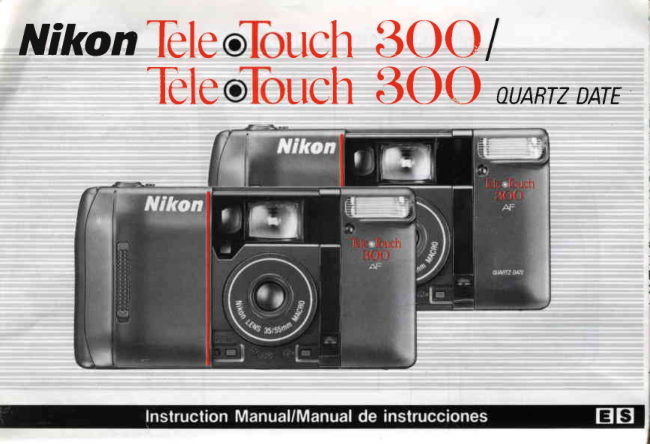
Nikon Tele Touch 300 User manual
User manual for Nikon Tele Touch 300. 37 pages in English. Read the original PDF, download or print a copy without registration.
37 pagesEnglish3.2 MB PDF
Loading your manual…Open PDF directly
Document details
- Brand
- Nikon
- Model / document
- Nikon Tele Touch 300
- Document type
- User manual
- Language
- English
- Pages
- 37
- File size
- 3.2 MB
- Category
- Film cameras
- Document date
- Not specified in catalog
Search available document text
Find a term, then jump to its page in the original PDF. Image-only pages may not be searchable; check the PDF for exact wording and diagrams.
Page 3 · Read text
FOREWORO/INTRODUCCION                                                                           Il{STAttIl{GBATTERIEI
Thankyou for purchasingthe NikonTele.Touch300/
Tele.Touch300 QUARTZDATE.For best results,read this
instructionmanualthoroughlybeforeusingthe camera.
Graciasoor comDrarsu NikonTeleTouch300/Tele'Touch
300 QUARTZDAT= Paraobtenerlos mejoresresultados,lea
eslemanualde instruccronescompletamenteantesde usar
su camara


                                                                   Using a coin, turn the battery
                                                           chamber lid lock from @  to @
                                                                                    to open the battery chamber lid.
                                                        Usando una moneda, gtre el
  .For      instructionson the Tele.Touch300 QUARTZ                   seguro de la tapa del compartt-
  DATEdata imprintfunctions,see IMPRINTDATAon                mrentode las prlasde la posrcron
   the reverseside.                                             rQ a la posrcion(  para aDrrrta
  -Para                                                                                                                                                                                                                                                                                          t       as funcronesde rmprestonde datosde su                                                                      cl lJd
  Tee Touch300 QUARTZDATEvea por favorel
  REGISTRODE DATOSen eJladopostertor


                           www.orphancameras.com
View original page 3Page 6 · Read text
IOADI]{GFILM/GARGADEtA PETICULA

                               The usablefilm speed rangefor DX-codedfilm is ISO 100to 1000.
                                  With ISO 100,200, 400 and 1000films,the camerais automatically
                                       set to the exactfilm speed.When usrngotherfilm withinthe usable
                                           film speed range (i.e.,ISO 125,lsr) 250, etc.),the film speed is auto-
                                        maticallyset to the nearestspeed,as shown in the followingchart.
                                       El rangodel velocrdadde las peli:ulasDX es ISO100a 1.000Con
                                    pellculasde velocidadISO100,2)0,400y1.000,la cdmarase colo-
                                 ca automAticamenteen la velocicadde la pelicula.Cuandouse otra
Use only DX-coded film.                clasede pelicula,que est6dentrcdel rangode velocidaddetermina-
                                do aqui,(porej.:ISO125,ISO 250,etc.)la velocidadde la peliculaUse solamente pelicula codificada                                  ser6seleccionadaen la posicionde velocidadmds cercana,talDX.                            como se indicaen la siouientetarrla:

   For usageother than photo                   PellculaDX-codedconfilm in useDX          SensibilidadFilm speedseleccionadato be set
   enlargement,we recommend              tso 25-40.100-160                rso100
   DX-codedISO 200 or 400                    lso 50-80, 200-320                 rso200
   film.                                    rso 400-640.1600-2500             rso400                                           rso 800-1250.3200                 rso1000
   Paracualquierotro uso dife-
   rentea amplicacronesfoto-
   grdficas,le recomendamos
   usarpeliculasDX ISO 200 o
   400.
View original page 6Page 8 · Read text
Viewfinderinformation
lnformaci6nsobre el visor


2

1. Parallax compensation marks
2. Flash ready-light LED
3. Pictureframe marks
4. Autofocus frame marks
1. Marcasde compensacidnde paralaje
2. TestigoLED de carga del flash
3. Marcas de encuadre
4. Marcas de autoenfoque


                       www.orphancameras.com
View original page 8Page 11 · Read text
II
            Efl
Pullthe film leaderout to the red    Checkto ensurefilm is locatedbetweenfilm guides,with no film slack.E
mark.                         Closecameraback.(Filmautomaticallyadvancesto frame #1.)

Trr,:la puntade la peliculahastala   Asegureseque a peliculaeste tensa entre las gulas para esta
rrarrcaroJa                         Cierre la lapa de la camara (El ro io avanzaautomattcamentehasta la loto
                                    g r a f i au 1 )


                                                                                                            lf film is not properly installed,the frame
                                                            counter does not move to frame #1.
                                                 S la peliculano es colocada adecuadamente
                                                                        el contadorde {otografias no avanza hasta
                                                                        la *'l
View original page 11Page 13 · Read text
2


Lookinto the viewfinderand positionautofocusframe marks on the main      Lightlypressthe shutterrelease     Depressthe shutterreleasebutton
-sublect.                                                              button.The camerawill automatic-    to take the picture.
                                                                                  ally focus on your subject.Mrrea travesdel visory coloquelas marcas de autofoco del marco de la                                    Presioneel obturadorparatomarla
lotogratiasobreel oble1oprrncrpala tomar                           Presioneligeramenteel botondel     fotoqrafia.
                                                               obturadorLa camaraautomdtrca-
                                                        menteenfocarAsu obreto


                                   Viewfi nder magn ificationautomatically adjusts         The built-inflashfiresautomaticallyif lightis in-                                 accordanceto Wide or Telesetting(0.4Xon    r"sufficient.For details,see ADVANCEDSMART
                                    "Wide".0.6Xon "Tele").                         FLASH.
                                      El aumentodel vrsorautomdticamentese ajusta-         El flashincorproradose drsparaautomAticamente
                                      ra de acuerdoal aumentousado,Wrdeo Tele            sr la luz es ins;uficienteParamds detalles,vea la
                                  (0,4Xen "Wrde"o 0,6 en "Tele")                    seccronFLAS|HINTELIGENTEDE AVANZADA.
View original page 13Page 14 · Read text
@+E


At the end of the roll, the lens automatically retracts into the camera body,        To rewind film before the end
and film rewind also starts automatically.The frame counter counts back-           of the film roll, push the mid-
wards until rewinding is complete, then automaticallystops. Confirm that the          roll rewind button, using a
film advance indicator has returned to "S".                                      pointed object.
At frnaldel carrete,el obletrvose retraeautomatrcamentedenlro del cuerpn      Para rebobrnarla pelicula
de la cdmara,y Ia peliculacomienza a enrollarseautomdticamenteEl           antes oue se hava termrnado
contador de fotografiascuenta hacra atrds, hasta que el rebobtnado de la          el rollo,presioneel boton de
peliculase termine,luego de lo cual se detieneautomZrticamente.Revisesi      rebobrnadode medro-rollo,
el contadorha reqresadoa la oosicton"S"                               usando un obieto ountudo


                              www.orphancameras.com
View original page 14Page 15 · Read text
To rewind film before the end      Close lens coverto switchthe       Open the cameraback and remove
of the film roll, push the mid-      camera off.                           film cartridge.
roll rewind button, using a
                      C errela cub ertadel obletrvo      Abrael resoaldode la capointed object.
                            paraapagarla c:tmara           mara oarasacarel carrete
Para rebobrnarla pelicula
antes clue se haya termrnado
el rollo,presioneel boton de
rebobrnadode medio-rollo.            Shifting the lens cover in the direction of the arrow automatically re-
usando un obleto puntudo              tracts the lens into the camera body. Confirm that the lens has fully
                                        retracted into the camera; then close the lens cover by sliding it until
                                                                      it clicks into olace.
                                       Al cambrar la tapa del obletrvoen la posicronde la flecha,este se
                                      relraeautomatrcamentedentro del cuerpo de la camara Asegurese
                               que haya entrado completamentedentro de la camara; cterreenton-
                                    res la lap.,roel obletrvo.hasta que suene "clrc',rndrcandoque esla
                                 en su {uqar correclo
View original page 15Page 16 · Read text
AIIYANCEDSMARTFTASH(FlashShooting)/FtASHlNTEtlGEilTEDEAUANZADA


lf light is insufficient,lightly press the shutter release             lf flash is not fullycharged,the red LEDblinks
button to cause the camera's built-in flash ready-light     and shutterreleasebutton locks.Remove
LED to light up. Then, to take the picture, fully de-          fingerfrom shutterreleasebuttonand wait a
press the shutter release button; the flash will fire         few secs.lf LEDstillblinksand shutterlocks
automatically.                                              after waiting 7 sec.,batterypower is insuffi-
                                                             cient.Change battery.
Sr la luz es insufrcrente,oresione levementeel boton
del drsparadorpara hacer que el LED de rndrcacton     Sr el flashno estdcompletamentecargado,el
de flash lrstoincorporadoen la camara se encienda     LEDro;odestellay el botondel dtsparadorse
Luego,lome Ia fotografiapresionandocompleta-        bloqueaRetireel dedo del botondel dtspara-
mente el boton del drsparador,con lo que el flash se      dor y esperepor algunossegundosSi el LED
encenderaautomaticamente.                    aun destellay el drsparadorse bloqueades-
                                                               nv u vrrpu  q dv v p    vpu vqv  , npru  ,   ar nnrv v  '   7, seorv v y u " v v v  tr ndns  la' s  notenciaY v  ! v
                                                 de las pilas es rnsuficienteCambre la pila.


                              www.orphancameras.com
View original page 16Page 17 · Read text
AutoBacklightCompensatlon/Gtrmpetls?Gi0nde contraluces
,v
,s9 @


To shoot without flash:                                                                                               lf you shoot a dark subject against a bright background (i.e.,with the win-
Simplyhold down the flashcancellationbuttonas you depressthe shutter    dow or the sun behind),the built-in flash will automaticallyfire to brighten
releasebuttonto take the picture.                                          the subject with fill-in lighting.To cancel this automatic fill-flashfunction,use
                                                                              the flash cancellation button. See orevious section.
Para tomar fotos sin flash:
Srmplementesostengahacraabajoel botonoaracancelarel flashcuando    Si usted toma una foto de su obleto contra un fondo brtllante,(por elemplo
presionael botondel obturadoral tomarla foto                            contra una ventana,o contra el sol),el flash incorporadoautom6ticamente
                                                                    se acciona para iluminarel obleto,ccn luz de relleno Para cancelaresta
                                                                    funcronde luz de relleno,use el boton de cancelacrondel flash Vea la
                                                                   seccion anlerior
View original page 17Page 18 · Read text
lf a subjectis too smallto
                                                                                         fullycoverthe autofocus
                                                                 frame marks,it is possible
                                                                        the camera'scomputermay
                                                                        not be able to decide if fill
                                                                                flash is necessary.Also, when
                                                                         takingpicturesof a person,
                                                                                                                                 it is recommendedthat the
                                                                    autofocusframe marks beTo use fill flash intentionally,coverthe auto exposuremeteringwindowwith                                                                   centeredon the chest.your fingertip,then lightlypressthe shutterreleasebuttonand hold it in.
Then uncoverthe windowand depressthe shutterreleasebuttonto take the      Sr un obletoes demasiado
oicture.                                                  pequenoparacubrrrlocom-
                                                                pletamentecon las marcas
Parausarel flashde rellenointencionalmente,cubrala ventanrllade medr-      del vrsorparael autoenfo-
cronde exposrcroncon el dedo,presroneentoncesel botondel obturador      que,es posibleque el
lrgeramentey sostengaloapretadoRetireel dedo de la ventanrllav accrone    computadorde la camara
el obturadorparatomarla fotografia.                                no puedadecrdrrsi el flash
                                                                      llenadores necesarioo no.
                                                             Tambien,cuandoesleto-
                                                      mandofotografiasde una
                                                                 persona,se recomtenda
                                                                    colocarlas marcasdel visor
                                                                parael autoenfoqueen el
                                                                    p-.chode la oersona                              www.orphancameras.com
View original page 18Page 19 · Read text
FlashShootingin Red-EyeReductionMode/Fotografiasconflashen e

                           "Red eye" is a phenomenonin flash photographyin which the center
lf a subjectis too smallto          portionsof a subject'seyesappearbrightred in color pictures,and white in
fullycoverthe autofocus         black-and-whitepictures.
frame marks,it is possible       To minimize"red eye,"the camera offersa special red-eyereductionmode.
the camera'scomputermaY        In this mode,the flashfirestwicewith each photo.The firstfiringcausesthe
not be ableto decideif fill         subject'spupilsto becomesmall,thus reducingthe possibilityof a red-eye
flashis necessary.Also,when       effect.lmmediatelyafter (approx.0.75 sec. later),a second flash takes the
takingpicturesof a person,        picture*.(Whileshutterreleasebuttonis lightlypressed,the flash ready-light
it is recommendedthatthe          in the vieMinderdouble-blinksrapidlyat regularintervals.)
autofocus{rame marks be       "Whenthe brightnessls underEV9.5 (at ISO100)and flash-to-subiectdlstancels
centeredon the chest.           approx.1.5m(4.9ft)or more.
Si un objetoes demasiado
pequenoparacubrirlocom-       El "Ojo rojo" es un fen6menoen la fotograflacon flash,en el cual las pupi-
oletamentecon las marcas        las de los ojos de la personaobjeto aparecenrojas en las fotograflasa
del visor oara el autoenfo-        color,y blancasen fotograflasa blancoy negro.
que,es posibleque el           Para minimizarel efectode "ojo rojo",6stacdmparaofreceun modo espe-
computadorde la cAmara         cial para la reducci6ndel efecto"ojo rojo".
no ouedadecidirsi el flash      En este modo,el flash se disparados vecespor cada fotografia.El primer
llenadores necesarioo no.       disparode luz hace que las pupilasde la personaobjetose reduzcan,dis-
Tambi6n,cuando est6to-        minuyendode esta manerala posibilidadde que aparezcael efectodel ojo
mandofotograffasde una          rojo.In mediatamentedespu6s(aproximadamente0,75 segundos despu6s),
persona,se recomienda        un segundodisparode luz toma la foto..(Mientrasse presionaligeramente
colocarlas marcasdel visor        el bot6ndel obturador,la ldmparaindicadoradel flashque se encuentraen
para el autoenfoqueen el           el visor,parpadearapidamentedos vecesa intervalosregulares).                            *Cuando                                                                               (a                                                               ISO100)y la distanciaflash-                                                   EV                                                        de 9,5                                                        debaio                                               ta                                              ituminaci\nest| porpechode la persona.                                                                        pies)                                                                     (4,9                                                               mds.                                                                o                                                        1,5metros                                   aproximadamente                                  objetoes
View original page 19Page 20 · Read text
oUse the wideangle posltion and at a close shooting
                                                             drstance.
1. Slidethe red-eyereductionmode switchto the
  positiont.t.                                      E l mo d o d e re cluccon de "olo r o1o"slr ve par it m r nr m r zarel
                                                                                                         optr                                                                       m                                                                                                               os.Jc2. Depressthe shutterreleasebuttonto take the         erefecoctomed en d"oa moJorolo"slos slgurPar a asegurenlespr arocedrr esullacjosm tentos                                                                                                   tsea                                                                                                 espe-   picture.                                                cra lme n lecu d adoso al tom ar fotogr aliasde n nos. ycj qr r e
                                                            d e b rd o a su s car acter istcas lisr cas.el efeclr r dc .ar ti,r , lr , ,1. Coloqueel botonde reduccrondel efectodel oio      lre n d ea se r ma s pr onuncr ador
  rojoen la posrcronr-t.                                  a L a s p e rso n a sde la fologr ala debcn nr r ar cj r eclatnr c.leI
2. Presioneel drsparadorpara tomarla fotoqrafia.     a Llaa scaprne rsoa ran a sde cor ta vr sla 1s!lelosque sufr encje cor ta
                                                               vrsla ,n p e rmelr Opta,aSlr gm atSnr o elC)deben r sar lenteS
                                                             o le n le sd e co ntaclo cor r ectr vos.
                                                            a Pa ra la to ma de fotogr afias en nter or , r lum r neia saia lan
                                                                 cla ro a o n ro se a posr ble.
                                                            a Use la f)()S rC r oncle qr an eingLtl;1it 1na CJr sta.aat ale llnr a
                                                                       C E T C A N A


                              www.orphancameras.com
View original page 20Page 21 · Read text
ib Gr rocusroCruunuzActoNDEtBLOOUEODEENFOOUE[Tow


To take a picture of a subject outside the autofocus          3. Recomposethe shot withouttakingyour frngeroff
frame marks, use focus lock.                              the button.
1. Center the autofocus frame marks on the subject.        4. Fullydepressthe shutterreleasebuttonto takethe
2. Lightly press the shutter release button.                    picture.
Para tomar una fotograliade: rtI oDleloque se              3. Vuelvaa componerel encuadresrnsctltarsu dedo
encuentrafuera de las marc:tscjr: lrlttr.rcnJoeue,Ltscel        del botondel drsparador
b l o q l e o d e c n fo q l e                                      4. Pre-'sronecornpet:rrnentec bolondel ctsDaraoor
1. Ccntre las marcas del vrsorpara el ltLttoenfoque             flara lOrnarrli,l lot()(lralttii
   soirre e suleto
2 . P r e s r o n el i q c r a m c n l ee b o t o n d e   i j r s l ) a t r i r ( t . ) r
View original page 21
Page 22 · Read text
III


With the following subjects, focus on another object the same distance from the camera (as the subject) and
use focus lock:
1. Subjects too small to fully cover lhe autofocus frame marks.
2. Subjects behind glass.
3. Glossy, light-reflectingsurfaces, such as cars or water.
4. Very bright light sources.
cnn lnc ctatttontoc^bletos,enfoque otro obleto que se encuentrea la misma drslancrade la cAmara,v use
el seguro del enfoque:
1. Obletosdemasiado pequenos para cubrir completamentelas rrarcas de aLttoenfoque
2. Obletosque se encuentrendetras de vrdrios
3. Superfrcresbrrllantes,que reflelenla luz,tales como automovileso aqua
4. Fuentesde iuz muV lumrnosas,


                             www.orphancameras.com
View original page 22Page 25 · Read text
Takespecialcare to avoidtouchingthe           At WIDE (focallength- 35mm; aperture-  f/3.8),
lens barrelas it moves.lf you pressit,            the pictureangle is wider and thereis greaterdepth
preventingnormalmovement,the lens            of field.
will stop moving.lf this happens,lightly          At TELE (focallength- 55mm; aperture-t/5.7),
pressthe shutterreleasebuttonor press         the pictureangle is narrowerand the depth of field
the Wide/Telebuttona secondtime,to               is shallower;focuslock is recommended.Be sure
returnto normalfunctioning.                     to hold the camerasteadilyto preventcamera
                                          shake,Debe prestdrselemucha atencional                                    oThe minimumshootingdistanceis 0.45m(approx.evitartocar el barrildel objetivomien-                                                        1.5ft)at W, and 0.59m (approx.1.9ft)at T.tras 6steest6en movimiento.Si usted
presionadicho barril,interfiriendosu          En la posici6n WIDE (Drstanciafocal- 35mm,
movimientonormal,el objetivodeja de           aberturadel diafragma-  f/3,8)el 6ngulode la foto-
moverse.Si 6sto llegasea suceder,              grafiaes mds ancho,y hay una mayorprofundidad
presioneligeramenteel boton para               focal.
desasegurarel disparador,o presioneel          El la posici6n TELE (Distanciafocal - 55mm,
botonWide/Teleuna segundavez, para         aberturadel diafragma -  f/5,7),el dngulode la
que la cdmararegresea su funciona-            fotograflaes mds estrecho,y la profundidadde
mientonormal.                        campo es mucho m6s pequefra;se recomienda
                                          usar el segurode enfoque.Aseg0resede sostener
                                                      la cdmarafirmemente,para evilarque se mueva.
                                      oLa distanciamlnima para tomar fotograffases de
                                            0,45 metros(aprox.1,5pies)en la posici6nde
                                            gran-angular(W) y de 0,59 metros(aprox.1,9
                                                pies)en la posiciondel lentetelefotogr6fico(T),

                          www.orphancameras.com
View original page 25Page 26 · Read text
.'.            :'


Automatic Flash Shooting Range Chart             Antesde dispararsu flash,aseg0reseque el
Diagrama de gama de drsparo autom6tico de flash    objetoest6dentrode la distanciade alcance
                      Unit:m (ft) Unidad:m(pie)   adecuadapara la peliculaque este usando,
   Film Speed   Automatic Flash Shooting Range    La tabla anteriorindicadistanciaspara peliculas
     (tso)     Gama de disparo autom6tico      para fotografiasa color.
 Sensibilidad de           de flash                                         Parapellculasde transparencias,acortela dis- la pelfcula (lSO)       Tele          Wide                                                tanciade alcancemds o menos un tercio.Si usa     100       3   e.8)         4.5 (14.8                                                 pelfculapara dispositivasde velocidadISO 1000     200        4.2 13.8)        6.3 (20.7
     400       6  19.7)       9  (29.5      o mayor,todas las tomasdentrode una distancia
     1000        9.4 30.8)      14  (45.9      menor a 0,6 metros (aprox.2 pies) del objeto,
                                       puedensalirsobre-expuestas.
Beforeshootingwith flash,make sure your sub-
ject is withinthe properflashshootingrangefor
the film speed in use.
This chart shows the flash shootingrange for
colorprintfilm.
For slidefilm,shortenthe shootingdistanceby
about one third.lf you are usingslidefilm with a
speedof ISO1000or higher,picturesshot within
0.6m (approx.2fi) of the subject may come out
overexposeo.
View original page 26Page 27 · Read text
With the followingsubjects,focus on anotherobjectthe same distancefrom the camera(as the subject)and
use focus lock:
1. Subjectstoo smallto fullycoverthe autofocusframe marks.
2. Subjectsbehindglass.
3. Glossy,light-reflectingsurfaces,such as cars or water.
4. Verybright lightsources.
C ,n los srgurentesobjetos.enloqueolro95191oque se prr Uprlrca 13mrsr|ad.stanCrade la camara.y dse
e segurodel enfoque:
1. Obletosdemasradopequenosparacubrrrcompletamentelas rrarcasclelitrrtocnfoque
2. Obretosoue se encuentrendetrasde vtdrios
3. Superfrcresbr llantes.qLrereflelenlit lirz 1.ics como automovileso agua
4. Fuentesde luz muVlLtrnrnr.r:;lts

                            www.orphancameras.com
View original page 27Page 28 · Read text
I

                                                            Flashshootingis possiblewith
                                                                  the self-timer. Afterthe firstshot,
                                                                  the secondexposurewill be taken
                                                           as soon as the flash is sufftciently
                                                          charged(e.9.,after10 secondsat
                                                                the most).
         T
                                                  Tambrenes posrbletomarfoto-
To take two consecutive self-timer pictures, keep the self-timer button      grafias con f lashen el modode
deoressed at least 3 sec. and confirm that the self-timer indicator lamp    drsparadoraulomattcoDespues
(visible from front of camera) has started blinking. After the first shot, the   de la prrmerafotografia,la
film automatically advances; after approx. 5 sec., the second exposure                   uspnrv Y U  r   r ndar v u  cxnosicr nn ser a tom ada
will be taken. The camera maintainsthe same focus setting for both        tan pronto como el flash sea
shots. To cancel the second of the two consecutive self-timer pictures      suficientementecargado (e1:
after the first has been taken, press the button a second time or close     despues de 1Osegundos,cuando
the lens cover.                                               mas)
Para tomar dos fotografiasconsecuttvascon disparadorautomatrco,
mantenga srr boton presionadopor lo menos por 3 segundos,y conftr-
me que su ampara rndicadora(vrsrbledesde la parte frontalde la cA-
mara) haya empezado a parpadear Despuesde la prtmerafologratia,
la peliculaavanla aulomAticamente:despues de aproxlmadamente
5 segundos,la scqunda exposictonserA tomada La camara manttene
el rr-.,,rr,, ulrfrrqrc para ambas fotografiasPara cancelarla segunda de
tds cios fotns e unsecutrvascon disparadorautomatrco.despues que la
prlmera ha srdo tomada, presroneel botonwww.orphancameras.comuna segundavezo cterrela
 l 2 r  ) /    r l F r   { ) r I   '
View original page 28Page 29 · Read text
IcnurnnCARETIPS/CONSEJOSPARAELCUIDADODEtA CAI,,IARA


1. Do not leave the camera in an        2. Clean all lens surfaces,including    3. lf the camerais exoosedto rain
  excessively hot place; store it           the autofocus window with a           or mist,or afterusing it near the
  somewhere cool and dry.                 soft, clean cloth.                    sea,gentlywipe the camerawith
                                                                 a soft cloth.1. No dele la cAmara en lugares       2. Lrmprelas superficresde todas
  excesivamentecalientes Guar         las lentes,rncluyendola ventani-    3. Sr la camaraes expuestaa la
  dela srempreen un lugar fresco                 l l a d e r a u t o e n l o q u ec.o n u n p a n o      lluvrao la humedad,o sr se Llsa
   y seco                                                             I r m p r oy s e c o                    cercaal mar,limpielasuave
                                                        mentecon un Danlrseco,

{f"*-'"'**'*
  VaXe surethe lens coveris closedwhen the camerais not being used.    Aseg0rese que la tapa del obletrvoseaf
i'  Alwaysstorethe camerawith the powerswitchturnedoff.This protects    e s t e e n u s o S i e . n p [ €!  r , r r , . u - d r t l l
   againstaccidentalactivationof the camerawhen it is in storageand         err la posrcion OFF (apal!la(.rJ)Esto la
   againstbatterydrainage.                                            accrdentaldr. 1ac:irnrrratcuando :,,rr-i
?I.                                                                                                              rj, -O.jslc ,l'     ,  [-r'aS
 \
View original page 29Page 30 · Read text
4. tsatterypowerfallsoff in extremelycold temperalures;use a new lithium     5. lf the cameramalfunctions,take
  batterypack and keep the camerawarm. Suddenextremetemperature            it to an authorizedNikondealer
  changesmay cause internalcondensationthat could damagethe             or servicecenter.
  carnera.                                                                          5. Sr la camarafuncionaincorrec-
4. La rargade las prlasdecaea temperaturasextremadamentef rias;use                            ft ^c 'l ll l^l ^Ytl ^   l l . U ,   ll ll Un 'V, nC lt nl c l  c^ l  ur lrn I ua Vn Uo nr  l Or t v
  un nuevopaquetede prlasde lrtroy mantengala c6maratibia.Cambros     autorizadoNIKON,o a un centro
  repcrtinosde temperaturapuedencausarcondensacioninternaque        de servicio.
  rlueoedanarsu camara.


;errada cuando  la camara  no
 c o n el in t c rrrrnln r r i e e n c e n d r d o
 ntcncri  cqnlra la actlvacron
re nt r a gua -d a d a , y c o n t r a e l

                               www.orphancameras.com
View original page 30From the M. Butkus archive. Original publisher and archive notices are retained.
Check the model and edition against your equipment.
PDF verified 2026-10-10.