Camera accessories
Olympus Winders User manual
User manual for Olympus Winders. 47 pages in English. Read the original PDF, download or print a copy without registration.
47 pagesEnglish4.1 MB PDF
Loading your manual…Open PDF directly
Document details
- Brand
- Olympus
- Model / document
- Olympus Winders
- Document type
- User manual
- Language
- English
- Pages
- 47
- File size
- 4.1 MB
- Category
- Camera accessories
- Document date
- Not specified in catalog
Search available document text
Find a term, then jump to its page in the original PDF. Image-only pages may not be searchable; check the PDF for exact wording and diagrams.
Page 1 · Read text
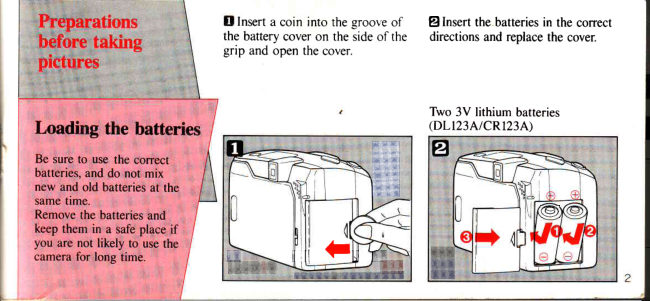
Dinsert a coin into the groove of — @lnsert the batteries in the correct,
the battery cover on the side of the directions and replace the cover.
‘grip and open the cover.

‘ ‘Two 3V lithium batteries

batteries, and do not mix
new and old batteries at the
same time.

Remove the batteries and
keep them in a sae place if
you are not likely to use the
‘camera for long time.
View original page 1
Page 2 · Read text
Note: After inserting the batteries the @)Set the power switch to ON and
camera may activate electronically

without having set the power switch
to the ON position. In this switch-
(ON status, the barrier opens and the
LCD panel is indicated. The LCD
panel will remain on for approximate-
|y 4,5 minutes.

check the charge remaining in the
batteries.

Battery power will be displayed in
the LCD panel

is displayed for 12 sec.
the batteries are OK.
‘When " 0” blinks, it indicates that
the battery power is low, and the
batteries should be replaced.

batteries immediately.

‘www.orphancameras.com
View original page 2
From the M. Butkus archive. Original publisher and archive notices are retained.
Check the model and edition against your equipment.
PDF verified 2026-10-10.