Film cameras
Pentax PC-505 / PC-505 date User manual
User manual for Pentax PC-505 / PC-505 date. 7 pages in German, French, Spanish. Read the original PDF, download or print a copy without registration.
7 pagesGerman, French, Spanish1.0 MB PDF
Loading your manual…Open PDF directly
Document details
- Brand
- Pentax
- Model / document
- Pentax PC-505 / PC-505 date
- Document type
- User manual
- Language
- German, French, Spanish
- Pages
- 7
- File size
- 1.0 MB
- Category
- Film cameras
- Document date
- Not specified in catalog
Search available document text
Find a term, then jump to its page in the original PDF. Image-only pages may not be searchable; check the PDF for exact wording and diagrams.
Page 3 · Read text
oEsbnipmoruwww.orphancameras.comor"pnhrs
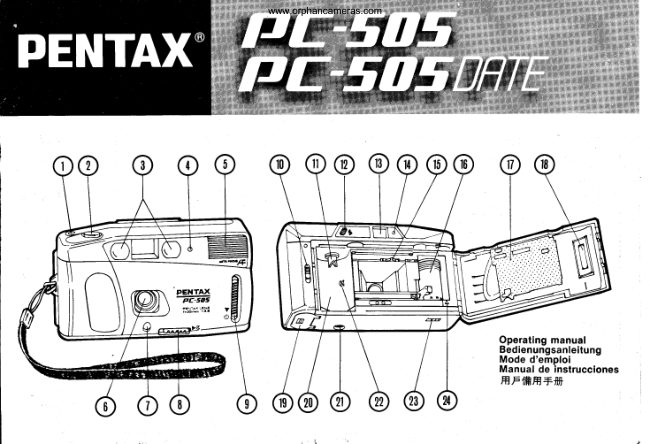
 1. EXPOSURECOUNTER
 2. SHUTTERRELEASEBUTTON
 3. AUTOFOCUSWINDOWS
 4. SELF-TIMERLAMP
 5. BUILT.INFLASH
 6. LENS
 7. LIGHT SENSORWINDOW
 8, LENS COVERRELEASELEVER
 9. SELF-TIMERLEVER
10. BACK COVERRELEASELEVER
11. FILM REWINDSHAFT
12. FLASH READYLAMP
13. VIEWFINDEREYEPIECE
14. LOW LIGHTWARNING LAMP
15. SPROCKETTEETH
16. FILM TAKE.UPSPOOL
17. FILM PRESSUREPLATE
18. FILM INFORMATIONWINDOW
19. BATTERYCHAMBERCOVER
20. FILM CHAMBER
21. TRIPODSOCKET
22. DX SENSING CONTACTS
23. REWINDBUTTON
24. FILM LOADINGMARK


FILM:Auto film-speedsettingwith 35mm perforatedDX
   coded film  with ISO rating from 100 to 400.
   24x36mm format. Use color print films only.
LENS: 35mm F3.8, 3 elements 3 grouPs
VIEWFINDER:With Albada bright frame.
FOCUSING:Infrared active autofocus system. Range:
   1.1m (3.6ft)-   infinitY.
SHUTTER:ProgrammedAE behind the lens shutter.
    Electro-magneticrelease.
EXPOSURECONTROL:ProgrammedAE control.
   Range: EV10 -  15 (lSO 100),EV8 -  13 (lSO 400)
 FILM LOADING:EasY loading
 FILM TRANSPORT:Auto film winding and rewinding.
    RewindingstoPs uPon comPletion.
 FLASH:Built-inauto dischargeflash.
 SELF.TIMER:Approx. 10-sec-delayself-timerwith LED
    indicaior.
 BATTERIES:Two 1.5VAA size ALKALINEbatteries(LRO
    type). Ni-Cd batteries not usable.
 DIMENSIONS:124.5(W)x 71(H)x 50(D)mm
WEIGHT:2409.


 Specificationsare subiect to change without any obli-
 gation on the part of the manufacturer.
View original page 3Page 4 · Read text
www.orphancameras.com


 Installing batteries(Fig. 1, 2)                    Einlegender Batterien(Abb. 1, 2)
 Open the battery chamber cover (19)and insert two "AA" size     Offnen Sie den Batteriefachdeckel(19) und legen Sie zwei
 fresh ALKALINE batteries into the battery chamber with their     neue Alkali-ManganBatteriender GroReMignon in das Bat-
 polarities aligned as indicated.                                teriefach unter Beachtung der angegebenen Polaritdt.
 CAUTION: DO NOT USE NI-CD BATTERIES.             ACHTUNG: KEINESFALLS NI.AKKUS BENUTZEN.
 Lens cover (Fig. 3)                              Objektivschutz (Abb. 3)
 Open the lens cover fully by sliding the lens cover release     Schieben Sie den Objektivschutz (8) und dffnen Sie das Ob-
 lever (8).                                                            jektiv ganz.
 NOTE: AS THE RELEASE LEVER IS THE POWER SWITCH     HINWEIS:DA DER AUSLOSERGLEICHZEITIGDER HAUPT-
AS WELL, ALWAYS CLOSE THE LENS COVER WHEN THE    SCHALTER IST, DECKEN SIE DAS OBJEKTIV IMMER MIT
CAMERA IS NOT IN USE.                       DEM D ECKEL AB, WENN DIE KAM ERA NICHT IN GE-
 Film speed (Fig. a)                          BRAUCH IST.
 Film speed is automatically set with 35mm DX coded film     Filmempfindlichkeit(Abb. 4)
 with ISO rating from 100 to 400. lf non-DX coded f ilm is load-     Die Filmempfindlichkeitwird bei 35 mm DX Filmen mit ISO
 ed, the f ilm speed is set at ISO 100 no matter what the film     100 bis 400 automatisch eingestellt. Bei Filmen ohne DX-
 speed is.                                          Code wird unabhdngigvon der tatsdchbichenFilmempfind-
Loading film (Fig. 5, 6, 7, 8)                                lichkeit ISO 100 eingestellt.
Open the back cover by pushing the back cover release lever    Einlegendes Filmes (Abb. 5, 6, 7, 8)
 (10)down. Place the film cartridge into the film chamber (20)     Offnen Sie durch Drricken des Rrickwandriegels(10) die
as shown in the Fig. 6. Pull the film leader out to reach the     RUckwand.Legen Sie wie in Abb. 6 gezeigt eine fitmp'atro-
 film take-upspool (16)and align the tip of the f ilm with f ilm     ne in die Filmkammer (20)ein. Ziehen Sie die Filmspitzeso
 loading mark (24).Make sure to align the holes on the edge      weit heraus, daR sie bis zur Filmaufwickelspule(16) reicht
 of the film leader with the sprocket teeth (15).              und richten Sie das Ende des Filmes an der Filmeinlegean-
After closing the back cover, depress the shutter release but-      zeige (241aus. Achten Sie darauf , daR das Transportrad (15)
ton (2) until the number "1" appears on the exposure coun-       in die Ldcher am Filmrand greift.
 ter. lf the exposure counter does not count, the film is not     Nachdem Sie die Rrickwandgeschlossen haben, betdtigen
properly loaded. Reload the film.                             Sie den Ausldser (2), bis im Bildzdhlwerk die Nr. "1" er-
Taking pictures (Fig. 9, 10, 11, 12)                      scheint.richtig eingelegt.Wenn das LegenBildzdhlwerkSie dennichtFilmzahlt,erneutist derein.Film nicht
The effective focusing range is from 1.1m (3.6ft)to infinity.
Compose the subject within the outer bright frame in the     Fotografieren(Abb. 9, 10, 11,121
viewfinder and bring the autofocus frame (  )on the main      Der effektive Schdrfebereichgeht von 1,1 m bis unendlich.part of your            subject                 and                     depress                                the                                     shutter                                          release                                                  button                                                                          lhr Motiv                                                 muR                                                                             sich                                                                             innerhalb                                                                               des liuBeren                                                                              Rahmens                                                                                                                     befin-gently.        After            the shutter                               is                         released,                                   the                                   motor                                                         will automat-                                                          den.                                                             Richten                                                                           Autofokus-Feld                                                                        Sie                                                                     das                                                                                                 auf den                                                                                                         Hauptteil                                                                                                                                          lh-
ically advance the film and cock the shutter for the next pic-'      res Motives und drUcken Sie den Ausloser ein. Wenn Sie denture.     For         subject               from                      1.1m(3.6ft)                                    to 2.5m(8.2ft),compose your      Ausloser loslassen,transportiertder Motor den Film auto-picture        within              the                  inner                        bright frame.                                                        matisch weiter und sperrt den VerschluR frjr das ndchsteNOTE:     MAKE               NOT          SURE                   TO                      BLOCK                            THE                              AUTOFOCUS                                                                     Bild.                                                                                Fr.ir                                                                   Objekte,die                                                                                   Abstand                                                                               Sie aus                                                                            einem                                                                                            von 1,1 m biswlNDow                                   (5),           (q, BUTLT-|N                FLASH                        LENS (6)AND                                        LtcHT                                                                                                                     gilt                                         SEN-      2,5                                          m                                                                    fotografieren                                                                                wollen,                                                                                 Rahmen.                                                                                         der innere                   youR             (7)wtTHsoR    wrNDow                     FTNGERS                          OR                                    HAIRS,                                             ETC.,
WHILE SHOOTING.                                  HINWEIS: ACHTEN SIE DARAUF, DASS SIE BEIM FOTO-
                                          GRAFTERENDAS AUTOFOKUS-FENSTER(3), DEN EtNGE.
Focus-lock (Fig. 13, 14)                                B A UTEN BLIT Z  ( 5) , DAS OBJEKT IV  ( 6) UND DEN
When the subject is off the autofocus frame, first bring the    BELICHTUNGSMESSER(7) USW. NICHT MIT IHREN FIN-
autofocus frame (   ) to the main part of one of the subjects.    GERN ODER HAAREN ABDECKEN.
As you keep depressing the shutter release button half-way,
the focus will be locked. Re-composeyour picture within the      Schdrfespeicherung (Abb. 13, 14)
bright frame and depress the shutter release button all the     Wenn sich das Objekt auRerhalb des Autofokus-Feldes be-
way.                                                               findet, so richten Sie zuerst das Autofokus-Feld auf den
                                                                Hauptteil eines der Objekte.Wenn Sie den Ausloser halb her-
Auto flash (Fig. 15, 16)                                    untergedrr-ickthalten, wird die Schdrfe eingestellt und ge-
The camera starts charging the built-in flash whenever the      speichert. Bestimmen Sie jetzt den Bildausschnitt und
lens cover is open, and the flash ready lamp (12)glows. This      drrlcken Sie den Ausl6ser ganz herunter.
is for     automatic               discharge                       under                              poor lighting                                             conditions.
   youAs
View original page 4From the M. Butkus archive. Original publisher and archive notices are retained.
Check the model and edition against your equipment.
PDF verified 2026-10-10.