Film cameras
Pentax PC35AF / PC35AF date User manual
User manual for Pentax PC35AF / PC35AF date. 14 pages in English. Read the original PDF, download or print a copy without registration.
14 pagesEnglish2.1 MB PDF
Loading your manual…Open PDF directly
Document details
- Brand
- Pentax
- Model / document
- Pentax PC35AF / PC35AF date
- Document type
- User manual
- Language
- English
- Pages
- 14
- File size
- 2.1 MB
- Category
- Film cameras
- Document date
- Not specified in catalog
Search available document text
Find a term, then jump to its page in the original PDF. Image-only pages may not be searchable; check the PDF for exact wording and diagrams.
Page 2 · Read text
www.orphancameras.com
PEHTAX
 T=C35^F


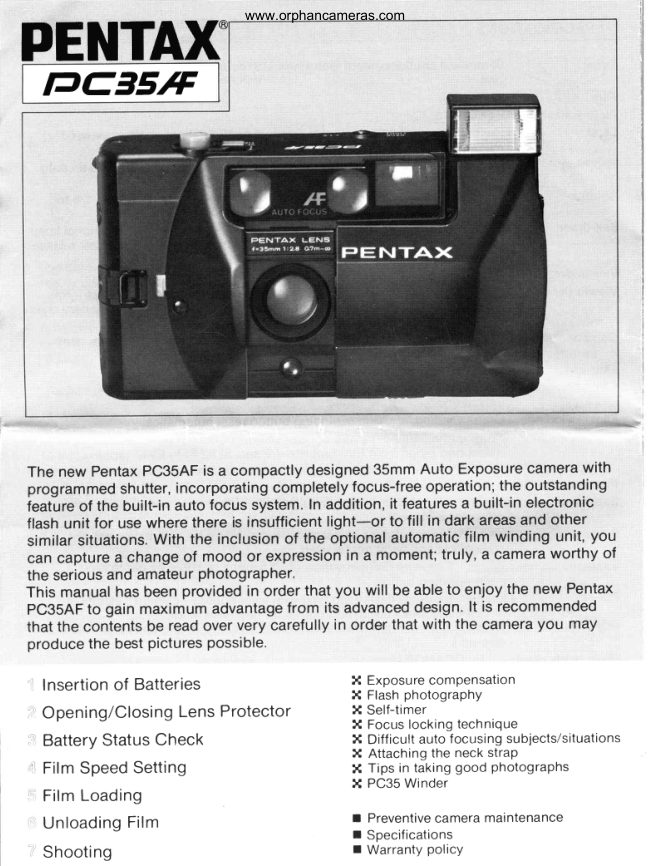
 The new PentaxPC3$AFis a compactlydesigned35mm Auto Exposurecamerawith
 programmedshutter,incorporatingcompletelyfocus-freeoperation;the outstanding
 ieatureof the built-in auto focus system.In addition,it featuresa buitt-inelectronic
 flash unit for use where there is insufficientlight-or to fill in dark areasand other
 similar situations.With the inclusionof the optional automatictilm winding unit, you
 can capture a change of mood Or expressiqnin a moment;truly, a cameraworthy of
 the seriousand amateurphotographer.
 This manualhas been providedin order that you will be able to enioy the new Pentax
 PC3$AFto gain maximumadvantagefrom its advanceddesign.lt is recommended
 that the contentsbe read over very carefullyin order that with the camerayou may
 producethe best picturespossible.

   Insertionof Batteries                  X Exposure compensation                                         X Flash photography
  Opening/ClosingLens Protector       X Self-timer
                                         X Focus locking technique
   Battery Status Check                  X Difficult auto focusing subjects/situations
                                         X Attaching the neck straP
   Film Speed Setting                    X Tips in taking good Photographs
                                         X PC35 Winder
   Film Loading
  UnloadingFilm                                                        I  Preventivecamera maintenance
                                                                                  r  Specifications
  Shooting                                                          r Warranty policy
View original page 2Page 3 · Read text
Descriptionof Componentswww.orphancameras.com


                                        eeYiE


      O Thumb wheel                  @ Self-timer lamp
    @ Exposure counter                @ Metering cell
    @ Shtrtter release button              @ Taking lens
    @ Self-timer lever                 @ Lens proiecior
    @ Auto focus windows               @ Flash ready lamp
    @ Exposure compensation button         @ Viewf inder eyepiece
    @ Viewfinder                    @ Back cover
    @ Flash head                   @ Battery chamber cover
    @ Winder contact terminal             @ Flash pop-up release
    @ Winder screw receptacle            @ Tripod receptacle
        (D Neck strap hook                 @ Film rewind butlon
    @ Winder guide pin hole              @ Film speed lever
    @ Lens protector release             @ Film rewind crank/Back cover
View original page 3Page 4 · Read text
www.orphancameras.com
X Insertionof Batteries
The electronicsystemof your Pentax             2. Fit two batteries into the chamber as
PC3SAFoperateson two 1.5Vmini batteries.      indicated-they  should be fitted as shown.
(AlkalinebatteryAAA)                         Note the * and - markings Provided.
 (Caution:NiCd batteriescan not be used')      3. Close the cover by pushing it back.
1. Open the batterychambercover locatedat
  the baseof the cameraby slidingit in the
  directionof the arrow;usefingernailin the
  grooveto push the cover.


 2 Opening/ClosingLens Protector


                                                         P E N T A X


 The lens protector may be opened by pushing      locked at the same time.
 protector release in the direction of the arrow.    o While holding the camera, even a slight
 To close, push protector back, locking same in     pushing-back of the lens protector would
 its original position.                                 activate the built-in safety device, locking the
                                                    shutter button. This is to avoid possible
 o With the protector closed, a safety device          vignetting.
   preventsaccidental firing of the shutter;
   similarly,the flash pop-up release is also
View original page 4Page 5 · Read text
3 eatteryStatusCheck    www.orphancameras.com
After opening the lens protector, battery status
can be checked by covering the metering cell
with the hand as illustrated,and partially
depressingthe shutter release button. The
ORANGE indicatorwill glow continuously,
accompanied by a beeping sound when
normal voltage is available;the lamp may be
seen in the upper section of the viewfinder.
Battery status is also known by another
method: in a brightly lit place, partially depress
the shutter button without covering the
metering cell with the hand, and if the GREEN
lamp lights, there is no problem with the
batteries.
o Insert both bafteries properly according to
  the indicated* and - markings.
o When replacing batteries, by type, brand,
  new or old they should not be rnixed, as by
  doing so, poor results may be the outcome.
o  lt is recommended that the batteries are
  removed from the camera if it is not used for
  a long time. Leaving batteriesin the camera
  may result in acid leakage and possible
  damage to the camera mechanism.


4 rnm Speed Setting

Align the index (red line) of the film speed
lever with the corresponding film speed
(ASA/ISO) of film being used.
          25  50 100 (200)400
  A S A / l So @
                 3240 6480  r?5160 250320


o Film speed is indicated on film package.
View original page 5Page 6 · Read text
www.orphancameras.com
5 rilm Loading
Avoid,if at all possible,loadingfilm in direct
sunlight.Keep lens protectorclosedwhen
loadingfilm.
1.To open the cameraback,raisethe film                           r'-ffi-r6'.'a.7871
  rewindcrank as shown,and pull it;
   f urtherpressurewill releasethe camera
  back'slocking.


      Q Film chamber
        g  Film guiderails
     @ Sprocket
     @ Slot
     @ Slot-claw


                                                                                                                   I o [ 0 E o 0 n [ [

                                                                                                                                                               !:a::a -.  r'!::.:: :.':::  .,:'.::',1::: ,:;   i ::1.::  ;tt   .


                                                                                                      , a ; r r o


2.Place the film cartridge in the film chamber        inserting it into one of the slots @ located
  Qas  illustrated,and depress film rewind          within the film take-up spool. Confirm that
  crank. Should crank be prevented from            the film perforation is engaged by the slot-
   returning to its original position, turn it          claw @. Slightlyturning the thumb wheel,
   slightly while pushing at the same time.          confirm that film is correctly movinq in
  Draw the film leader across the back,            alignment between the two guiOe riits @
View original page 6Page 7 · Read text
properly,                                 confirmwww.orphancameras.com           has         film             engaged3. When                                         raise   EI                        slack                     illustrated,                            otherwise,                flat as  that film              is
  film rewind crank and turn it slightly in the
  direction of the arrow to take up any slack-  then return the crank to its original position.  X
4. Close the back cover until it locks with a
  click sound.
5. Film advance must be continued by means
   of the advancing wheel until exposure
  counter registersas illustrated.Advance
  automatically halts when the first frame is
  ready tor exposure. You may now begin to
  take photographs.


     s:N\

         ffim          *                                                  '*
6 UnloadingFilm


                                                                   @
                   ,@^wroc-;                       f]-*^ff  The film should be rewbund  TiJ ffi
   afterexposingthe last
  frame, and the cassetteremoved


 Unloadingfilm in directsunlightshouldbe       2. Raisethe film rewindcrankand turn in the
avoidedif at all possible.                        directionof the indicatedarrow.Continueto
                                               turn the crankuntila suddentensionrelease
 1. When the lastframe has been exposed-           is felt.Then,turn a few additionaltimesuntil
   felt by a slighttautnessduringfilm            crank movesfreely.Pullthe film rewind
  advance-depressf ilm rewind button          crank to open the back cover.Then remove
  found at the camerabase.                    the film cassette.
View original page 7Page 8 · Read text
www.orphancameras.com
 7 Shooting
 1. Centeryour subjectwithin the auto focus
  framein the middleof the viewfinder.
 2. Atterwindingfilm, partiallydepressthe
   shutterbutton.Confirm,thatthe GREEN
  lamp is lit in the uppersectionof the
   viewfinder,which indicatesa fastershutter
  speed-suitablefor hand-heldshooting.
 3.  Continue            to depress                    the shutter,                          and                                  the
  distance          needle                  indicator                    moves                                with                                a                             t]t o
   hissingsound.Furtherdepressingwill
  completepictureexposure.
  Shouldthe lamp in the upper part of the          o
   viewfinderbe unlit,properexposureis not                                                               Ei-i
  guaranteed                    A     ,ll.Tuoa a       -o
                                                                                    """"  O
 o The auto focus controlof PentaxPC3SAF
  operatesfor the subjectwithin the auto    Q Auto focus ,r"r:'
  focus frame.               @ Field-of-viewframe
o Partlydepressthe shutterbutton,and the   O Snort distancecompensationindicator
  needleindicatorautomaticallymovesalong  (O Distanceneedleindicator
  the zonefocusingmarks,accordingto the  @ Zone focusing marker
  camera-subjectdistance.The zone markers O GREEN/ORANGElamp
   indicatethe camera-subjectdistance
  involvqd,as follows:
*   9:a  distanceof approx.0.8m
     ii:a  distanceof approx.1.5m
    A:-   (infinity)
o When the needleindicatorwaversin the
  areaot " !   ", framethe subjectso
  that it is locatedwithinthe shortdistance
  compensationi ndicator.
 .  lf.youheara beepand the ORANGElamp is
    lit, it is a warningthat the shutterspeedis
  too slow,causingpossiblecamerashake,
  and that insufficientlight is beingregistered.
   In this event,use of the flash is
  recommended,referto "FlashPhotography"
  found in the backof this operatingmanual.
o The autofocusingsystemis highly
  accurateand reliablefor ordinary
  photographicrequirements.However,
  undercertainconditions,the auto focusing
  systemmay be confused.For example:
  Whenthe zonefocusingmarkerand the
  knownsubjectdistanceindicatean
  obviousdiscrepancyto a largedegree,then
  the subjectdistancecannot be accurately
  measuredby the electronicsystemof Pentax
  PC35AF.Additionalinformationand possible
  remediescan be found under"Difficultauto
  focusingsubjects/situations"in this manual.


                                                                                                                                                                                                                                                                                                                                 I
                                                                                                                                                                                                                                                                                                                                                                                                             i  l
View original page 8Page 9 · Read text
Recommendedcamera-subjectwww.orphancameras.comdistancewith the system


o For best possible results, operate at a camera-   meteringcell,flash head,etc.,found at the
  subject distance of 0.7m 1e oo (infinity.)                 f ront of the camera,with your hands(or
  Focusing cannot be satisfactorilyaccomplished  other objects)-it will interferewith the
   at the shoder distances of less than 0.7m.        lightenteringthe camera,causinga false
o Do not block the auto focus windows, lens,      reading.


Gameraholding


It is importantto hold the cameraproperlyin     hands, hold the camera gently against the face
order to take blur-freephotos.Practiceholding   in a fixed position, and relax the rest of your
and operatingthe camerabeforeinsertingyour  body in a secure posture. Brace the elbow of
firstroll of film.                                 the arm supporting the camera against your
The illustrationsshow the basicholding         body. Always press the shutter release button
positions.No matterwhich positionyou use,     gently.
be sure to grip the camerasteadilywith both
View original page 9
Page 10 · Read text
l3 Tips in taking good photographswww.orphancameras.com

   o Keepyour back to the sunlight-with the
     subjectfrontlit-and, depressshutterbutton
     gently.


   o Use the built-in flash often. Use it at parties,
      family get{ogethers, and other activities
     where the lighting leaves much to be desired
       for picture-taking.Avoid having highly
      reflectivebackground, when using flash, such
     as glass or metals.


.qlg-                          Sb.*"

    o The self-timer can add much pleasure to
      your picture taking-use    it often. The Pentax
     PC35AF self-timer possesses a 1O-second
     delayed shutter release mechanism. Confirm
       that the film has been wound, prior to setting
      the self-timer.
    o Make maximum use of the highly efficient /K
     exposure compensation control to obtain
      satisfying pictures under adverse
      conditions such as people against a highly
      reflectivewindow, a bright sky, at the
     seaside in fine weather, or even against a
     background of snow, and many other similar
      situations.
View original page 10Page 11 · Read text
ll PC35Winder            www.orphancameras.com
An optionalaccessoryto enablemotorized
automaticfilm windingwhen it is fittedto the
PC35AF.This alsoservesas a cameragrip for
easierholding.Poweredby two alkaline
 batteries,it alsoofferssingleframefilm
advance.


                                                                                                                                                                                  .**/d&"'
                                                                                                                                                                                                                                                                    .ffi

         CAMERAMAINTENANCE

 1. The PentaxPC3SAFis a highly developedprecisioninstrument.Care must be takento avoid
  droppingthe cameraor strikingit againsta solidobject-wall,bookcase,etc.Shouldthis
  happen,it is recommendedthat the camerabe takento one of the nearestPentaxservice
   facilitiesfor detailedinspectionof any possiblemechanicaldamage.
2. Dust,dirt and otherforeignobjectsappearingon the lens,viewfinderor the auto focusing
  windowsshould be removedas soon as possiblefor it will interferewith the performanceof
  your camera.lt is recommendedthat a commerciallensbloweror brush-availableat camera
  dealers-beemployed.This meansis normallysufficientto accomplishsimplecleaning.
  Smudges,such as fingerprints,should be wiped off carefullyby using a soft lenstissueor
  cottoncloth impregnatedwith a mild lenscleaningliquidcompound.
3. Solvents,such as thinnersor alcohol,shouldnot be usedto cleanthe components-seepage
  may causeirreparabledamageto the speciallens sealingand adhesivecompoundbetween
  the glass.
4. lf the cameragets wet, the camerashould be wiped by using a soft,dry cloth. Following
   lengthyseashoreuse,the camerashouldbe carefullycleaned,again,usinga soft cloth-
   preferably,cotton,to removethe salt traces.
 5. Camerasshould not be subjectedto high temperaturesand humidity.For example:A car
   interioror its trunk compartmentis often subjectedto a high degreeof heat.
    It is alsopossiblydamagingto storeyour camerain a cabinetor closetcontainingcertain
  chemicals-insecticides,such as naphthaline-forany lengthof time.
 6. Shouldthe camerabe subjectedto immersionin water (saltwateror fresh water),for example,
  by beingdroppedinto a lakeor the ocean,the unit will malfunction;or, at worst,become
   irreparable.lt is recommendedthat the camerabe broughtinto the nearestPentaxservicing
   facilityfor a thoroughinspectionand possiblerepair/overhaulas soon as possible.
View original page 11Page 12 · Read text
www.orphancameras.com
   SPECIFICATIO

   Type:       35mm leaf shuttercamerafeaturingauto focus controland built-inflash
                     unit
   Film:        35mm film
   Picturesize:    24 x 36mm
   Lens          Pentax35mm t/2.8,S-elementin S-groupconfiguration;angleof view,63o;
               minimumfocusingdistance,0.7m
   Focusing:       InfraredActiveAuto FocusSystem,equippedwith "foc_uslgck,l'andan auto
                  focus control rangefrom 0.7m 16oo(infinity) A   , L 1  ({      .
   Shutten       ProgrammedAE electronicshutter,with variablespeedsof approx.1/B to                   ilI                  '11430                         sec.
   Self-timen       Electronic;equippedwith an electronicaudible"beep"and an additionallamp
                    indicator.Time delayof approximately10 secs.;3-sec.priorto shutterrelease
                  warning, incorporated;w/shutterbuttonactivation
   Viewfinden     Albadatype, brightframefinder;field of view,850/o;0.5x magnification
   Viewlinderdisplay: Pictureframe;auto focusingframe;parallaxcompensationindicatorfor
                    short distance;zone focusingmarkers;distanceindicatorneedle;batterycheck
                    display;and,camerashakewarningindicator
   Camerashakewarningdevice: Audibleelectronicsignalwith simultaneousORANGElamp
                        lighting in viewfinder
    Film wind:      Thumb wheel w/winding angle of 360"
    Film counter     Automatic zero reset; normal count, O,20,24 and 36, color (orange) coded
                      indications
    Film rewinding:   Crank winding, and film rewinding button reset automaticallyIl.* Exposure meter  Programmedauto exposurecontrol,utilizingCdS cell light detector;light  **
                 measuringrangefrom EV6(approx.1/8 sec.alt/2.81toEV17(approx.1/430
                   sec.at f/17)with ASA/ISO100film
   Film speed range: ASA/ISO 25 - 4O0
   Exposuremeteringswitch: By shutterbutton (Shutterbutton does not operatewhile lens
                    protectoris closed).
   Powersupply:  Two 1.5Vmini batteries(AlkalinebatteriesAAA); NiCd batteriesare not
                 compatibleand must not be used.
   Exposurecompensation: Exposurecompensationof +1.5 stepspossibleby depressing
                 comoensationbutton
   Flash:            Built-in;"pop-up"flash head type with levercontrol-camera'selectrical
          - - /.          circuitryautomaticallysynchronizesfor flash-usemode.
                  (Flashis not operablewhile lensprotectoris closed,and flashheadwill not  %           , /10      g       I        pop-up.)
   Ffashreadydisplay: By ORANGElamp next to viewfindereyepiece                                    .    ?/                                                                                                                             -l  ">'   Guidenumber  11 (ASA/ISO100,m)                                        ^  -t?                                                                             v   Ffashcouplingrange: 0.7to 4m (w/ASA/ISO100film);1.4to 6m (ASA/ISO400)     tq cO lF
                                                                                                                                                  '/     "'   Recycfinginterval: Approx.B sec. utilizingfresh set of AAA batteries                                                            F
   Numberof flash: Approx.100flashes(by the time when the flashis recycledwith the interval
                       of 30 secs.)
   Size& weight   116(w)x 66.5(h)x 45.5(d)mm 2759(withoutbatteries)
   Accessories:    Neck-strap
     A set of fresh batteriesis sutficientto powerthe PentaxPC35AFfor one year when using
            it in normalphotographyand at normaltemperature.Shouldthis camerabe utilizedat a
      lowertemperature,however,batteryabilityaccordinglylowers.In that event,take some
     measureto keepthe batterieswarm.The PentaxPC35AFmechanismis speciallydevised
View original page 12From the M. Butkus archive. Original publisher and archive notices are retained.
Check the model and edition against your equipment.
PDF verified 2026-10-10.