Film cameras
Perfex Series 100 User manual
User manual for Perfex Series 100. 14 pages in English. Read the original PDF, download or print a copy without registration.
14 pagesEnglish5.1 MB PDF
Loading your manual…Open PDF directly
Document details
- Brand
- Perfex
- Model / document
- Perfex Series 100
- Document type
- User manual
- Language
- English
- Pages
- 14
- File size
- 5.1 MB
- Category
- Film cameras
- Document date
- Not specified in catalog
Search available document text
Find a term, then jump to its page in the original PDF. Image-only pages may not be searchable; check the PDF for exact wording and diagrams.
Page 1 · Read text
www.butkus.us


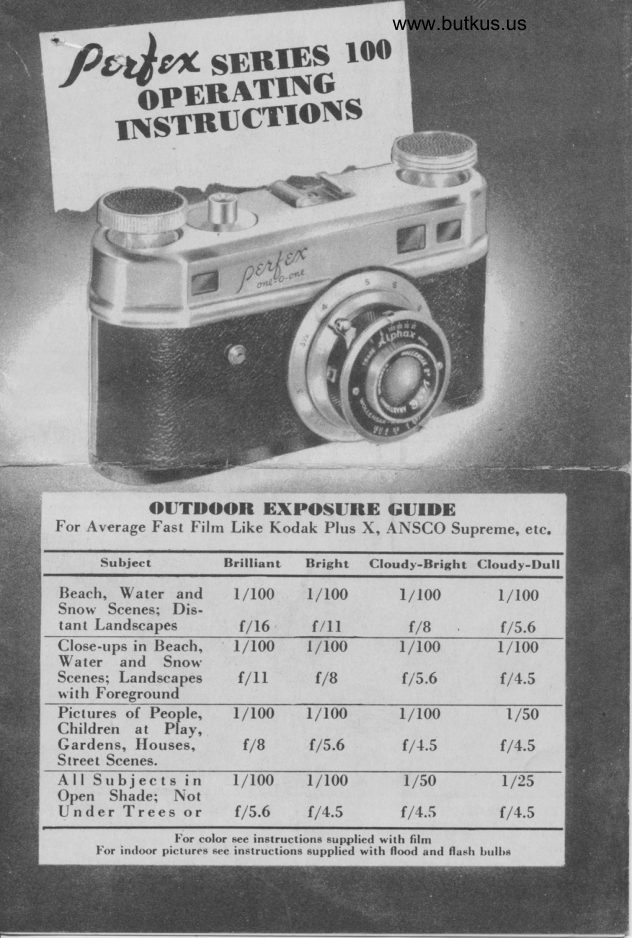
      OUTDOON EXPOSURE GUIDE
For Average Fast Filrn Like Kodak Plus X, ANSCO Supreme, etc.
      Subject           Brilliant   Bright  Cloudy-Bright  Cloudy-Dull
Beach, Water and  l/100   f/100          l/ r00       r/r00
Snow Scenes: Dis-

Scenes; Landscapes  f/ll        f/8          I/s.6                   f /4.5nith Foresround
Pictures of Peo        r/r00    r/r00      r/r00                  | /s0Children at  Plav.
Gardens, Houses','      f/B              f /s.6                  f /4.s                   f /4.s
Street Scenes.
AllSubjectsin       l/l00     l/100       r/so        r/2s
Open Shade; Not
UnderTreesor      f/5.0     I/4.5                   f /4.s                     f /4.5
                        l'or color see instructione supplied with film
        l'or indoor pictures 6ee in6tructions eupplied with flood and flash brrlbe
View original page 1Page 2 · Read text
STIP 2
         1o ading f llmtBeforerot ate f ilrn sproclt-ets with thumb llrl-
til  locked Position                 thesels reach€d. Ifdo not rotate  it  lsan indhc at ion thatthey are alreadY in
l"ocked poslttont
Then proceed with
Io adirrg.
View original page 2Page 7 · Read text
IN BLACI(AI\ID WHITE OR COLOR


REPTACE CAMERA BACK               ADVANCE  FITIA
  Plqce the bock of lhe comero into po-     To bring frerh film into porition for lhe
sition qs shown in the illustrolion, moking     first picture, depress the f.lm releqse bul-
sure lhol the sides fit rhe runwoys-then    lon ond qdvonce the film wirh the film
push up into position qnd lock.              knob. Do lhi: two times.
View original page 7
From the M. Butkus archive. Original publisher and archive notices are retained.
Check the model and edition against your equipment.
PDF verified 2026-10-10.