Film cameras
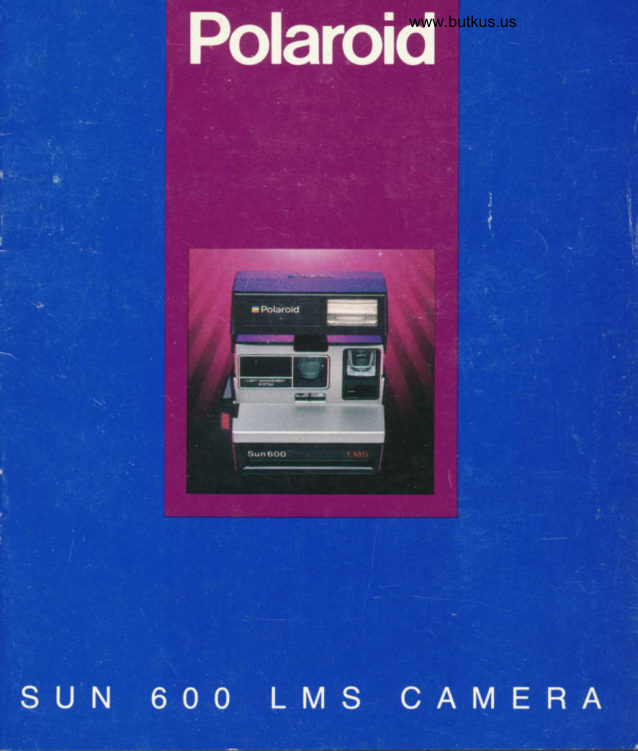
Polaroid SUN 600 LMS User manual
User manual for Polaroid SUN 600 LMS. 20 pages in English. Read the original PDF, download or print a copy without registration.
20 pagesEnglish2.4 MB PDF
Loading your manual…Open PDF directly
Document details
- Brand
- Polaroid
- Model / document
- Polaroid SUN 600 LMS
- Document type
- User manual
- Language
- English
- Pages
- 20
- File size
- 2.4 MB
- Category
- Film cameras
- Document date
- Not specified in catalog
Search available document text
Find a term, then jump to its page in the original PDF. Image-only pages may not be searchable; check the PDF for exact wording and diagrams.
Page 2 · Read text
This product  is listed by Underwriters'
 Laboratories, Inc. (UL). As a condition
 of listing, UL requires that basic safety
 information be provided.
IMPORTANT
SAFEGUARDS
AS WITH ANY BATTERY-
OPERATED EQUIPMENI OB-
SERVE THESE BASIC SAFETY
PRECAUTIONS:
follow ALL oF THESE                  3.DO NOT DISASSEMBLE THE
INSTRUCTIONS.                FLASH UNIT TO REDUCE THE
t.                                RISK OF AN ELECTRICAL
DO NOT USE THE ELECTRONIC    SHOCK, SERVICE OR REPAIR
FLASH UNIT IF IT HAS BEEN      WORK MUST BE DONE ONLY BY
DROPPED OR DAMAGED, UNTIL   AN AUTHORIZED POLAROID
IT HAS BEEN EXAMINED AT AN     SERVICE CENTER INCORRECT
AUTHORIZED POLAROI D SER-     REASSEMBLY CAN CAUSE AN
VICE CENTER.                  ELECTRICAL SHOCK WHEN THE
                            FLASH UNIT IS USED AGAIN. DO
                           NOT IMMERSE THE FLASH UNIT
                                        IN WATER OR OTHER FLUIDS.

PLEASE KEEP
THESE INSTRUCTIONS

2
View original page 2Page 3 · Read text
Contentswww.butkus.us

 2 lmportant safeguards
 4 The film
 4 Callus, free
    To use the camera
 5 Raise the electronic flash
 6 Load the film
 7 Position your subject
 8 Hold the camera
 9 Take the picture
   The camera
 10 The electronic flash and other oarts of
    the camera
    Great pictures in any light-
    outdoors and indoors
12 Use the electronic  f lash for everv
     picture          and indoors          -outdoors
   Special"itr"tioF
    troubleshooting
1 6 Trouble-free picture-takinq
17 Taking a picture through g'1ass
17 Lighten/darken control
  Customerinforffi
18 Full one-year warranty
19 Copies and enlargements
19 Camera reoair
View original page 3Page 4 · Read text
The film                               Call us, free

Use only Polaroid 600 cotor film.       Whenever you have a question about
Other Polaroid films will not fit into or       your camera or pictures,  call us toll
work with this camera.                           free:
Each film pack provides 10 color        800-225-1384pictures and contains a high-energy
battery that powers both the camera       from anywhere in the U.S.A. Our rep-
and the electronic flash.                     resentatives can be reached every
                                    weekday from B a.m. to 5 p.m.,
A film expiration date appears on the       Eastern Time,
bottom of every {ilm box. This date is
your assurance that you are buying           In Canada,  call toll free:
fresh film.                      800-268-6970
View original page 4Page 5 · Read text
To use the camera:                       www.butkus.us 1  I Raise the electronic flash

  Grip the sides of the flash urrit.                 . Take a picture.
  Swing the flash unit up to snap  it in          . Or, when you touch the shutter button.  place.
                                     The flash is designed to be used for
  The flash willfully charge, automati-      every ptcture-outdoors and indoors.
  cally, in about 3 seconds every time
  you:                            When you are not using the camera,
                                            lower the flash unit.  lt will protect the
. Load film into the camera when the         lens and lock the shutter button.
  flash unit is raised.
. Raise the flash unit when there is film
 already in the camera.
View original page 5Page 6 · Read text
toaa the film
 f
 Use only Polaroid 6fl1 color film.         . The red light on the back of the flash
                                                        unit will come on to show the flash is  Push the latch forward.                                           charging. In about 3 seconds, the
  Hold the film pack by its edges only, as    green light will come on to show the
  shown, and slide  it allthe way into the       flash is ready to fire.
  camera. Close the film door As soon                                          To remove an empty film pack, pullthe  as  it is closed:                                             colored tab on the film pack.
. The camera will eject the film cover.
View original page 6Page 8 · Read text
Positionwww.butkus.usyour subiect3
Indoors
For best results indoors, your subject
should be  f rom 4 to 10 feet (1.2 to 3m)
away and near a light colored
background.
Outdoors
Your subject should be at least 4 feet
(1.2m) away.
View original page 8
Page 9 · Read text
/f  aota the camera

Grip the camera in the palm of your         Or, if it is more comfortable, place the
left hand.                                     fingers of your left hand over the top ol
                                           the viewfinder and your thumb underPlace your right thumb on the thumb-                                           the camera-holding your right handrest, your index finger on the shutter                                         as described on the left.button, and curl your other fingers into
your palm.
View original page 9Page 10 · Read text
Takethepicture                       www.butkus.us
$
When you see the green light, press      When you want to take a picture and
the shufter button all the wav to take a      the green light has gone ofi, lightly
oicture.                                   touch the shutter button and releaso it
After you have taken a picture, the flash    as soon as the red llght comes on.
                                    Then take the picture when you see thewill recharge.and the green light will                                        green light.come on again in about 3 seconds.


                                          www.buktus.us
View original page 10Page 13 · Read text
Great pictures in any light-
outdoors and indoors

The human eye adjusts to ligtrt differ-
ently than the camera's eye, which
makes  it difficult to judge how light
from the scene will affect your picture.
Everyone who takes pictures has had
the experience  of looking at a subject
or scene, photographing  it, and being
disappointed With the picture because
it looks different than what he or she
saw in the viewfinder.
So Polaroid designed a camera system
that gives you the beautiful picture
you expect to see. By blending light
from the scene with just enough flash,
the camera more accurately repro-
duces, on film, what appeared in the
viewfinder.
Here are some examoles  of what this
camera can do when you use the
electronic flash for every picture-
outdoors and indoors.


12
View original page 13
Page 14 · Read text
Use the electronic flash for every           www.butkus.us
picture- outdoors and indoors

Sof t window light creates a wonderf ul    Your electronic flash will provide the
atmosphere for picturelaking, but it     balanced  light needed to create a
can be uneven.                                flattering portrait.


                                        www.butkus.us
View original page 14Page 15 · Read text
Use the electronic flash for every
picture-outdoors and indoors

Shade will spare your subject from       Your camera's built-in electronic   f lash
having to squint in the harsh sunlight,       will automatically supply the addi-
but it does not always provide enough     tional light needed to produce a
light for a well-exposed picture.          pleasing photograph.
View original page 15
Page 16 · Read text
www.butkus.us

ln this outdoor scene, photographed      Your camera will blend sunlight with
without electronic   f lash, bright sun-        iust the right amount of flash to soften
light has created harsh facial shad-      snadows and reveal the tacial details
ows. When taking a picture in this        you expect to see in the picture.
lighting situation, your eye adlusts to
these shadows  , showing you, in the
viewfinder, facial features that will not
be recorded on tilm.


                                                                                                                         tc
View original page 16Page 17 · Read text
Trouble-f ree pictu re-taking

Hold the developing picture by its      The developer rollers are located
wide white border.                          inside the  f ilm door.  ll there is film in the
While it is developing, keep the picture     camera, open the door in dim light.
out of direct sunlight                                       Clean the rollers with a damp, lint-f ree
When the temperature  is below 55'F        clolh.
(13'C), keep the camera and film warm                                   What to look for  it the camera doeslmmediately place the developing                                         not eiect film:orclure in a warm oocket for at least                                    Check the picture counter. When thea minute.                                                    film pack is empty, the  f lash will charge
Keep the developer rollers clean.         but you cannot take a picture.
Dirty rollers can cause a repeated spol                               When the red light on the back ol theor bar pattern to appear in the picture.                                                flash unit is on, the  f lash is charging
                                    and you cannot take a picture until the
                                        green light comes on.


 to
View original page 17Page 18 · Read text
Taking a picture through glass      Lighten/darkenwww.butkus.uscontrol

Photographing a dayllght scene         Use this control only when you want to
through glass  is a special situation         reshoot a picture to make  it lighter or
which requires that you stop the elec-      darker
tronic flash from firing to avoid a flash
reflection. Take the picture by pressing
onlythe flash ovenide button as shown.


                                     To take a llghter plctur€, slide the
                                            control oast the white arrow.


                                     To take a da*er plcture, slide the
                                            control past the black anow.


                                      Rsturn the control to tho center
                                         posltlon when you have finished
                                             reshooting. A white double arrow ap-
                                        pears in the bottom of the vievyfinder as
                                      a reminder that the control  is not
                                                       in the center position.


                                                                                                     17
View original page 18Page 19 · Read text
Full one-year warranty


 lf your camera proves to be defective     The warranty does not cover damage
within the warranty period, we will,        caused by accident, misuse or tamp-
without charge, either repair  it or at our     ering with the camera, and a charge
option replace  it with a fully recondi-           will be made for such repairs.
tioned camera.                                         For warranty service, the camera
The warranty period is one year from      must be returned to and repaired by a
the original date of purchase. To verify     Polaroid Service Center or Authorized
the warranty period, you should         Service Center in the United States or
keep the sales slip or other proof of     Canada. You can return the camera
the purchase date. Without this infor-      through your Polaroid camera dealer.  lf
mation, the warranty will be deter-           that is not convenient,  call us toll free:
mined by the manufacturing date on       800-225-1384 from anywhere in the
the camera.                                 U.S.A. We can be reached Monday
                                       through Friday, 8 a.m. to 5 p.m., East-The repair or replacement  of your cam-                                          ern Time. In Canada, calltollf ree:era is guaranteed  for the remaining                                        800-268-6970.warranty period on your original cam-
era. lf, within the warranty period, your     This warranty gives you specific legal
camera is mailed to us for service from      rights and you may also have other
inside the U.S.A.,  it will be returned with     rights which vary from state to state.
a oostal refund.                                        This warranty excludes allconse-
                                    quentialdamages. Some states do
                                         not allow the exclusion of conse-
                                         quential damages, so the foregoing
                                       exclusion may not apply to you.
View original page 19Page 20 · Read text
Copies and enlargements        Camera repair                                                www.butkus.us

    Send Polaroid any photograph-color              lf you think your camera needs repail
     or black and white, instant or conven-      please call us toll free: 800-225-1384
     tional (up to 4 x 5 inches). We can copy    from anywhere in the U.S.A. We can be
    photographs and make enlargements.     reached Monday through Friday, I a.m.
                                                     to 5 p.m., Eastern Time. In Canada,  call    You can order square or rectangular                                                                     toll  f ree: 800-268-6970.    copies and enlargements in six sizes.
    There is an order form on the back of    We may be able to save you the trouble
    the film cover, which is ejected when        of returning the camera
    you load your camera.
         lf you have any questions or special
    reouests. call us tollfree:
    800-421-1030. In California,  call
     collect: 213-643-8093.  In Canada.  call
      toll free: 800-268-6970.


  I


  i
l
View original page 20From the M. Butkus archive. Original publisher and archive notices are retained.
Check the model and edition against your equipment.
PDF verified 2026-10-10.