Film cameras
Polaroid SX-70 Sonar One Step Pt. 2 User manual
User manual for Polaroid SX-70 Sonar One Step Pt. 2. 11 pages in English. Read the original PDF, download or print a copy without registration.
11 pagesEnglish5.5 MB PDF
Loading your manual…Open PDF directly
Document details
- Brand
- Polaroid
- Model / document
- Polaroid SX-70 Sonar One Step Pt. 2
- Document type
- User manual
- Language
- English
- Pages
- 11
- File size
- 5.5 MB
- Category
- Film cameras
- Document date
- Not specified in catalog
Search available document text
Find a term, then jump to its page in the original PDF. Image-only pages may not be searchable; check the PDF for exact wording and diagrams.
Page 1 · Read text
Daylight picture hints continued

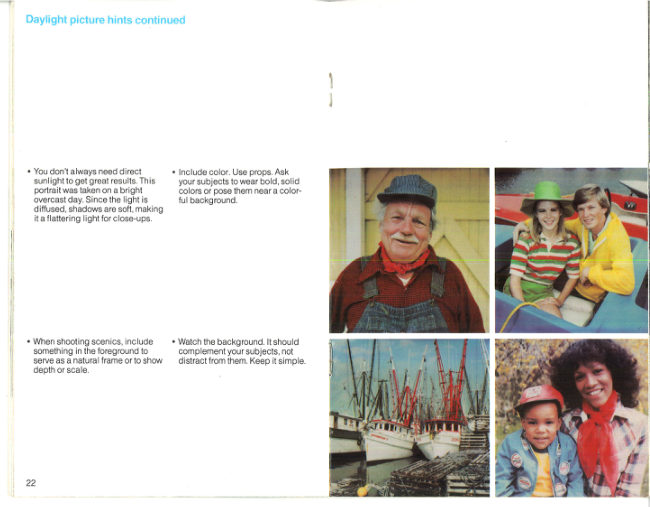
* You don't always need direct + Include color. Use props. Ask
sunlight to get great results. This __ your subjects to wear bold, solid
Portrait was taken on a bright colors or pose them near a color-
overcast day. Since the light is ful background,

diffused, shadows are soft, making
ita flattering light for close-ups,

+ When shooting scenics, include + Watch the background. It should
something in the foreground to ‘complement your subjects, not
serve as a natural frame orto show distract from them. Keep it simple.
depth or scale.

22
View original page 1
Page 2 · Read text
Close-ups

Your camera is designed to open

‘a new world of beautiful, exciting
close-up pictures. You can take
them in daylight or with flash and no
other camera does it so easily.

With no accessories, you can come
as close as 10.4 inches. Pictures
taken at that distance will show your
subject at half its actual size.

For medium close-ups (pets,
children, etc.), look through the
viewfinder and as you move in
close, lightly press the shutter
button partway several times to
“preview” the picture at various dis-
tances. When you see the picture
you want, just press the button all
the way.

‘To shoot at the closest possible dis-
tance, look through the viewfinder
and come closer to your subject than
10.4 inches. Lightly press the shut-
ter button partway and hold it there,
You'll hear the camera set the lens
for 10.4 inches.

Move the camera back and forth
until your subject is as sharp and
clear as possible. When itis, press
the button all the way to take the
picture.

To avoid possible discomfort from
the flash, extreme close-ups of
People should be made in natural
light rather than with flash.

24

Time exposures

Your camera can make automatic
time exposures up to 14 seconds.

Keep the camera steady by placing
iton a firm support—a tripod is best
and use the Polaroid Remote
Shutter Button #112. The tripod
socket is on the bottom of the camera.

To take the picture, press the shutter
button for at least a second; then’
release it. The camera will do the
rest

For best results indoors, stand so
bright lights are behind you or to
the side.

Although pictures taken indoors
without flash may not faithfully
reproduce the colors of the subject,
they often have a charm and beauty
all their own.

25
View original page 2
Related documents and language editions
From the M. Butkus archive. Original publisher and archive notices are retained.
Check the model and edition against your equipment.
PDF verified 2026-10-10.