Film cameras
Reflex-Korelle Chrom III User manual
User manual for Reflex-Korelle Chrom III. 9 pages in English. Read the original PDF, download or print a copy without registration.
9 pagesEnglish1.6 MB PDF
Loading your manual…Open PDF directly
Document details
- Brand
- Reflex-Korelle
- Model / document
- Reflex-Korelle Chrom III
- Document type
- User manual
- Language
- English
- Pages
- 9
- File size
- 1.6 MB
- Category
- Film cameras
- Document date
- Not specified in catalog
Search available document text
Find a term, then jump to its page in the original PDF. Image-only pages may not be searchable; check the PDF for exact wording and diagrams.
Page 1 · Read text
www.butkus.us
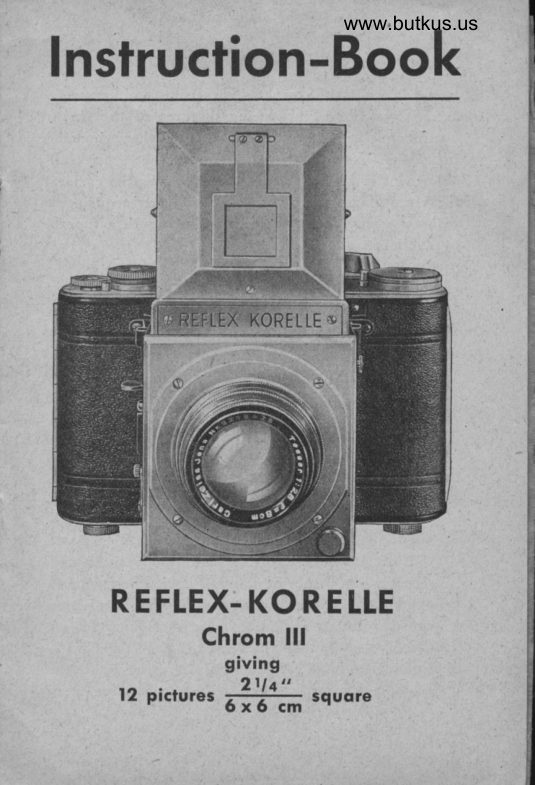
Instruction-Book


   REFLEX.KORELLE
          Chrom lll
                    giving
                      2lll"      12 pictur"t          squore                    6ffi;
View original page 1Page 2 · Read text
The Reflex-Korelle.
 Ie a camera of the greateat precision and properly
 used is capable of producing pictures of the finest
 possible quality. But, in common with other scientific
 instruments care is necessary to ensure your full
 enjoyment of its proper uee. Before using the camera
 therefore please make yourself thoroughly acquainted
 with the many featurea whidr make it su& a auperb
 production.

   Instructions for using the Reflex-Korelle
                 2llq "
                   llffi      squqre'
 l.  Loading the Camera with RolI Filrn.
  Open the ba& by pushing the catch in  the
    direction of the arrow.
    Pull out the knob whie} holds the film in position
    (fig. l) as far aa it will come and then turn it
    slightly to the right. You can now insert the
   film with the red or green bad<ing paper up-
   ward. Iurn the film holding knob slightly to
   the left and it will spring ba& into position and
   securely hold the film. Now split the gummed
   paper on the. film and draw the badring paper
   over the rollers and insert it in the longer elit on
   the take up spool. Make certain that the film is
   running {uite straight. It  is now advieable to
   give the lever (no. I on fig. J) a complete turn.

2
View original page 2Page 3 · Read text
www.butkus.us
This winds the shutter ready for the first ex'
posure. After closing the badr continue to wind
on the film by a serie of ehort movements of
the same lever until the figure 1 on the film
appears in the window at the bad< of the camera.


                             fig.  I

 Setting the Film Counter.
'When figure I on the film appeare in the window
press the small button (no. 4 on fig. 3) of the
 film counter, the film counter will then auto'
 rnatically spring badc to number 1. The red
window at the badc can now be covered up and
 ignored. The number of the exposures will appear
                                               .3
View original page 3Page 5 · Read text
in the small square of the film counter (no. 3 on
    fig. 3).  If  the above instructions have been
   followed the camera will now be ready for the
    first exposure after the desired shutter speed has
   been determined.


                                                                                      Digitally signed by Mike Butkus
                                                                DN: cn=Mike Butkus, o=Butkus camera manuals,
                                                                                    email=mike@butkus.org,                                                                                            c=US      Mike Butkus  ou=butkus.org,Date: 2021.07.20                                                                                            13:58:19 -04'00'

                                                                                                       t'


                              fig.2

3. Setting the Shutter Speed,.
  The  f ocal plane shutter'spe'eds are Bet by lifting
   the speed diec and revolving it until the deeired
   apeed is opposite the bla& dot (no. 5 and 6 on
    fig. 3). This movement can be carried out either
   before or after winding the shutter. On both
   models the slow speeds can be obtained by first
   winding the ehutter placing B opposite the blad<
View original page 5Page 6 · Read text
www.butkus.us

  dot aE above and then turning the cmaller diec
   (containing the slow epeede) clo&wiee until the
   desired speed is oppoaite the emall blad< line.
  For all slow speeds pressure muet be retained on
  the Release Knob during the whole of  the
   exposure.
  Vhen the ehutter ie sot the two emall red dots
  come opposite ea& other.

                                   z  5a    s6  7   1 3


,10
 9


                              www.butkus.us

                                 lig. 3

4. Open the Hooded Screen by lifting iis metal cover
    fullyo the view finder hood will then spring into
    position.
View original page 6Page 7 · Read text
Ta cl,ose the Hood. First push the sides inwardso
then the back and the cover will collapse into the
closed position.
The magnifier is for critical focussing and should
be used close to the eve.

Focussing the Lens is done by rotating the milled
ring on the lens mount. The aperture is set in a
similar way.

Exposing the lilm is done by gently preseing the
trigger release (no. l0 on fig. 3). Perform this
operation as smoothly as possible to avoid any
possibility of the camera shaking. To get ready
for the next exposure:
a) when using model Ia and IIa: first turn the
   knob (no. I on fig. 3) one complete turn this
   winde the shutter and partly winds the film,
   a small supplementary turn will now complete
   the winding of the film,    this second turn                                 -    is automatically stopped at the correct position.
b) When using model Chrom III: One complete
   turn of the knob (no. L on fig. 3) is the only
.'  movement necessary to prepare the Camera
   for the next exposure.
After the twelfth picture hae been taken the fild
wind should be continued until the film leaves
the original spool. It  sometimes happens with
View original page 7
Page 8 · Read text
www.butkus.us

   certain malies of filme that the paper will not
   leave the original spool. If resistance is felt this
   is the cau6e, and no attempt to overcome this
   should be made by using force. No harm will be
   done by opening the camera and easing the paper
   as the extreme end of the paper will have been
    reached.

       Using the Direct Vision Finder
              (No. 8 on Fig.3).
The back part of the Direct vision finder should be
lifted to the upright position    the front part is                                   -tucked away in the front of the camera and can be
withdrawn upwards by gripping  it  at the milled
edge. The camera is then held at eye level and any-
thing coming within the square will be included in
the picture.

            Inrerchongeoble lens
can be used on both models by unscrewing the stan-
dard lens and replacing with the lens desired.
Vhen replacing the standard lens of the model II
care must be taken that it is screwed home until the
mark on the lens coincides with that on the camera
flange: otherwise the mirror will be fouled and the
shutter cannot be released.
The bayonet ring of the model Chrom III  allows
a very simple replacing without any special precaution.
View original page 8From the M. Butkus archive. Original publisher and archive notices are retained.
Check the model and edition against your equipment.
PDF verified 2026-10-10.