Film cameras
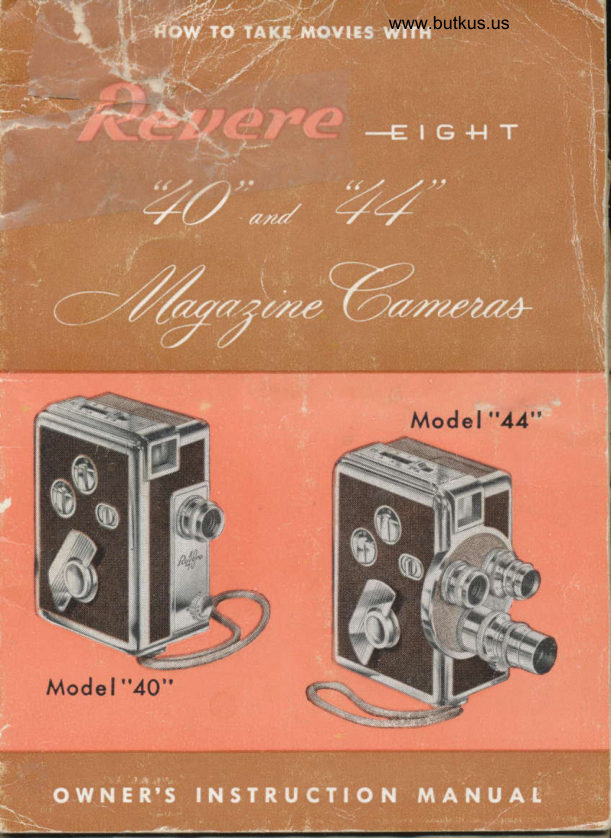
Revere 8 model 40 and 44 User manual
User manual for Revere 8 model 40 and 44. 29 pages in English. Read the original PDF, download or print a copy without registration.
29 pagesEnglish5.2 MB PDF
Loading your manual…Open PDF directly
Document details
- Brand
- Revere
- Model / document
- Revere 8 model 40 and 44
- Document type
- User manual
- Language
- English
- Pages
- 29
- File size
- 5.2 MB
- Category
- Film cameras
- Document date
- Not specified in catalog
Search available document text
Find a term, then jump to its page in the original PDF. Image-only pages may not be searchable; check the PDF for exact wording and diagrams.
Page 2 · Read text
o

A Revere Registration ccrrd is included with your
cctmerct.
Pleqse print the seriql number which you will find
inside your cqmerq on the etched nqme plate.
Plecrse give complete informcrtion requested on the
                                                                                                                                                                                                                  icord, qnd to insure qccurqcy pleose PRINT.
Send ccrrd within ten dcrys crfter mcking purchcrse                  tato the Revere Cqmerq Compcny, 320-336 Eost                    {
Twenty-first Street, Chiccrgo, Illinois. This is im-             f
portcnt. The gucrqntee does not go into ef{ect until                                 I
you mcril the registration card.                                                                                          I

   REVERE CATIERA COIIPA]IY
                     Generol Offices ond Foctory
     320-336 Eost Twenty-First Street  o    Chicogo 16, lllinoir


Copyright 195 1, Revere Comero Compony                      Printed in U.S.A
                                              c-2 20M t-54
View original page 2Page 3 · Read text
\;
                                          www.butkus.us

                ,#QREWORD il-
                                                                      the-f,ut*    F          "44"I 8mm cqmercs rePresent
                         ;r. I   ,         1                    : of engineering to qchieve the
           {ino       oitg!                      .t.;, I{qndsomely designed, ultrq
              COiT J, r ^. ";nd e  ;rily  -'i li in true Revere trcdition, they
            Oflgi 'rr"' " (lf i newest ont.! simplest in movie csmero opero'
               tion.
           Looding Revere "40" or "44" with film mogczines is
           so eosy q child cqn do it. No threcding-you chcnge quickly
          from Color to Blqck-ond'White crt ony time without spoiling
          the Iilm.
          Numerous other outstcnding feqtures include: continuous
                                                                                                                                                                                      .         run . . . single frqme exposure for titles qnd trick shots . .
            built-in micromqtic view'finder   lootcge meter . . . ex'
          posure chqrt . . . five speeds including slow motion. Cooted
           lenses qvqilqble are l3mm F2.5 (Universol Focus) or 13mm
           Fl.9 (Focusing Mount) Ior model "40" ..  . ond l3mm F2.8
         or l3mm Fl.9 (Focusing Mount) or l3mm Fl.9 (Universal
          Focus) for model "44." Interchongeoble lens mounts qlso
          permit use of wide-ongle cnd telephoto lenses. Accessory
           lenses qvqiloble for both comerqs iriclude c 25mm (I") F2'5
            telephoto, and 38mm (IVz") F3.5 telephoto.
              . It's eosy to tqke good movies with the Revere "40" cnd
          "44," stqrting with your lirst mogcrzine oI film. II you
          Iollow the simple instructions, you soon will moster your
          cqmercr. Give it the proper attention by relerring to these
            instructions occasionclly. It will help you produce the Iinest
         movies easily.

                        REVER.E CAMERA COMPANY

                         -2-
View original page 3Page 6 · Read text
\1,
                                   www.butkus.us                    ,./1i


     3
    4


   s-#

 l.  Slide-o-mqtic View-Finder         6. ScIety Wrist Cord
   Button                          7. Door Lock
2. Speed Control                   8. lvz" F3.5 Telephoto Lens
3. Adjustcble Footoge Meter          9.  t/2" 82.5 or Fl.9 Lens
4. Operating Button                 10. l" F2.5 Telephoto Lens
5. Winding Key                                 ll.  Three-Lens Turret Heqd


                     -4-
View original page 6Page 9 · Read text
',   GENERAT 'fiJlriERA ftrti:ii:;.. i
  To mqke good iri,ori*: with your  .'le' . ..  40' Eight Ccmerc, it is nece,ssqry to lqrr,iria: , :,-durse:; witl ;              ^:- tion cnd operotion.
   First, exqmine the outside oI _vr-rr:: -nero. It   l.;               to
memorize the nqmes oI the coll::,,. u'." parts rele-     ..   i:--. r:;is
book. See pcges 3 qnd 4. Leorr;. !;:  ,:..iii thr.rugh:::',. rr',.;.iirier
qnd slide Slide-o-mctic view-finder lr';  ,-:.; (i,)  "... des'.i: i..  ii stop indicoted for vqrious loccl lengths: sc :peed control ( ;, uu.ust Ioot-
qge meter (3); slide opercting buttoi. (4); wind sl.ri:rg rnotor (5);
 fqsten safety wrist cord (6); open qnd dlose cqmerq door (Z); set lens
 (10) Ior correct exposure qs indicated by exposure guide on door olcqmercr; rotqte turret head (Il).
  WINDING SPRING MOTOR-Before winding spring motor, be sure
operoting button is in neutrol position. Powerlul motor runs l0 leet ol lilm per winding.
  OPERAIING BUTTON-For normql shooting, slide button back obout
hclf-wcy.
   For continuous run, slide button cll the way back. This gives you c
chqnce to leqve ccrmers unqttended while you get into your own
movies.
  For single frqme exposures, push button forwqrd. One frqme of q
time is exposed, permitting you to take qs mqny qs 4000 pictures with
c single mogazine oI film! single frqme exposures qre ideql for titling
qnd trick qnimqtion ol inqnimate objects.
  FIVE SPEEDS-Revere "40" qnd "44" Magazine Camerqs qre pro-
vided with live speeds: 12, 16, 24, 32, qnd 48 lrqmes per second.
   set ct 12 lor fqst motion (e.g. crowded street corner trqlfic cqn be
speeded up to hectic pcce for qn qmusing sequence). Use 12 olso
when lighting conditions qre poor.
  Set ct 16 lor oll normql shooting.
  Set qt 24 when shooting from moving vehicles to oflset speed oI
motion.
  Set at 32 for semi-slow motion shots.
  Set qt 48 for slow motion. Subjects will apecr to move on screen
qt one-third speed. This speed offers q host of possibilities lor comicql
                                                                                                                                                                                                                                                                                                                                                                                                                                 jqnd trick shots. (Also ideal for disclosing the rhythm qnd lorm of q
high dive or goll swing, etc.)
  (Note: Different speeds reguire corresponding chcnges in lens open.
ing. For excmple, scenes shot ct 48 lrqmes per seco-nd reguire three
limes the exposure lor scenes shot qt 16 trqmes.)                                                                                                                  i
                        -7-                                                                                                                                                                                I
View original page 9Page 10 · Read text
www.butkus.us


          fruiiL.     -'t


        THE VIEW.FIIIIDER
  The stide-o-mqtic view-finder on your Revere Model
                                                             cor-"40" or "44" McLgczine Eight Cqmerc is pcrcllqx
rected. and glcre-free. One of its outstqnding-leatures             -stopis the click      opticcl cdjustment, which eliminctes
mqsks cnd giv-es you c full view of the field for the
                                                       pr-oPerlens being used. Simply slide button to the
                        (Click                                 9mm                                                  at                              stops     stop cclibrqtion.click                                       -cre-ryg.1\edt/2"                                  25mm                                                lens,                            stqndqtd                              for                lens, l3mm   widelcrnglefor
for l" teleplioto lens, qnd 38mm for Lt/2" lel-ephoto lens.)
 When titking extreme close-ups, remember thqt sub-
jects closer thcn four feet frorr the cqmercr cqnnot be"centered         accurctely through the view-finder. Either
center subject by mecsuring to the center of the lens,
or by mcliing visual allowqnces (i.e.: sighting "high"
through the view-finder so thqt top of subject qppectrs
in lower hclf only).
                     -8-
View original page 10Page 11 · Read text
s,                                                                  '1r.-

                                                                                                              l                                                 iff'
                                                                                                                       , iTlri'  i:           TlfE SSf 9TAGii;  l}f
  The Footcge Meter q!.ltoi'il{:liei'r":   i *q,.:.:di[:l'i'
ber of feet of-exposeJ  fi m in iii:.,ii-rguzrn€. ,          r!
diql qt "0" qfter locding cq-Err '"r, qnd qg, '       u'
                                                                                  ir;--d.when mcgczine  is'li .ned over 'rr.'r ccrrl€ro rr:
  When Meter registers 25 ls;,,. tire end         .,, film
hqs been reqched. The mcr{.r,ii:ine shou   rlr+;1. be
turned over for second run, qiter which inugczine
should be removed for processing.
   If the mcgczine is chqnged before being completed,
mcrrk the scqle on the mogczine to qgree with the
recding on Footqge Meter. When mogczine is ogoin
in   _ploce, Footcge Meter should be set qt the {ooiogeindicqted on the magczine sccle.
    If o mogczine should be replcced with onother qfter
only one side hqs been entirely exposed, indicote
plainly on the diol on the side of the mogozine mcrked
"This Side Up." This will prevent double exposure.

         DEPTH OF FOGUS
    FOR FOCUSITTG mOUl{T rErrSES
 On pcaes 2l qnd 22 crre Depth of Focus Tqbles to be
consulted when using Revere Focusing Mount lenses,
such qs the r/z inch F 1.9, the one inch-F 2.5 telephoto,
qnd the LVz inch F 3.5 telephoto. The Depth of Focus
tqbles give you the distcnce in front of cnd behind the
point of locus within which all subjects will be in shcrp
focus. Hyperfocol distonce is the necrest distqnce in
shcrp focus when the lens is focused qt infinity. If the
lens is focused o+_ the hyperfocol distqnce, thle depth
of shcrp focus will then extend from c point one-hclf
the hyperfocus to infinity.
View original page 11Page 12 · Read text
www.butkus.us                     \:                                                           r.., PIAPHRAGTI                            , i 'f4, '", ' THE fE[
                           , ^;;.' ,;' ,r*e;,.'ot-;. Reverg :'Joi:l.erqs qre crpproxi-
                                 , .  (..     ::'if .!pg}r" ier:-qeS. StCndCrd F 2,5['                    .:' :                                t,            'i t.rn'r,"s c,,  ;rh'i:.rsql or lixedlocustype, which
                I                       . "..rsing for .r,,.,irrii.ce is not necessqry, except cs
       de,        . below. .l{" .riiirrercr is equipped wilh F I.9
     foc*'       rr.,rrnt lens, i''q*lqrTe mus i;,e cdjusted to your
     nee,j.,,.    r lenses  i', :vr,, r.li,:lrhrcgrr openings or stops
       cqlil."r'cr.. n the rotr-riinq lens barrel. The purpose of
      these cp.;rrings is to uontrol the qmount of exposure
       light to the film. As tl.e size oL the opening or stops
       is incregsed, the qmount of exposure light is increqsed.
     The drcwing below shows the relctive opening of the
     diophrcgm stops.


                                                             16       F3.5 4    5.6  8   11 oooooo              REIATIYE OPEl{tlIG OF DIAPHRAGTf, STOPS
     When Universql Focus lens     Pictures will be in shcrp locus
         stops, listed below, qre used:    Irom distonces. listed below, to
                                                     infinity.
          F 2.5 or F 2.8                        8.35 feet
              F 3.5
             F4                                   s.2
             F 5.6                                  3.7
             F8                                    2.6
               F11                                  l.8s
               F16                                      i.3
       Auxilicry portrcit lenses may be used when subjects
    qre neqrer the cqmerq than the qbove distqnces.
     Importcnt: Viewfinder cqnnot be used with crccurccy
    when working qt shorter distqnces thqn 4 feet from
     subject to cccrnerc; subjects must then be centered with
     center of lens by mecsurement.
                        -10-
View original page 12Page 13 · Read text
l;


                                                                                                                                                                                                                                                                                                                                                                                                                                                                                                                                                                                                                                                  i


                     MAGAZTNE        B  ,oo*oo                                                                                                                                                                                             j            "Peuene
              -'Ar-
       =$=
            -


         EXPOSTI{G THE FI1TI
   It is vitqlly importqnt thqt the correct lens aperture
opening be used in order that the film mcy be prop-
erly exposed. The setting of the lens cperture opening
is determined by two fqctors: first, the emulsion speed
of the lilm which is being used in the cqmerc, qnd
secondly, the qmount of light on the subject.
  The emulsion speed rcting on eqch film is merely o
compqrqtive number or factor set up by the exPosure
meter mcsrufqcturers to denote differences between
film emulsions qnd the rcpidity with which eqch film
cccepts the light to which it is exposed. Before you
cqn make q properly exposed picture you must know
the proper rcting of thqt film. If you do not use qn
exposure meter, you must .use qn exposure guide for
thcrt pcrticulqr film rcting. Since color films qnd the
more popular blcck crnd white pcnchromqtic films qre
View original page 13Page 14 · Read text
www.butkus.us
         rcrteri by A.S.A. Iu or Weston 8, *9 hqve prepcrred on
     pqge 16, qn exposrrre guide for this speed IiIm. On
     ihe-sqme pcAe, yo"r w-ill find qn expo_s-ure guide for
      film hcrvin! on A.S.A. 40 or Weston 32 roting.  - You      should study both of these exposure guides, ond test
      yourself by- study4g thg lighi conditions on several
       different subjects. Then ligure out which in your opin-l,      ion would be the proper exposure Ior eoch subiect.

              ]IGHTI]{G THE SUBIECT
        Light is qs importcnt in photogrcphy as gcsoline is
      to qn qutomobil-e. Alwcrys remember, to mqke good
       pictures, you must properly expose the film. The rcpid
       iise in populority ol color film mqk_es it imqerative thqt                ^cqrefui                      thought qnd study to h{hting condi-     you give
       iions qnd the exposure oI your film.
        Lighting                  is of vitql importcrncg _rggqrdles_s oI which           -you       film      rise. When worliing with blcck cnd white film
      the l-orm cnd shcpe of your subjects qre mqde more
      interesting by shqdows. The exqct reversql of this is
      true when ybu ore working with color film. When
     working with color film the colors of your subjects
     provide the contrqst, qnd produce the shcpe and
     iorm of the subject. Shadows, especiclly heovy block
     shqdows, should be avoided.
       For best results with color film, the source oI light
     should be clmost directly behind the cqmerq. A flqt,
       front lighting on your subject is the best. Side lighting
      or bqcf lighiing should be qvoided when working with
      color filmi, unless you use a reflector to throw light up
      into the dcrkened qreqs of the subject. Also cvoid
     mcking outdoor exposures of people with c bright sun
                           -12-
View original page 14Page 15 · Read text
directly overheqd. The slln, in this position, mckes
deep shqdows ccround the eyes qnd the neck. These
deep shqdows ccn only be removed through the use
 of d reflector. You wiil find that some of-your best
 results with colored pictures will be obtcined when
the sky is lightly overcqst or when your_ subject is
 in open shqde,            light from the sky but not
 directly in the sun."receiving
 A greot decl more cqre must be exercised in deter-
mining the proper exposure for color film than is re-quired- with- bl&ck q;a white film. This is becquse
cblor film hqs considerqbly less lqtitude for exposure
error. Incorrectly exposed pictures will be slightly off
color cnd they will lqck clcrity qnd shqrpness. The
exposure guide for colored film on pqge 20 should be
studied with extreme cqre. The basic exposures given
in the tqble qre bqsed on the use of front lighting cs
described qbove. When it is qbsolutely necesscry to
use side lighting on the subject be sure to use qt leqst
one dicphrcgm opening lcrger thqn for front lighting.      I
                                                        {        FTTTERS FOR CO|.OR HtrI
HAZE FITTER
 When working with regulcr color film outdoors, no
filter is necesscry for close ups ond medium close up
"shots." When tcking distqnt shots of lqndsccrpes or
over wqter it is crdvisqble to use q hqze filter. Atmos-
pheric hqze or ultrq-violet light hqs q tendency to
photogroph os violet. This hcze tends to mqke your
pictures fuzzy or indistinct, becquse the ultrq-violet
light is more prevclent in extremely distqnt scenes,
snow scenes, wcrter scenes qnd those tcken ct high
                         -t3-
View original page 15Page 16 · Read text
www.butkus.us
       qltitudes. when tcking such scenes the haze filter will
      improve the color rendition.
        Also, on q grqy doy cnd in the shqde, the lig-lt.is
      colder in tone.- fdkinq color pictures under such light                                                       q I     irg conditions is usuclly not qdviscble; however,
     hqze filter used under fhese conditions will help to{     bring qbout o wqrrner tone to the colors.
     TYPE A FIITER, FOR COTOR FIIM
        Indoor color film is different from regulcr dcrylight
      color film. It is especiclly prepcred for use with white
      photoflood lights. This liim cqnnot be used in sunlight
      or dcylight unless c Type A filter is used on the lens.
      This specicl filter is required to chcnge the quolity of
      dcrylight to that of regulcr photoflood illuminction;
      thelefbre the color of the lilter is reddish yellow. It is
      not necesscrry to use the hqze filter when using the
     Type A filter. When using the Type A filter with in-
     door color film outdoors, the speed rcting of the film
      is then the sqme crs thct given the regulqr outdoor
      color film. When using the indoor color film with
      photofloods, it is not necessqry to use cny filter.
       Regulcr color film, prepcred especiclly for use in
      dcylight, cqn be used with regular white photoflood
       lights, if the proper blue filter is used in front of the
      lens. The use of the blue filter is not procticcl becquse
      of the effect of the lilter on the speed of the film. The
     speed of the film is cut down to less thqn hqlf when
     the blue filter is used. Reqsonqbly good results ccn
     be obtqined with dcy light color film by using blue
      photoflood lights. With these blue lights no filter is
      required. Blue photoflood lights qre especiclly useful
    when there is c combinqtion of dcylight and ortificicl
        light.
                          -14-
View original page 16Page 17 · Read text
FITTERS FOR BTACK A]ID WHITE FI]M
YETLOW FILTERS
  The filters for blcck qnd'white likii cre mqde in
vqrvinq degrees of yellow, red, green ond blue' The
*o='t p'opuldr filter, &s well cs th-e most useful, is the
vellow filter. There qre mqny shades or intensities of
iellow 1ilters, but the most wiilely used is the "medium
iellow" filter. The yellow filter helps the lens to pene-
irote mist, fog cnd hqze. It helps to shorpel uP y9u{
                                          shqdedpictures bv diving better detqil especially in
Lt"o.. It ied--uces-the glcre from sun, wqter or sqnd'
It qlso tends to dcnken the blue of the sky sulficiently
to allow the white clouds to stond out more noturally.

RED FITTER
  Another populcr lilter is the "red" filter. This lilter
is qlso qvqilqble in q vqriety of intensities of the color.                     I
  The red filter is used fof more drqmqtic effects. It    4dcrrkens the blue sklr more thqn the yellow filter. It
                                                                                                               1will help bring out more detcil in- subjec-t motter inthe darlier col6rs such cs purple, dqrk red, qnd deep
shqdows. It is also helpful when tcrking pictures in    +
bright sun light qnd on snow qnd wqter.
  When you purchqse o filter it is- impg.ttql-! thot you
obtoin infbrmction qs to the "filter fqctor". When using
q filter, it is necessqry to increqse the exposure. The
filter foctor, which should be supplied by the monu-
facturer of the filter, will tell you how much more light
 is necessory when using that pcrticulqr filter.
  Remember, q filter will moke obiects oI its own
color photogrcph cs white, cnd objects- of the opposite
 color witt photogrcph qs dqrk grcy or blqck.
                          -t5-
View original page 17Page 18 · Read text
www.butkus.us
    PtAlIlITl{G AND TAKTI{G PICTURES
  Alwcys plcn interesting pictures thqt tell cr story.
Your Iirst movies will likely be of the children, the
fcmily qnd your close friends. Alwcys cvoid cly
cttempt to mqke the subjects qct, or pose in front of the
       Hqve them relqx qnd qct nqturql. Never tqke
"o*"iq.pictures directly into the rcrys of the sun. Before high
noon or ecrly qfternoon is the ideql time to tqke
movies. Don't mcrke the mistcrke of "clipping" scenes
too short; keep the cqmerct operqting long enough on
eqch scene. When q short scene is projected upon
the screen it flqshes on qnd off so quickly it is difficult
for the eyes to grosp the mecnring of the image. You
should never run less thqn LV2 to 2 feet of film on
eqch scene. At times you will use q longer period,
depending on the importqnce of the subject. You cqn-
nol conveniently tqke pictures csrd wqtch the footoge
meter ct the sqme time; however you cqn ecsily mem-
orize opercting time   IT TAKES ABOUT 5 SECONDS                     -           OF FILM. TIME EACH SHORTTO NUN I FOOT
SCENE FOB AT LEAST EIGHT SECONDS.
  Close-up scenes qnd portroits qre interesting and
qdd to the vqriety ond interest of your reels. CAU-
TION   Be sure the entire subject or fqce you wish to
      - seen in the center o{ the finder. Only whqt istclke is
seen in the view linder will be recorded on the lilm.
The only exception to thqt stcrtement occurs when you
qre tqking extreme closeups of less thqn 4 feet. Then it
will be necesssry to center subject with center of lens
by mecsurement. (See page l0 for closeup focusing
limitations while using universql focus lens.)
                     -16-
View original page 18Page 19 · Read text
BRIEF COURSE IlI MOVTE.iIAKI]IG
       l.  Locrd cqmerc per instructions.
      2.  Set footqge meter to ZERO.
      3. Check Speed Control Diql (should remqin qt 16
       frames for normql movies).
      4. Now wind Cqmerc.
      5.  Set Lens Dicphrcgm to proper position.

                                                                                                                                                                                                                          .     6.  Hold Ccmrerq steody. This is importonf. For extreme
        qccurcrcy, c tripod mqy be used. However, qs most
      Movie Cqmerqs cre held by hcrd, the REVERE "40"
        o;nd "44" McAczine Cqmercrs qre so designed thct a
         firm_, stec4y grip is ecsily obtcined. Scfety wrist
       cord should be securely cround the left wrist. This
 s\  droppingcrssists youcqmercr.in obtoining steqdiness cnd prevents
      7.  Sight through the Viewfinder. Slide operoting but-
       ton qnd you're mcking movies. It's qs simple ci thct.   =>
       .->- flTLEs AltD SPllGIltG
      Titles help you tell your story qnd mqke your pic-
    tures more interesting. Titles mqy be spliced into the
    film qt cny desired plcce. You cqn mcke your own
     titles or purchqse them from your photogrcphlc deoler.
 j.   When you hcve tqken severql reels of pictures, you<  will wcrnt to splice them together ond ploce them- qll(.                                                                                       '   on one or more Revere 300- foot reels.  Splicing your
    films with q Revere Curvqmqtic Splicer iJ ecsf. Ask
   your deqler.
View original page 19Page 21 · Read text
,t


     E.iit*OS$nES WITH FIOODIIGHTS
  Motion pictures of fine quoiity mqy be mcdg indoors
ot night with Color or Black-qnd-White Film. There ore
only q few detqils to consider for making sotisfoctory
indoor piciures. FoiJ ,,w the Photoflood Exposure Guide.
Be sr.r.rL ,cf proper l:,7ht distribution ond use proPer          I
exposure stop on lens. Also foilow these suggestions:                i
                                                                          tI    Ist.  A.rrc:,ge lights so they come lrom dillerent directions"                                  i    this breoks up strong shodows ond gives liner detail to the
   pictures. II you ore using two Mqzdq lomps-ploce one on
   eoch side oI comerq, this will give on even distribution ol
    light on subject.                                                                                                                                                                                                                                                                                                                                                                                                                                                                                        i
   2nd. Use white photolloods with bright rellectors. Number  I
                                                                                                                                                                                                                                                                  ',{   photoflood bulbs hqve q roted lile oI two hours. Number 2
   photollood bulbs hove q rqted lile ol six hours ond will give            l    slightly more lhqn twice the illuminotion of the number I bulbs.
  To conserve lomp life, turn them out when scene is complete.                             1
   3rd. A  liqht colored bockground should be used.  Direct  some light behind the subject to lighten the bockground.                      If                                                                                                                                                                                                                                                                                                                                                                                                                II
   4th. Be sure there cre no bright rellections glarinq into the
   camera Jens-reflections  will Iog pictures.
                                                        +   Sth. Locqte lomps higher thon subject. The lights should
   Ilood the subject. Toke cqre thot lomps do not show in pic-
   ure. Determine this by looking through view finder.
   6th. When possible use o tripod lor indoor pictures, or rest
   cqmero on tqble or stqnd-to keep ccrmercr steody.
   7th. Remember the distonce between the cqmerq ond subject
   does nol qflect the exposure. It is the distonce lrom light to
   subject thot is importont. Do not crowd your subjects. Stand
   well bock with cqmero to include qs much oI the subject cs
   desired. but oI course the reflectors must not show in linder.
   8th. Follow the PHOTOFTOOD EXPOSURE GUIDE. Take
  omple time ond excellent results will  lollow.
                     -19-
                                                       .l
View original page 21Page 25 · Read text
:T
                                                                           {
            rURE DEFECTS

                          "rr'd by shaking of cqmera when                               (l s l1:'nes. Prcrctice more, or iI un-
                                  'l  jr'rld stecdy-use cr triPod.

                           i..j,.'',!',u cciiise'd by dirty lens, or lens
                           ..'t res,!'rg ugo-inst seqt.
                                            .1.r.
                              'llr,                    .:erexposr,         '_f         '  d film due to use of im-
              proper lens stop. If tcrken inside, in-
                iufficient ortificiol light wcrs used.

PICTURES      Overexposed Iilm. Due to imProPer
TOO LIGHT:     lens stop, or if tcrken inside-too much
                      crrtificicrl light wcrs used.

EDGES OF      Finger or object obstructed lens bcrrrel
PICTURE      when picture was taken.BLACK:

EDGES OF      Ccrmercr locrded in too brilliqnt light.
PICTURE       To crvoid edge fog, film should be kept
LIGHT OR      in cqrton qnd hondled in subduedCLEAR:                  lisht.

The cbove defects are bqsed on reversible Iilm thqt
hqs been developed crnd processed-rrecrning negc'
tive picture reversed into cr positive picture.                           t
                   _23_
View original page 25Page 26 · Read text
www.butkus.us

             THTilGS TO REilTI


                                                                                                                                                           I      1. Alwcrys remove rubberi; lPrrs  1''
         pictures.                   +:).'  js
                                     Q""'      2. Clean cctmerc lens qt tiq'r{l;  'i            soft, ccrmels hcrir brush.
          3.  Wind cqmerct aftc,r etch.      .).r.a: -     'f     ,qfl1"                                               "i.p-',
          4.  Plcrn pictures befor:e t'pu:r:rtirii''':ctrrlr'-'i'('
          sure everything is tl  tt"'f i":,::',                                                                                ,;iEfiUl:::i
           5.  Follow exposure instructieng wi'€n-$iFi'?ti.i''
           stops. Shuiter speed L/30 second <rt 16 frcrmes'
                                                                      hcrs          6.  check lens before ecrch scene to see thct it
           not been crccidently moved from proper setting'

a                                                                             fctce,           7.  Hold ccrmerct steody. Brcrce it ogclinst your
    1          foreheod, or stcrtiottoty objects. Use sqfety cord'

   I
                                                          shoot)           B.  Pcnoraming (swinging comerct cts you9.,-'                                           must be          should be Lvoided. When necesscry it
         done very slowly crhd stecrdily.- Otherwise, pic-
            tures wilicnnoy the cudience when projected'
           9. When toking "slow motion" scenes ccrution sub-
             jects to move nclturcllY
         10.  Don't ottempt to tcrke pictures in poor light'
        It.  Hold cqmerc verticqlly-never tilted sid'ewcrys'
       t2.  Don't oil ccrmelq-sgnd to fcrctory.
                        -24-
View original page 26Page 28 · Read text
www.butkus.us
        ULTIMATE IN 8mrc, ::ii.iCljl;ri  i ii.'j

                                                                                                           'e,i:.1'    E!                          frr*  r"tt".i

T                                                                                                                                                                                         t                             s:!,,r,.i,:i
 I
t
q
 r


       Complele with carrying cose, 500-watt lamp,         300-tt. reel, ond fost l-inch FL6 cooted lens.

    Inllqnt Tilt Control-        Reel Compartment             Slip-over Gqse     Fitr    Ecsy oction  tilt knob        Convenient Storcrge-         snugly over projector,-     quickly centers imcge        spcce in projector            lilts  ofl instantly to    on screen. Pilot liqht         bcrse holds two 300-        simplily ond speed   tmd "still"    picture          foot reels securely,         setting up. Stream-    projection cre other       keeps them immedi-         lined, easy to cqrry.    important Iecrtures.            ately qvoiloble.               Flexible hcrndle.
View original page 28From the M. Butkus archive. Original publisher and archive notices are retained.
Check the model and edition against your equipment.
PDF verified 2026-10-10.